
If I save the filters with the "Active tasks" option on the web Quire, it works well on the web.
But in the mobile app somehow I constantly get filtered results with the "All tasks" option enabled, despite the fact that I have saved the filter with "Active tasks" option enabled. This way I get a lot of completed tasks on the screen.
So each time I select a saved filter on my app, I have to go to "Customize..." option and set "Active tasks" option explicitly. Otherwise, as a filtered result, I get a mix of finished and unfinished tasks, which is especially messy on the small smartphone display. This way makes using the saved filters almost useless.
I do not understand why it is this way, because it's counterproductive. I filter the tasks in order to see what is to be done, and not to get messy output of mixed finished and unfinished tasks. This somewhat defies the principle of saved and bookmarked filters.
Could you pls look at this? This seems more like a bug, as the web version does not have this problem.
Hi @Juraj - Thank you for your feedback.
Could you please send us a screen recording video of this issue to this email support@quire.io? This way, we can have a better understanding of how this issue occurs.
Please kindly record starting from the top, when you first access the Quire app and then how you have set up a customized filter. Awaiting for your reply. Thank you very much for your help in advanced!
Peggy, Feb 22, 2021
Hi, seems it works. Thank you very much for the prompt fix! 👌
Juraj, Mar 24, 2021
Hi @Juraj and @Adam_Edison - This issue has been fixed in the newest version update (version 6.10). Please update your Quire app and kindly let us know if the issue persists.
To play it safe, I would suggest you delete the already saved custom filters on the web browser first and let them re-sync to the mobile app. Then continue to add the filters back. It should sync between two devices this time. Thanks for your help!
Peggy, Mar 24, 2021
@Juraj I've found a temporary workaround for myself. I don't know if it will work for your use case. But what I did was:
- create a sublist on the web (Exclude, select nothing)
- Customize an empty filter (not an existing filter or saved filter).
- Pin that sublist
In the mobile app, pin those sublists and re-define the filters as they are defined in the web app - once.
I now just keep those sublists open (and pinned). Switching back and forth does not cause problems for me as of yet.
@peggy This really does support my hypothesis that the issue is with saved filters not correctly saving the Status correctly.
(deleted-dRgR), Mar 9, 2021
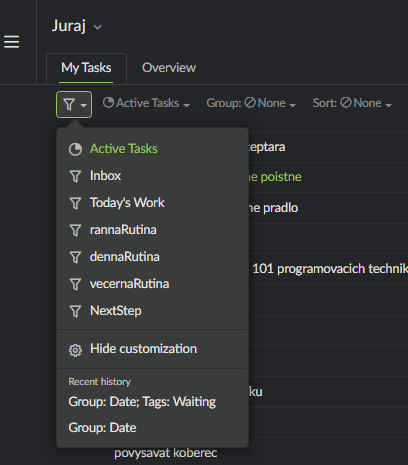
Here is how the filters look on my web Quire
Juraj, Mar 9, 2021
Yes, it seems there is a whole issue with saved filters in the app.
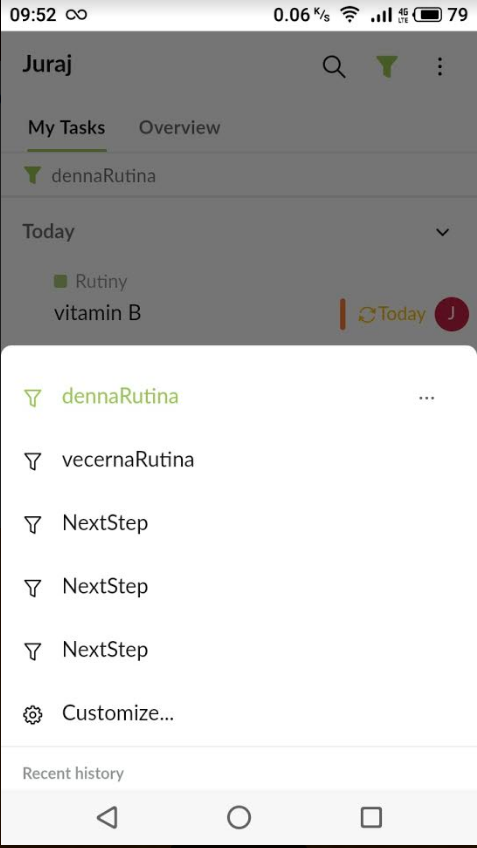
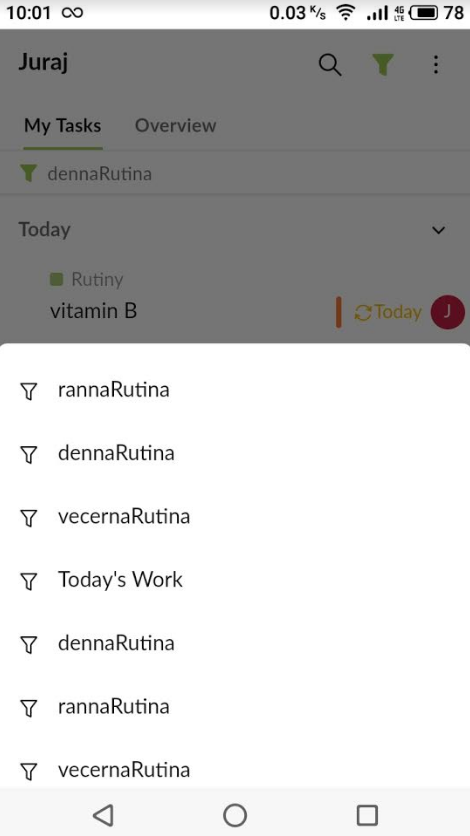
On the top of the above mentioned, I have only few filters saved, but they show multiple times in the app (pictures attached). Each of the "rannaRutina", "dennaRutina", "vecernaRutina" or "NextStep" filters I have saved only once. On the web Quire this works well and each filter name is displayed only once, but there seems to be some serious bug with the filters in the app.
Unfortunately I have no capacities to make the videos at this time (would have to include the screenshot video AND the video of the smartphone screen and I don't have an external camera and would be too much of a hassle for me currently). But I hope these bugs can be replicated without them, as I can see more people share this issue.
Juraj, Mar 9, 2021
@Adam_Edison and @Juraj I'm really sorry for the inconvenience caused. I have shared the information with our team. We will look into it and I will get back to you as soon as I have an update.
Peggy, Mar 12, 2021
I have the same issue, I logged it as #4220
(deleted-dRgR), Mar 6, 2021