
#4369: Quire Feedback
Status: Completed
When I am at board view, changing items, there is a little button which I can press and refresh the filtering. How can I press it without a mouse? Is any keyboard shortcut for this
 ?
?
Created by G Mar 30, 2021, Edited Apr 9, 2021
Hi @glebsam - We have added a keyboard shortcut for the green refresh icon r.
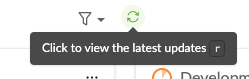
Please refresh your Quire page to get the newest updated version. Kindly let me know if there's any questions. Thank you!
Peggy, Apr 9, 2021
Hi @glebsam - This is noted. I have passed this to our team and when there's an update, I will let you know. Thank you.
Peggy, Apr 8, 2021
Hi @glebsam - Would you please share a screen recording of this issue to us at support@quire.io? We weren't able to reproduce this issue at our side. 😭 Thank you for your help!
Peggy, Apr 12, 2021
@peggy It's not a solution - the whole page refresh is a much longer and resource-intensive operation. Instead, I would like to refresh only parts that should be refreshed. Just ponder, why would developers implemented this feature in such a tricky way - it would be easier to just trigger a page refresh with this little button. But instead, the button do refresh of the data accurately.
G, Apr 2, 2021