
Why this option is useful: Priority symbols always catch my attention when I try to get an overview of the tasks at hand. I guess that's intended.
This leads to confusion when there are tasks of low priority involved. Their priority symbol is permanently visible, the priority symbol of a task of medium priority is not. Hence, my intuition always drives my to focus on the low instead of the medium priority, I guess that's not intended 😞
Boi, Quire is awesome 😃
Hi Megan - At the moment, the default priority for a task is Medium priority. When the priority is set back to Medium, the priority icon (grey arrow) will only show when the task is selected or when you hover over the task. It cannot be removed.
We have passed your feedback to the team and we will keep you posted if we have any updates!
Peggy, Oct 26, 2021
I had a new team member recently ask why is medium priority not showing 😃 I believe it's inconsistent (and thus unintuitive) the way it is now. But I believe you're gonna change it sooner or later.
Ivan Cajic, Nov 19, 2021
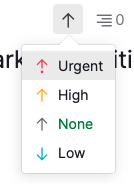
We have changed the priority options to Urgent, High, None, Low. When there isn't a priority set to the task, the priority arrow will not show on the main panel (left hand side of the task name).
Peggy, Nov 19, 2021
Hi Tobias - Thank you for your feedback! I will pass your feedback to our team for more discussion and let you know if we have any updates for this.
Peggy, Jul 9, 2021
+1 on this one
Ivan Cajic, Jul 21, 2021
@peggy
Just piggybacking on this... I have googled but to no avail.
In the meantime, is there a way to remove a priority marker once you have accidentally clicked it?
Even if I set it to medium, it has a priority maker show up when there isn't one on others and I find it very distracting.
Since it is just the one, and I can't for the life of me figure out how to remove it, it stands out in a distracting way.
megan@mooneyontheatre.com, Oct 22, 2021