
In the list of notifications I have 3 items that are already read and done. The tasks were already deleted but the notifications are still in the list. I would like to delete them but I don't find the way.
Via Quire Android
Hi Ana - When marking a notification as read, the notification will not be highlighted in a light green color anymore. But it will not be removed/archived from the panel. This feature hasn't been implemented yet. We will keep you updated if we have an updates.
Peggy, Sep 15, 2021
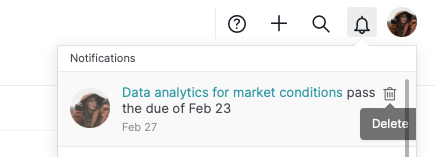
Hi, in our latest update, we added a new function where you can delete the notifications from the notification panel. I hope this helps 💪
Hover over the notification and click the trash icon to remove it from the notification panel.
Peggy, Mar 10, 2023
Thanks Peggy for the explanation.
(deleted-Ana*r), Sep 15, 2021
Hi Ana - Thank you for your feedback. Currently, there is not a way to archive a notification. You can only mark all the notifications as read by tapping the More options icon at the upper right corner on your app.
Here is a similar request by other users: #3403. You may follow that thread for more future updates from the Quire team.
Peggy, Sep 14, 2021
Now I have only one notification. When I mark the notifications as read, it stays there always.
(deleted-Ana*r), Sep 14, 2021