
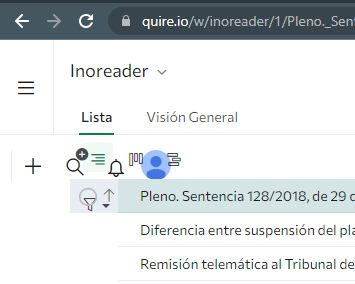
All buttons (Add, Find Tasks, Notifications, My Profile, Tree, Board, Chronology) are on the left, Why? I am using Chrome Version 95.0.4638.69 (Official Build) (64 bits) on Windows 10 Pro 1803. No Does with Microsoft Edge 42.17134.1.0
Se apilan todos los botones (Añadir, Buscar tareas, Notificaciones, Mi perfil, Árbol, Tablero, Cronología) en el lado izquierdo, ¿por qué? Estoy usando Chrome Versión 95.0.4638.69 (Build oficial) (64 bits) en Windows 10 Pro 1803. No ocurre con Microsoft Edge 42.17134.1.0
Thanks, Peggy
(deleted-6T9N), Nov 9, 2021
Hi Carlos - Could you please help to clear your browser's cache and try again? Kindly let us know the results.
We will pass the above information back to our team first.
Peggy, Nov 9, 2021
No solved. All right in private mode.
(deleted-6T9N), Nov 8, 2021
Hi Peggy, I have restored Chrome settings to their original defaults. Solved.
(deleted-6T9N), Nov 9, 2021
Hi Peggy, I'd followed all step of the guide. No fixed it.
(deleted-6T9N), Nov 9, 2021
Hi Carlos - I am glad to hear that the problem is solved. 👍 👍 I will close this thread and mark it as resolved. Please don't hesitate to reach out if you have any other questions. Thank you.
Peggy, Nov 9, 2021
Hi Peggy, I have deleted the browser cache. It has not been fixed.
(deleted-6T9N), Nov 9, 2021
Hi Carlos - Sorry for all the trouble.
The tech team suspects that this issue might be caused by cache at the service worker. Please help to follow this guide and kindly try again.
Peggy, Nov 9, 2021
Hi Carlos - Please try to turn off all the extensions if have any then reload the page to try again. If the issue is still there, could you please quit the browser and reopen again? 😭 Thank you for your help!
Peggy, Nov 9, 2021
Hi Carlos - Sorry for the inconvenience caused. We have recently updated our server.
The issue is also brought to our tech team, unfortunately, we weren't able to reproduce this issue on our end. Could you please follow the below steps and let us know if the issue persists?
Shift+Ctrl+R)Thank you for your help. Looking forward to your reply.
Peggy, Nov 8, 2021