
As a power user ;), when I put start date in a task, if the start date does not include today's date, when I filter "active tasks", I don't want to see it as the task has not begun.
Hi @fiveteebox, Active Tasks will display all the tasks that are not completed. It will not be displayed based on the task's start and due date. If you want to see the tasks based on the current date, you can go to the Filter icon > Customize > Filter by Date. You can then choose Until a date to filter tasks until a certain date or select Within a date range for a more specific time frame.
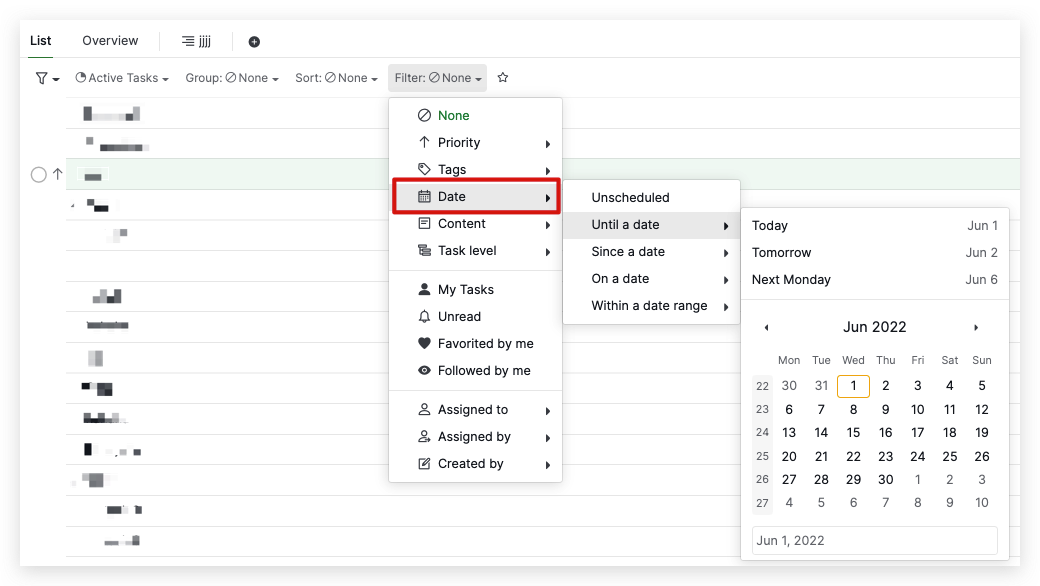
We have a complete guide about FIlter that you can check out here.
I hope this helps. Thank you.
Golda, Jun 1, 2022
Hi @fiveteebox, In Quire, Today's date is dynamic, so your today's view will be based on the current date.
Now I am looking for a view that shows me tasks without start date and hides tasks with start date > today.
I'm afraid I do not fully understand what you mean. Could you kindly elaborate more on this? Thank you very much.
Golda, Jun 1, 2022
Actually, most of my tasks can be started right now, so I don't put start date on them. So, in a custom view, I want them shown with tasks with start date <= today and I want to hide tasks with start >= today as I can't start them yet
Fiveteebox, Jun 1, 2022
Hi @fiveteebox, For this custom view, you can go to the Filter icon > Customize > Filter by Date > Until a date > Today. With this filter, you will not see tasks that have a start date in the future (thus, filtering Until a Date Today will hide the tasks with a start date later than today).
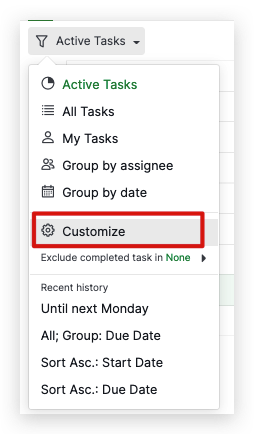
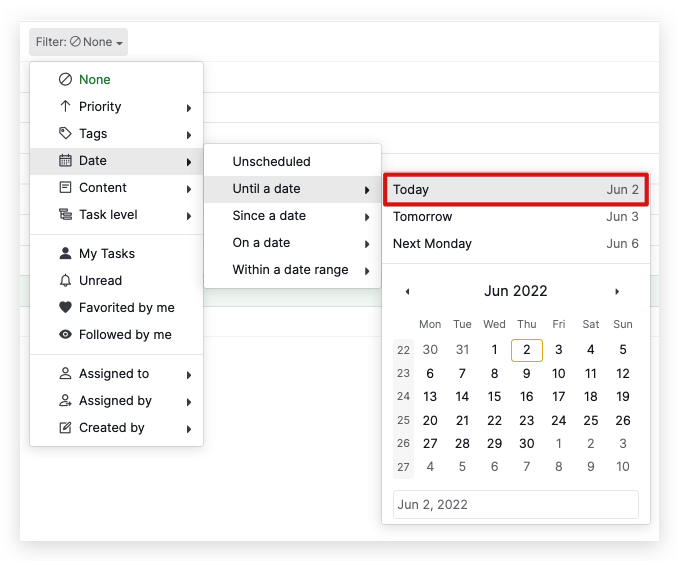
Previously you mentioned that you would like to view tasks without a start date. Unfortunately, we do not have the option to filter out tasks without a start date.
I hope this helps.
Golda, Jun 2, 2022
Hi, thanks for your reply. I've read the page you've sent but nothingseems to fit my request. Actually, when I create a task that doesn't start today but in the future, I set start date on this task. Now I am looking for a view that shows me tasks without start date and hides tasks with start date > today. The today's date should be also "dynamic" and not precise date, then, if I look at the same view tomorrow, it will adapt the today's date.
Fiveteebox, Jun 1, 2022