
Hello,
Is there a way I can collapse my task list when it is grouped?
Eg. when I Group by Tag, I'd like to get to a view then everything is collapsed and I see the Tags only.
Hi, I've seen that, but this is meant to collapse the Groups not the Tasks! It's different.
tilusnet, Jun 16, 2022
Hi @tilusnet, I'd like to double-check your question. Do you mean when in Group by Tag, you would like to see all tasks collapse and only the tags will showed like in the screenshots I attached here?
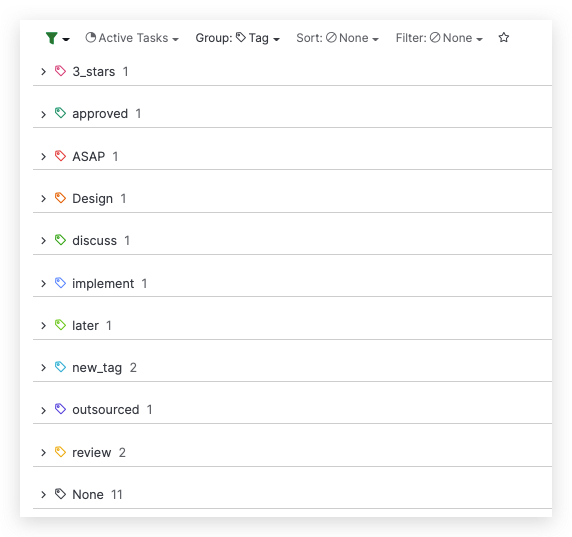
If you use Shift + ← (left arrow), all the tasks will collapsed and only the tags will be displayed. Because this shortcut will collapse all tasks by their level altogether, you can press a few times until all the tasks level collapsed.
Please let me know if this is what you are looking for. Thank you.
Golda, Jun 17, 2022
Hi @tilusnet, Thank you for your suggestions! I have passed your feedback to our Product Team for further discussion and I will inform you when we have any updates. Thank you.
Golda, Jun 22, 2022
Hi @tilusnet,
Yes, there is a keyboard shortcut to collapse all tasks altogether by level. Hit the Shift + ← to collapse, and Shift + → to expand.
We also have other keyboard shortcuts that you can check out here.
I hope this helps. Thank you.
Golda, Jun 16, 2022
Try with a task list having eg 10 Tags. Now group by tags and you'll see that your tasks are expanded and collapsed randomly under those grouped tags. If you wanted to collapse all groups how do you do it?
tilusnet, Jun 16, 2022
Yes, thank you. I wish this also worked on mobile though - in any case a keyboard shortcut is useful when on computer.
tilusnet, Jun 17, 2022