
Hello, once I suddenly discover, that Quire has an "inbox" folder. But unfortunately I cant see the way how I can see it. I dont remember how I get it the last time((
Via Quire Android
Hi @dzeboeff, We're afraid we don't have an inbox folder. However, we have My Tasks. In My Tasks, you can view:
- Tasks created by you, not assigned to others, with start or due date
- Task assigned to you
- Personal tasks
A personal task is a task that doesn't belong to any project; it belongs only to your My Tasks. So you can create tasks specifying the project. For more details about My Tasks and personal tasks, please visit our guide here: https://quire.io/guide/my-tasks/.
Golda, Sep 27, 2022
Hi @dzeboeff, I would like to double-check your question. Are you looking for My Tasks? You can navigate to My Tasks from the bottom menu next to Home in the mobile app.
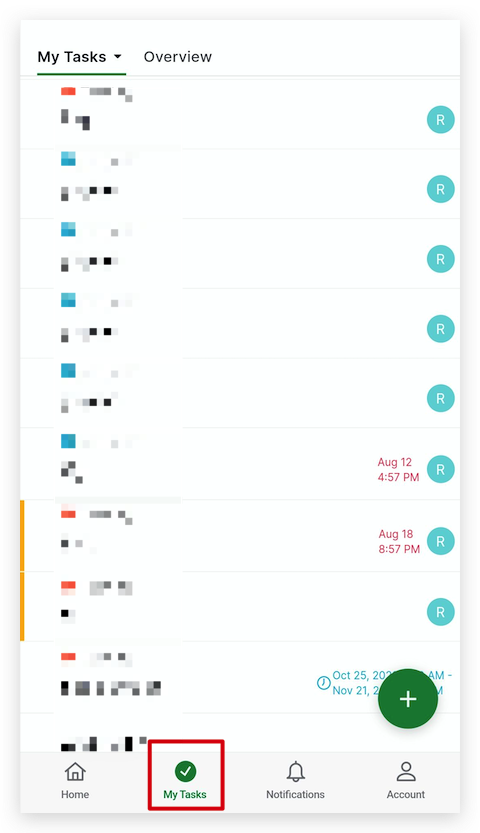
Please let me know if this is what you are looking for. Thank you.
Golda, Sep 26, 2022
No, it is not my task. I saw the the fold "inbox".
Дмитрий Дзебоев, Sep 26, 2022
Ok, I see. But I dont exactly understand how on mobile app (Andriod) create this my tasks
Дмитрий Дзебоев, Sep 27, 2022
Hi @dzeboeff, You can add a task in My Tasks, just like in a project. In the mobile app, you can navigate to My Tasks from the bottom menu. Click the green plus icon to add a task. Another way is you can drag and drop the green plus icon directly to add a task at the desired position.
Tasks that belong to My Tasks requirements will display in My Tasks. You can also see which project the task belongs to.
In My Tasks, you can Group or Sort your tasks using the Filter icon. For example, you can Group by Project in My Tasks. This way, it's easier to view your tasks from various projects.
I hope this helps! Thank you.
Golda, Sep 29, 2022