
In the IOS app, it would be great to have the status symbol visible next to the title for lists in the tree-view. With the default "active tasks" filter, there is currently no way to tell the difference between To-Do and In Progress status. I simply want to be able to check mark an item by swiping it to "In Progress" and have that readily visible without stepping over to Board view. Please consider!
Ok, you are right. In Advanced mode the task status In Progress is visible in task list. My request concerns Basic mode, where task status should also be visible, just like favourite task, task priority, and tags are. The reason is I need to be able to swipe a task in task list view to change its status and have that change directly visible. A related suggestion is therefore that a single long swipe to right changes status only one step (e.g. from To-Do to In Progress), instead of directly moving it to Done. In the default status configuration, two long swipes would then take a task from To-Do to Done. Wouldn't that be great!
Daniel Ljunggren, Mar 31, 2023
As said in the beginning, this concerns iOS, and the status icon does not show in task list, even when status is set to In Progress. I think it is fundamental to be able to see the task status in task list view in iOS just as in the web interface, i.e. not needing to open or swipe the task to view status. The task priority is shown by a vertical color bar and even the heart symbol for favourite task, so why not the the even more fundamental task status!?
Daniel Ljunggren, Mar 30, 2023
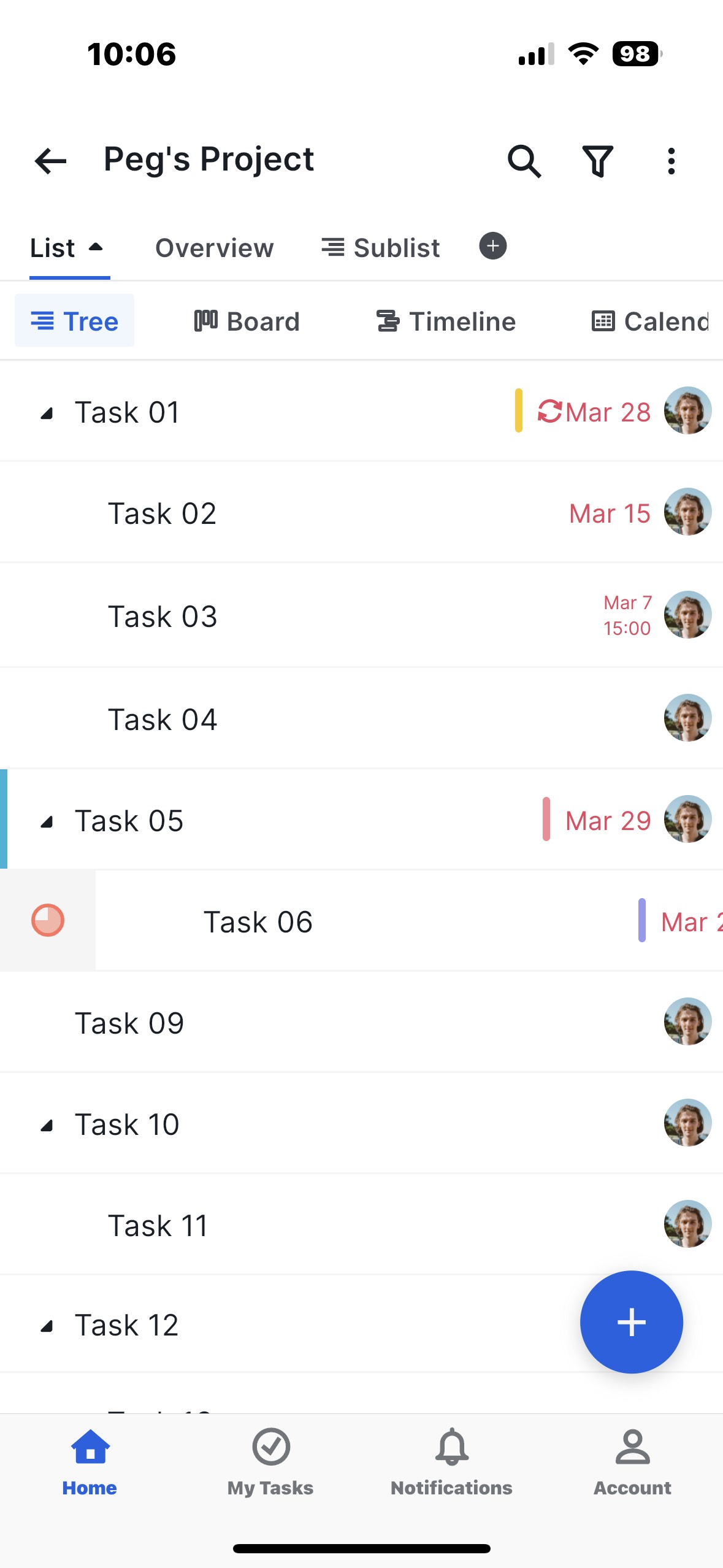
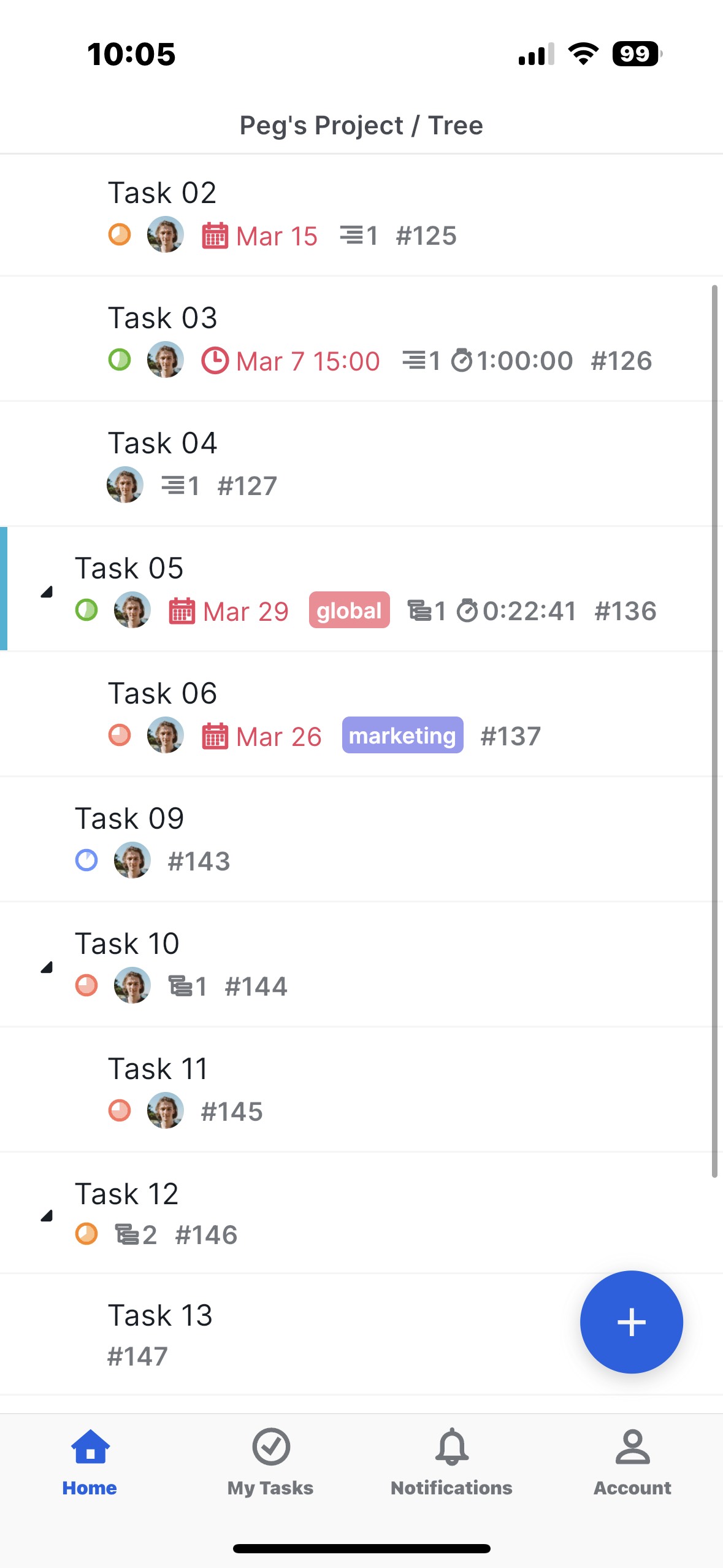
Hi Daniel, When the advanced mode is toggled on, the task status will show when it's not in To-Do. When you set the task status to In Progress, for example, you can see the status icon on your task list.
However, I understand that you'd like task status to be displayed on your task list. I will pass on your feedback to our internal team, and we will get in touch with you once we have any updates. Thank you.
Golda, Mar 30, 2023
Hello Golda, Unfortunately, advanced mode does not show task status, therefore my request to implement this. However, I’d not like task status show together with all other disturbing information in advanced mode, but to show in any mode (always or by option).
Daniel Ljunggren, Mar 28, 2023
Hi Daniel, Thank you for your feedback. I will inform our team about your feedback. Once we have any updates, we will keep you updated.
About the task status not showing up in the task list, I'd like to double-check with you. Did you not see the status icon for tasks that you had set the status for after toggling on the Advanced mode? If so, could you please provide us with screenshots of your task list? Please also let us know your iOS version so that our team can check if there is a potential glitch related to this.
If you have set the status for a task and toggled on the Advanced mode, you shall see the status icon on your task list. Please refer to the screenshots below:
Basic mode:
Advanced mode:
Golda, Mar 31, 2023
Hi Daniel, We understand your concerns and have passed them on to our Product Team. The current workaround you can do is to toggle on Advanced mode to see the task status.
To quickly change the task status, you can swipe right and tap on the status circle. I have attached a short video for your reference.
Golda, Apr 20, 2023
Hi Daniel, In the mobile app, you can toggle on the Advanced mode to show the tasks' breadcrumbs, such as the task status, task ID, tags, etc. This can be done by shaking your phone. For more details, please check our guide here.
To change the task status, swipe right on a task and tap on the status circle. Please find our guide here.
Golda, Mar 28, 2023