
Hi there, One of the ways that Quire excels in desktop mode is quick, contextual subtask creation.
When on the mobile app, however, that experience changes entirely, at least on the Android app. In the tree view, I can easily create tasks and sub-tasks using the + button at the bottom. For some reason, that button is not available in the table or timeline views, and in the calendar view, I can only create a parent task.
More importantly, when I go into a task view, I can do everything with that task except create sub-tasks. I can even make it a sub-task of another task, but cannot create a sub-task from within it, which is often on mobile where I would want to create the sub-tasks, contextually within the parent task.
Hi, thank you for your feedback.
We understand that the current workflow of creating subtasks within the detail panel of the mobile app may not meet your expectations.
I will bring your use case to our team for thorough consideration. Rest assured, when we have any updates related to your feedback, we will keep you posted. Thank you very much.
Golda, Jan 26, 2024
Thank you, Golda. But actually, in that task view, you can't press to select a task.
The faster way to me is to simply work with sub-tasks from the main tasks screen rather than from within the actual parent task.
(deleted-Mic*l), Jan 31, 2024
Hi, Yes, the workaround I mentioned previously applies when you're viewing your tasks in your project. This is not available when you are in the parent task view. However, rest assured that your feedback has already been passed to our team for further consideration. Thank you.
Golda, Feb 6, 2024
I do see the right-swipe option for creating sub-tasks, but my question is specifically related to creating a sub-task from within the actual full screen task view.
(deleted-Mic*l), Jan 25, 2024
Hi, We've added the option to Add a subtask in both the web and mobile app. You can find this option in the More option in the task detail panel.
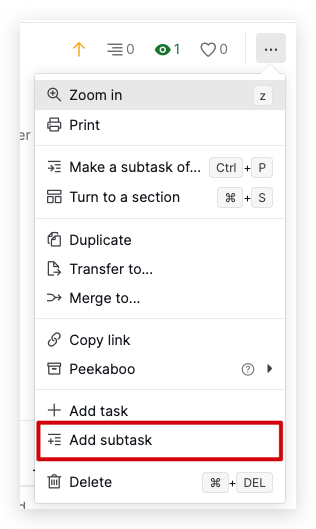
Please let me know if you have any questions. Thank you.
Golda, Mar 13, 2024
@golda - this can probably be closed out now (I actually opened it originally), as your swipe functionality addresses this fully.
Michael, Apr 1, 2025
Also, @Raisag, related to this is managing sub-tasks from within a task view on mobile.
When in the main Tasks view, it is easy to manage and complete sub-tasks with a swipe.
But if I click on a notification, let's say, for the main task, and go into that, and there are sub-tasks that I want to complete within that task, it now takes four clicks to complete a sub-task. And then, if I want to complete multiple sub-tasks, each time it is four clicks.
The mobile view of a task should allow for much easier management of sub-tasks within a task, as fewer clicks is key for mobile. The section that mentions the subtasks should just expand to show the subtasks, and allow for swiping to manage them individually just like on the main tasks screen.
(deleted-Mic*l), Jan 31, 2024
Hi, thank you for your feedback.
For a faster way to complete multiple tasks, you can use the following workaround: long-press on a task, select the tasks you wish to complete, then use the bottom menu bar to choose the status icon and complete tasks. Check out our guide here for more details.
Regardless, I will pass your feedback to our team for further discussion. Please keep in mind that we cannot promise your feedback will be implemented soon. When we have any updates, we will let you know. Thank you.
Golda, Jan 31, 2024
Thank you, Golda!
(deleted-Mic*l), Jan 26, 2024