
I often misclick tasks as "completed" (it's too easy to do because "complete" checkbox is just nearby "unfold" arrow) and they disappear from list. Only later I discover that some tasks were accidentally completed. I have no idea how to resolve problem with accidental misclicks, but can I have at least "All tasks" filter enabled by default instead of "Active tasks", so even if I misclick I will see completed tasks always on the list?
Hi @Etoidei, thank you for your feedback. Also, thank you @Grox for stepping in to help us out! 😃
If you often misclick the task status, you can adjust your project settings to prevent tasks from automatically completing when the status icon is accidentally clicked. Here’s how: In your project, click the dropdown menu next to your project name > Options > toggle on the Always show status options when you click on the status icon.
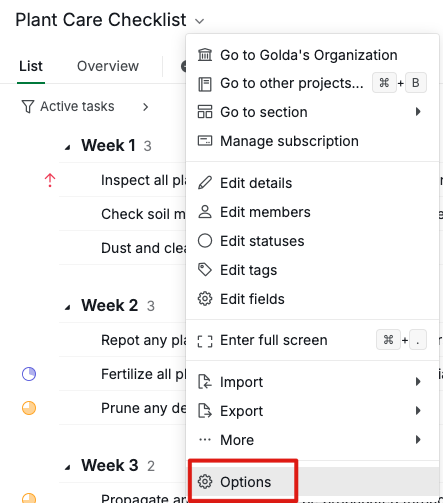
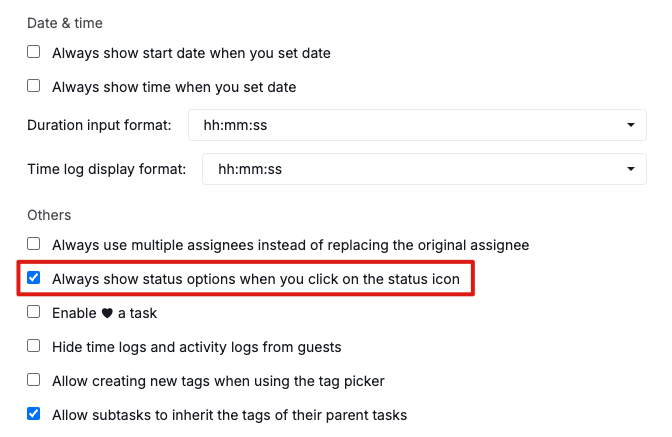
Regarding the All tasks filter, our system remembers the last filter you used for each project. If you select All tasks, this filter will be applied again when you switch back to the same project.
As Grox mentioned, saving a customized filter can make it even easier to apply your preferred settings. For detailed steps, check out our guide here.
Feel free to let me know if you have any further questions. Thank you.
Golda, Nov 27, 2024
Thank you all for handful of tips!
Etoidei, Nov 28, 2024
Hello,
As I see it applied to details panel, where indeed it is quite close, maybe increasing width for arrow click area would resolve it.
You can save custom filter for project with All tasks, which would be automatically applied.
You can also change in project settings to require opening dropdown and selecting task status instead instant completion.
Grox, Nov 27, 2024