
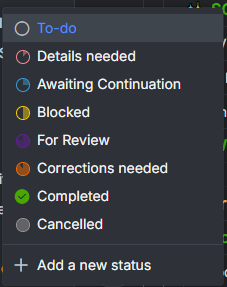
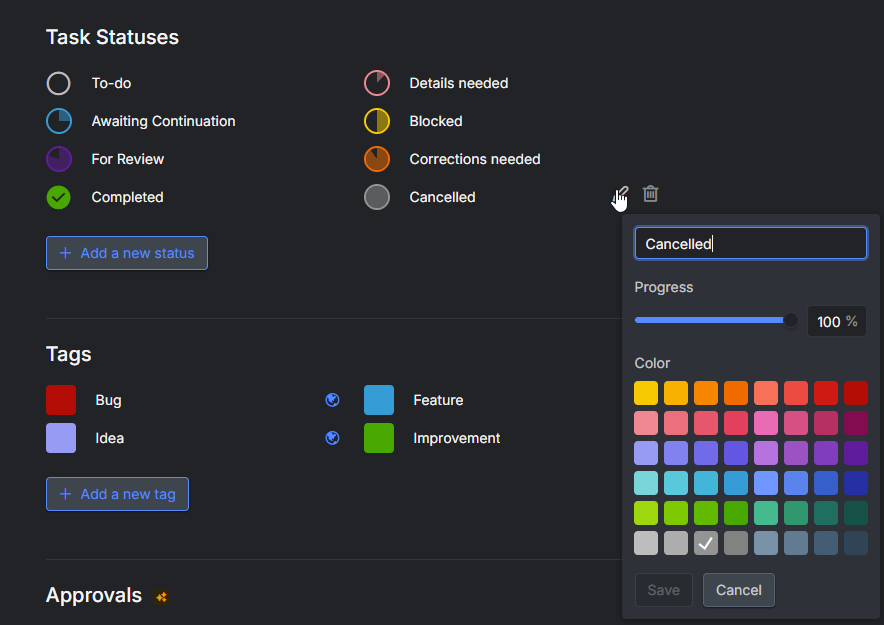
Statuses are ordered by their progress percentage, so a custom status set to 100% (in our case "Cancelled") always ends up in the status list next to the default "Completed" status, and there is no way to put it before it.
Use case
We use a custom "Cancelled" status with 100% progress, so that cancelled tasks count as finished in progress calculations. In the status dropdown of a task (and in the list of statuses in project settings) it is listed right after "Completed", at the very bottom of the list. "Completed" is the status people click most often, and it sits right next to a status that means the opposite. It is very easy to misclick, and the mistake is easy to miss because both statuses are "done" states. Completing a parent task also completes all of its subtasks, so a misclick can be more than a one-task problem.
Request
Give us a way to control where a custom 100% status appears relative to "Completed", for example:
- Drag & drop reordering of statuses in the status editor (related to #5889, which asks for general reordering), or
- At least a way to order statuses that share the same percentage, so that a custom 100% status can be listed before "Completed".
Option 1 would also solve the more general case where the percentage-based order does not match the order people want (statuses like "Paused" or "Cancelled" do not really belong on the percentage scale).
Related: #5889
Hi,
Thanks for sharing your detailed feedback with us. I've passed this along to our team, and I'll update you if there's any update on it.
Golda, Oct 21, 2026