features · Jul 15, 2015
5 Easy Steps to Quire’s External Team

Last updated: October 20, 2026
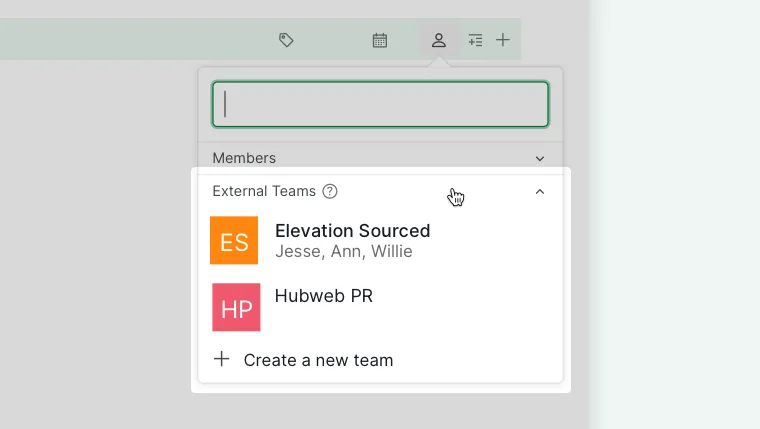
Quire's external team feature lets you outsource a task to freelancers or an agency while keeping their access to just that task. Set it up from the task's assignee menu: expand External Teams, click Create a new team, name it, and invite members by email. They can break the task into subtasks and manage their own people, and the parent project still shows the whole picture.
Outside help is the norm now, not the exception. Statista reports that about 38% of the U.S. workforce did some freelance work in 2023, so a clean, safe way to bring contractors into a project is worth the five minutes to set it up.
Here is something useful for those of you who need outside help, like freelancers, to help you complete a task in your project: You can now easily (and safely) outsource the task with Quire’s new feature “external team.”
Before we move on, you can take a look at the overview to get an idea of what it is. Or we can just get straight to the hows:
1. Click on the Assignee icon.
2. Open the "External Teams" section of the list.
3. Click on "+ Create a new team".
4. Enter a name for the external team.
5. Add external members by typing their emails, pick a role for each one, then click on Create.
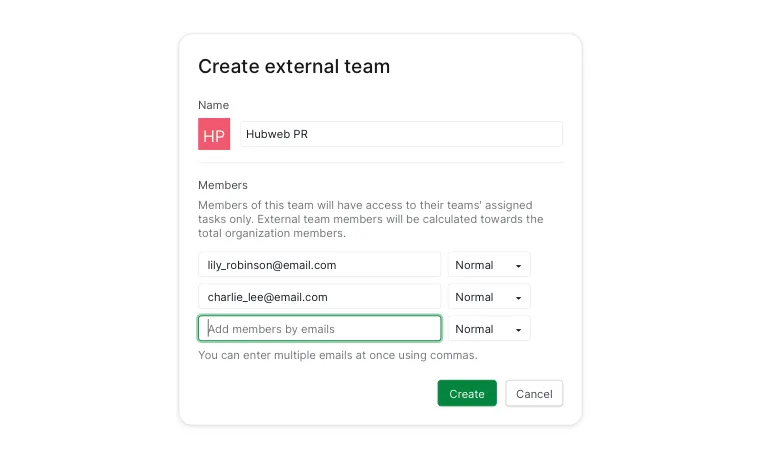
After you clicked on Create, you will return to your project.
Note: When you assign a task to an external team, the assignee will always be the team even when it has only one external member.
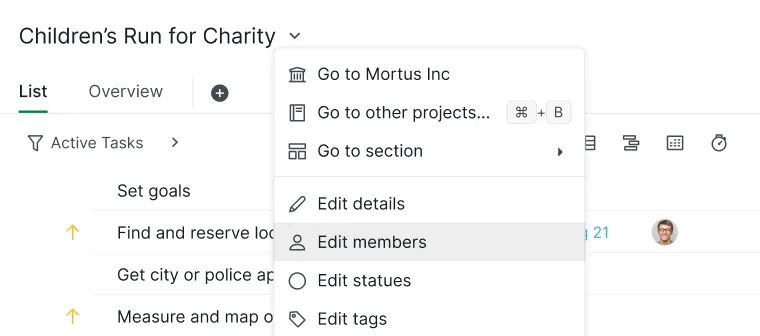
Prefer the project menu? Click the dropdown next to the project name and choose Edit members.
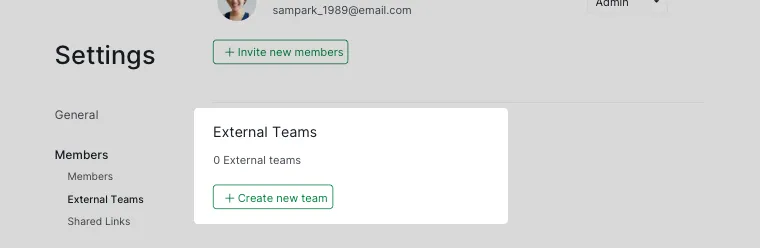
In the External Teams section, click + Create new team. The same panel is where you edit or delete a team later.
Now, you are just one step away!
The external members you have invited will need to accept the email invitations you have just sent.
Once they have done so, you would have successfully assigned the task to them, and they would be able to start working on it.
When you work on your project, you will see the whole picture.
And if you sort (group) by assignee, you will see the outsourced task under the external team’s name.
What can an external member actually do?
When your external team work on the same project, they will see only the assigned task. So, you do not need to worry about them seeing your other tasks. External Team is really just Quire's permission model applied to people outside your organization.
That said, external members can still create subtasks under the assigned task and manage them.
And so can you.
Why use an external team instead of full access?
“External team” is a useful feature for those of you who want to focus on the core tasks at hand while delegating those that are non-core to third parties without compromising your safety. It sits alongside the member roles you can already assign inside your own organization.
Related: Introducing Master Organization: Saving Money on Quire Subscription — for when your own team spans multiple linked organizations, rather than outside collaborators.
In our upcoming reports, we will go into more details of what you and your external members can do — starting with I Don't Really Know Them, But I Need Their Help.
Please stay tuned!
What are the five steps to set up an external team?
The whole setup takes about a minute. Here it is end to end.
| Step | What to do |
|---|---|
| 1. Open the assignee panel | Click the Assignee icon on the task you want to outsource |
| 2. Open External Teams | Expand the "External Teams" section of the list |
| 3. Add a new team | Click "+ Create a new team" |
| 4. Name it | Give the external team a name |
| 5. Invite members | Enter their emails, pick a role for each, then click Create |

Frequently Asked Questions
What is the External Team feature in Quire?
It lets you safely outsource a task to outside helpers like freelancers. They work on the assigned task without seeing the rest of your project.
How do you set up an External Team in Quire?
Click the Assignee icon, open External Teams, click Create a new team, enter a name, add members by email, then click Create.
What can an external member do on a task in Quire?
They can work on the assigned task and create subtasks under it. They only see that task, not the rest of your project. They work on what they are given and see nothing else. That containment is why Quire's External Team exists, since a contractor needs the task and its discussion without the rest of the project.
How does Quire show a task assigned to an external team?
The assignee is always the team, even with one member. Group by assignee to see the outsourced task under the team's name; members must accept the email invite first.