
productivity tips · Sep 24, 2014
Make your Product Backlog Speak the Whole Story

Last updated: September 30, 2026
Conventional Scrum Product Backlogs flatten requirements into ordered user stories, stripping the context that gives a product its value. A tree-structured backlog in Quire nests stories under epics, preserving the relationship between coarse vision and fine tasks. Priority tags like PL1 and PL2 replace strict ordering, and filter views surface Sprint candidates without losing the whole product picture.
- What is a conventional Product Backlog?
- What does a conventional backlog look like?
- How do you build a tree-structured backlog in Quire?
- How do distributed teams estimate effort?
- How does Quire's backlog compare to Jira's?
- Can Quire's Table view manage the backlog today?
- What should a Product Backlog really capture?
- Frequently Asked Questions
What is a conventional Product Backlog?
The conventional Product Backlog contains an ordered list of requirements often written in a User Story form. These fragmented “stories” do not give us a clear picture of what the Product is, or what values they bring as a whole.
According to the 2020 Scrum Guide, the Product Backlog is “an emergent, ordered list of what is needed to improve the product.” Ordered is the load-bearing word. It is also the reason a backlog can be perfectly prioritized and still tell you nothing about the product.
The Product Owner, the Development Team and stakeholders all depend on this backlog to fill their roles in Scrum, yet this very backbone that they rely on does not present a mental image of the product that the team needs to bring out the product’s value or advantage.
What does a conventional backlog look like?
Imagine you’re a stakeholder of our task management software, Quire. By convention, you’ll have access to a Product Backlog that looks something like the list below:
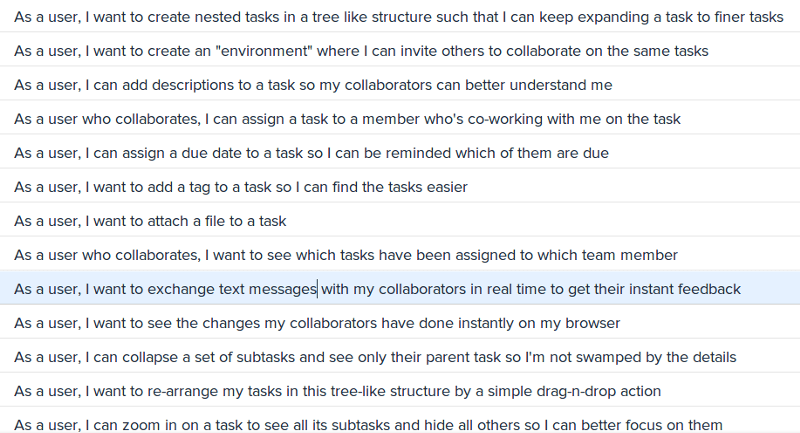
Each of these user stories is self sufficient in portraying a requirement; however, by sorting them with respect to their Return On Investment, we've taken each item out of its context, the core value it contributes to the product.
How do you build a tree-structured backlog in Quire?
Let’s try a different approach to creating a Product Backlog in Quire.
We first put down the core values that drive the development of our product:
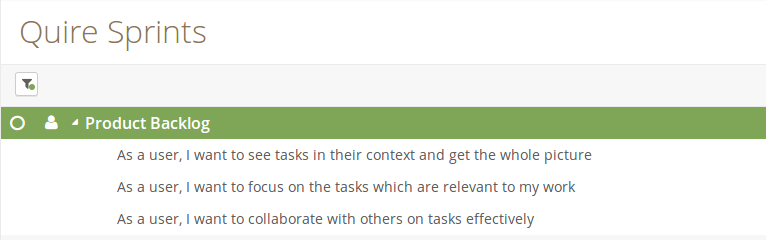
Although these “epics” are too large to be estimated with any reliable accuracy, they do paint a better picture of what values this product would bring.
We then expand on each epic, specifying more stories, or even more epics, that would build on top of these foundations toward our product:
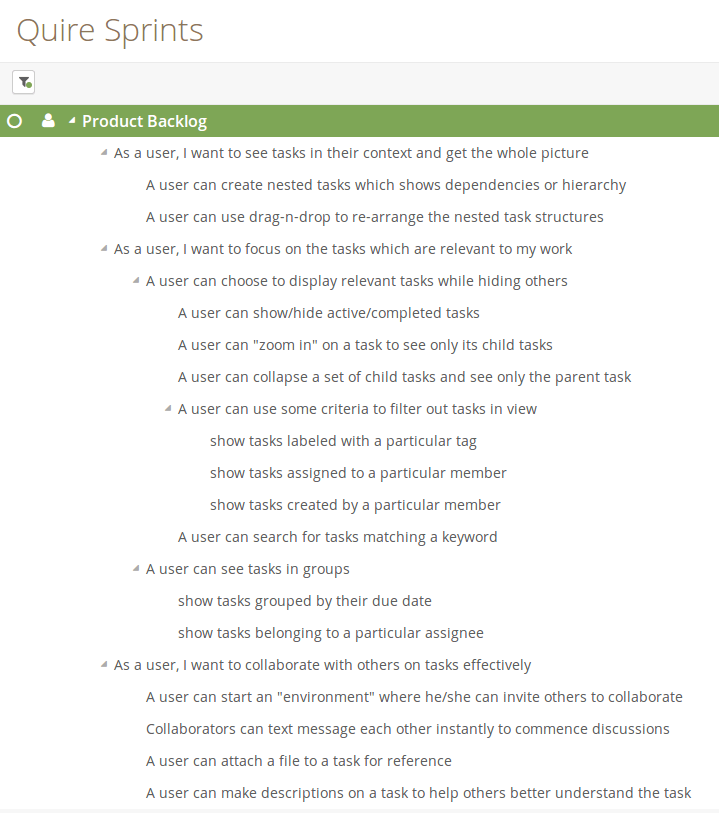
Notice this tree-like structure fits naturally with how we had developed our ideas. If we make the analogy that the product is a tree, then the epics would be the main branches of the tree. With the conventional Product Backlog, we are picking up a leaf here and there at the ends, stacking them up without seeing what the whole tree looks like.
With Quire’s tree structure, we can nest stories within other stories(or epics) so we’re always made aware of their context and not lose focus on what value we wish to bring forth in the product.
But we are supposed to prioritize the Product Backlog Items?
The convention dictates that we put the Product Backlog Item with highest priority on the top of the list; but there are other alternatives to highlight our immediate concerns than a sorted list.
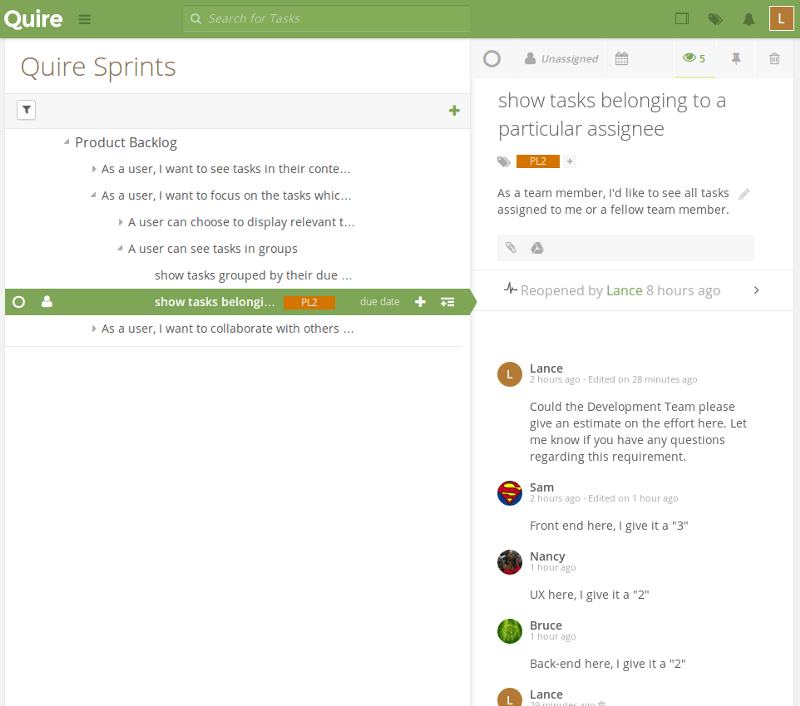
We can define priority level tags such as PL1, PL2, and so on; upon the Product Owner gets all the necessary information to prioritize the tasks, he or she can assign these tags to tasks that are in considerations for the upcoming Sprints:
How do distributed teams estimate effort?
It’s best to estimate effort on tasks together in a meeting room, but team members often live on different continents. Quire’s built-in chat is a good alternative for estimating together.
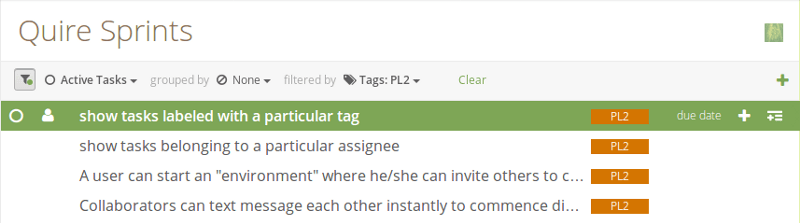
During the Sprint Planning Meeting, when it comes to picking the items to commit to the next Sprint, team can then use Quire’s filter function to display only the items that are of immediate concern:

How does Quire's backlog compare to Jira's?
Jira ships a dedicated backlog view, sprint objects, story-point estimation, and burndown charts out of the box. Quire takes a different approach.
You shape the backlog as a task tree, tag priority levels, and pull Sprint candidates with filters. That keeps the whole product visible in one structure rather than splitting it across a backlog screen and a board.
If you want the backlog and the delivery plan to stay in one connected tree, Quire's model is built for exactly that.
Can Quire's Table view manage the backlog today?
Yes. Quire's Table view renders the same task tree as a spreadsheet, so you can sort, filter, and bulk-edit backlog items alongside custom fields for priority, estimate, or status. It is a faster way to triage a large backlog than scrolling the tree, and every edit stays linked to the item's parent epic.
Treat the Table view as the backlog-grooming and prioritization surface; sprint tracking is what Dashboard View covers, with workload, at-risk, and deadline widgets.
What should a Product Backlog really capture?
A Product Backlog should not only contain fragmented user stories. Rather, it should speak the whole vision your team has for the product. Coarse requirements better portray value and as we develop them into finer items, they branch into items that are more tangible so we can assess their cost more accurately. A tree structure naturally captures this branching and retains information encoded in both, and as a whole.
We've only tapped into how Quire can help us to reinvent the Product Backlog. We’ll explore how Quire can be used to deal with other aspects of Scrum in subsequent articles. Until then, please give Quire a try and let us know what you think.
More on how Quire is built for this: a design hiding complexity in simplicity, and Quire for small business if you want the AI side of it.
Related reading: Agile project management puts this tree-structured thinking inside a full workflow, the Scrum Master role is what keeps the backlog moving, and product roadmap planning is where its committed part goes.

Frequently Asked Questions
What is a Product Backlog in Scrum?
It's an ordered list of requirements, usually written as User Stories, that the Product Owner, Development Team, and stakeholders rely on. It's conventionally sorted by Return On Investment.
What is wrong with a flat, ordered Product Backlog?
It strips each story out of its context, so the team loses the bigger picture of the product's value. You end up picking individual leaves without seeing the tree.
How does a tree-structured Product Backlog work in Quire?
You start with epics that capture core product values, then nest stories underneath them. The tree keeps every story tied to its parent epic, so vision and tasks stay visible together.
How do you prioritize a Product Backlog without a sorted list?
Use priority level tags like PL1 and PL2 instead of strict ordering, and assign them to tasks being considered for upcoming Sprints. The Product Owner can revise tags anytime without rearranging the backlog.
How do you choose Sprint items from a tree backlog?
Use Quire's filter function during Sprint Planning to show only items tagged with a priority level like PL1. Quire's live chat then helps distributed teams estimate effort together.
How does Quire's backlog compare to Jira's?
Jira ships a dedicated Scrum backlog, sprints, story points, and burndown charts. Quire takes a different route: you shape the backlog as a task tree, tag priority levels, and filter for Sprint candidates. The result is one connected structure, where the backlog, the current sprint, and the roadmap are all views of the same tasks rather than separate artifacts you keep reconciling.
Can Quire's Table view manage the backlog?
Yes. Table view shows the task tree as a spreadsheet, so you can sort, filter, and bulk-edit backlog items with custom fields. Use it for grooming and prioritization, with Dashboard View covering the sprint tracking.
