
project management · Mar 13, 2025
Improve Remote Collaboration: 8 Best Practices for Success

Last updated: October 21, 2026
Remote collaboration fails not because the work is different but because the implicit coordination of an office disappears. Async time zones, missing non-verbal cues, and tool sprawl take its place. Eight practices replace what the office did for free: the right tooling, clear work norms, productive meetings, deliberate social engagement, async-by-default workflows, strong documentation, visible accountability, and protected work-life balance.
An office does an enormous amount of coordination work invisibly. Decisions happen in hallway conversations, blockers get surfaced when someone overhears them, and informal trust accumulates through proximity. Move the team remote and all of that disappears overnight. The work didn't change; the coordination scaffolding did. Teams that struggle remotely aren't worse at their jobs; they're trying to run the old coordination model on infrastructure that no longer carries it.
Remote work itself isn't the weak link. Stanford economist Nicholas Bloom's two-year randomized study at Ctrip found that working from home made employees 13% more productive and 50% less likely to quit. The teams that struggle remotely are the ones that never rebuilt the coordination an office used to handle for free.
This post covers what remote collaboration actually requires, the eight practices that replace what an office did for free, and how to install the practices without drowning the team in more meetings to make up for the office time you lost.
How Do You Improve Remote Team Collaboration?
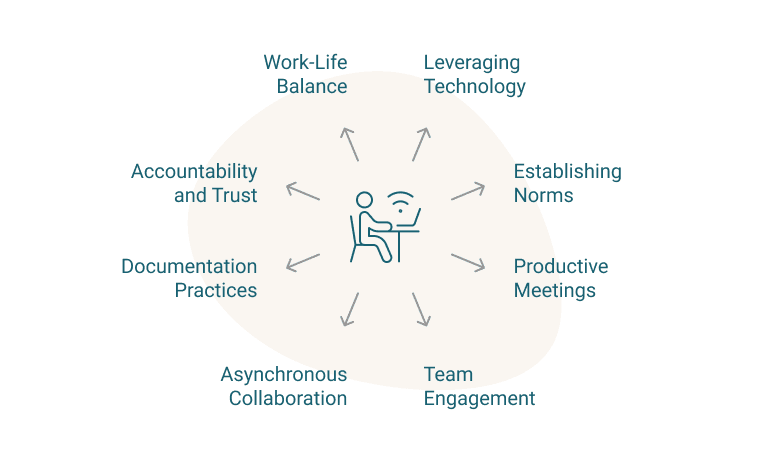
To improve remote team collaboration you have to make the office's invisible coordination explicit. Eight practices close the coordination gaps that show up when the office disappears. Each one targets a specific implicit office habit and gives it an explicit replacement:
- Set up the tool stack. Quire for tasks and progress, Zoom or Google Meet for live calls, Slack or Teams for quick decisions, Google Docs or Notion for shared writing.
- Write the work norms down. Response times, file names, where documents live, and core overlap hours.
- Run meetings for decisions, not recaps. Agenda shared in advance, action items logged in Quire with an owner.
- Schedule the social time an office gave you for free. Coffee chats, casual channels, and one team event a month.
- Make async the default. Update tasks on the board, record sessions with Loom, and co-edit shared docs.
- Write down anything asked twice. A knowledge base, plus instructions inside the Quire task itself.
- Swap oversight for visibility. OKRs, owners, and due dates in Quire, with a weekly self-reported update.
- Protect the end of the workday. Set work hours, allow flexible schedules, and back a no-email-after-7 policy.
1. Which Technology Stack Enables Remote Collaboration?
Remote work runs on a deliberate tool stack, not on email and goodwill. Each tool category covers one coordination function the office handled implicitly:
How to do it:
- Use Quire to create detailed project timelines, assign tasks, and track progress with real-time updates.
- Hold virtual meetings via Zoom or Google Meet, using breakout rooms for focused discussions.
- Use instant messaging tools (Slack, Microsoft Teams) for quick decision-making and organized conversations.
- Collaborate on documents with Google Docs or Notion, using version history to track edits.
Impact: A global marketing team using Quire benefits from structured workflows, clear accountability, and automated progress tracking. In contrast, teams relying solely on email struggle with slow responses, missed deadlines, and document confusion.
If the project management slot is still open, the remote team management software roundup compares ten tools and explains why custom fields matter more once nobody shares an office.
2. How Do You Set Clear Guidelines and Work Norms?
An office teaches its norms silently; a remote team has to write them down. When does a Slack message need an answer? Where do files live? Who's online when? If the answers aren't written somewhere, everyone invents their own.
How to do it:
- Establish response time expectations for emails and instant messages.
- Standardize file-naming conventions and store documents in shared spaces like Google Drive or Notion.
- Define core working hours for better coordination across time zones.
Impact: A software team with a "No Meeting Wednesdays" policy and structured Slack channels protects real deep-work time. Teams without such norms live with constant interruptions and a permanent low-grade confusion about who's available.
3. How Do You Conduct Productive Remote Meetings?
A bad remote meeting is a special kind of purgatory: ten people watching one person read a status update off a screen. Meetings earn their calendar slot when they produce decisions and owners, not recaps.
How to do it:
- Share meeting agendas in advance using Quire or Notion.
- Document discussions and action points in Quire, assigning follow-ups directly.
- Use collaborative tools like Miro for brainstorming and interactive whiteboarding.
Impact: An HR team keeping structured meeting notes in Quire actually follows through on what was decided. Unstructured meetings produce the opposite: an hour of talk, zero owners, and the same agenda next week.
4. How Do You Foster Team Engagement Remotely?
Remote work quietly removes every casual interaction that made colleagues feel like people. Nobody bumps into anyone at the kettle anymore. The connection an office created by accident, you now have to schedule on purpose.
How to do it:
- Schedule informal virtual coffee chats with Donut (Slack integration).
- Create social Slack channels (e.g., #hobbies, #pets) for casual conversations.
- Organize online team-building events using Kahoot! or virtual escape rooms.
Impact: A remote customer support team hosting monthly virtual events builds real connections between people who've never shared a room. Skip this, and colleagues stay usernames.
5. Why Should You Embrace Asynchronous Collaboration?
If every decision needs a live meeting, a team spread across time zones can make roughly one decision per day. Async collaboration removes that ceiling: work moves forward while half the team sleeps.
How to do it:
- Use Quire’s project boards to update tasks asynchronously and track workflows.
- Record important meetings with Loom and share key takeaways in Notion.
- Collaborate via shared documents (Google Docs, Notion) for smooth contributions without time constraints.
Impact: A content team spanning multiple time zones assigns tasks asynchronously in Quire, so work keeps flowing around the clock. Teams that insist on live handoffs stall every time the calendars refuse to line up.
6. How Do You Strengthen Documentation Practices?
On a remote team, undocumented knowledge lives in one person's head, in their time zone, on their vacation schedule. Writing things down turns "ask Priya when she's online" into "read the doc now."
How to do it:
- Maintain a knowledge base using Confluence or Notion, linking project guides and SOPs.
- Document detailed workflows in Quire, ensuring tasks include clear instructions and deadlines.
- Regularly update SOPs (Standard Operating Procedures) to reflect new best practices.
Impact: An IT consulting firm documenting troubleshooting steps in Quire lets employees find answers on their own. Undocumented teams answer the same question weekly, live, forever.
7. How Do You Promote Accountability and Trust Remotely?
You can't hover over a remote team, and you shouldn't want to. The trick is replacing oversight with visibility: when goals, owners, and due dates are public, accountability mostly takes care of itself.
How to do it:
- Set clear OKRs (Objectives and Key Results) for team members and track them in Quire.
- Use Quire’s task assignments and due dates to hold team members accountable.
- Encourage self-reporting through weekly progress updates in Slack or Notion.
Impact: A product team running structured check-ins in Quire always knows where things stand. Without that visibility, priorities blur and deadlines slip in silence, until it's too late to fix them quietly.
8. How Do You Protect Work-Life Balance on a Remote Team?
When your office is the kitchen table, the workday has no natural ending. The laptop is right there. Without deliberate boundaries, remote work drifts into always-on, and burnout follows close behind.
How to do it:
- Encourage employees to set defined work hours and use Google Calendar to block focus time.
- Support flexible schedules while ensuring deliverables are met through Quire’s deadline tracking.
- Provide mental health resources and encourage breaks with reminder tools like Time Out or Pomodone.
Impact: A tech company backing a "no emails after 7 PM" policy gives people their evenings back, and gets better mornings in return. Where no boundary exists, everyone feels obliged to stay permanently reachable, and the work quality pays for it.
You don't need all eight at once. Start where the pain is loudest, usually meetings or documentation, and add the next practice once the first one sticks.
Related: 10 Strategies to Make Hybrid Collaboration Effective in Your Team — most of these same practices also close the coordination gaps that show up when only part of the team is remote on a given day.
What Is Remote Collaboration?
Remote collaboration is working together as a team despite being geographically dispersed. What an office handled through proximity, remote teams handle through digital communication tools, project management platforms, and written operational guidelines.
Done well, it pays off in productivity, employee satisfaction, and lower operational costs. Zapier, an entirely remote company, scaled worldwide on two habits: strong documentation and asynchronous communication. That's the whole trick behind its team collaboration, and it's copyable.
How Does Remote Team Collaboration Work Differently?
Compared to in-person collaboration, remote teams face distinct challenges, such as:
- Asynchronous Communication: Remote team members may work in different time zones, making instant feedback and discussions more difficult.
- Lack of Non-Verbal Cues: Without in-person interactions, misunderstandings can arise more frequently due to the absence of facial expressions and body language.
- Dependence on Digital Tools: Remote teams heavily rely on project management software, video conferencing, and cloud-based documentation to stay connected and aligned.
Office vs Remote: what coordination disappears
| Coordination element | In-office (implicit) | Remote (needs explicit replacement) |
|---|---|---|
| Hallway decisions | Overheard, absorbed by proximity | Async-decision channels, written summaries |
| Blocker surfacing | Someone walks by, notices the stuck person | Stand-ups, visible task boards |
| Informal trust | Builds via shared time and space | Built via virtual social rituals, named owners |
| Status awareness | Body language, desk activity | Updated task boards, weekly written check-ins |
| Tone and intent | Read from facial expression | Documented norms; video over chat for sensitive topics |
How Does Quire Support Remote Team Collaboration?
The practices above need somewhere to live. Quire gives remote teamwork and collaboration one structured home, with the transparency that replaces hallway awareness.
What Quire Features Promote Remote Collaboration?
- Advanced Task Management: Break down complex projects into structured, nested task lists to ensure clear workflows and accountability.
- Real-Time Collaboration: Team members can leave comments, attach files, documents, mention colleagues, and update task statuses instantly, ensuring smooth communication.
- Kanban Board for Visual Progress: Easily switch between task lists and a Kanban board to track project status and manage workloads efficiently.
- Works Offline: Quire can work 100% offline, so teammates keep managing tasks and projects with no connection, and changes sync once they are back online.
- Integrations with Essential Tools: Sync with Google Calendar for task scheduling, connect with Slack for instant updates, and integrate with Outlook to turn emails into tasks.
- Transparent Workflow & Reporting: Use detailed progress tracking, filtering options, and analytics to monitor team performance and project milestones.
What's the Next Step for Your Remote Team?
Pick the one practice from the eight above that your team is currently weakest on (most teams are weakest on async-by-default or documentation). Run it deliberately for one month and measure the meetings it eliminated or the blockers it surfaced earlier.
Quire gives the structural layer the practices need: nested tasks, real-time comments and mentions, Kanban boards, calendar integration, and transparent reporting. Try Quire free and pilot one remote-collaboration practice on shared infrastructure this week.

Frequently Asked Questions
What is remote collaboration?
Remote collaboration is working together as a team despite being geographically dispersed. It relies on digital tools, project management platforms, and clear guidelines to keep work efficient across locations and time zones.
How does remote team collaboration differ from in-person collaboration?
Remote teams juggle asynchronous communication across time zones, miss the non-verbal cues of in-person work, and depend heavily on digital tools. The work is the same but the coordination rhythms are fundamentally different.
What are the best practices for improving remote collaboration?
Use the right technology, set clear work norms, run productive meetings, foster social engagement, embrace async collaboration, strengthen documentation, promote accountability, and protect work-life balance. Each one replaces an implicit office habit with an explicit system.
How can remote teams improve asynchronous collaboration?
Update tasks on project boards instead of in meetings, record key sessions with Loom, and co-edit shared docs so contributions don't depend on overlapping hours. Async only works when it's the default, not the fallback.
How does Quire help remote teams collaborate?
Quire provides nested task management, real-time comments and mentions, Kanban boards, integrations with Google Calendar, Slack, and Outlook, and transparent reporting. One structured surface where accountability stays visible to everyone.
