
Hello Vicky, I am trying to remove 2 profiles from past employees and at the same time, add new employees to give access to all projects. Any way to do this?
Thank you,
Jody Sigmund | Marketing Products Group Jody@helloMPG.com
Hi, thank you for your inquiry.
To remove members from your organization and its projects, please follow the steps below:
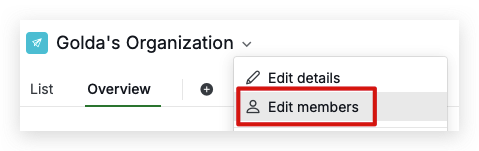
Go to your organization and click the dropdown menu next to its name.
Select Edit members.
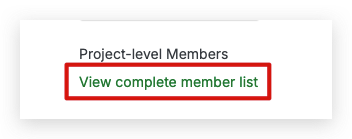
- Click the View complete member list.
- Hover over to the member's name and click on the trash icon to remove the member from your organization and its project.

Additionally, there are two ways to add a new member. You can add them to the organization or to a project. Please refer to the guides below for more details:
Please note that you must have the Admin role in the organization to add or remove members.
Let me know if you have any questions.
Golda, Jun 25, 2025
Hi Jody,
If you're the project/organization admin, you can go to Edit Members >> Delete Members to remove the past employees. Please note that only Admin can edit the members.
If you want to add new employees to all projects, just add them at Organization level so that they can access to all of the projects within the Organization.
Hope it helps!
Vicky, Aug 30, 2019
can you please provide were we can add and delete users, we do not see the Edit option
Ppacheco, Jun 25, 2025