
The notification window often becomes a sort of check list/to do list for me. Some services, like Asana, give you a dedicated notification window, and once you've handled a notification to your satisfaction, you can click a button on the far right that "archives" that notification. Otherwise the notification remains on that screen forever.
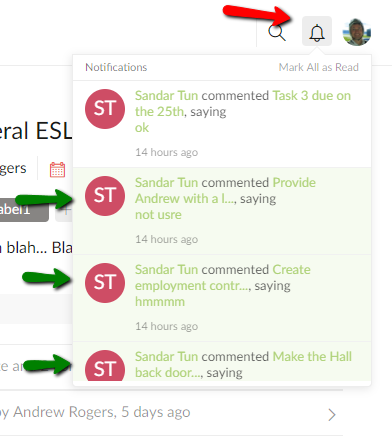
Right now on Quire, the notification screen is like a newsfeed, and if I handle one item, I cannot easily dismiss it. I believe I can either dismiss ALL of them or leave them all there. This makes it less useful for handling @ mentions, etc.
It would be awesome to have a more dedicated notification window with some added functionality.
Hi Ben, This is an interesting idea. Basically, you would like to dismiss (remove) a notification once you have read or responded to it, so the notification window on the upper-right will not be too long or too crowded for you?
Crystal, May 9, 2017
I want to have complete control over when a notification is dismissed and when it isn't. I don't want any notifications being marked "read" automatically ever. Or at least I would like the option to have them never automatically be marked read.
That way I can use the notification window as a todo list in itself, in addition to whatever actual to dos I have.
Benjamin Brown, May 10, 2017
I agree with that post completely.
However i would be happy if the Bell simply always showed the number of unread messages. At present, as soon as i click on the bell that red number disappears.
The next step would be a simple option to filter only the Unread messages. Most times that is all i want to see. Scrolling back over days of notifications to find a message i havent read is a real pain (I have done that a lot in Producteev). At least Producteev told me how many messages there were that i hadnt read. Without the red number i dont even know if there is still a message i need to read :-(
Andy, Apr 27, 2018
I added another task for this issue #1150 when i couldnt get to this forum. I still think this is a very desirable addition :-)
Andy, Aug 15, 2018
⭐️ We have closed your thread in order to optimize the performance of the Quire Feedback Forum. Please see our Quire Feedback Official Guideline for more information.
If the request/feedback wasn’t answered or the issue hasn’t been resolved in the newest version, please leave a comment below, the Quire team will be notified.
Peggy, Jun 25, 2021
Sorry, Crystal. I think I added a very similar or identical task (#467)
Mark Gurling, Jun 28, 2017
Notifcations is a key issue for us as well. If you can mark individual notifications as read you could go into a inbox zero workflow and verify you have all notifications covered
Stefan, Oct 10, 2018
Hi Ben, I see. Please let us think about it and if there is any news, I will get back to you. Thank you for the suggestion. 😃
Crystal, May 10, 2017