
Kanban Board not intuitive if it doesn't preserve dependencies/subtask relationships
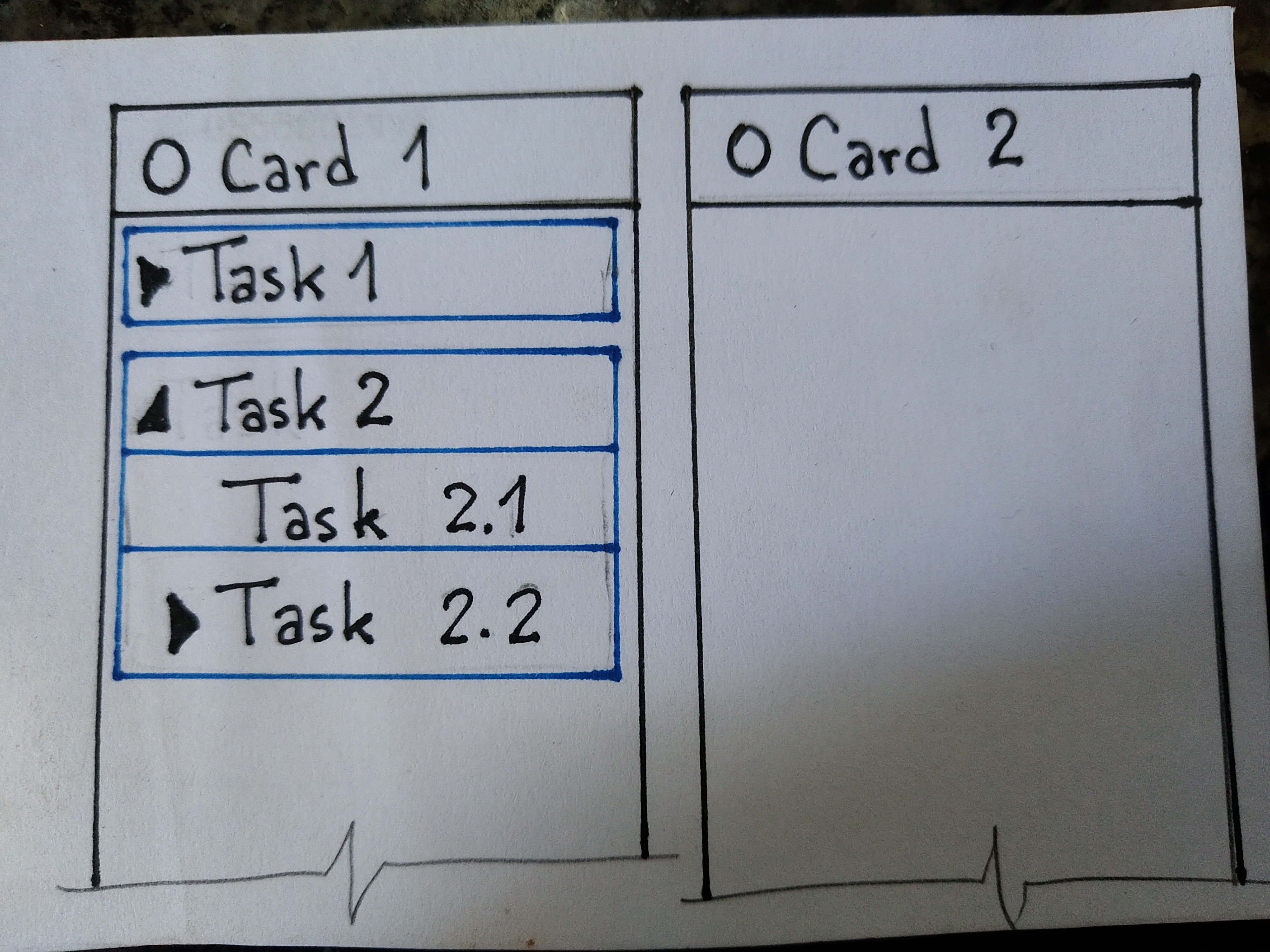
@peggy, a suggestion for this would be to be able to choose which level we want to "open" in the tables. For example: at level 1 only the main tasks, which carry all dependent subtasks together; for level 2, the main task and the first subtask are "opened" in their respective states, carrying their own subtasks; and so on.
Ketlin Milani, Mar 2, 2021
Complementing...
I know that this interface depends on the use. For example, I always consider a main task to be "in progress", regardless of the number of tasks that I have completed. As it is organized today, I can have a main task like "to do" and have all subtasks as "completed", so, because they are independent, I need to mark the main task separately as completed.
Maybe I'm thinking a lot about the boards without them having a status, but only pictures that I can customize with the titles that I find most convenient.
Ketlin Milani, Mar 18, 2021
⭐️ I have merged your post with this post #4175 already covering this request. Feel free to add your comments to that thread.
Peggy, Mar 30, 2021
Sorry, I don't speak English so I translated it through Google.
I tried to draw a picture of what I thought. I believe that leaving only the main task linked to the framework would be enough (and the subtasks are within it).
The problem, for me, is to link the board to the task status, which seems to be an underutilization of the staff's potential. I can't categorize my tasks according to my activities, just by the status of each task (and then all the subtasks are mixed in the boxes). If I can already group my tasks by status, it would be more useful for me to be able to customize the tables without linking a status (%) to it.
For example: I have tasks that take place in 5 different cities ... It would be amazing to be able to use the tables to separate my tasks by cities. Another example would be to name the tables with the names of suppliers or customers. In both cases, it would not be useful for me to have this table linked to a status number (%).
Ketlin Milani, Mar 10, 2021
Hi @peggy
"However, if we implement the idea that you have mentioned, then you won't be able to move the subtasks to another column. It can only be always grouped with the parent task in the same column. Is this the behavior that you are expecting?"
THIS IS WHAT SUBTASKS ARE #smh
WJK, Mar 26, 2021
@Ketlin-Milani - Thanks for your explanation and idea~
I'm interested to know more about the below part:
at level 1 only the main tasks, which carry all dependent subtasks together;
Your expected behavior would be: you can select which level of task they want to display in your Board view.
If you have chose to see the 1st level, then each of the respective subtasks will be shown in the detail panel. Or would you like them to show inside the task card itself? Where do you expect to see and access the subtasks?
Looking forward to your reply!
Peggy, Mar 10, 2021
Ketlin Milani, Mar 10, 2021
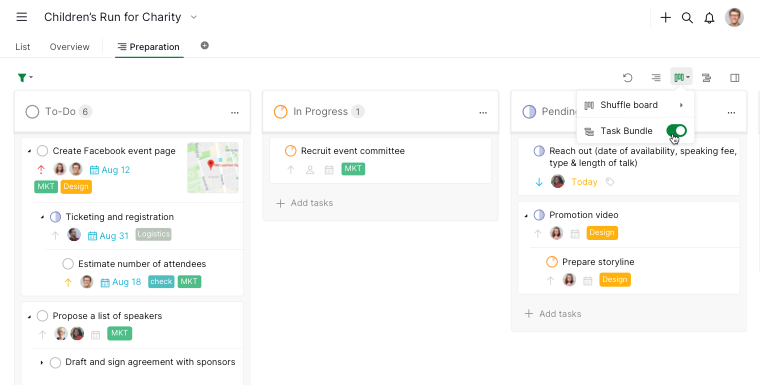
Hi all! We have introduced a new feature called Task Bundle, which allows you to group the subtasks under their parent tasks so the task hierarchy will be preserved as it is. Check out this blog post for more information! 😃
Note: This feature is only available for Professional, Premium and Enterprise subscription.
Peggy, Dec 13, 2021
Hi @peggy
"However, if we implement the idea that you have mentioned, then you won't be able to move the subtasks to another column. It can only be always grouped with the parent task in the same column. Is this the behavior that you are expecting?" Yes
Thanks for the suggestions and support 😃
Ketlin Milani, Mar 18, 2021
Hi @Walter_Kawecki - The task cards in Board view will look like flat (without any hierarchy). However, you can toggle on the Advanced mode for the task path to show, this way you will see the parent task name shown above the subtask name.
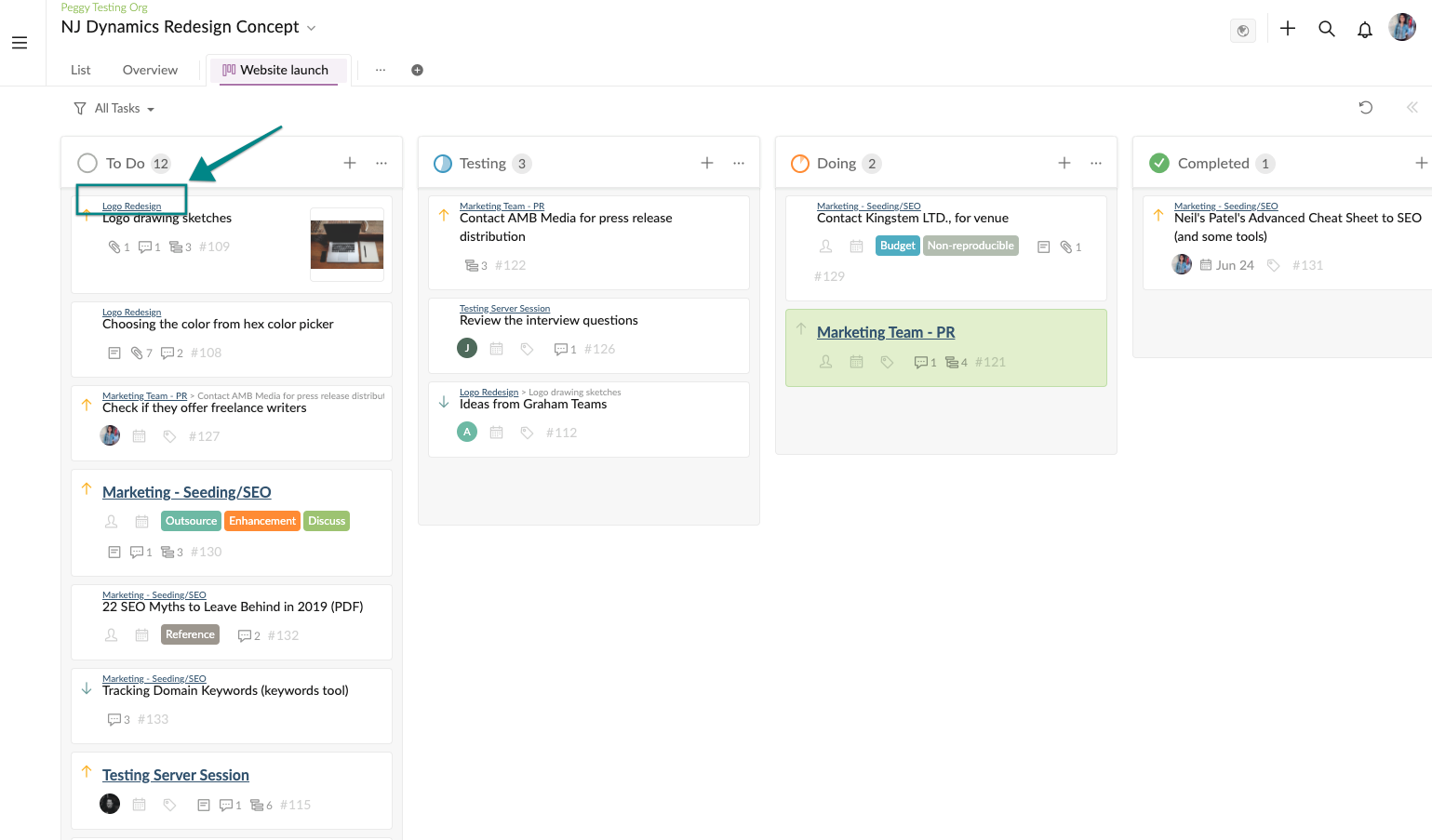
Visit this guide for more information on Advanced mode: https://quire.io/guide/advanced-mode/
Kindly let me know if this helps or if you have other suggestions in mind. Thanks!
Peggy, Feb 17, 2021
Hi @Ketlin-Milani - Thank you for your drawing!
After reading your explanation, I concluded two things that you think Quire can be improved. Please let me know if I have mistaken anything.
Here's our reply and concerns:
Peggy, Mar 17, 2021