
Hi, Is there a chance to get a result as a parent task with its lower-level subtasks when filtering ?
Hi, Thank you for your response. However, that wasn't exactly what I was looking for. I’m trying to find a way to get both parent tasks and their subtasks (child tasks) in the filtering results, not just the parent tasks. Based on this, I want to create a sublist. I know how to do this using batch commands. I often need to update the view, which is why I’m looking for a way to automate the process. The issue is that the batch command “create sublist based on selection” can only be executed with the mouse, so I can't automate it. Another solution would be to filter tasks of the parent-child type.
Michał, Sep 2, 2024
Hi, In the Tree and Timeline views, you can use the Task Bundle feature to nest subtasks under their parent tasks when you apply a filter to group or sort tasks.
When in grouped or sorted mode, click on the List or Timeline icon on the right-hand side and toggle on Task Bundle.
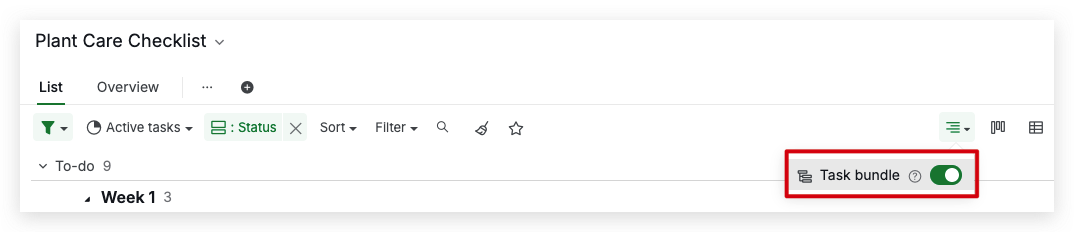
For more details on using Task Bundle in Tree and Timeline views, please see our guide here.
You can also enable Task Bundle in the Board view. For more information, visit our guide here. Feel free to let me know if you have any questions. Thank you.
Golda, Sep 2, 2024
Hi, Thank you for providing more details on your inquiry. Could you please clarify if you'd like to see subtasks included when applying a filter and also have a keyboard shortcut to add tasks to a sublist?
For the first point, applying a filter will hide tasks that don't meet the filter criteria, including subtasks, as this is the intended function of filtering. Nevertheless, we'll make sure to share your feedback with our team for further discussion.
As for the second point, we do have a keyboard shortcut to add tasks to a sublist by pressing ^. You can try this keyboard shortcut to see if it works for you.
Please let me know if this doesn't address your needs or if you have any further questions. Thank you.
Golda, Sep 5, 2024
Returning to your question: I would like the result of filtering to be a subtask that meets the conditions, but at the same time, I want to be able to display its subtasks. Very often, I only take some of the tasks for further processing — those that I have filtered out. If their subtasks are not displayed, I can't do anything. It's good that I can work around this issue using a batch-created sublist.Returning to your question: I would like the result of filtering to be a subtask that meets the conditions, but at the same time, I want to be able to display its subtasks. Very often, I only take some of the tasks for further processing — those that I have filtered out. If their subtasks are not displayed, I can't do anything. It's good that I can work around this issue using a batch-created sublist. By the way, thank you for the "^" shortcut. I didn't know it until now.
Michał, Sep 14, 2024
Hi, I'm not entirely sure I understand your inquiry. Could you please provide an example of what you're looking for?
Additionally, if you could share some screenshots or mock-ups, it would help us better understand your feedback. Thank you.
Golda, Sep 3, 2024
Hi, I will try to describe the topic a bit differently.
I have Task A with sub-tasks a1, a2, a3, ... Task B with sub-tasks b1, b2, b3, ... and Task C with sub-tasks c1, c2, c3, ... I am only interested in Tasks B and C with their sub-tasks. I apply a filter for B and C. Unfortunately, I only see two lines—Task B without sub-tasks and Task C without sub-tasks. This result is not what I need. I need the complete view, with all the sub-tasks included. To see them, I create a view (sublist) from the result of this filter. I do this using batch commands (sublist) located at the bottom right corner. There are grouped commands that allow properties to be assigned to selected tasks simultaneously. Unfortunately, to execute this command, I need to select it with the mouse. At this point, I get a sublist of B and C along with all their sub-tasks. I often repeat the procedure, meaning that from this sublist view, I filter the tags I am interested in. Then, I create another sublist (view) from the result. I haven’t found any other way to achieve this result. The situation would be simplified (a little) if it were possible to filter in such a way that the result would show tasks with visible sub-tasks. It would also be helpful if there were a keyboard shortcut instead of using the mouse to trigger the batch command "Create sublist from selected sub-tasks." This would allow me to automate the process a bit more.
Michał, Sep 4, 2024
Sorry for the mistake of double copying
Michał, Sep 14, 2024