
workstyle · Aug 26, 2014
How a Good Task Management Tool can Help Make Your Life a lot Easier!

Last updated: September 3, 2026
A good task management tool does more than hold a list. The ones worth adopting share three traits: real-time collaboration so a team works as one, a visual hierarchy that shows how tasks nest and relate, and restraint, because piling on features makes a tool harder to use, not better. Simplicity plus collaboration beats a longer feature list.
What makes a task management tool actually good?
The cost of a clumsy tool is real. McKinsey found that knowledge workers lose nearly 20% of the week just hunting for information and the right people, which is exactly the friction a good task tool is meant to remove.
In a modern world like this, with the launch of the internet and what comes with it the abundant flow of information makes today’s business world more dynamic than ever. If you are still using sheets of paper or static documents to manage your tasks, you’re out. It’s about time you find yourself and your team a task management tool that would help you increase your team’s productivity, efficiency and performance.
So, how to choose? When it comes to task managers, the phrase “the more the merrier” doesn't seem to be quite the phrase to use. You want all the necessary features but without all the unnecessary features that would complicate the UI, or slow down the performance. Imagine managing your tasks in a turtle speed, I don’t know about you, but I would definitely go crazy. Find one that balances your needs.
A good task management tool should not only provide a list of tasks you don’t want to forget, it should also have 3 things —
- time collaboration.
- visual hierarchy of tasks and,
- simplicity in the UI.
Let’s take “Quire” as an example and see how it can transform the way you do things to help you and your team to achieve more work, in less time.
Related: Quire 101: Tasks, Subtasks & Projects for Beginners — a walkthrough of how tasks, subtasks, and projects fit together if you're new to Quire.
Needless to say, team work is very important. It is the key to successful projects which ultimately leads to a successful company.
In order to do this, traditionally we have meetings, meetings AND more meetings which can be both physically and mentally draining, not to mention time wasting. And when there’s a tiny little change in the project or on a particular task, this will happen all over again!
To make your life easier, real time collaboration and notification is essential for a dynamic team project that may change at any second.
In Quire, comments of your team members, file attachments, any changes made to tasks are notified in real time working pretty similarly to Facebook notifications. Like you don’t want to miss a comment from your friend, you also don’t want to miss an important piece of information from your project members.
You can also see who’s currently online working on the same project as you so you can cue them for immediate response. For conversations that don't belong on a single task, Quire also has a dedicated Chat feature so team discussions stop scattering across other apps.
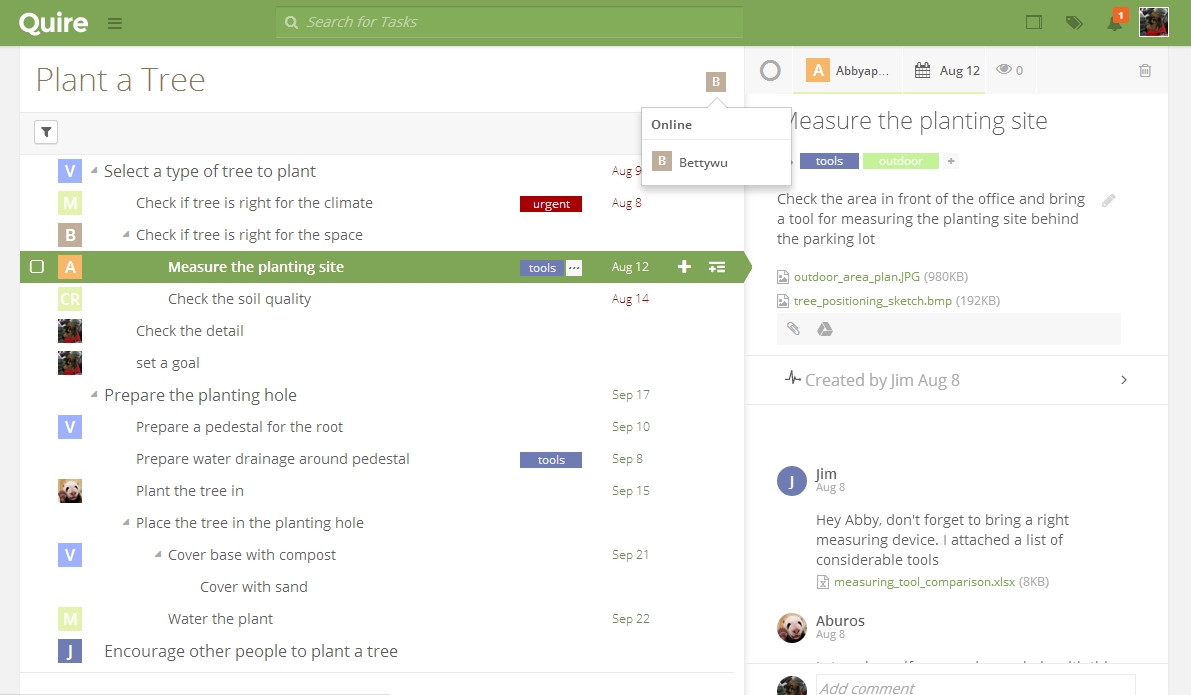
Visual hierarchy of tasks. This is something more rare and less found in the market which is rather surprising considering its importance. As the actual executor of the tasks, we don’t just want a list of to-dos, it is important that we can visually see the relationship and hierarchy between tasks.
Quire has made this possible by introducing the tree structure — the fundamental pattern we see everywhere in nature. Like how an idea spawns more ideas, a task may lead to several sub-tasks, Quire replicates how the human minds work into the app’s workflow.
Your team can easily work your way through completing a big task by dividing it into sub-tasks and assigning them to different people. We go deeper into why we built this tree structure instead of a flat list in Why We Abandoned the To-Do List.
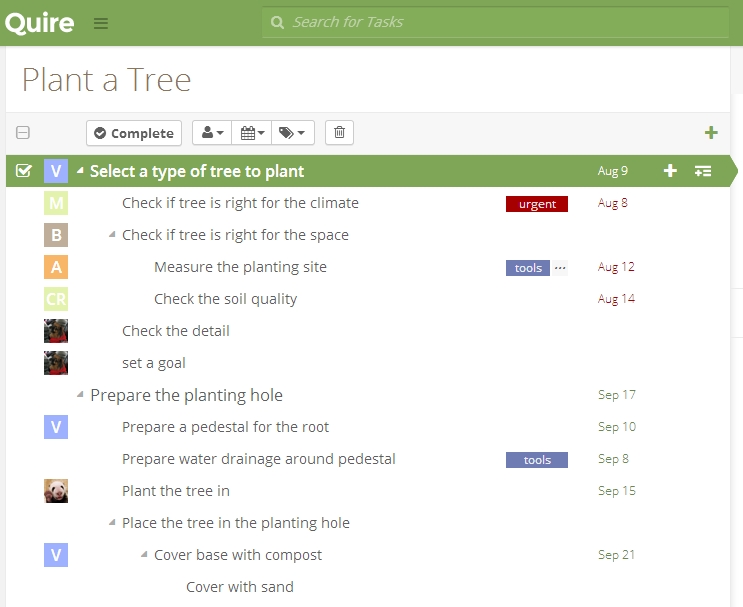
Simplicity in the UI (user interface). This is just about as important as water is to fish and air is to you. Easier said than done, most task management tools have appalling complicated UIs to accommodate the many features they provide. But is complexity of UI really proportional to features? The answer is NO. After all, what’s the point of all those good features if you can’t know where to find them?
Quire has a succinct and elegant UI providing you great user experience. You can easily find where to edit your profile, filter your tasks, who’s assigned to what, whether or not there is an urgent task to do, comments of your colleagues, files attached etc. all in a spacious design.
You won’t have to make vigorous eye movements to find a particular task. Like Leonardo da Vinci said “simplicity is the ultimate sophistication”. We unpack the design thinking behind this UI further in Quire — A design hiding complexity in simplicity.
So now, it is time to chuck out that piece of paper of yours or leave that un-user friendly task management tool you’re currently tolerating and start finding yourself and your team a suitable task management tool! Increased productivity, efficiency and performance will come closer to you by the day. Good luck!
I also recommend you to try Quire, it’s free!
What separates a good task tool from a bloated one?
Three traits do most of the work. Here is the good version next to the one that gets in your way.
| A good task tool | A bloated one |
|---|---|
| Lets the team work in real time | Everyone edits their own separate copy |
| Shows a visual hierarchy of tasks | A flat list with no sense of what nests under what |
| Stays focused and simple | Piles on features you will never open |
The trap is thinking more features means more power. Usually it means more to learn and more to ignore. The tools people actually stick with are the ones that make the next step obvious, not the ones with the longest menu.

Frequently Asked Questions
What makes a task management tool actually good?
A good tool gives you real-time collaboration, a visual task hierarchy, and a simple UI, without extra clutter that slows things down. It should hold the shape of the work rather than flatten it. That is the design bet behind Quire, where a task nests as deep as the job needs instead of everything sitting on one level.
Why is real time collaboration important in a task tool?
It cuts down on status meetings. Comments, attachments, and task changes show up as instant notifications instead.
Why does seeing a visual hierarchy of tasks matter?
It shows how tasks relate instead of a flat list. Quire's tree structure breaks big tasks into sub-tasks you can assign to different people.
Does adding more features make a task tool better?
No. Extra features are useless if you can't find them. The goal is a clean design where filters, assignees, and urgent tasks stay easy to locate.
