
project management · Apr 17, 2026
What is Procurement Management and Why Is It So Important?

Last updated: August 27, 2026
Procurement teams lose the most time on the approval workflow, not on sourcing, email threads and spreadsheets can't show who approved what, when, or why. Quire's free procurement approval template replaces that with a structured workflow, three approval actions (Approve, Reject, Raise Query), and an automatic timestamped audit trail.
The step that breaks most often is the approval workflow, where a purchase request stalls because nobody knows who still needs to sign off.
If the answer makes you wince, you’re not alone. Most procurement teams are still running cost approvals through some combination of email threads, shared spreadsheets, Slack messages with the enthusiasm of a message in a bottle, and the occasional hallway ambush. It works, until it doesn’t. And it usually stops working right around the time your CFO asks for an audit trail.
This post introduces a free procurement approval template built in Quire that handles the entire cost-approval lifecycle: from the moment a Procurement Officer raises a request to the final sign-off from the VP, with every approve, reject, and query logged along the way. No spreadsheets. No email archaeology. No "per my last email" energy.
Whether you’re a procurement manager evaluating tools, a finance controller tired of being the bottleneck, or an ops lead who just wants approvals to not be everyone’s least favorite task, this template is built for you.
What Is Procurement Management, and Why Does It Feel So Broken?
Procurement management: the end-to-end process of acquiring the goods and services an organization needs, covering identifying the need, sourcing vendors, negotiating terms, approving cost, and managing delivery. The step that breaks most often is cost approval, because it crosses IT, HR, finance, and legal without a single owner.
It sounds straightforward on paper. In practice, it’s a web of dependencies that involves IT, HR, Finance, Legal, and at least one person who’s perpetually on holiday.
The part that breaks most often? The approval workflow. The moment a purchase request needs sign-off from multiple people in a specific sequence, things fall apart. Emails get buried. Spreadsheets get stale. Nobody knows if the Finance Controller approved that laptop order or just opened the email and forgot.
Most procurement management tools address the sourcing side well, vendor databases, RFQ workflows, contract repositories. But the approval side, the part where actual humans need to say yes, no, or "wait, can you explain this line item?", is often an afterthought. And that’s exactly where procurement teams lose the most time.
Why Do You Need a Dedicated Procurement Approval Template?
You could build an approval workflow from scratch in any project management tool, or start from one of Quire's ready-made templates. You could also build a house with a Swiss Army knife. The question is whether you should.
A purpose-built procurement approval template gives you three things on day one:
1. Structure Without Rigidity
The template pre-builds the task sections that mirror a real procurement lifecycle: Intake & Scoping, Vendor & Pricing Check, Budget & Finance Validation, Compliance & Policy Check, Final Approval & PO Issuance, and Post-Approval Tracking. You’re not starting from a blank board wondering what columns to add, the structure is already there. But it’s fully customizable, so you can rename, reorder, or extend it to fit your organization’s specific process.
2. Built-In Accountability
Every task has an assignee, a priority, tags (IT, HR, Finance, Vendor, Compliance), a budget code, an estimated cost, and, critically, an approval status column. When a request is sitting at "Request Changes" in yellow, everyone can see it. When it’s been "Rejected" in red, there’s no ambiguity. No more "I thought you approved that" conversations.
3. Audit-Ready From Day One
Every approval action, who clicked approve, who raised a query, who rejected and why, and exactly when each action happened, is recorded automatically. When your compliance team or external auditors come knocking, you don’t scramble through inboxes. You open the task and show them the trail.
What's Inside the Quire Procurement Approval Template?
Setting up this template takes about five minutes. Here’s the general flow, we’ll use a real scenario (procuring laptops for five new hires, $24,250 estimated spend) to show how it comes together.
List down your tasks by section
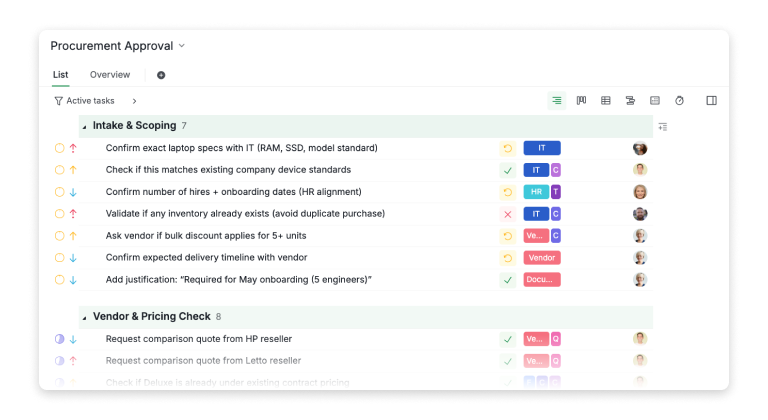
Start by creating task sections that mirror your procurement lifecycle, Intake & Scoping, Vendor & Pricing Check, Budget Validation, Compliance, Final Approval, and Post-Approval Tracking. Under each section, add the individual tasks your team actually performs: confirming specs, collecting vendor quotes, validating budgets, routing approvals, tracking delivery.
The goal isn’t to overthink it. Write down the steps your team already follows, except now they live in one place instead of scattered across email threads and shared drives.
Switch to Table View
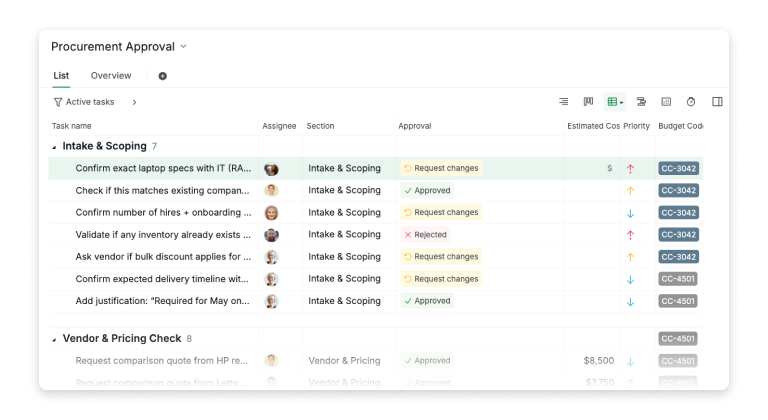
Once your tasks are in, switch to Table View. This is where the template really starts to look like a procurement tool instead of a to-do list. Table View gives you a spreadsheet-style layout where every task is a row and every detail is a column, but with the project management features (assignees, statuses, dependencies) that spreadsheets can’t offer.
Set up your custom fields
Add the custom fields that matter to your procurement workflow. In this template, we use Approval (with statuses like Approved, Request Changes, and Rejected), Estimated Cost, Priority, Budget Code, Vendor, and Tags. Each field gives you a different lens into the same data, Finance cares about cost and budget codes, Compliance cares about vendor tags, and your manager just wants to know what’s green and what’s not.
The Estimated Cost column is especially useful. It supports a live SUM at the bottom of each section, so you always know the total spend without maintaining a separate tracker. In our scenario, the Vendor & Pricing Check section shows three vendor quotes ($8,500, $7,750, $7,250), a -$500 negotiation target, and a $1,250 warranty line item, all rolling up to $24,250.
Label and tag your tasks
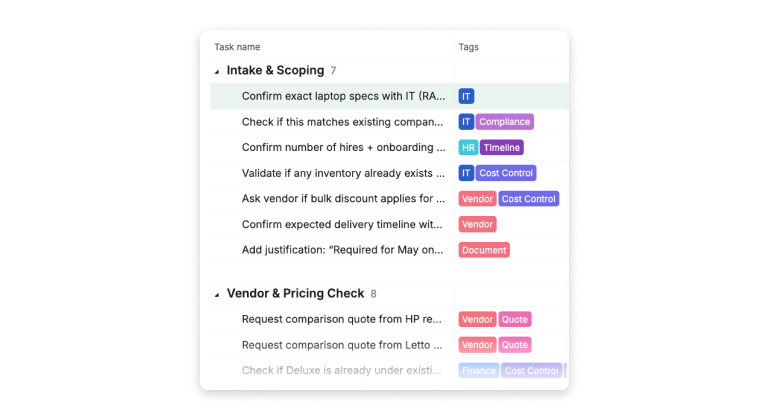
Tags are how you keep the right people in the loop without manually forwarding everything. Tag tasks by department (IT, HR, Finance, Vendor, Compliance, Cost Control) or by purpose (Quote, Timeline, Document). When someone filters by their tag, they see only the tasks that need their attention, nothing more, nothing less.
Budget codes work the same way. Assign codes like CC-3042 or CC-4501 at the task level so Finance can slice the data by cost center without asking you for a report.
Add the approval workflow
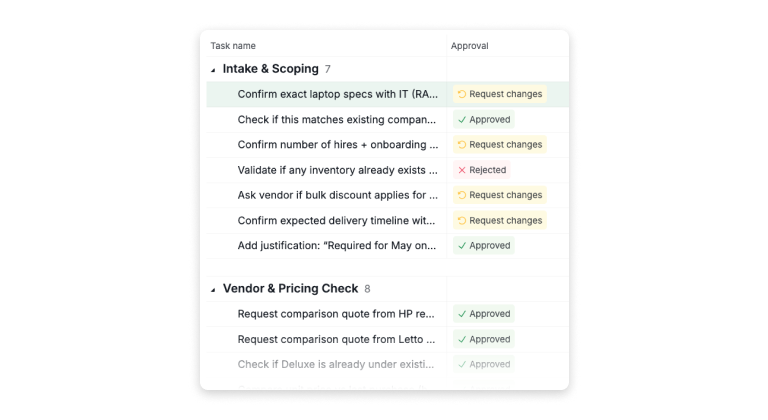
This is the part that replaces your email chains. The Approval column turns each task into a decision point, assignees can mark tasks as Approved, Request Changes, or Rejected, and that status is visible to everyone in real time. No more "did you approve that?" follow-ups. Green means yes, yellow means questions, red means no. The color coding does the communicating for you.
How Do You Approve, Reject, or Raise a Query in the Approval Chain?
Here’s where Quire earns its keep. Most approval tools give you two options: approve or reject. That’s like giving a restaurant reviewer a thumbs up or thumbs down, it misses all the nuance.
Quire adds a third action: Raise Query. When a Finance Controller needs clarification on a line item, say, why the warranty upgrade costs $1,250 instead of the usual $800, they don’t reject the request and force the requester to start over. They raise a query.
The request stays live. The Procurement Officer gets notified, responds with context directly in the task, and the Finance Controller picks it back up. The entire conversation is attached to the task permanently, not buried in an email thread.
Procurement Managers who are tired of chasing approvals through email and want a single source of truth for every cost-approval request.
Finance Controllers who need to see spend at a glance, approve or query requests without switching tools, and provide auditors with a clean trail.
Operations Leads who are building procurement processes from scratch and want a proven structure instead of a blank spreadsheet.
IT and Compliance Teams who need visibility into what’s being purchased, whether it meets policy, and who signed off on it.
Procurement Approval is one of seven business and operations templates: 20+ project management templates your team will actually use lists the rest.
More project management reads: Unveiling Insights into Project Management Software and its Demographics and Project Crisis Management: Getting a Project Back on Track.
Frequently Asked Questions
What is a procurement approval workflow?
A procurement approval workflow is a structured process where purchase requests are routed through designated approvers, typically a Department Manager, Finance Controller, and senior leadership, before a Purchase Order is issued. Each approver can approve, reject, or raise queries against the request, creating an auditable chain of decisions.
Is there a free procurement template available?
Yes. Quire offers a free 30-day trial with full feature access, no credit card required. You can set up the complete procurement approval template described in this post, including multi-level approval chains, Slack/Outlook integration, and reporting dashboards, all within the free trial. Here's the template: https://quire.io/w/Procurement_Approval/1?view=table
How does Quire compare to using spreadsheets for procurement?
Spreadsheets lack automated routing, real-time approval status tracking, integrated notifications, and audit trails. Quire replaces the manual steps with automated approval chains, live status columns, Slack/Outlook integration, and timestamped records of every action. The Estimated Cost column with live SUM also eliminates the need for a separate budget tracker.
What reporting does Quire offer for procurement?
Quire provides an Approval Dashboard for live request tracking, Approval Cycle Time analytics to identify bottlenecks, Approver Performance metrics, custom chart builders, CSV export, and a complete audit trail with user, timestamp, and comment records for every action.
Ready to stop chasing approvals?
Start your free trial at quire.io/signup, no credit card, full access, 30 days.
