features · Mar 19, 2015
Recurring Tasks

Last updated: October 21, 2026
Recurring tasks in Quire handle work that repeats on a schedule, a monthly newsletter, a fortnightly meeting, a stats update every couple of days, so you set it once instead of retyping it. Pick the task, choose how often it repeats, and Quire recreates it each cycle and lets you complete it each time. For a whole repeating project rather than a single task, templates do the same job at a bigger scale.
What are recurring tasks, and when should you use them?
Recurring task: a task Quire recreates on a schedule you set, weekly, monthly or yearly, about 10 seconds after you complete the current one. You set it from the task's due date with the repeat task icon, check it off each cycle, and the next copy appears on its own.
Repetition is exactly what software should carry. McKinsey found that about 30% of the activities in most jobs could be automated, and a recurring task is the smallest, easiest version of that win.
Recurring tasks can be very useful for tasks that happen repeatedly in a regular pattern. A newsletter that must be sent to customers every month, statistics that needs to be updated every second day, or a meeting one must attend fortnightly.
It would be highly annoying to have to enter these tasks repeatedly and even more annoying to have it stay on your task list all the time without the pleasure of “completing” it. If it's a whole project you repeat rather than a single task, templates solve the same problem at a bigger scale.
Related: Say Hello to Quire Templates: Project Kickstart Made Easy — Quire's own template library for kickstarting repeatable projects.
The new “recurring tasks” feature will help you create the same task 10 seconds after you have completed the original one.
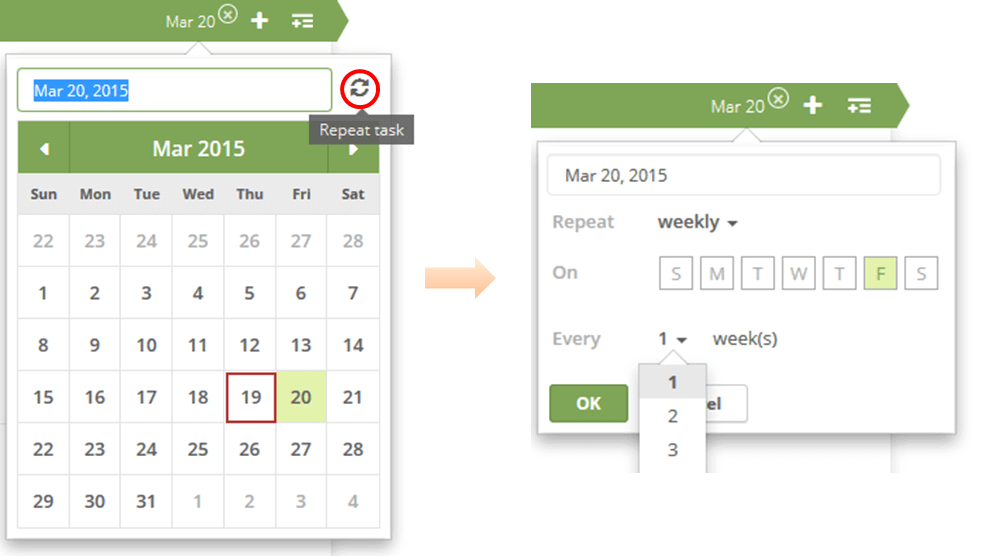
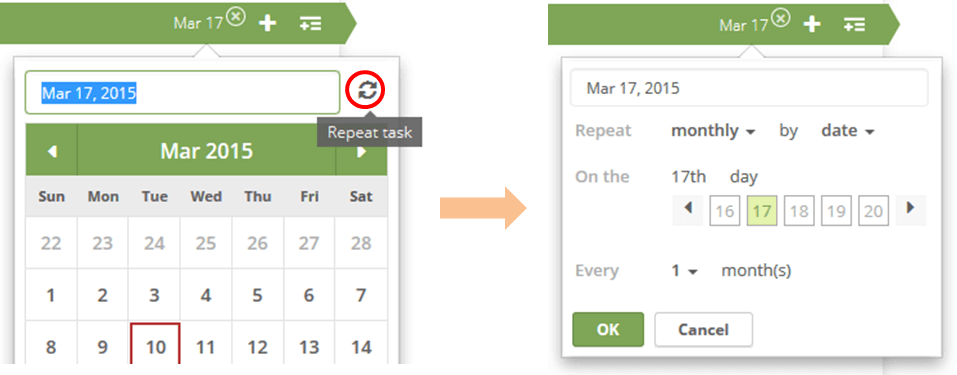
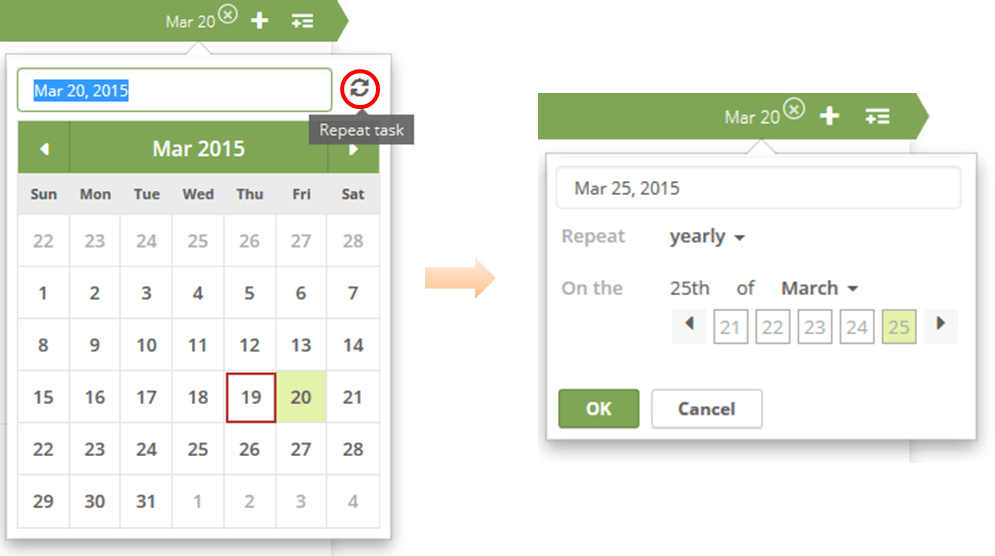
Setting a recurring task is easy. Simply go to the task’s due date -> repeat task icon -> choose how you like the task to be repeated.
By weekly:
monthly:
or, yearly:
Hope you found this blog post useful and will enjoy this new feature! I will continue to keep you updated on new features of Quire!
Related: Introducing Task Dependency: Draw a Map Among Your Tasks — for when your repeating tasks also depend on each other.
Read more on running a daily standup as a recurring task your team actually keeps up with.
Thanks for reading!
When do recurring tasks earn their keep?
Any job that comes back on a predictable rhythm is a candidate. A few common ones:
| A repeating job | Set it to repeat |
|---|---|
| Monthly newsletter | Every month, recreated automatically |
| Team meeting | Weekly or fortnightly |
| Stats or report update | Every couple of days |
| Invoice or rent reminder | Monthly, so it never slips your mind |
The alternative is retyping the same task forever, or worse, leaving a permanent to-do on your list that you never get the satisfaction of completing.
A recurring task fixes both: it shows up when it is due, you check it off, and it comes back on its own next cycle.
And because the schedule lives in Quire, the whole team sees the same recurring commitments instead of each person keeping a private mental list of what is due again next week.

Frequently Asked Questions
What are recurring tasks in Quire?
They're tasks that repeat on a pattern you set, so you don't have to enter the same task over and over. Good for things like a monthly newsletter or a fortnightly meeting.
How do you set a task to repeat in Quire?
Go to the task's due date, click the repeat task icon, and choose how it should repeat. Quire creates the next copy shortly after you complete the current one.
What repeat intervals does Quire support for recurring tasks?
Weekly, monthly, or yearly, so you can match the cadence to how often the work happens.
Why use recurring tasks instead of recreating tasks by hand?
It saves you from entering routine work by hand, and you still get to complete each task since a fresh copy appears about 10 seconds later.