
features · May 13, 2025
Introducing Chat in Quire: No More Scattered Communication
Last updated: September 30, 2026
Chat in Quire is a built-in messaging layer that keeps team conversations attached to the projects and tasks they relate to, so decisions stop getting buried in email or scrolled past in Slack. It comes in three types (project-level, task-level inside a task card, and ad-hoc group), supports file sharing and notifications, and is included on every plan including free.
Let's be honest, project management can feel like a constant juggling act, right? Tasks pile up, deadlines creep closer, and everyone's trying to keep a million things in the air.
And you know what often gets lost in the shuffle? The actual conversations we need to have! Important stuff gets buried in endless emails, scattered across different messaging apps, or just fades away after a quick chat by the water cooler.
It's like trying to piece together a puzzle with half the pieces missing, and it totally eats up time we could be using to, you know, actually do the project.
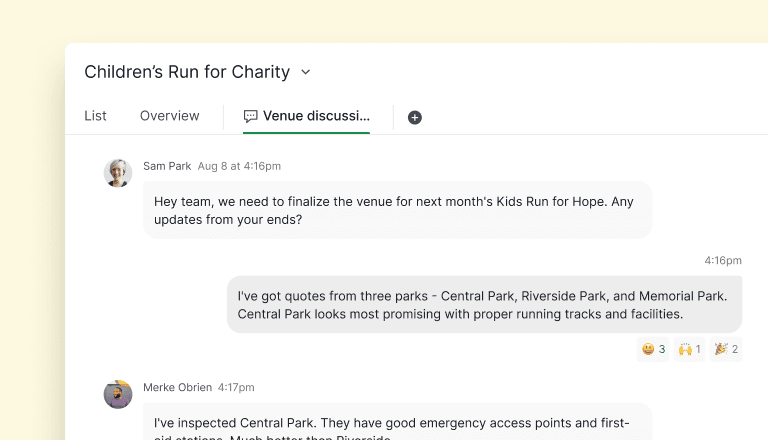
Say hello to Chat in Quire, a real-time messaging layer built directly into your project workspace. The idea behind it is simple: when conversations live next to the work, fewer decisions get lost between threads.
The cost of scattered communication isn't small-talk territory. McKinsey's classic knowledge worker study found roughly 28% of the workweek goes to reading and responding to email, before factoring in Slack, DMs, and the meetings called to clarify what was said in those threads.
Microsoft's annual Work Trend Index keeps confirming the same pattern in fresher data: most knowledge workers feel they're drowning in communication tools while also feeling like nothing important gets discussed in the right place.
Read more on cross-functional project management. Chat keeps conversations connected to tasks, but the bigger question is whether those conversations turn into shipped work or get lost between teams. This playbook is the broader operating model: ownership, visibility, handoffs, rhythm.
That is why we built Chat directly into Quire, so your team can discuss work in the same place the work lives, without bouncing between apps to reconstruct context.
Chat is made for all subscription plans. More information can be found on our Pricing page.
How does Chat in Quire fit your workflow?
Chat in Quire comes in three types, each fitting a different kind of conversation:
| Chat type | Best for | Example use |
|---|---|---|
| Project-level | Team-wide updates, project goals, broad announcements | Sprint kickoff, release planning, weekly status |
| Task-level (inside a task card) | The specifics of a single task | Debugging a bug, reviewing a deliverable, clarifying scope |
| Ad-hoc group | Sub-teams or cross-project topics | Cross-functional working group, urgent incident room |
Every chat supports file sharing and notifications, so the files you drop and the updates you follow stay attached to the conversation they belong to, not scattered across folders and inboxes.
For a step-by-step guide on how to best utilize Quire Chat, please visit our guide.
Our team recorded a 50-minute tutorial on Document, Chat, and Templates, built around real use cases.
How does Quire's engineering team use Chat for debugging and feature discussions?
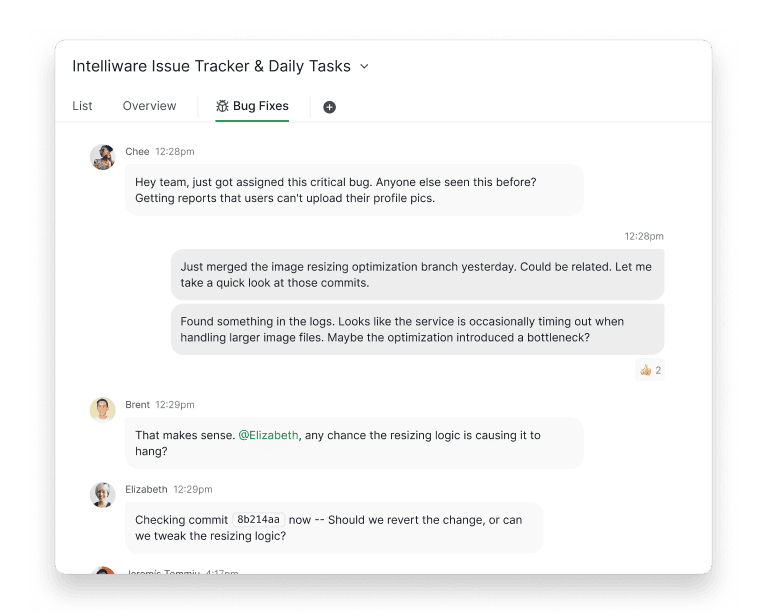
Imagine a critical bug has been reported. The engineering team utilizes task-specific chat within the bug's Quire card to discuss the issue in detail.
Developers share code snippets (not directly in chat, but referencing them), error logs, and potential fixes, all directly linked to the problem. This eliminates the need for lengthy email threads or frantic Slack messages.
When brainstorming new features, the team might create a dedicated project or task in Quire. Within this space, they use project-level chat to share initial ideas, discuss technical feasibility, and provide feedback on proposed solutions.
This keeps all feature-related discussions organized and accessible for future reference as the feature progresses through development. Ad-hoc group chats might also be created for focused discussions on specific technical aspects or integrations.
Related: Introducing Document: Your Creative Canvas — when a conversation in Chat turns into a spec or plan worth writing up, Document gives that work its own home.
How does Quire's marketing team use Chat to discuss campaign performance?

The marketing campaign is live, and the reports are in! Instead of scattered emails, the Quire team gathers in their campaign project in Quire.
In a "Performance Report" task, the latest data is shared. Right in the task chat, the social team notices a winning trend and asks the content folks if they can create more similar material. The email team shares their stats and suggests tweaks based on what's resonating on social media.
For a wider view, the project-level chat buzzes with initial reactions to the overall numbers. The lead posts a summary, and everyone jumps in with quick insights and ideas for improvement.
They might even spin up a temporary group chat for urgent issues, like "Fix Low Conversions," to brainstorm solutions fast. It's all about keeping the performance conversation connected to the campaign itself, so they can make smart changes on the fly.
How does Chat in Quire work alongside your other channels?
Chat in Quire is built for project-context conversations, the ones about a task, a deliverable or a decision. Everything else keeps a clear home:
- Company-wide announcements. HR news, off-topic banter and all-hands DMs can stay in Slack or Microsoft Teams, and Quire's Slack integration keeps task updates flowing into the channels you already use.
- Client conversations. Clients can follow the project through a view-only share link with no sign-up, while the back-and-forth with them stays in email.
- Live calls. Voice and video stay in your meeting tool, and Chat keeps the text, the files and the decision on the task afterward.
That's the point of Chat: the conversation about the work lives next to the work.

Frequently Asked Questions
What is Chat in Quire?
A real-time messaging feature built into the Quire workspace so team conversations happen right next to the tasks and projects they relate to.
What types of chat does Quire support?
Project-level chat for team-wide updates, ad-hoc group chats for sub-teams or cross-project topics, plus file sharing and notifications on anything you're following.
Is Quire Chat free?
Yes. Chat is included in every Quire plan, including free. See the Pricing page for details.
How do Quire teams actually use Chat?
Engineers use task-level chat to debug bugs in context (sharing logs and fixes directly on the card), and the marketing team discusses campaign performance in-task so reactions, tweaks, and decisions stay tied to the data. See the Chat guide for more.
How does Quire Chat replace scattered tools?
It ties conversations to the tasks they're about, so decisions don't get buried in email or lost after a Slack scroll.
Does Quire Chat work offline?
Yes. Quire Chat works 100% offline, and your messages sync once you reconnect.
Ready to stop scattering project conversations?
Spin up your first project-level chat, drop a question on a task card, and stop scrolling Slack for "that thing someone said last week." Chat is included on every Quire plan, including free.
