
project management · Mar 25, 2025
Digital Collaboration: 10 Benefits + Best Practices That Actually Work

Last updated: October 21, 2026
Digital collaboration delivers ten compounding wins (productivity, flexibility, transparency, cost savings, real-time editing, scalability, secure cloud backups, better brainstorming, easier performance tracking, and smooth cross-team communication), but tools alone don't get you there. It fails when teams adopt platforms without a supporting strategy, clear communication norms, accountability, and a plan for security and adoption.
- What is Digital Collaboration?
- What Are the 10 Benefits of Digital Collaboration?
- Which Jobs Rely Most on Digital Collaboration?
- How Do You Use Online Collaboration Tools Effectively?
- Why Does Digital Collaboration Sometimes Fail?
- Why Choose Quire as Your Digital Collaboration Tool?
- What's the Next Step to Make Digital Collaboration Work?
- Frequently Asked Questions
Buying the tool is the easy part. The teams that struggle with digital collaboration aren't the ones missing software; they're the ones that installed it without deciding how the team would actually use it.
Six months in, Slack has 40 channels nobody reads, the project tool has half-filled tasks from two different conventions, and the documents nobody can find are split across Drive, Dropbox, and the inbox of whoever set up the workspace. The tools work; the strategy underneath them didn't get written.
The payoff for getting it right is well documented. The McKinsey Global Institute estimated that social and collaboration technologies can raise the productivity of knowledge workers by 20 to 25 percent, but only when teams actually use them to communicate and share work instead of just installing them.
This post covers what digital collaboration actually means, the ten benefits it produces when teams pair tools with practice, the most common failure modes, and the best practices that turn a software stack into a working collaboration system. The real goal isn't owning more apps. It's building digital workplace collaboration that holds up when the team is spread across cities and time zones.
10 benefits of digital collaboration at a glance
| # | Benefit | What it replaces |
|---|---|---|
| 1 | Productivity | Email back-and-forth, scheduling delays |
| 2 | Accessibility and flexibility | In-office requirement, fixed-hours work |
| 3 | Transparency | Status meetings, manual reports |
| 4 | Cost savings | Travel, office space, printed materials |
| 5 | Cross-team communication | Departmental silos |
| 6 | Real-time editing | Version conflicts, lost edits in email |
| 7 | Scalability | Process collapse as team grows |
| 8 | Security and backups | Lost physical documents, single-point failures |
| 9 | Innovation and creativity | Lossy email-thread brainstorming |
| 10 | Performance tracking | Manual updates, scattered reports |
What is Digital Collaboration?
Digital collaboration is teamwork that runs on shared tools instead of a shared room: tasks in one tracker, documents in one workspace, questions in chat. A team across Taipei, Berlin, and San Francisco works the same project without waiting for a meeting. McKinsey puts the productivity gain at 20 to 25 percent, once the team agrees which tool does what.
Digital collaboration: working together through shared digital tools and platforms rather than through in-person meetings, phone calls, and physical documents, so location stops deciding who can contribute. The tools are only half of it. Digital collaboration starts existing once a team has also agreed which tool carries which kind of work.
The practical shift is from scheduled contact to continuous access. Cloud-based tools and platforms, instant messaging, video conferencing, and shared workspaces let a team stay in the same piece of work between meetings rather than only during them.
For example, a marketing team spread across different continents can brainstorm ideas using shared documents, conduct virtual meetings, and track project progress using digital collaboration tools like Quire.
The result is a team that stays aligned even when it's collaborating remotely across continents.
When those tools stop living as separate logins and start working as one connected environment, that's what teams mean by digital workplace collaboration: chat, tasks, documents, and calendars that talk to each other instead of fighting for attention.
Want the fundamentals first? What Is Team Collaboration? Definition, 8 Must-Haves, and 5 Benefits covers the baseline before you add the digital layer on top.
What Are the 10 Benefits of Digital Collaboration?
Ten benefits compound when digital collaboration is set up well. Each one replaces a specific friction from the pre-digital workflow:
1. How Does Digital Collaboration Increase Productivity?
The biggest productivity killer in teamwork isn't the work; it's the waiting. Waiting for an email reply, waiting for a slot in six calendars, waiting for someone to forward the file. Digital collaboration lets everyone work on shared tasks at the same time, so progress doesn't queue.
A marketing team prepping a campaign in a shared workspace assigns tasks, tracks progress, and drops feedback right where the work lives. Fewer misunderstandings, fewer delays, and deadlines that get met without the last-week panic.
2. How Does Digital Collaboration Improve Accessibility and Flexibility?
For most knowledge teams, remote work is now a default rather than a perk. All anyone needs to contribute is a laptop, a decent connection, and the right tools, whether they're at home, on a train, or nine time zones away.
A remote development team runs on exactly this: project management software for task assignment, video calls for daily check-ins, and cloud storage for file sharing. Shared dashboards and instant feedback do the rest. The flexibility pays back twice, once in work-life balance and again in the productivity that follows it.
3. How Does Digital Collaboration Enhance Transparency?
When progress, deadlines, and owners sit on a shared surface, nobody has to ask "where are we on this?" The answer is already visible to teammates, managers, and clients alike. That visibility kills the follow-up emails, and accountability comes free with it.
On a software project, developers update the shared task board, managers watch pending work, and clients review milestones, all in real time. Automated notifications handle the rest, so "keeping everyone informed" stops being someone's part-time job.
4. How Does Digital Collaboration Save Costs?
Travel, office space, printed materials: digital collaboration takes a bite out of all three. A video call replaces the flight, and a shared document replaces the binder nobody was going to read anyway.
The savings don't vanish; they get redirected. Money that used to fund conference-room hours can fund product work, employee benefits, or marketing instead.
5. How Does Digital Collaboration Enable Cross-Team Communication?
Big organizations grow silos the way gardens grow weeds: nobody plants them, they just appear. Marketing chases brand messaging, sales chases deals, development builds the product, and none of them can see each other's timelines. Cue delays, misalignment, and two teams solving the same problem twice.
Take a product launch. Marketing needs promotional materials, sales needs product knowledge, and support needs to brace for questions. A digital collaboration platform centralizes the updates, so when marketing adjusts a campaign around a new feature, sales and support find out the same day, not at the post-mortem.
6. What Does Real-Time Collaboration Make Possible?
Anyone who has opened a file called final_v2_FINAL_reallyfinal.docx knows the old way. Real-time editing ends it: multiple people work on the same file at once, see updates instantly, and leave comments in context instead of in a reply-all thread.
In a content project, a marketing team drafts a campaign proposal in Quire's shared workspace while designers add visuals and managers leave feedback, all in one place. Changes save automatically, so "which version is current?" stops being a question anyone asks.
And when the feedback needs a conversation rather than a comment, Quire's built-in Chat keeps that discussion in the same workspace, updating in real time as the team talks.
7. How Does Digital Collaboration Scale With Growing Teams?
The five-person process that runs on goodwill collapses somewhere around person twenty. Growth adds people, projects, and cross-departmental noise, and the collaboration setup has to absorb all of it. Good digital tools scale through task management, permission controls, and automation.
A startup that begins with Quire and a small team doesn't outgrow it. As headcount climbs, the same workspace gains extra project spaces, role-based permissions, and integrations like Google Drive or Slack. The tooling stretches, so the process doesn't snap.
8. How Do Digital Collaboration Tools Handle Security and Backups?
Unlike physical documents that can be lost, damaged, or misplaced, digital collaboration platforms provide secure cloud storage with automated backups, ensuring that valuable data is always protected and retrievable.
For businesses handling sensitive information (think law firms with confidential case files, or healthcare providers with patient records), encrypted cloud storage is the difference between an incident and a headline. The standard kit: end-to-end encryption, multi-factor authentication, and role-based permissions that control who sees what. Version history and regular backups cover the rest, so an accidental deletion doesn't become a permanent one.
9. How Does Digital Collaboration Lift Innovation and Creativity?
Ideas improve with speed of iteration, and digital collaborative brainstorming tools iterate fast. Virtual whiteboards, mind maps, and shared workspaces give a distributed team one place to toss out ideas, refine them, and build on each other's thinking.
A product development team can add ideas to a shared board simultaneously, talk them through on a video call, and vote on the keepers, all in one sitting. Compare that to a week-long email thread where the best suggestion dies quietly in someone's inbox.
10. How Does Digital Collaboration Simplify Performance Tracking?
Nobody enjoys compiling the weekly status report, and with digital collaboration, nobody has to. The tools collect task progress, deadlines, and workload distribution automatically, giving managers real numbers instead of optimistic estimates. Problems show up in the data while they're still small.
Quire, for example, gives visual insights into task completion rates, overdue assignments, and team workload. With those analytics, managers can spot bottlenecks, rebalance responsibilities, and adjust timelines before a slip becomes a crisis.
Which Jobs Rely Most on Digital Collaboration?
Some jobs would simply stop working without digital collaboration. Here's how five of them lean on it:
- Remote Project Managers – Oversee distributed teams by coordinating tasks, tracking progress, and ensuring deadlines are met through project management software. These tools eliminate the need for constant email updates, allowing managers to assign responsibilities, set priorities, and monitor team performance in one centralized space.
- Software Developers – Use cloud-based repositories like GitHub to collaborate on coding projects in real time. Version control, automated testing, and issue tracking ensure that multiple developers can work on the same codebase without conflicts, speeding up development cycles and reducing errors.
- Marketing Teams – Manage complex campaigns across different locations by utilizing shared content calendars, real-time document editing, and collaboration tools. This ensures smooth coordination between designers, copywriters, and strategists, preventing miscommunication and keeping projects on schedule.
- Customer Support Teams – Rely on shared platforms to track customer queries, update ticket statuses, and provide timely assistance. Centralized knowledge bases and chat integrations enable support agents to access accurate information instantly, improving response times and customer satisfaction.
- Consultants and Freelancers – Work with multiple clients remotely using digital collaboration tools for file sharing, virtual meetings, and task tracking. These platforms eliminate the need for physical meetings, making it easier to manage projects, share updates, and receive feedback efficiently.
Different jobs, same dependency: the work only flows if the tools carry it across locations.
How Do You Use Online Collaboration Tools Effectively?
Using online collaboration tools well is less about features and more about deciding who does what, where. The team that wins isn't the one with the most apps. It's the one that agreed on the rules before the work piled up.
Four habits do most of the work:
- Give every piece of work a named owner and a due date. "Someone is on it" is not an owner. Accountability has to be explicit, or it quietly evaporates.
- Pick one channel per job. Chat for quick questions, a task tracker for decisions and status, video for tone. When the same update lives in three places, nobody trusts any of them.
- Keep work visible. Real-time updates and a shared board mean no one re-asks for status, which is the most common time sink on distributed teams.
- Set role-based permissions before sensitive data lands. Decide who sees what first. Retrofitting access control after a leak is no fun for anyone.
In Quire, these map cleanly onto nested tasks, real-time updates, calendar integration, and role-based permissions, so the rules you set actually hold. The signup link below is the fastest way to try it on real work.
Why Does Digital Collaboration Sometimes Fail?
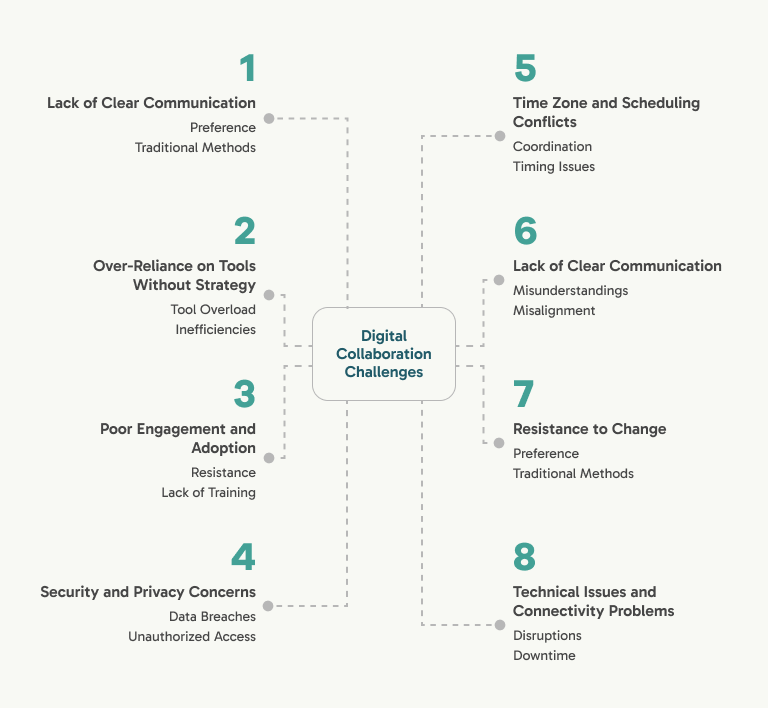
Eight failure modes account for almost every case where digital collaboration delivers less than it promises. Each one maps directly to one of the best practices in the HowTo block at the top of this post:
1. How Does Lack of Clear Communication Hurt Digital Teams?
Text strips out tone. A message meant as a quick heads-up reads as a reprimand, a joke reads as a jab, and suddenly two colleagues are quietly annoyed at each other over nothing. Without an agreed communication strategy (which channel handles what, and when to switch to video), those misreads pile up into missed deadlines and misaligned goals.
2. Why Does Over-Reliance on Tools Without Strategy Fail?
Buying software is not a strategy. Without workflow guidelines, teams accumulate platforms the way drawers accumulate cables: each one made sense at the time, and now nobody knows what half of them do. Tool overload replaces tool absence as the bottleneck.
3. Why Does Poor Engagement and Adoption Happen?
An account is not adoption. Employees skip tools they were never trained on and quietly fall back to email and habit. Onboard people, not just logins, or the shiny new platform becomes an expensive place to store unread notifications.
4. How Do Security and Privacy Concerns Derail Digital Collaboration?
Cloud platforms are only as secure as their configuration. Sensitive company data in a workspace with sloppy access settings is one wrong share-link away from a breach. Settle the security model (encryption, permissions, multi-factor authentication) before the sensitive data arrives, not after.
5. How Do Time Zone Conflicts Compound?
A team spanning Taipei, Berlin, and San Francisco shares almost no comfortable overlap. Decisions stall waiting for the next mutual hour, and someone always ends up on the 11 PM call. Unmanaged, time zones erode both decision speed and goodwill.
6. Why Do Accountability and Visibility Erode?
"Someone is on it" is the phrase that precedes most missed deadlines. Without named owners and a tracking mechanism, responsibilities blur, and managers face a bad choice between flying blind and micromanaging. Explicit assignments remove the dilemma.
7. How Does Resistance to Change Stall Adoption?
Some people genuinely prefer the old way, and not irrationally: the old way is the one they're fast at. New tools mean a learning curve, a dip in confidence, and the nagging worry that this change is churn for churn's sake.
Half-adopted tools waste more time than no change at all. Pilot with a small group first, explain the why, and give the skeptics a real path to catch up. Training and patience beat mandates.
8. How Do Technical and Connectivity Issues Compound?
When the whole workflow lives on digital platforms, an outage is an everyone-problem: software downtime, a dropped connection, or a broken integration can stop the team mid-stride. Write the fallback plan before you need it.
One built-in contingency is offline access. Quire works 100% offline across the entire product, so tasks, projects, Documents, and even built-in Chat stay usable when the connection drops, then sync once it returns. No other project management tool covers its whole product offline like this.
Why Choose Quire as Your Digital Collaboration Tool?
Quire was built for exactly the failure modes above. Its task hierarchy breaks large projects into smaller, manageable tasks with named owners and real-time progress. Here is how that maps onto the teams that lean on digital collaboration most:
- Marketing Team: A global agency keeps campaign execution aligned across multiple time zones with Quire's structured task management and calendar integration, so no region works off a stale brief.
- Software Development Team: Integrating Quire with GitHub ties tasks to commits, so a remote development team cuts the back-and-forth that stalls releases and ships on a more agile cadence.
- Event Planning Team: Quire centralizes vendor coordination and scheduling, so event logistics stay in one place instead of scattered across inboxes and spreadsheets.
- Nonprofit Organizations: A distributed nonprofit coordinates volunteers across countries in a single workspace, so effort lands where it is needed rather than getting lost between teams.
What's the Next Step to Make Digital Collaboration Work?
Pick the one best practice from the HowTo block your team is currently weakest on (communication strategy, onboarding, time-zone planning, contingency, security). Address that one this quarter, instead of overhauling the whole stack.
Quire gives the structural layer the practices need: nested tasks for role clarity, real-time updates for transparency, calendar integration for time-zone coordination, and role-based permissions for the security model. Try Quire free and run one best practice on top of a tool that supports it.
Frequently Asked Questions
What is digital collaboration?
Digital collaboration is the use of cloud-based tools to let teams work together from anywhere, replacing in-person meetings and physical documents with real-time messaging, video calls, and shared workspaces.
What are the main benefits of digital collaboration?
Higher productivity, better flexibility for remote teams, clearer transparency, and real savings on travel and office space. It also makes cross-team communication, real-time editing, and performance tracking far easier.
Why does digital collaboration sometimes fail?
It usually fails when teams adopt tools without a communication strategy, skip proper onboarding, or ignore security and time zone planning. Poor accountability and resistance to change are the other common culprits.
Which jobs benefit most from digital collaboration?
Remote project managers, software developers, marketing teams, customer support, and freelancers benefit most, because their work depends on coordinating with others across locations and time zones.
How does Quire support digital collaboration?
Quire breaks projects into nested tasks, syncs updates in real time, and integrates with tools like Google Calendar and Slack so distributed teams stay aligned. Check out Quire to see it in action.
