
project management · Aug 27, 2026
Project Milestones: How to Set Them and How Many You Need

Last updated: September 1, 2026
Project milestones are zero-duration checkpoints, like "design approved" or "beta shipped," that tell you at a glance whether a project is on track. Set one every one to two weeks, tie each to a real decision rather than a date, and keep them on the same timeline as the tasks so their status updates itself.
- What are project milestones?
- What's the difference between a milestone, a task, and a deliverable?
- How do you choose project milestones?
- How many project milestones does a project need?
- What are some project milestone examples by type?
- When do project milestones stop working?
- How do you track project milestones without a status meeting?
- Key takeaways
- Frequently Asked Questions
Somewhere on most project plans is a row that says "Phase 1" with a little diamond icon and a date, and if you asked three people on the team what reaching it actually means, you'd get three answers. That diamond is supposed to be a milestone. Usually it's decoration.
Milestones are one of those project management ideas everyone nods along to and few use well. Done right, they're the cheapest early-warning system you have. Done wrong, they're diamonds on a chart that make a plan look official without telling anyone anything.
This guide fixes that. Here's what project milestones actually are, how they differ from tasks and deliverables, how to pick ones that earn their place, how many a project needs, when they stop working, and how to track them without turning Thursday into a status meeting.
What are project milestones?
Project milestone: a significant checkpoint in a project that marks the completion of a phase or a key decision, and that has no duration of its own. A milestone is not work you perform; it is a moment you reach, and you either hit it or you do not.
That zero-duration idea sounds like a technicality and isn't. The moment you give a milestone a start and end date, it quietly becomes a task, and it stops doing its one job: acting as a clean gate where the project either passes or it doesn't.
A milestone is a yes-or-no question. A task is the work that earns the yes. Keep those two apart and the rest of this gets easy.
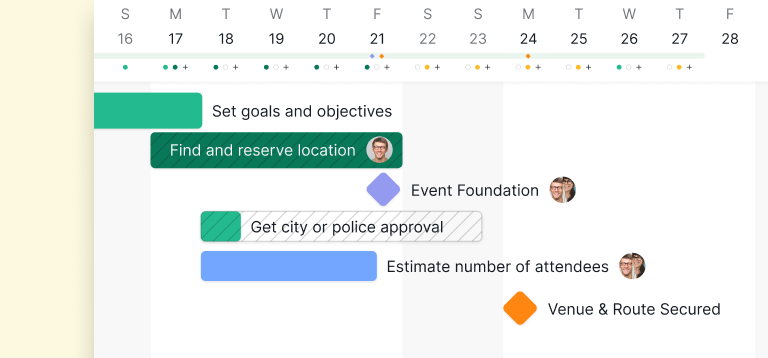
They also do something quieter and underrated: they make progress visible. Harvard Business Review's research on the power of small wins found that of all the things that lift people's motivation during a workday, the single most important is making visible progress on meaningful work. Milestones are how a team sees itself moving instead of just grinding.
What's the difference between a milestone, a task, and a deliverable?
A task is work with a duration, a deliverable is the thing that work produces, and a milestone is the checkpoint that confirms it. These three get used interchangeably and shouldn't be.
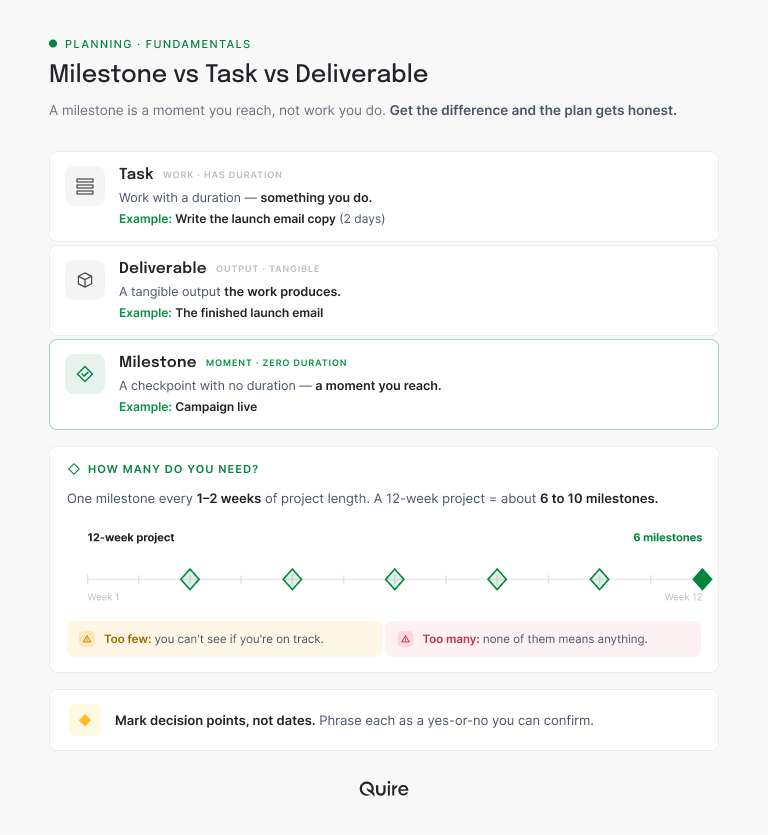
The clean way to hold it: tasks produce deliverables, and hitting a set of deliverables trips a milestone. "Write the launch email copy" is a two-day task. The finished email is the deliverable. "Campaign live" is the milestone.
Why bother separating them? Because each one answers a different question on the plan:
- Tasks tell you what people are working on right now.
- Deliverables tell you what the project will hand over.
- Milestones tell you whether you're on schedule.
Blur them together and you lose all three signals at once, which is exactly what happens when a plan is nothing but a long flat list of to-dos with a few dates sprinkled in.
Milestones sit on top of your schedule, so they make most sense next to it: a project timeline lays out the four types and six worked examples your checkpoints sit on.
A checkpoint and a working window are two of the three date types a schedule quietly mixes together. See what belongs on a project calendar and what does not.
How do you choose project milestones?
The rule that fixes most bad milestones is one line: mark decision points, not dates.
A weak milestone is a calendar square someone picked because a month had passed. A strong one is a place where the project genuinely changes state: something gets approved, a phase closes, a gate opens. Ask of any candidate, "does anything get decided or confirmed here?" If the answer is no, it's a date, not a milestone.
The best places to find them are the seams between phases. Kickoff to discovery, discovery to build, build to test, test to launch: each seam is a natural checkpoint where you want to stop and confirm before committing the next chunk of effort. A broken phase structure usually means broken milestones.
And phrase each one as something checkable. "Design approved" is a milestone anyone can confirm. "Design mostly there" is an argument waiting to happen. If the team could argue about whether you've hit it, the wording isn't sharp enough yet.
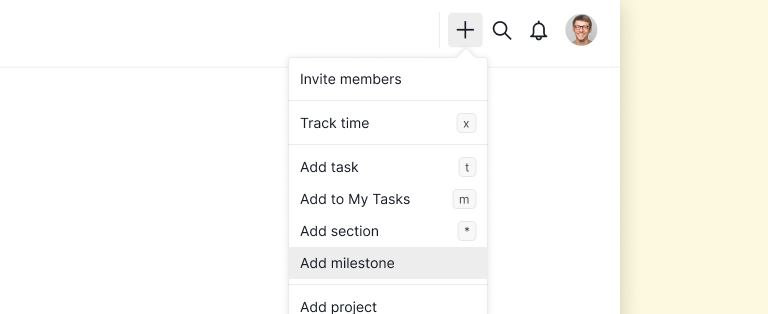
Then make the checkpoint look like one. In Quire you click Add Milestone at the top of the project and the checkpoint drops into the same list as the work, carrying a diamond icon instead of the usual round status circle. That small difference is the whole point: "design approved" stops reading like one more to-do somebody could tick off quietly.
Milestones mark the transitions between stages, so each one should land on a seam in the project life cycle phases.

How many project milestones does a project need?
Fewer than a nervous planner wants, more than a busy one sets. The workable rule is one milestone every one to two weeks of project length.
For a 12-week project, that lands around 6 to 10. Here's what six clean gates look like in practice:
- Week 0: kickoff
- Week 2: requirements signed off
- Week 4: design approved
- Week 8: build complete
- Week 10: testing passed
- Week 12: launch
Each of those is a place where you'd genuinely want to stop and check before spending the next few weeks. Drop them onto a Quire timeline and the spacing becomes something you can see, which is usually when a lopsided plan gives itself away.
The two failure modes are mirror images. Too few milestones and you can go a month without a real signal, so a slipping project looks fine until it obviously isn't. Too many and they stop meaning anything, because when every Friday is a milestone, none of them is a checkpoint.
Scale it to the work. A two-week sprint might have three milestones; a six-month program might have fifteen. The cadence matters more than the number.
One more sizing tip: weight milestones toward the risky, uncertain stretches, not the routine ones. If the build phase is well understood but integration always turns messy, don't space them evenly. Put more checkpoints where the project is most likely to go sideways, so you catch trouble while it's still cheap to fix. You point a warning system at the weather, not the clear skies.
What are some project milestone examples by type?
The shape stays constant across project types; only the labels change.
- Software project: kickoff, requirements signed off, design approved, development complete, testing passed, beta launched, general availability.
- Marketing campaign: brief approved, creative locked, assets produced, campaign live, results reviewed.
- Event: venue booked, speakers confirmed, registration open, run-of-show final, event day.
Notice that every single one is a checkpoint you can confirm as done or not done, with no ambiguity. That's the tell of a real milestone. If an item on your list can't be answered with a clean yes or no, it's a task or a wish, and it needs rewriting before it goes on the plan.
A useful test when you're unsure: imagine reporting the milestone to someone who wasn't in the weeds. "We hit design approved" lands cleanly; they know exactly what happened. "We made progress on the design" tells them nothing and invites a follow-up question, which is the sound of a milestone that wasn't one.
When do project milestones stop working?
They fail in three specific ways, and only one of them is about picking the wrong checkpoints.
The milestone nobody owns. Every task on a plan has an assignee. Milestones often have none, so the day arrives and there's no one whose job it is to say yes or no. The checkpoint sits amber, everyone assumes someone else is confirming it, and the gate never actually closes. Give each milestone an owner the same way you'd give a task one.
The milestone that slides instead of failing. When a date moves the moment it's threatened, the milestone is never missed and never warns you. That's the expensive failure, because it looks like success right up until launch week. A missed milestone is data. Log the slip, keep the original date visible, and let the pattern tell you something.
Work that has no phases. Support queues, always-on content pipelines, and ongoing operations run as a stream, not a sequence of gates. Forcing diamonds onto a stream produces milestones nobody believes by week three. Measure cadence and throughput instead, and let the checkpoints belong to the projects that genuinely have seams.
The first two are structural, and structure is fixable. In Quire you link the tasks that must finish before a checkpoint through task dependencies, so the milestone can't be marked done while its own work is open, and it rolls up to 100% only when that work closes. Ownership stops being a convention and starts being visible.
If the work turns out to be a stream rather than a sequence of gates, the fix is the tracker, not the checkpoints: compare the best task management software and task trackers and pick one tuned to flow.
How do you track project milestones without a status meeting?
Keep the milestones in the same task management software as the work, so their status is a consequence of the tasks instead of a weekly chore. That's the whole trick.
Here's where most milestone systems quietly die: the milestones live in a slide deck and the work lives somewhere else, so keeping them in sync becomes a person's job. Within a month the milestone view is stale and nobody trusts it, which is why the meeting exists in the first place.
Run the same 12-week project in Quire and it looks like this. Beta shipped is a milestone with a week 10 date, sitting on the timeline with its diamond icon. Under it sit the tasks that have to land first: feature freeze assigned to Dan for week 8, QA pass assigned to Mei for week 9, release notes drafted with two subtasks of its own.
Each of those tasks is linked to the milestone through task dependencies. As they close, the milestone's progress moves on its own, and it reads 100% only when the last one is done. When QA slips two days, the diamond on the timeline moves into view as a problem while there's still a week to fix it.
Milestones are available on every Quire plan, including the free one. Details on the pricing page.
If your milestone list currently lives in a deck, the cheapest test is to rebuild one project's checkpoints where the tasks already are. Start a free Quire account, add three milestones to your longest-running project, and link the work under each one. It takes about ten minutes and you'll know by next Thursday whether the status meeting still has anything to do.
Where you keep them decides whether they stay honest:
| Where the milestones live | Who keeps them current | What the status reflects | Fits when |
|---|---|---|---|
| Quire, on the tasks and the timeline | Nobody. Linked tasks roll the progress up | The real state of the work underneath it | The plan and the work have to stay the same object |
| A slide deck or status doc | A person, by hand, before each review | What someone believed at the last update | Reporting up on a fixed cycle, with very few checkpoints |
| A spreadsheet tracker | Whoever remembers to open it | Typed percentages, not finished work | The plan and the work already live in that one sheet |
| A planning-only Gantt tool | A planner re-baselining the chart | The schedule, not the tasks people work in | Scheduling is genuinely a separate job from doing the work |
That's what turns the weekly "are we on track" meeting into a glance. Anyone who wants to know can look, because the milestone is telling the truth about the work in real time. The plan and reality never drifted apart, so there's nothing to reconcile.
For a walkthrough of the feature itself, see how Quire Milestones help you set, track, and reach every goal.

Key takeaways
Project milestones are checkpoints, not tasks: zero-duration moments where the project either passes a gate or doesn't. Choose them at real decision points, phrase each as a yes-or-no you can confirm, and set roughly one every week or two so they keep meaning something.
Then watch for the three ways they rot. A checkpoint with no owner, a date that slides instead of failing, and work that has no phases to gate in the first place.
The last piece is where they live. Milestones stranded in a slide deck go stale; milestones sitting on the same timeline as the work stay honest on their own. That's the difference between a plan that reflects reality and a diamond on a chart nobody believes.
Want your milestones to track themselves? Start free at quire.io/signup, drop your milestones onto the timeline next to the tasks, and watch the weekly status meeting quietly lose its reason to exist.
Frequently Asked Questions
What are project milestones?
Significant checkpoints that mark the completion of a phase or a key decision, with no duration of their own. A milestone is a moment you reach, like "design approved," not work you do. It answers one question at a glance: are we where we should be by now?
What's the difference between a milestone and a task?
A task is work with a duration; a milestone is a point in time with none. "Build the checkout flow" is a task; "checkout flow live" is the milestone it leads to. Tasks are how you get there; milestones are how you know you arrived.
How many milestones should a project have?
Roughly one every one to two weeks, so a 12-week project has about 6 to 10. Too few and you can't see if you're on track; too many and they stop meaning anything. Tie each to a real decision point.
What are examples of project milestones?
Kickoff, requirements signed off, design approved, development complete, testing passed, beta launched, final delivery. In a campaign: brief approved, creative locked, campaign live. Each is a checkpoint someone can confirm as done or not done.
When do project milestones stop working?
Three ways: nobody owns the checkpoint so it sits amber, the date slides the moment it's threatened so nothing is ever missed, or the work is a continuous stream with no phases to gate.
How do you track project milestones without a status meeting?
Keep them in the same task management software as the work. In Quire you click Add Milestone, link the tasks that must finish first through task dependencies, and progress rolls up on its own instead of being typed into a slide.
Do milestones actually help a team stay productive at work?
Yes, because visible progress is a strong motivator. Teams stay more productive at work when they can see themselves nearing a clear checkpoint. In Quire, milestones sit on the timeline by the tasks, so wins land visibly and momentum holds.
