
features · Nov 25, 2025
Introducing Milestones: Reach Every Goal with Confidence
Last updated: September 15, 2026
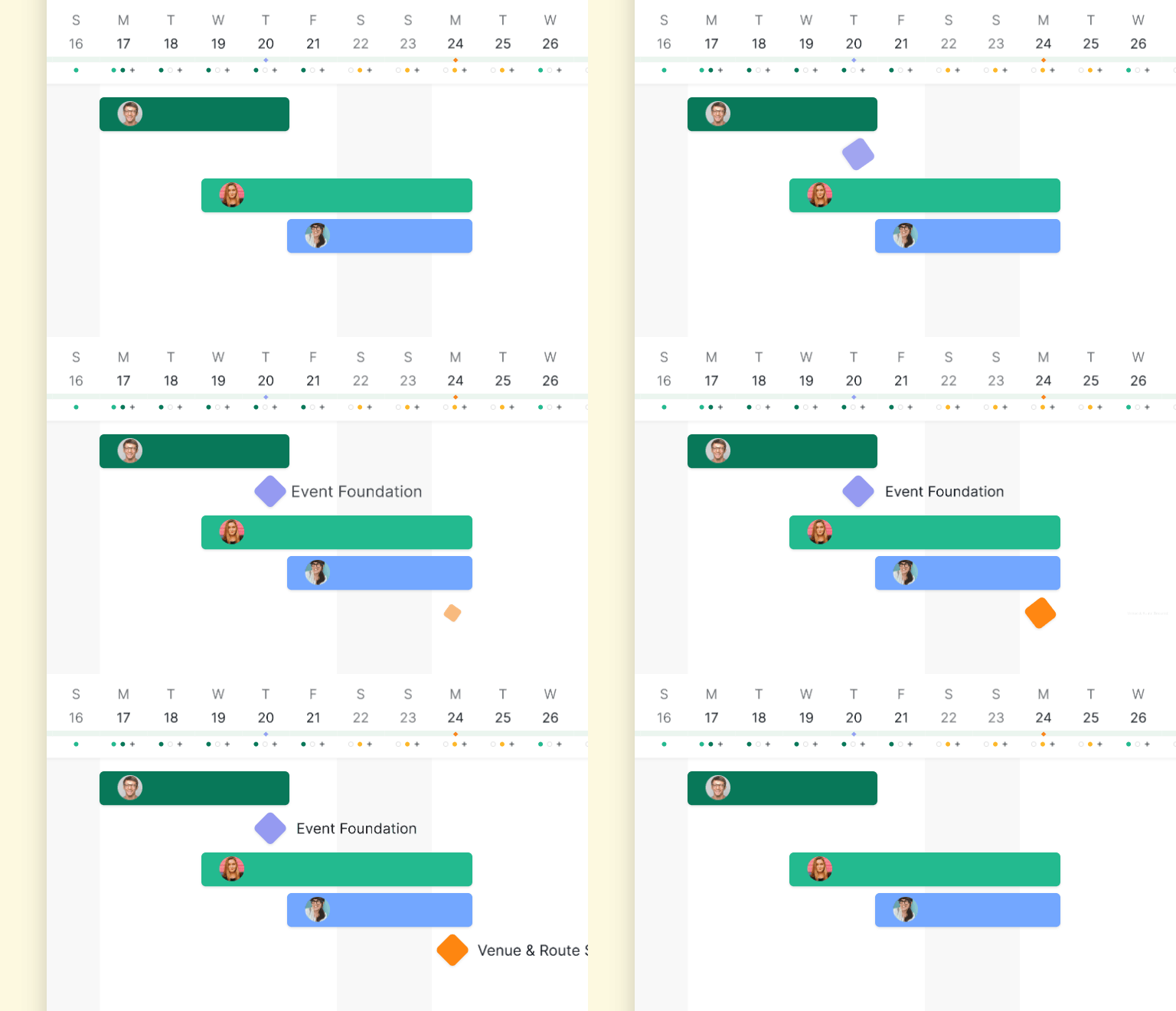
Milestones in Quire are checkpoint markers (not work units) that anchor a project's key achievements. They display a diamond-shaped icon to stand out from regular tasks, support a due date, and can have tasks linked via task dependencies so milestone progress rolls up automatically. Click Add Milestone at the top of any project to create one. Available on every Quire plan including the free tier.
A long project without checkpoints reads as one indistinguishable wall of tasks, which is how teams lose track of whether they are halfway to launch or two weeks behind. Milestones fix that by marking the moments that actually matter: Design Finalized, Beta Launched, Campaign Delivered. Each one is a visible anchor the team can plan around.
Quire's Milestones feature brings that structure into the workspace: diamond-icon markers that stand out from regular tasks, optional due dates, and progress that rolls up automatically through task dependencies.
The benefit of marking milestones isn't a new idea. Locke and Latham's goal-setting research, built across more than thirty years of studies (summarized in their 2002 paper in American Psychologist), consistently found that specific, hard goals outperform vague encouragement to do your best.
PMI's annual Pulse of the Profession reports keep finding the same pattern at the project level: teams with defined checkpoints hit their objectives at noticeably higher rates than teams that work toward a single distant deadline. The structure does the work.
Milestones is made for all subscription tiers. More information can be found on our Pricing page.
Task vs Milestone in Quire
| Dimension | Regular task | Milestone |
|---|---|---|
| Purpose | Unit of work to complete | Checkpoint marker for a major goal |
| Icon | Round status icon | Diamond-shaped icon |
| Typical content | "Write landing page copy" | "Beta Launched" |
| Progress source | Direct status updates | Rolls up from linked tasks via dependencies |
| Frequency in a project | Many (the bulk of the list) | Few (the key moments) |
| Available plans | All plans | All plans, including free |
What Are Milestones and Why Do They Matter?
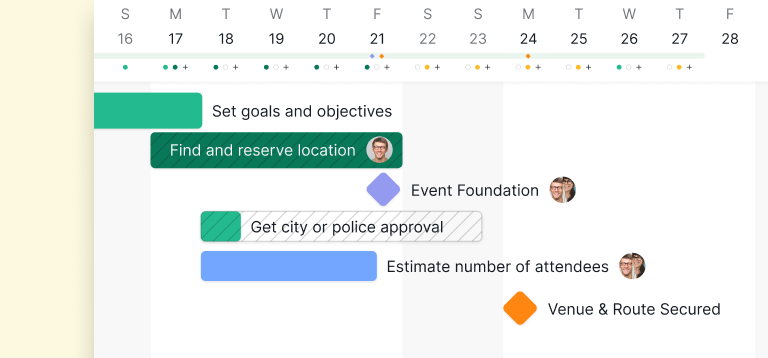
A project milestone is a significant checkpoint in a project's lifecycle. It is not every task or deliverable; it is the small set of moments that define real progress and tell the team how far they have come.
Milestones break a long project into named stages. A product launch, a marketing campaign, or an event becomes a sequence of recognizable checkpoints instead of an undifferentiated task list.
For example:
- In a product development project, milestones might include Design finalized, Prototype ready, and Beta version released.
- In a marketing campaign, they could be Campaign strategy approved, Content published, and Performance report delivered.
Each milestone signals that a critical step has been completed and the project is ready to move to the next phase.
But beyond structure, milestones also provide several deeper benefits that often determine whether a project succeeds or struggles:
- Visualize progress: See how far you’ve come and what’s ahead.
- Stay aligned: Ensure everyone is working toward the same major objectives.
- Maintain motivation: Celebrate small wins that keep the team energized.
- Improve accountability: Set clear checkpoints to review progress and adjust plans.
Without milestones, it’s easy for projects to drift. With them, your team gets the clarity and focus needed to move forward with confidence.
Read more on the handoff gap. Milestones tell you where you're going, but most cross-team timelines slip in the gap between them, when work transfers from one person to another and nobody's quite sure whose turn it is. This post lays out the four-question test that catches it before it costs you a week.
New to the concept rather than the feature? Start with what project milestones are and how to set them, including how many a project actually needs. For the build itself, our Quire Milestones guide goes step by step.

How Do You Create a Milestone in Quire?
Adding milestones in Quire is simple and flexible enough for any workflow. Milestones stand out visually so your team can instantly spot key goals: instead of the usual round status icon, milestone tasks display a diamond-shaped icon on the left side of the task name. This makes them easy to identify in long task lists or complex project structures.
Go to your project.
Open your project in Quire where you want to track major goals.
Add a milestone.
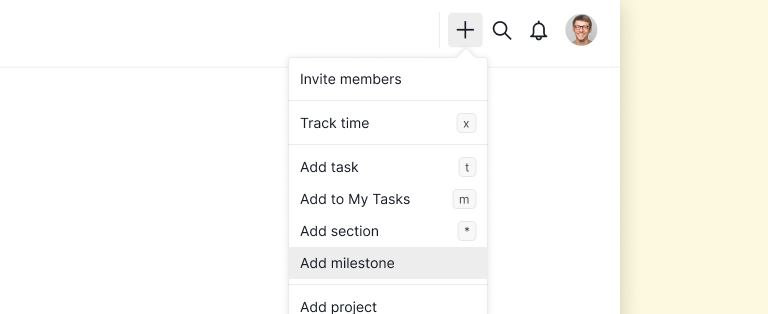
Click “Add milestone” at the top of your project view. Give it a name that captures your goal (e.g., Product Beta Launch, Q2 Marketing Push, or Design Review Phase).
Set a due date (optional).
You can add a date to define when that milestone should be achieved. This helps align everyone’s timeline.
Connect related tasks.
Link specific tasks to your milestone by setting task dependencies. This helps you map out what work needs to be completed before the milestone can be marked done, giving you a clear view of progress and potential blockers.
Track and celebrate.
As you check off related tasks, you’ll see your milestone progress move forward. When it’s 100% done, celebrate your team’s achievement right in Quire!
How Does Quire's Marketing Team Use Milestones?
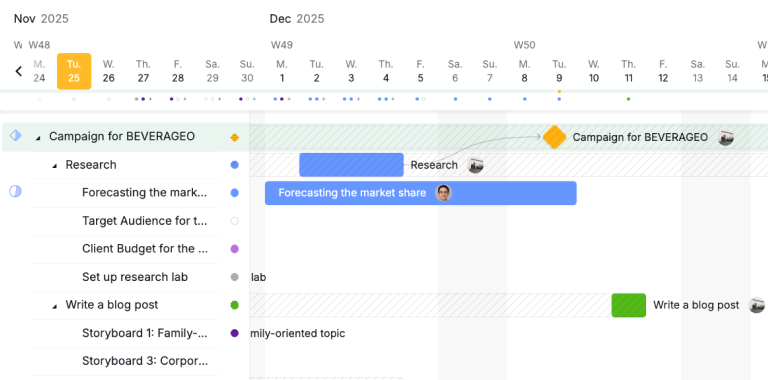
At Quire, the marketing team uses Milestones to anchor every major campaign and keep fast-moving work aligned.
For example, a milestone like “Campaign for BEVERAGEO” becomes the team’s north star, clearly marked with a diamond icon so it stands out from everyday tasks. All supporting work, from market research to content creation, rolls up beneath it, giving the team a clear picture of what contributes to the campaign’s success.
In Timeline view, the milestone marker makes it even easier to see how tasks connect and whether the team is on track. As each task is completed, progress toward the milestone becomes instantly visible, helping the team spot delays early and celebrate major wins the moment a milestone hits 100%.
How Does Quire's Developer Team Use Milestones?
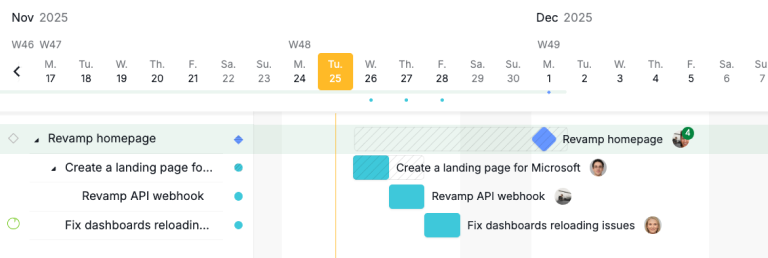
For the Dev team at Quire, Milestones help bring structure to fast-moving, issue-heavy workflows. A milestone like “Revamp homepage” becomes the central anchor for all related development tasks, clearly marked with a diamond icon so engineers can immediately see it’s a major deliverable, not just another ticket in the queue.
In the Issue Tracker & Daily Tasks project, every bug fix, enhancement, and implementation, from API webhook updates to dashboard reload fixes rolls up beneath this milestone, giving the team a clean snapshot of what drives the release forward.
In the Timeline view, the milestone marker shows exactly how these tasks line up across days and sprints, helping developers anticipate dependencies, avoid unexpected blockers, and keep releases on schedule. Once every task contributing to the milestone is resolved, the team instantly sees the milestone hit 100%, signaling that the feature or release is ready to ship.
How Do You Get Started With Milestones?
Pick the one project where the timeline feels longest right now. Open it in Quire, click Add Milestone at the top, and create three to five checkpoints that mark the moments you would actually announce to the team or stakeholders. Link each one to the tasks that have to finish before it. From there, milestone progress updates itself.
Two neighbours worth reading: the project plan template, a starting structure for when there are no milestones worth pointing to yet, and what belongs on a project calendar and what does not, since a milestone is only one of three kinds of date a schedule holds.
Milestones earn their keep on a longer horizon too. Quire's strategic roadmap guide puts quarterly gates on a Timeline right next to the initiatives they close out, each one carrying an owner, a department tag, and the risks that could move the date.
Milestones are available on every Quire plan, including free. Try Quire free and anchor your next long project to the checkpoints that matter.
Frequently Asked Questions
What is a project milestone in Quire?
A significant checkpoint in a project's lifecycle. The key moments that define progress, like Design Finalized or Beta Launched, rather than every individual task.
How is a milestone different from a regular task?
Milestones display a diamond-shaped icon instead of the usual round status icon, so major goals stand out visually from everyday tasks in lists and on the Timeline view.
How do I create a milestone in Quire?
Click Add Milestone at the top of your project, name the goal, optionally set a due date, then link related tasks using task dependencies so progress rolls up automatically.
Can I link tasks to a milestone?
Yes, through task dependencies. Milestone progress updates automatically as linked tasks complete, and slipping dependencies surface early.
Is the Milestones feature available on the free Quire plan?
Yes, Milestones are included on all subscription tiers, including the free plan. Full details on the pricing page.
