
Milestones Permalink
Milestones are critical checkpoints that represent the completion of key tasks or transitions between project phases. Unlike regular tasks, they focus on major events, decisions, or achievements that indicate project progress.
Milestones help you:
- Monitor overall project status
- Set clear targets and deadlines
- Keep stakeholders informed
-
Identify potential delays early

Create a Milestone
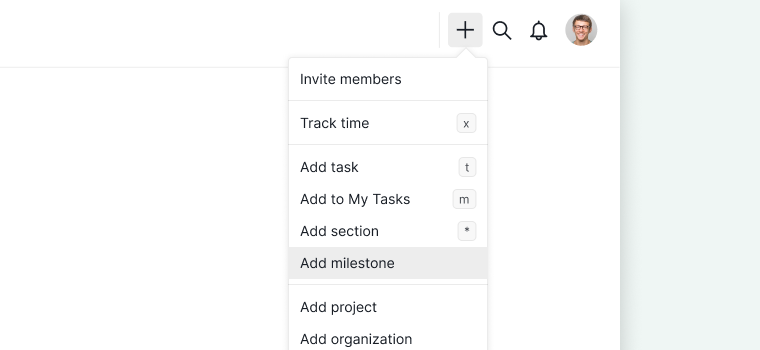
From the + Button
- Click the + button in the upper-right corner of your workspace.
-
Select Add milestone.

From a Task
- Create a task in your project.
- Open the detail panel for the task.
- Click the More Options icon.
-
Select Turn into a milestone.
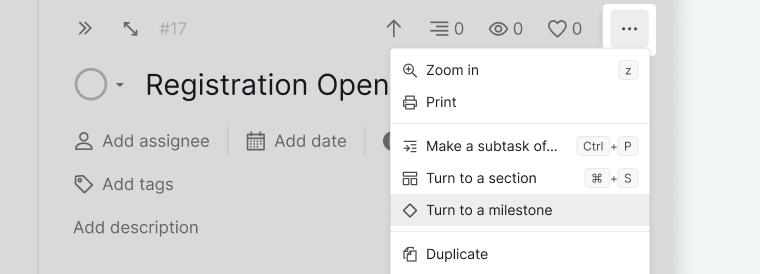

The task’s status circle will change to a diamond-shaped icon, indicating it is now a milestone.
Tip: Press Ctrl + Alt + M (Windows) or Ctrl + ⌥ + M (Mac) to convert a task to a milestone using the keyboard.
Reverting to a Task
- Open the milestone’s detail panel.
- Click the More Options icon.
-
Select Turn into a task.
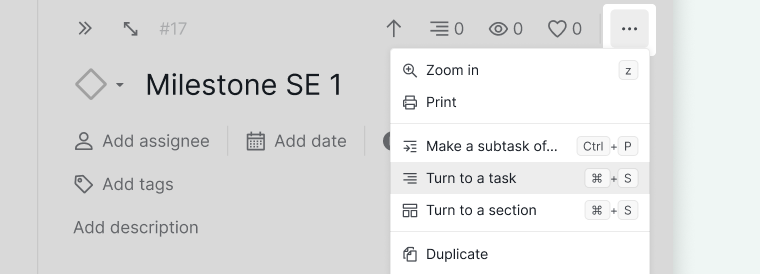

The diamond-shaped milestone icon will revert to the regular task status circle.
Track Milestones
Tracking milestones helps teams spot schedule risk early. An overdue milestone signals that a phase boundary has slipped and downstream work may be affected. Most teams review milestone status in a timeline or calendar view where all key dates are visible at once.
In Timeline and Calendar Views
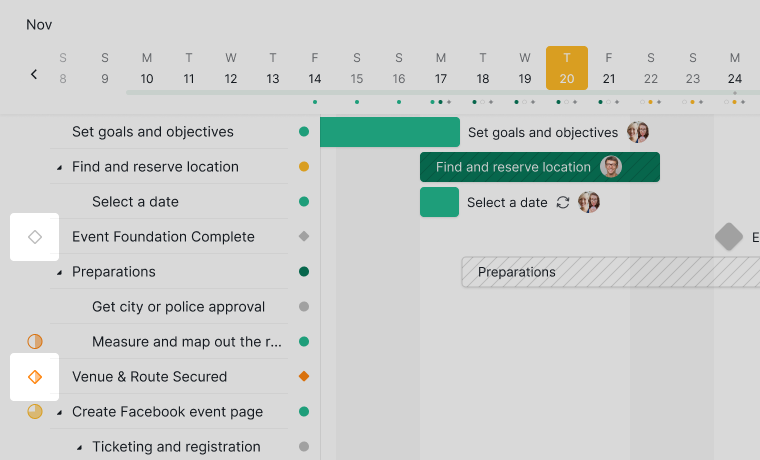
In Timeline and Calendar views, milestones are easily identifiable by the diamond-shaped icon, making it simple to track key events, deadlines, and transitions at a glance.

Read more on our blog about the Milestone feature. Want to see milestones alongside your full project schedule? See Timeline View.
Frequently Asked Questions
How do teams use milestones to track project progress?
Milestones act as checkpoints that divide a project into phases, giving teams a shared way to measure progress beyond task counts. An overdue milestone signals that a phase boundary has slipped and downstream work may be at risk, prompting reprioritization before delays compound. Milestone status also simplifies stakeholder communication. In Quire, milestones appear as diamond-shaped icons in Timeline and Calendar views, making schedule risk visible at a glance.
What’s the difference between a milestone and a task in Quire?
Milestones represent major checkpoints like key events, decisions, or phase transitions, not day-to-day work items. They use a diamond-shaped icon instead of a status circle, and appear in Timeline and Calendar views to help track overall project progress.
How do I create a milestone in Quire?
Click the + button in the upper-right corner and select Add milestone, or create a task, open its detail panel, click More Options, and select Turn into a milestone. Keyboard shortcut: Ctrl+Alt+M (Windows) or Ctrl+⌥+M (Mac).
Can I convert a milestone back to a regular task in Quire?
Yes. Open the milestone’s detail panel, click More Options, and select Turn into a task. The diamond icon reverts to a regular status circle.
How do I track milestones in Quire?
Milestones appear as diamond-shaped icons in Timeline and Calendar views, making key deadlines and project transitions easy to spot alongside regular tasks.