
Project Overview Permalink
The Project Overview page in Quire allows you to track your project’s progress, view key statistics, monitor activity logs, and update your team with comments or status updates.
Go to the Overview tab at the top of your project page to access these features.

Set Project Dates
- Click Add date.
- Select the desired due date for the project.
-
Toggle on Set start date to choose a start date.
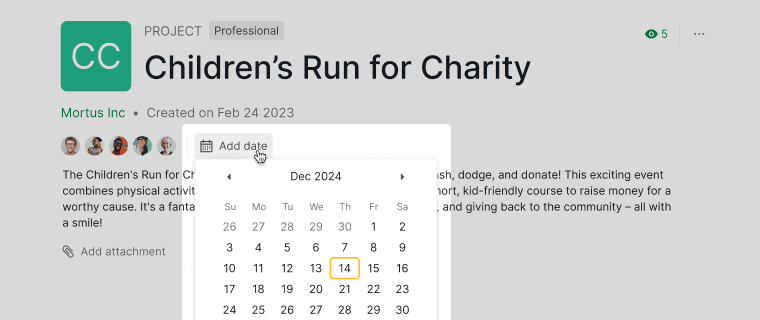

Once added, these dates will be reflected in the Timeline view of your project.

Tip: You can use embed formulas in the project description to perform further calculations based on the dates you have set for your project. For example, to calculate the total duration of your project, you can embed a formula like this in the project or task description: project.due - project.start.
Track Project Progress
The Overview tab always shows four fixed widgets:
- Project Health: active, completed, due, and overdue task counts, plus a trend chart tracking those metrics over time.
- Task Status Distribution: a pie chart of all tasks broken down by status.
- Deadline Calendar: a calendar grid showing where due dates cluster across the month.
- Member Activity: a heatmap of task activity per member over time.

These four widgets are fixed on the Overview tab and cannot be resized, rearranged, or removed. If you want a customizable set of widgets instead, create a Dashboard tab for the project.
View Project Activity Log
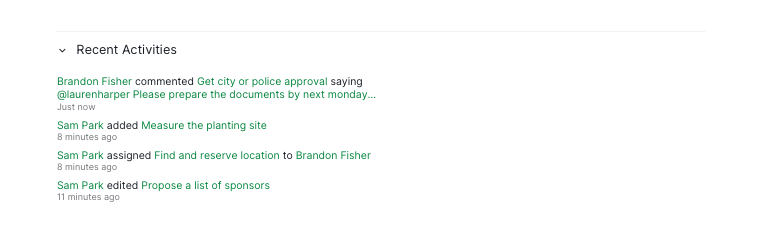
The activity log helps track changes, updates, and actions made by all project members.
- Click the detail panel icon to open the detail panel.

-
Find Recent Activities in the detail panel to review all past actions taken on the project.


Frequently Asked Questions
How do I set start and due dates for a project in Quire?
Go to the project’s Overview tab, click Add date, select a due date, and toggle Set start date to add a start date. These dates appear in the Timeline view.
How do I track the progress of a Quire project?
Open the Overview tab to see four fixed widgets: Project Health, Task Status Distribution, Deadline Calendar, and Member Activity.
Can I customize or rearrange the widgets on a Quire project’s Overview tab?
No. The Overview tab’s four widgets are fixed and cannot be resized, rearranged, or removed. For a customizable set of widgets, create a Dashboard tab instead.
How do I view the activity log for a Quire project?
Click the Overview tab, then click the detail panel icon to open the detail panel and find Recent Activities, which lists all past actions taken on the project.