
Add an Organization Permalink
An organization is the top-level workspace in Quire. It contains projects, members, and organization-level settings such as billing, permissions, and quotas. Each organization operates independently from others in your account.
Learn more about Quire’s hierarchy and structure.
Add an Organization
You can create a new organization using either the top navigation or the sidebar. Once created, you are automatically assigned as the Organization Admin.
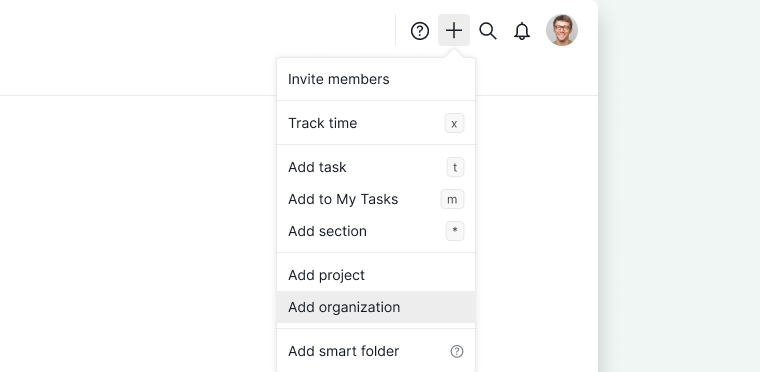
From the Top Menu
- Click the + icon in the upper-right corner of the page.
- Select Add organization.
-
Enter the organization details and confirm.

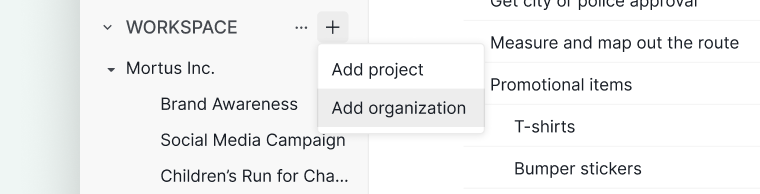
From the Sidebar
- Locate Workspace in the left sidebar.
- Click the + icon next to Workspace.
- Select Add organization.
-
Enter the organization details and confirm.

Frequently Asked Questions
What is an organization in Quire?
The top-level workspace in Quire. It contains projects, members, and organization-level settings such as billing, permissions, and quotas.
How do I add a new organization in Quire?
Click the + icon in the upper-right corner and select Add organization, or click the + icon next to Workspace in the sidebar and select Add organization.
Who becomes the organization admin when I create a new organization in Quire?
You are automatically assigned as the Organization Admin when you create a new organization.