
I would quite like to use the Start Date option but it seems mostly useless for me. What is its intended use?
If i set a Start Date before today and Due Date after today then I would assume that i should be working on that task today. However the task doesn't show up in tasks i should be working on today. It only shows up in the tasks due in the future based on the Due Date.
Of course if i wait to start the task on the Due Date then I will be in trouble because the task takes days to complete. So Quire really doesn't help me to manage those tasks even though the fields needed are present in the app.
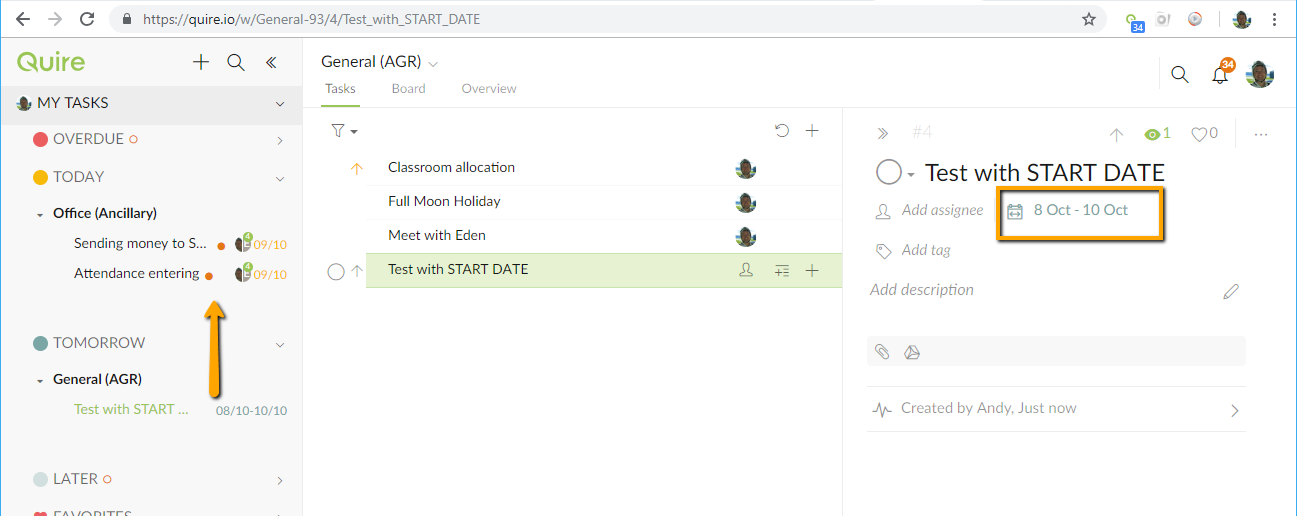
PS: I thought there was another task in this Feedback list about this but i couldn't find it. I found them #1150 #392 #467
Great. Thanks
Andy, Dec 18, 2018
I just noticed the change. Very excited. Thank you @michelle-28 and the whole Quire development team!
Wayne Villars, Dec 19, 2018
@michelle-28 Thanks - its making life much easier ❤
Jacquie Mitchell, Feb 7, 2019
I just watched this video https://www.youtube.com/watch?v=3eid1GEi6kc
and in the middle the 'expert' said the problem with most Task Lists is that they dont manage Start Dates well. That is, everything shows up on a Due date when what you need is things showing up before the Due Date in your 'Today's' task list.
I'm hoping that Quire will look at this one sometime. It seems there is a genuine need for this feature but a lack of it.
Andy, Dec 16, 2018
Hi Andy, this feature is available now. 😃
Michelle, Dec 19, 2018
#1174 I have requested this with the ability to add a scheduled date somewhere between the start date (which is the earliest date the task can be started) and the date the task is due. With the same task for 30-40 clients all starting & due on the same day, set to recur at least 4 times in a year, you need to be ale to schedule them with a date without interfering with the recurring start & due dates
Jacquie Mitchell, Oct 9, 2018
It works well, Thank you!
Andy, Oct 11, 2019
Hi Andy, yes we are considering this. It is in our plan to include start date in My Tasks. 😃
Michelle, Dec 17, 2018
Wow. I will check it out. Thanks!
Andy, Dec 29, 2018