
project management · May 12, 2026
Project Management Tools With MCP Support in 2026

Last updated: August 20, 2026
MCP (Model Context Protocol) is the open standard that lets AI assistants like Claude securely act on your project data: read tasks, draft status updates, create work from meeting notes, without custom integrations. By mid-2026, Quire is the only PM tool with a first-party MCP server covering its full data model. Notion has partial doc coverage; Linear and Jira rely on community-built servers; Asana, ClickUp, Monday, and Trello have none. When evaluating, check for read+write coverage, hierarchy preservation, scoped authentication, and first-party ownership. See our broader comparisons of the best project management software for the non-MCP angle.
- What is the Model Context Protocol (MCP)?
- What Is a Project Management MCP Server?
- Why Does MCP Matter for Project Management Specifically?
- Which Project Management Tools Support MCP in 2026?
- What Should You Look For When Evaluating an MCP-Enabled PM Tool?
- Where Does Quire's MCP Sit?
- When Isn't MCP the Point (Yet)?
- Key Takeaways
- Frequently Asked Questions
Your AI assistant can now read your inbox, edit your docs, and run SQL queries against your warehouse. What it still can't do, for most teams, is touch your project management tool. That gap is the quiet reason your AI-powered workflow keeps stalling on the same step: the thing that actually runs the work is sitting in a tab the AI can't reach.
The protocol that closes that gap is called MCP, short for Model Context Protocol. It matters more for project management than for almost any other category of software, because PM is where the state of your work actually lives.
This post is a plain-language look at what MCP is, why it's suddenly the capability that separates modern PM tools from legacy ones, which tools have shipped it, and what to look for when you evaluate one.
If you've already picked a side and you're trying to set up a Claude-to-Quire connection, the setup guide is a better destination than this post. If you're still mapping the category, read on.
What is the Model Context Protocol (MCP)?
Model Context Protocol (MCP) in project management: MCP is an open standard, released by Anthropic in late 2024, that gives AI assistants like Claude direct, structured read and write access to your tasks, subtasks, projects, documents, and comments. No custom integration, no browser extension, and no pre-built automation in between.
By 2026 MCP has become the de facto way to wire Claude and other AI clients to the systems that run a team's work, from CRMs and file drives to project management tools. It is the piece that lets your assistant act on project state instead of describing it.
The short version: instead of every AI product writing a custom integration for every tool, and every tool writing a custom integration for every AI product, MCP gives both sides a shared contract. The tool runs a small MCP server that exposes its capabilities.
The AI client connects, reads the list of capabilities, authenticates, and can now call them on your behalf, creating tasks, reading projects, updating status, without you having to write a single line of code.
That architectural decision matters because it changes the economics of AI integration. Before MCP, getting your AI to touch your PM tool required either a Zapier workflow you configured in advance or a custom automation somebody on your team built. With MCP, the AI assistant has the keyring and the instruction manual, it picks the right tool based on what you ask, in natural language, in the moment.
MCP is the middle layer of a bigger picture. For how it fits alongside plain AI assistants and autonomous agents, read our guide to AI project management.
What Is a Project Management MCP Server?
An MCP server is the component that runs on the project management tool's side. It publishes a list of capabilities (read tasks, create a project, update a due date, fetch comments) that any MCP-compatible AI client can discover and call. The AI client (Claude, Cowork, or another MCP-capable app) connects to that server, authenticates once, and from that point on can act on your project data in natural language, without any pre-built workflow.
Think of it this way: the MCP server is the keyring and the instruction manual combined. It tells the AI what it can do and holds the credentials to do it. When you say "move that overdue task to next sprint," the AI reads the available tools from the server, picks the right call, and executes it against your real project data.
Not all MCP servers are equal. A minimal one might expose read-only task access. A full one, like Quire's, covers the entire data model: tasks, subtasks, projects, tags, documents, chats, comments, and insights, with both read and write access. The depth of the server determines how much of your actual workflow the AI can touch.
The clearest way to see what's different is to line MCP up against the two things teams already use to connect their PM tool to everything else:
| Zapier or no-code automation | REST API integration | MCP server | |
|---|---|---|---|
| Execution model | You define the trigger and the action in advance. It runs that, every time. | A developer writes code against endpoints, then someone runs or schedules that code. | You describe the outcome in a sentence. The AI chooses which calls to make in the moment. |
| Context awareness | None. The workflow sees only the fields you mapped into it. | Whatever the developer decided to fetch, fixed at build time. | The AI can read current project state first, then decide what to do about it. |
| Setup overhead | One workflow per scenario, re-maintained every time your process changes. | Engineering time up front, and again on every breaking API change. | One authenticated connection, then no per-scenario setup at all. |
Why Does MCP Matter for Project Management Specifically?
Project management is where coordination lives, and coordination is exactly the kind of work AI assistants are well-suited to do. Three things change materially once your PM tool speaks MCP.
1. Status reporting turns into a review step
If your AI assistant can read the current state of every project, the weekly stakeholder update stops being something you assemble and becomes something you approve. The assistant pulls what moved, what slipped, and what's blocked from the same data your team is already working in, drafts the update, and hands it back for edits.
No manual reconciliation. No "what did we ship this week?" Slack thread. The status is already there; the AI phrases it and you correct it.
2. Tasks can be generated from wherever ideas actually start
Meeting notes. A customer email. A Slack thread. A doc. All of those become valid sources for new tasks, because the AI can parse the content and drop structured tasks into the right project without you tabbing between tools. For teams running cross-functional project management, this alone can remove a surprising amount of friction.
3. The coordination tax shrinks
We've written before about the coordination tax, the hidden cost that shows up when a team spends more of its week describing progress than making it. MCP attacks the tax directly. Status lookups, blocker triage, deadline reminders, onboarding task lists, these are all coordination work that can move from "a human's Friday afternoon" to "a prompt your AI handles in the background."
That's the theory. The practical question is: which tools have actually shipped MCP, and which are still talking about it?
Which Project Management Tools Support MCP in 2026?
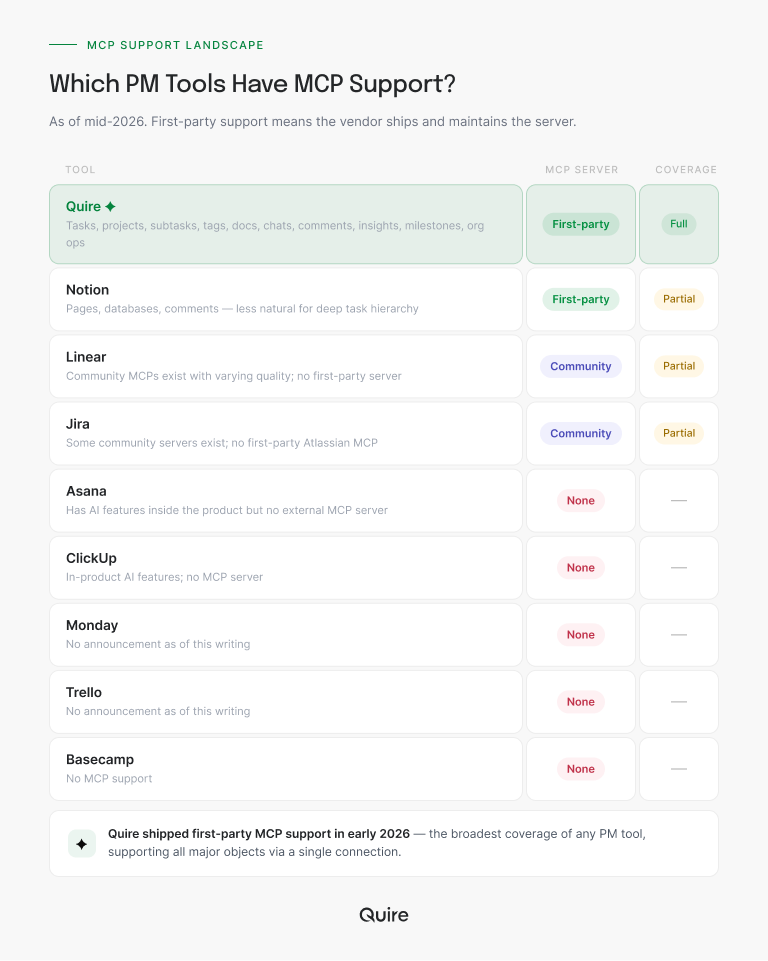
Here's the honest map. Verified August 2026, nine tools, each checked against the vendor's own documentation and public repositories. Vendors ship fast in this category, so read the "None" column as a snapshot, not a permanent verdict.
First-party MCP servers: Quire and Notion
Two of the nine ship a server the vendor builds and maintains itself. Quire's reaches everything the product models: tasks and their nested subtasks, sublists, projects, tags, documents, chats, comments, insights, and milestones, all of it readable and writable. Notion's is narrower by design: strong on pages, databases, and comments, weaker the moment you need real task hierarchy, because a database row doesn't naturally carry the parent-child relationship a nested project plan depends on.
The reason Quire shipped early is mostly the reason you'd expect. Quire's product is built around a nested task structure that maps cleanly to MCP's tool-and-resource model, projects contain tasks contain subtasks contain comments, each with well-defined operations. Tools with fuzzier data models, a Notion database or a Trello board with irregular custom fields, have a harder time exposing a clean, stable MCP interface.
Community-built MCP servers: Linear and Jira
Linear and Jira both have community servers and no first-party equivalent. They're a real option with real tradeoffs:
- Coverage is partial and varies by maintainer.
- Authentication often means pasting a personal API token into a config file rather than completing a scoped OAuth grant.
- When the vendor changes its API, the maintainer may or may not update promptly.
Treat a community server as a useful stopgap rather than a long-term bet, and check the repository's recent commit history before you build a workflow on top of it.
No MCP server yet: Asana, ClickUp, Monday, Trello, and Basecamp
Five of the nine have nothing. Asana and ClickUp both shipped AI features inside their own products across 2024 and 2025, which is exactly the distinction worth holding onto: having "AI features" inside a product is not the same as shipping an MCP server.
In-product AI is closed. You get their model, their prompts, their roadmap, and only inside their UI. MCP is the opposite: your AI of choice, your prompts, your workflow, their data.
Monday, Trello, and Basecamp have made no MCP announcement as of this writing.
What Should You Look For When Evaluating an MCP-Enabled PM Tool?
If MCP support is starting to shape your evaluation criteria, and for any team planning to run AI-assisted workflows in 2026, it probably should, here's the short checklist we'd use.
Coverage
Can the MCP server read AND write? Some early MCP implementations are read-only, useful for status reporting, useless for actually acting on the work. Look for servers that cover creating, updating, and deleting tasks, not just listing them.
Hierarchy support
Does the server preserve the structure of nested work, or does it flatten everything into a list of independent items? For PM specifically, the second option is a deal-breaker. Your AI needs to know that "finalize Q3 brand guidelines" sits under "Brand refresh" which sits under "Marketing Q3", otherwise every generated task lands in the wrong place.
Structure also decides how much of the assistant's context window you spend on plumbing. A server that returns a task and its whole subtree in one call is far cheaper to work with than one that makes the assistant page through a flat list and reassemble the tree itself, and on a large project that difference is the gap between an answer and a truncated one.
Authentication and scope
MCP authentication should be revocable, scoped, and auditable. "Log in once, the AI can do anything" is a bad default. The safer pattern is an OAuth grant tied to your own user account, so the assistant inherits exactly the permissions you already hold and nothing more, plus a clean way to see what it did and cut it off.
Quire's server works this way. Access is scoped to your Quire user, so the AI reaches the projects you can already reach and no others, every action lands in the activity log attributed to you, and you revoke a client from Account Settings under My Apps.
Ask any vendor the same three questions:
- What scope does the grant carry?
- Where is the record of what the AI did?
- How do I revoke it?
Blast radius and prompt injection
An MCP server hands your assistant the ability to write, so the question that matters isn't whether it can do the job. It's what happens the day it gets something wrong. Two things to check before you connect anything to live project data.
Prompt injection through project content. Task titles, descriptions, and comments are text your AI reads, and anyone who can comment on a task, including clients and external collaborators, can put instructions in that text. No MCP server can sanitize that away, because reading real project content is the entire point.
What limits the damage is permission scope. When the connection carries only your own access, the worst case is bounded by what you could already do by hand. A server that connects with a workspace-wide admin grant has no such ceiling.
Write confirmation and traceability. Good AI clients ask before executing a write, and good MCP servers expose read tools and write tools separately, so a client can allow one and gate the other. Check that you can run read-only for the first few weeks, and that agent actions land in the same activity log as human ones. If nothing records what the AI changed, you have no way to unwind a bad run.
Stability of the server
Is it a first-party server backed by the vendor, or a community project? First-party is not automatically better, but it is more likely to survive API changes and get updated promptly when the protocol itself evolves.
Non-MCP fallback
Good MCP support is a bonus, not a substitute. If your team needs to use the tool without MCP, for compliance reasons, for people who aren't AI users, for edge cases, the tool should still be complete and usable in its normal UI. Don't pick a tool whose non-AI experience is compromised just because the MCP story is strong.
The whole checklist, in one glance:
| Criterion | What good looks like | Walk away when |
|---|---|---|
| Coverage | Reads and writes: create, update, and delete tasks, not just list them | The server is read-only, fine for reports, useless for acting on work |
| Hierarchy support | Preserves nested structure, so a subtask knows which project it belongs to | Everything gets flattened into one list and generated tasks land in the wrong place |
| Authentication and scope | Revocable, scoped, auditable, with a record of what the AI did on your behalf | The default is "log in once, the AI can do anything" |
| Stability of the server | First-party and vendor-backed, updated when the API or protocol evolves | It's an unmaintained community build that breaks on the next API change |
| Blast radius | Read and write exposed as separate tools, with agent actions in the same activity log as human ones | Writes fire with no confirmation and nothing records what the AI changed |
| Non-MCP fallback | The tool stays complete and usable in its normal UI without any AI | The non-AI experience is compromised and MCP is doing all the selling |
Try Quire's MCP server free →, no credit card, full access, 30 days.
Where Does Quire's MCP Sit?
We'll keep this honest and short, because the full setup story lives in its own post.
Quire's MCP server was built to cover the full Quire data model rather than a subset. That means your AI assistant can list organizations and projects, create and update tasks with full metadata (assignees, tags, due dates, peekaboo, recurrences), manage subtasks and sublists, add and retrieve comments, create and modify documents, and read insights and milestones, all through a single connection.
What this opens up in practice:
- Point Claude at a meeting transcript and ask for a sprint backlog. Tasks land in the right project, under the right parent, with assignees and due dates already set.
- Ask your assistant to walk a project's task tree and find what's actually putting a milestone at risk: the blocked subtask three levels down that nobody's status update mentioned, plus the work downstream of it that quietly slipped with it. That question is unanswerable against a flat task list, which is the practical argument for hierarchy support.
- Ask Cowork to draft a stakeholder update from the last week's activity, and it pulls real task state rather than paraphrasing vague prompts.
- Set up a recurring "morning standup" where your AI reads what shipped, what's blocked, and what's at risk, and posts the summary to your team channel.
Each of those is one sentence typed into a chat window. If you would rather start from wording that already works, we keep 10 Quire MCP prompts that do real work as a copy-paste cheat sheet.
For five more concrete examples like these, see 5 Project Management Workflows That Changed the Day We Got an MCP Server. And for the recurring-agent pattern behind that automated morning standup, built out end to end, see Quire MCP + Claude Managed Agents: A Working Build.
We've published a setup guide that walks through connecting Quire to Claude Code and Cowork. If you're already a Quire user, it takes about five minutes.
When Isn't MCP the Point (Yet)?
We'd be being cute if we pretended MCP is the right filter for every team. Two honest scenarios where it's not:
Teams without any AI adoption yet. If nobody on your team is using Claude, ChatGPT, or an MCP-capable client, an MCP server is a feature you won't touch for six months. Pick the tool on its own merits first. MCP is a bonus that ages well.
Teams whose project data can't cross a boundary. Air-gapped networks, security reviews that have to clear every new data processor before anyone connects it, and client contracts that name exactly which subprocessors may see the work all put a real gate in front of MCP, and that gate is procurement and legal, not product. Those teams should still evaluate PM tools on hierarchy, permissions, pricing, and integrations, then revisit MCP once the review clears.
For everyone else, especially growing teams running cross-functional work, MCP is going to matter more every quarter. The tools that shipped it early will have a head start on building the workflows that take advantage of it.
Key Takeaways
MCP changes what an AI assistant can do with your project data, from generic summarization to real action on tasks, projects, and documents. MCP support in this category is still young, which means there's a meaningful gap between tools that shipped first-party MCP servers early (Quire, Notion for docs-centric workflows) and the long tail of tools that haven't yet or rely on community builds.
If AI-assisted workflows are on your 2026 roadmap, make MCP support a real evaluation criterion, not a nice-to-have. Look for full coverage, hierarchy preservation, scoped authentication, and first-party ownership. And pick a tool that's still great without MCP, because the MCP story is additive, not foundational.

Frequently Asked Questions
What is the Model Context Protocol (MCP)?
The Model Context Protocol (MCP) is an open standard from Anthropic, released in late 2024, that lets AI assistants like Claude securely connect to external tools through one shared interface. In project management, an MCP server is what lets your AI read tasks, create work, and update status directly.
What is MCP in project management software?
MCP stands for Model Context Protocol, an open standard released by Anthropic in late 2024 that lets AI assistants like Claude securely connect to external tools. When a project management tool has an MCP server, you can ask your AI assistant to read, create, or update tasks, projects, and documents directly, without a custom integration or a browser extension in between.
Which project management tools have an MCP server?
As of 2026, MCP support is still early in the PM category. Quire was one of the first to ship a full MCP server covering tasks, projects, subtasks, tags, documents, chats, comments, and insights. A handful of others have limited or community-built MCP integrations, but most mainstream PM tools, Asana, Monday, ClickUp, Trello, do not have a first-party MCP server yet.
Why does MCP matter for project management?
MCP collapses the coordination tax between doing the work and reporting on it. When your AI assistant can read your project state, draft status updates, create tasks from meeting notes, or triage blockers on your behalf, you spend less time moving information between tools and more time doing the work. The productivity gain shows up fastest in status reporting, sprint planning, and onboarding.
Is MCP the same as a Zapier or API integration?
No. Zapier and traditional APIs require you to define workflows in advance, trigger X, do Y. MCP is more like giving your AI assistant a keyring: it gets the credentials and the tool descriptions, then decides what to call based on what you asked. The difference is conversational flexibility versus pre-built automation.
Does connecting your project management tool to an AI assistant make a team more productive at work?
It removes the step where somebody moves information between tools. Status lookups, weekly updates, meeting notes turned into tasks, blocker triage, all of that is coordination work, and MCP lets your assistant do it directly against live project data instead of you relaying it by hand.
Do you need to be a developer to use MCP with your project management tool?
No. If the tool has a first-party MCP server like Quire's, connecting is a few-minute setup in your AI client (Claude Code, Cowork, or another MCP-capable app). You do not need to write code. You will need to be comfortable authenticating the connection and reading a short setup guide, but that is the extent of it.
Ready to give your AI assistant real access to your project data?
Quire ships the only first-party MCP server in this category that covers the full data model. Connect Claude in five minutes and your standups, status updates, and sprint planning move from chore to prompt.
Start free at quire.io/signup, no credit card, full feature access, 30 days. Then follow the Claude-to-Quire MCP setup guide and you're live in another five minutes.
