
developers · May 11, 2026
Introducing Quire CLI: Project Management from Your Terminal
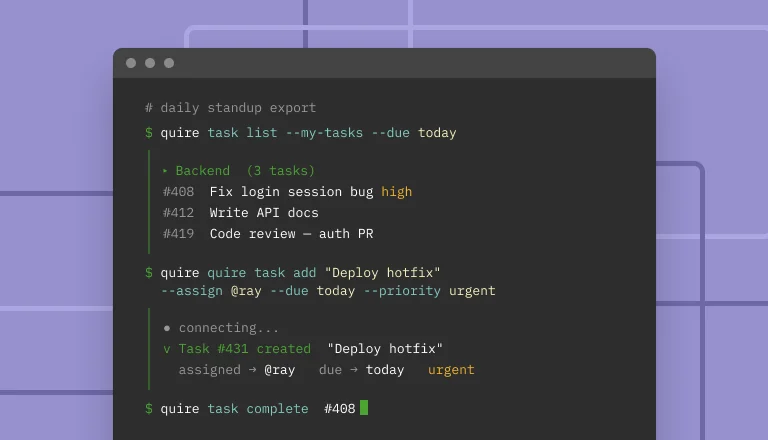
Last updated: September 30, 2026
Quire CLI is the standalone command-line tool for managing Quire from a terminal. Install once via npm or Homebrew, log in with OAuth, and run structured subcommands (quire project list, quire task create, quire mine) that you can pipe, script, and cron. It is a different category from the Quire MCP server, which is for AI agents like Claude Code or ChatGPT that call Quire as tools. Pick the CLI when you live in a terminal and want speed, scriptability, and predictable commands.
- What is Quire CLI?
- Why a CLI for Quire?
- Quire CLI vs Quire MCP server vs Quire REST API: which one should you use?
- What do you need before installing Quire CLI?
- How do you install Quire CLI?
- What can Quire CLI do?
- What are some example Quire CLI workflows?
- Which Quire surface fits which job?
- What are some tips and best practices for Quire CLI?
- Key takeaways
- Frequently Asked Questions
Most Quire users live in the browser. The web app is the right surface for visual planning, drag-and-drop sublists, and stakeholder reviews. But there is a quieter group of users (developers, ops, technical PMs, anyone who already lives in a terminal) for whom opening a browser tab just to mark three tasks complete feels like overhead. Quire CLI is for those people.
It is not an AI tool. It does not bring its own language model. It is the kind of tool git, gh, or aws are: a structured command-line interface to a service you already use, where every action maps to a predictable command you can pipe, script, or schedule. Sign in once, and the next time you need to create a task you do not break flow to find the right Quire tab.
Below is the honest version of what Quire CLI is, how to install it, the commands worth knowing, and the five example workflows that earn back the setup time in the first week.
What is Quire CLI?
Quire CLI (@quire-io/quire-cli on npm, quire once installed) is a single executable that talks to the Quire API over OAuth.
What it is:
- A regular command-line tool with structured subcommands you can pipe and script.
- OAuth-backed. Run
quire loginonce, no API key juggling, no service-account dance. - Cross-platform. macOS, Linux, Windows, anywhere Node.js or a single binary runs.
- A direct interface to the Quire API. Every CLI command maps to a real API endpoint, so nothing the CLI does is hidden behind a thinner surface.
How it fits next to Quire MCP:
- Structured by design. Commands are structured (
quire task create "Marketing_Q4" --name "Draft launch email"), so scripts and pipes get the same result every run. - Built for people at a terminal. When you want AI agents to read and write Quire on your behalf, the Quire MCP server is built for that. Different surface, different audience.
Why a CLI for Quire?
Three specific reasons, not vibes.
Reason 1: Speed. Opening Quire, finding the right project, finding the right task, clicking "complete" takes 15 to 20 seconds even on a good day. quire task complete <task-id> takes one second from a terminal you already have open. Multiply that across the 30-some-odd touches a day a Quire-heavy user makes, and the time difference compounds.
Reason 2: Scripts and cron. A CLI is a building block for automation. A morning shell script can pull your overdue tasks into a Markdown digest. A make weekly-status target can search every project for items completed this week and write a status update. A cron job can post the result to Slack on Fridays at 4pm. None of that is possible from a chat window or a web tab.
Reason 3: Honest output. Every CLI command prints what it did. You see the task ID it just created, the response from the API, the error if something failed. There are no hidden tool calls, no "I'll go ahead and create those for you" with no way to inspect what landed. When 40 tasks are about to enter a shared workspace, that visibility is the difference between a useful tool and a liability.
Quire CLI vs Quire MCP server vs Quire REST API: which one should you use?
Quire offers three programmatic surfaces. Use the one that matches the work.
| Surface | Best for | Who calls it |
|---|---|---|
| Quire CLI | Terminal users, shell scripts, ad-hoc commands, cron jobs | A human typing, or a shell script running |
| Quire MCP server | AI agents that need to read and write Quire | Claude Code, Codex CLI, ChatGPT Connectors, Claude Desktop, Cursor, Perplexity, and any other MCP client |
| Quire REST API | Server-side integrations, webhooks, custom apps | Your backend service, an n8n or Zapier flow, a webhook handler |
The MCP server and the CLI both authenticate via OAuth. The REST API uses access tokens. All three operate on the same data and respect the same permissions, so a task created by any of them shows up immediately in the others.
If you want the AI side, the Quire MCP setup guide walks through wiring the MCP server to Claude Code, ChatGPT, or any other compatible client. The CLI and MCP are complementary, not alternatives.
Wondering how Quire stacks up against other tools on MCP support? See Project Management Tools With MCP Support in 2026 for the full comparison.
What do you need before installing Quire CLI?
- A free or paid Quire account with at least one organization and project you want to control from the terminal.
- A terminal: macOS Terminal, iTerm2, Windows Terminal, or any Linux shell.
- One of: Node.js 18 or newer (for the npm install), Homebrew (macOS or Linux), or the ability to download a single-file binary from GitHub Releases.
- The ability to receive an OAuth callback on
localhost. Most networks allow this. Some corporate VPNs block it. Ifquire loginever times out waiting for the redirect, ask IT to whitelist loopback redirects.
How do you install Quire CLI?
Quire CLI ships as a single command-line binary. Pick whichever install method matches how you already manage CLIs. The GitHub README lists every option.
npm (most users):
npm i -g @quire-io/quire-cli
Homebrew (macOS or Linux):
brew install quire-io/quire/quire
Try it without installing:
npx @quire-io/quire-cli --help
Or grab a single-file binary from the GitHub Releases page.
Once installed, run the one-time OAuth login. A browser tab opens, you sign in to Quire and approve workspace access, and the CLI stores its token in ~/.config/quire/credentials.json (or the OS keychain when available):
quire login
quire whoami
If quire whoami prints your account, you are connected. Try a few real commands:
quire project list
quire task list "Marketing_Q4"
quire mine --all-orgs --json

What can Quire CLI do?
The full subcommand surface is documented in the GitHub README, but the commands worth knowing on day one fit on one screen.
quire login                                       # one-time OAuth setup
quire whoami                                      # confirm you are signed in
quire logout                                      # remove local credentials

quire project list                                # list your projects
quire task list "<project>"                       # list tasks in a project
quire task tree <task-id> --depth full            # recursive subtree view
quire task search "release notes" --mine          # search tasks (yours only)
quire task create "<project>" --name "Ship CLI v1" --due 2026-06-30
quire task complete <task-id>                     # mark a task done
quire mine --all-orgs --json                      # list your tasks across orgs
Every command supports --help for full options. Most also support --json for machine-readable output, which is the foundation of every example workflow below.
| Resource | Common actions |
|---|---|
| Tasks | Create, update, complete, delete, move, bulk-create, set dates, assign, search |
| Subtasks & sublists | Create, list, organize hierarchy |
| Projects | List, create, update, search, manage members |
| Comments | Add, update, delete, list (with attachments) |
| Tags & statuses | Create, update, apply, list |
| Documents | Create, update, list, get content |
| Insights | Create, list, manage custom fields |
| Chats | Create, list, post messages |
| Organizations & users | Get current user, list orgs, list members |
Every action maps 1:1 to a Quire REST API endpoint.
What are some example Quire CLI workflows?
Five small patterns that earn back the install time in the first week.
Daily standup digest
quire mine --all-orgs --json \
  | jq -r '.[] | select(.due == "2026-05-11") | "- [" + .name + "](" + .url + ") (" + .project + ")"'
Run it at 9am, paste the markdown into Slack or the daily-status doc. Add an alias to .zshrc so it is one word the next morning:
alias standup='quire mine --all-orgs --json | jq -r "..."'
Bulk-create tasks from meeting notes
grep "^TODO:" ./meetings/2026-05-04-sync.md \
  | sed 's/^TODO: //' \
  | while read task; do
      quire task create "Marketing_Q4" \
        --name "$task" \
        --tag "from-monday-sync" \
        --due 2026-05-08
    done
Twelve minutes of Monday admin reduced to a shell loop. Put it in a Makefile and the same target works every Monday without you remembering the syntax.
Cron job: Friday overdue digest
0 17 * * 5 cd ~/work && /usr/local/bin/quire task search "overdue" --mine --json > friday.json
Pair it with a follow-up script that posts the JSON to a Slack webhook, generates a Notion page, or just emails it to you. The CLI handles the data plumbing; whatever you bolt onto the end is up to you.
Convert a content calendar CSV into tasks
tail -n +2 ./calendar/2026-Q2.csv \
  | while IFS=, read -r publish_date channel title; do
      quire task create "Content_Pipeline" \
        --name "$title" \
        --due "$publish_date" \
        --tag "$channel"
    done
CSV to tasks in one pipeline. Idempotent if you also tag rows with a source identifier so you can clean up if a run goes sideways.
Complete tasks by ID from a file
cat finished_today.txt | xargs -n 1 quire task complete
Where finished_today.txt is just a list of task IDs, one per line. Useful at 5pm on a Friday when you have eight things to close at once and clicking each one in the browser feels like punishment.
Which Quire surface fits which job?
The CLI is one of four ways into Quire, and the other three each have a job:
- The web app, if you don't live in a terminal. Everything the CLI does, the web app does too; the CLI is simply faster for people who already work in a shell.
- Quire MCP, when you want AI to do the reasoning. When the work is "find every stalled project and tell me which to escalate," that is AI-shaped. Connect the Quire MCP server to Claude Code, Codex CLI, ChatGPT, or Claude Desktop, and let the model decide which tools to call. The CLI does data plumbing; MCP does reasoning.
- The REST API, for server-side integrations. For workflows that fire on webhooks or run on a service you operate, the Quire REST API is built to run unattended.
One setup note: some corporate VPNs block OAuth loopback redirects. If quire login waits on the redirect, ask IT to allow 127.0.0.1 callbacks.
What are some tips and best practices for Quire CLI?
- Use
--jsonandjqfor anything you want to reuse. Plain-text output is good for reading; JSON is good for everything else. Most CLI commands accept--json. - Quote project names exactly. "Marketing_Q4" is unambiguous, "the marketing one" is not a project name the CLI knows about. Project names are case-sensitive.
- Tag bulk-created tasks. Adding
--tag from-cli(or--tag bulk-import-2026-05-11) makes it trivial to find and clean up if a script run goes sideways. - Put OAuth login in your setup script for new machines. A one-liner
quire login && quire whoamiafter a fresh install lets a new laptop reach a working state in 30 seconds. - Read
quire <command> --help. It is shorter and more accurate than any blog post can be. Every option for every subcommand lives there. - Combine the CLI with the MCP server. Use the CLI for the deterministic half (create, complete, list, search) and an AI client connected to MCP for the ambiguous half (triage, summarize, plan). Same data, two complementary surfaces.
Key takeaways
The interesting shift in 2026 is not that AI clients can manage projects. It is that the people who do the most project management already had a tool they trusted: the terminal. Quire CLI gives them a first-class entry point into their workspace, with no AI in the path unless they want one.
If you live in a terminal, install it this week. Wire one of the example workflows above into your morning or Friday routine. The setup is five minutes. The payback compounds for as long as you keep using Quire.
The MCP server is still the right tool when reasoning is the work. The two are not competitors; they are complementary surfaces on the same workspace.

Frequently Asked Questions
What is Quire CLI?
Quire CLI is a standalone command-line tool for Quire. Install it via npm, Homebrew, or a binary, run quire login, and manage tasks, projects, and documents from any terminal.
Is Quire CLI the same as the Quire MCP server?
No. Quire CLI is for humans typing commands. The Quire MCP server is for AI agents calling Quire as tools. Same data, different audience.
Do I need to be a developer to use Quire CLI?
No. If you can open a terminal and run two commands, you can use it.
What can I do with Quire CLI?
List and search tasks, create them in bulk, complete them, organize subtasks, manage projects and members, post comments, create documents. Every Quire object is reachable.
When should I use the MCP server instead?
When the work needs reasoning. Triage, summaries, turning unstructured notes into tasks. Quire CLI is for the deterministic half.
Does Quire CLI work in cron jobs?
Yes. Use --json output, schedule from cron, post results wherever you need them.
Is there a free tier?
Yes. Quire's free plan covers the same CLI access as paid plans.
Ready to run your Quire workspace from the terminal?
Install Quire CLI from npm, Homebrew, or GitHub Releases. Free Quire account, full access, no credit card.
