
project management · Sep 30, 2026
Collaborative Work Management: What It Is and 5 Checks to Test Any Tool

Last updated: October 21, 2026
Collaborative work management is the category where a piece of work carries its own plan, discussion and current state. Task management assumes one person choosing what's next; project management assumes a plan that ends. This category assumes people whose work depends on each other. The test: open a real task and find the last decision. In Quire, it's on the task.
- What is collaborative work management?
- How is collaborative work management different from task management software?
- How can you tell whether a tool really belongs in this category?
- When does a team need collaborative work management software?
- Why do CWM rollouts stall even with the right tool?
- What does the five-check test look like in Quire?
- Key takeaways
- Frequently asked questions
Software categories are usually marketing, and it's reasonable to ignore most of them. This one is worth ten minutes, because it describes a real difference in what a tool assumes about your work.
The name doesn't help, though. Every tool with a comment box now claims collaborative work management, from task management software to full project suites, which makes the phrase useless exactly when you need it, at the point of choosing.
So here's the version that survives contact with an evaluation, ending in five checks you can run on any tool this week.
What is collaborative work management?
Collaborative work management: the category of tools where a piece of work carries its own plan, its own discussion and its own current state, so all three stay attached to the thing they describe instead of living in separate systems.
Collaborative work management is software for teams whose work depends on each other, where every task holds its own plan, discussion and status. A to-do app serves one person's list, and a project tool serves a plan with an end date. This category answers who's waiting on whom and what changed. In Quire, that answer sits on the task itself.
According to Gartner's market definition, collaborative work management (CWM) tools are stand-alone products that provide "task-driven workspaces to enable end users to plan, coordinate and automate their work." Translated out of analyst language, that sentence makes three claims.
- The task is the workspace. Work isn't a row in someone else's plan. It's the place where the plan, the files and the conversation about that work gather.
- Coordination is the job. Gartner lists in-context collaboration right beside work planning, which is the analyst way of saying the discussion belongs on the work it's about.
- State should be readable. Reporting and dashboards are part of the definition, because the point is that anyone can see where things stand without asking a person.
That sounds abstract until you apply the test. Open any tool and find a piece of work that went sideways last month. Where is the reasoning? If the argument about why the date moved is on the task, the tool is in this category.
If the task holds only the new date and the reasoning is in a chat thread that scrolled away in March, the tool is a record-keeper with a comment box, whatever its category page claims.
Run the same test in Quire and you know exactly where to look: the task's comments, where whoever moved the date can @mention the approver, and its activity trail, which records the change itself.
The underlying problem the category exists to solve is that knowledge work is invisible by default. Nothing about writing, designing or planning produces a physical signal that it is happening, which is why teams substitute meetings and status updates as a way of manufacturing visibility.
That substitution is the cost. Harvard Business Review made the case a decade ago that visual systems make knowledge work easier to track, and the category is essentially the software expression of that argument.
How is collaborative work management different from task management software?
Classic task management assumes one person deciding what happens next; collaborative work management assumes several people whose work depends on each other. Project management sits between them, built around a plan with a start and an end. Whichever assumption a tool was built on decides what it makes easy.
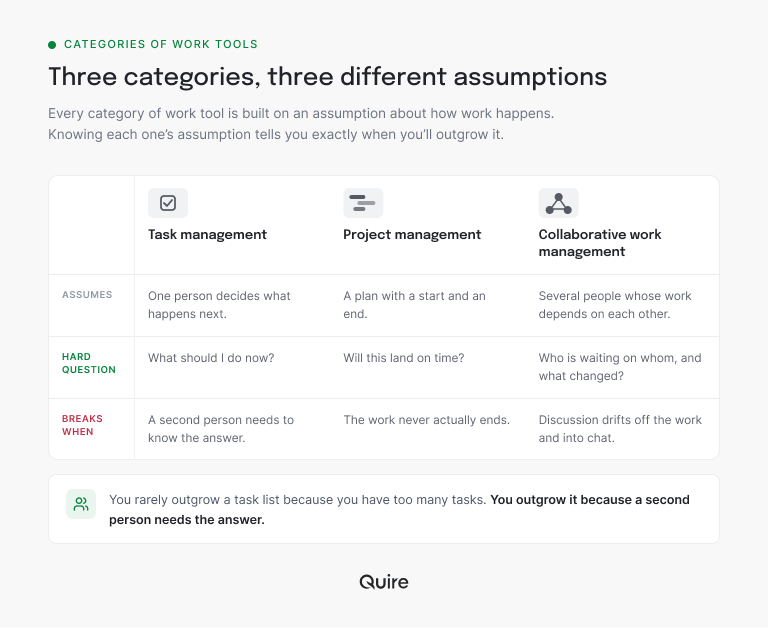
The classic personal task list answers one question: what should I do next? Everything in it, down to the sort order, serves that answer. It copes gracefully with more tasks, because more tasks is still one person's problem.
Project management answers a different question: will this land on time? Its center of gravity is the schedule, which is exactly right for a launch or a migration.
It's slightly wrong for a marketing team or an operations function, where the work doesn't conclude. When a project ends, the plan gets archived. When a quarter ends, the work simply continues.
The gap between those two assumptions is where this category sits. Its hard question is neither priority nor schedule but coordination: who is waiting on whom, and what changed since yesterday.
Most teams need all three questions answered at once. That's why a tool's foundations matter more than the label on its website.
Quire is task management software built on shared, nested tasks. The same task can sit on someone's My Tasks list, on a project Timeline and inside a cross-team discussion, without being copied into three tools.
For the practice rather than the software, read what collaborative working is, with its types and benefits.
How can you tell whether a tool really belongs in this category?
Run five checks on a real piece of work, and trust what you find over what the category page says. Every vendor claims the label, so the label settles nothing. What settles it is how a tool behaves once work gets messy.
| Check | What to do | A CWM tool passes when |
|---|---|---|
| Decision trail | Open a task whose date moved last month | The reason for the change sits on the task itself |
| Outside read | Ask someone from another function where the work stands | They find out without messaging anyone |
| Awkward shape | Add work with sub-parts, two owners and a dependency | It stays one piece of work with its parts inside it |
| Handoff | Pass the next step to someone in another function | The owner, the history and the discussion travel with it |
| Two audiences | Read the same work as a plan and as a to-do list | Both views show the same tasks, with no copy to keep in sync |
Two rules keep the test honest. Use work with genuine mess in it, because every tool looks the same on a clean three-task demo where nothing has gone wrong yet.
And run all five. Most tools pass one or two, and the category line shows up in the checks a tool quietly fails.
Want your own answer by Friday? Start a free Quire project, add one messy piece of work with sub-parts and two owners, and run the five checks against it.
When does a team need collaborative work management software?
When the work regularly depends on handoffs between people, and three symptoms tend to show up first. You rarely decide to enter a software category. You notice symptoms and go looking.
Work is crossing functions and the handoff is verbal. Design finishes something and tells someone in a message. Nothing in any system records that the baton moved, so the only person who knows the current state is whoever was in the thread.
In Quire the handoff is an assignment rather than a message. Reassigning the task puts it in the next owner's My Tasks, and the record of who had it and what was said stays on the task.
Handoffs are where cross-functional collaboration most often breaks, and the handoff gap maps exactly where it happens.
Decisions live in chat. Somebody asks in three weeks why the scope changed, and answering means scrolling. The decision was made properly; it just wasn't recorded anywhere attached to the work it changed.
Quire keeps that conversation next to the work. Comment on the task and @mention whoever has to weigh in, or open the task's own chat when it needs a real back-and-forth. Three weeks later, the reasoning is still where the work is.
Status has to be assembled by a human. Somebody spends Thursday afternoon collecting updates into a document so other people can read on Friday what was already true on Tuesday. That job exists only because the state isn't readable at the source.
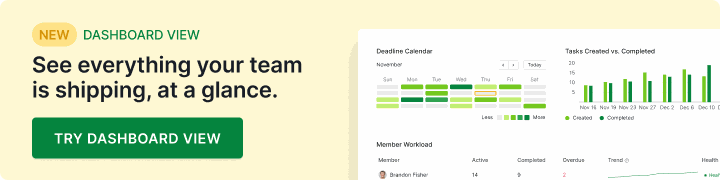
In Quire the source is readable. Every project's Overview tab shows Project Health and a Deadline Calendar, and a Dashboard can pull several projects into one shared view for whoever used to write that Thursday document.
Dashboard View is available on Professional plans and higher. The Overview tab is on every plan, including Free. More information can be found on our Pricing page.
If none of those sound familiar, a list or a plan is genuinely fine (Quire runs both, for the record). Two out of three is the point where a category change usually pays for itself.
If you're still deciding whether your team has crossed that line, the three signs you need a work management system walk through it with one supplier contract, from a ticked list item to a task that answers for itself.
Why do CWM rollouts stall even with the right tool?
Most stall because the discussion never moves. A team adopts the workspace, keeps arguing in chat and pastes the conclusions in afterward. Everything looks adopted and nothing has changed, because the reasoning still lives somewhere the tool can't see.
Call it the paste-back. It's hard to spot from the inside, because every task has an owner and a tidy status. What's missing is the one thing the category exists to hold, which is why.
The cure is a few norms, and a good tool's job is to make each one cheap:
- An owner on every piece of work. A shared workspace exposes an unowned task sooner and to more people, which can feel like the tool causing conflict. It's surfacing an old gap. In Quire every task and subtask has its own assignees, so nobody has to guess.
- A priority call. A shared workspace shows everything competing for attention, and a person still has to pick the winner. Quire gives every task a priority; a team that has never agreed on one will simply have the argument in public.
- Decisions made where the work lives. The paste-back is cured by a norm, not a setting: decide on the task, even when a thread would be faster in the moment. Comments and a task-level chat on every Quire task keep that norm a click away.
When a decision is big enough to outlive the task it changed, it deserves a home of its own, and the decision log is the cross-functional doc built for exactly that.
What does the five-check test look like in Quire?
In Quire, all five checks run on one task, because a task is a real container rather than a row. Here's the test on an example that crosses three functions: a pricing page refresh.
The parent task is "Refresh the pricing page," owned by the marketing lead and due in three weeks. Under it sit four subtasks, each assigned to the people doing it:
- New copy, assigned to the content writer and a product marketer
- Page design, assigned to the designer
- Build, assigned to the developer and set to depend on the design
- Sign-off, sent to the head of marketing as an approval
Decision trail. Legal asks for new terms and the launch slips a week. The reason goes in a comment on the parent task with the head of marketing @mentioned, and the date change lands in the task's activity trail, so the what and the why sit together.
Outside read. The sales lead who wants a launch date checks the project's Overview tab, where the Deadline Calendar already shows it. Nobody has to send the message asking.
Awkward shape. The copy has two owners, so both are assigned to that one subtask. The build depends on the design, so the Timeline shows the link, and a slipping design is visible before it turns into a late build.
Handoff. When the designer finishes, they complete the design subtask. The build is already sitting in the developer's My Tasks, and the design discussion is still on the task it was about.
Two audiences. The marketing lead plans the three weeks on the Timeline, and the developer works from a Board. They're looking at the same tasks, so there's no second copy for anyone to keep in sync.
That's the part that matters for category fit. Tasks nest, so a piece of work with sub-parts stays one thing instead of six unrelated cards, and the discussion sits on the task it's about, which is what keeps reasoning attached to outcomes three weeks later.
Quire is a work management platform built for teams whose workflows are getting more complex, with several projects running at once and handoffs that cross functions.
If your shortlist is judged on where the work and the reasoning live, that's the test Quire was built to pass. When you're ready to compare, here's how Quire stacks up as work management software.
For the neighboring practice and its own set of traps, see what makes collaborative project management hard.
Key takeaways
- It's a real category. Collaborative work management is defined by what a tool assumes about the work, not by its feature list.
- Different assumptions, different tools. Task management assumes one person choosing, and project management assumes a plan that ends. This category assumes people whose work depends on each other.
- Test on real work. Run the five checks on something messy before you trust a category label.
- Watch for the paste-back. A rollout stalls when decisions stay in chat and only outcomes get pasted in. Decide where the work lives.
- In Quire, the task holds it all. The plan and the discussion sit on the same nested task, so all five checks pass on the work itself.
Ready to see where your work actually lives? Start free at quire.io/signup, move one cross-functional piece of work in, and check next week whether anyone had to ask where it got to.
Frequently asked questions
What is collaborative work management?
A category of software where the plan, the discussion and the current state of a piece of work all attach to the work itself. Gartner calls these tools task-driven workspaces. The test is where decisions live: on the task, or in a thread the tool never sees.
How is collaborative work management different from project management software?
Project management is built around a plan with an end, and its center of gravity is the schedule. This category is built around ongoing work that several people touch. The difference shows when a project ends but the work doesn't.
Is collaborative work management the same as task management software?
They overlap. Classic task management answers what one person should do next, while this category answers who is waiting on whom. Quire is task management software built on shared, nested tasks, so one task holds its parts, its owners and its discussion.
How do you tell if a tool is collaborative work management?
Run the five checks from the table above on a real, messy piece of work. A tool in this category passes all five without an export or a status meeting.
Why do collaborative work management rollouts stall?
Usually because the discussion never moves. Teams keep deciding in chat and paste the conclusions in later. The fix is a norm: decide on the task, which in Quire means a comment or the task's own chat.
Does collaborative work management help a team be more productive at work?
It removes the tax of reconstructing state, like reading back a thread to find out where something got to. Teams are more productive at work when the current state is readable without interrupting a person. In Quire the discussion sits on the task it is about.
