
project management · Jun 18, 2026
The Decision Log: The Cross-Functional Doc Most Teams Skip and Then Regret

Last updated: October 21, 2026
A decision log is a running record of what your team decided, who owns it, and what would reopen it. It isn't meeting notes. Notes capture what was said; the log captures what was settled and why. Keep each entry to six short fields, write it the moment the decision lands, and store it where the project lives. Twenty minutes a week buys back hours of "wait, didn't we decide this?"
- What is a decision log in project management?
- How is a decision log different from meeting notes?
- What goes into a decision log entry?
- Why do teams skip the decision log, and how do you fix it?
- What does a decision log template look like?
- How does a decision log pay off?
- Where should a decision log live?
- Can AI make the decision log more useful?
- Key takeaways
- Frequently Asked Questions
There's a specific moment in every cross-functional project where somebody asks the question nobody wants to answer. "Hold on. Didn't we decide this back in February?" Then everybody looks at each other. Then somebody opens Slack and starts typing in the search bar. Then they surface half a thread that doesn't quite say what they remembered it saying. Then the team re-litigates a decision that took a week to make the first time.
You're not alone. This happens at every growing company, on almost every project that spans more than two teams. The reason isn't that people forgot. It's that the decision was never written down anywhere anyone would look. The thinking lived in the meeting. The meeting ended.
The notes captured what was said, not what was decided. And three months later, the only record of the choice sits in three or four people's heads, none of which agree. That quiet drift is one of the biggest hidden lines in the coordination tax.
The fix is one of the cheapest moves in project management. A decision log. It takes twenty minutes a week to keep up, and it saves the hours you'd otherwise spend explaining things you've already explained. Most cross-functional teams either don't have one or have a half-built one nobody updates, because they confuse it with meeting notes and abandon it within a month.
This post is about the difference. What a decision log actually is, what goes in it, who owns it, and a template you can copy today.
What is a decision log in project management?
A decision log is a project's running record of settled choices: what the team decided, who owns it, the date it landed, the alternatives that lost, and what would reopen it. Each entry runs six fields and under two hundred words, and the log sits beside the project tasks so a new hire reads four months of context in minutes.
Decision log: a running record of every choice that shapes a project: what was decided, who owns it, when it was settled, the alternatives that were weighed, and what would cause the team to reopen it.
That's the whole idea. Not a transcript, not a wiki, not another doc to maintain for its own sake. A short, scannable list of decisions and the reasoning behind each one.
Here's what one looks like in practice, pulled from a fairly ordinary cross-functional product launch. Five entries, four columns, no ceremony.
| Decision | Owner | Decided | Trigger to revisit |
|---|---|---|---|
| Use feature flags for the dashboard rollout | Maya, Eng Lead | 2026-02-03 | Rollout error rate tops 2% |
| Hold the EU launch until DPA review clears | Sam, Legal | 2026-02-10 | DPA signed, or EU drops from scope |
| Onboarding ships in English first | Priya, PM | 2026-02-14 | Non-English signups pass 15% |
| No live chat in v1, async support only | Jordan, Support | 2026-02-21 | Tickets exceed 200 a week |
| One pricing tier at launch | Alex, Growth | 2026-03-02 | Enterprise deals stall in procurement |
Notice what's missing. No discussion, no debate, no list of who said what. Just the decision, an owner, a date, and the one thing that would put it back on the table. A new engineer could read this in ninety seconds and understand four months of context.
How is a decision log different from meeting notes?
The most common reason decision logs fail is that the team treats them like meeting notes. They're not. They have different jobs and different lifespans, and the table below is the fastest way to see it.
| Meeting notes | Decision log | |
|---|---|---|
| Who it's for | The people in the room | The people who weren't |
| What it captures | What was said | What was decided, and why |
| Stays useful for | About a week | The whole project, and after it ships |
| Lives with | The meeting, in the invite or thread | The project, in the doc or workspace |
| When neglected | Becomes harmless clutter | The team quietly re-decides things |
Meeting notes are the receipts of a conversation. The meeting was the process to reach a decision, and the notes prove it happened. A decision log captures the destination, not the route. We chose A over B because of C. That's it. The discussion is gone. The decision survives.
If you have meeting notes but no decision log, you have a record of conversation without a record of conclusion. The team will know what was discussed and have no idea what they're actually supposed to do.
What goes into a decision log entry?
A decision log entry is short. If you can't write it in under two hundred words, the decision probably hasn't really been made yet. The format I keep coming back to, after more cross-functional projects than I'd like to count, is what I call the Six-Field Entry. Small enough to write at the meeting, complete enough to survive the new hire reading it six months later.
Title. A short sentence in plain English. "Use feature flags for the new dashboard rollout," not "Rollout strategy discussion." The title should tell you what was decided, not what the meeting was about.
Date. When the decision was finalized, not when discussion started. The debate might have run three meetings long. The log only cares about the day it resolved.
Owner. The person accountable for the decision standing, who isn't always the person who proposed it. If it ever needs to be revisited or defended, this person is the first stop.
Summary. One paragraph of plain prose. What was decided, the most important constraint behind it, and any obvious second-order effects. Don't go longer. The log gets ignored the moment it turns dense.
Alternatives considered. A short list of the other options that were on the table, with a one-line note on why each lost. This is the field most teams skip, and the one that's most valuable three months out, because the trap is reopening a decision without remembering what the original alternatives even were. Capture the trade-off, not just the outcome.
Trigger to revisit. What would cause the team to reopen this. New data. A scope change. A specific date. If nothing would, write "stands until project ends." If you genuinely can't think of a trigger, that's a quiet sign the decision was made on vibes, which is fine sometimes but worth flagging.
That's the whole entry. Six fields, under two hundred words, written at the moment of decision.
Why do teams skip the decision log, and how do you fix it?
Decision logs are easy to design and hard to keep alive. The failure modes are predictable, which is good news, because predictable problems have fixes.
The first is retroactive logging. Someone tries to update the log on Friday based on what happened all week. By Friday, nobody remembers the alternatives. The entries flatten into bland summaries with no decision context, and the log slowly becomes a list of things that happened, which is just meeting notes wearing a different hat. Within a month, nobody reads it.
The fix is to log decisions at the moment they land. Whoever's facilitating types the entry as the decision resolves, and the team agrees on the wording before moving on. If the log can't be written in five minutes, the decision isn't actually done yet.
The second failure mode is centralized authoring with no agreement. One person, usually the PM, tries to capture every decision the team makes. By the time they write it up, the decision has already been bent a little by retelling. The team disagrees with the log's version, stops trusting it, and stops updating it.
The fix is shared authoring with central ownership. The PM owns the format and the location. Anyone who makes a decision writes the entry. The PM reviews for consistency. The log stays accurate because the people closest to the decision wrote the words.
The third failure mode is no agreed home. The log lives in someone's personal Notion, and the link breaks when they leave. Or it lives in five places because each team prefers a different tool, so people give up looking and re-decide things instead of searching.
The fix is to give the log one home, attached to the project itself. If you're using a PM tool with a documents feature like Quire Documents, the log lives in the same workspace as the project tasks. It travels with the work, anyone with project access has log access, and nothing breaks when somebody changes roles.
If the project doc and the project tasks live in two different tools, the log gets orphaned within a quarter. Keep them on the same surface. More on the cross-functional doc-plus-task pattern.
What does a decision log template look like?
Here's a copy-paste template that works for most cross-functional projects. It's plain enough to drop straight into Quire Documents, Notion, a Google Doc, or a markdown file in a repo.
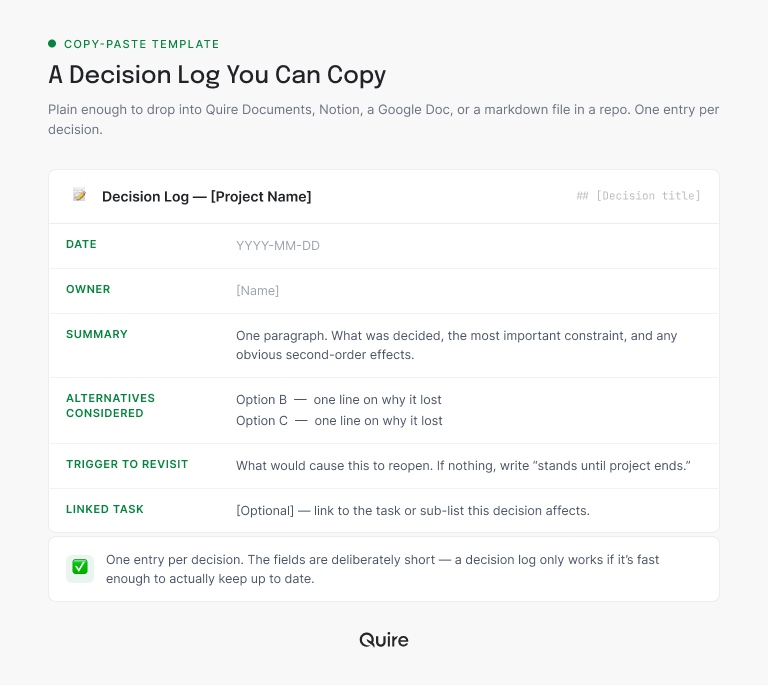
## Decision Log — [Project Name]

### [Decision title]
- **Date:** YYYY-MM-DD
- **Owner:** [Name]
- **Summary:** [One paragraph. What was decided, the most
  important constraint, any obvious second-order effects.]
- **Alternatives considered:**
  - Option B — [One line on why it lost]
  - Option C — [One line on why it lost]
- **Trigger to revisit:** [What would cause this to reopen.
  If nothing, write "stands until project ends."]
- **Linked task:** [Optional. Link to the task or sub-list this
  decision affects.]
A few notes on using it. The linked-task field is optional but quietly powerful. It lets the decision show up in the project graph, not just in the doc. Open the task and you see the decision that shaped it. Open the decision and you see the work it produced. The two surfaces stay coupled.
The trigger field is the one that gets skipped. Resist that. Even "stands until project ends" is a useful trigger, because it tells the team not to reopen the question casually. Decisions with explicit triggers are decisions with longevity.
And keep each summary to one paragraph. If you're writing four, the decision wasn't really made. It was discussed, and the discussion is sneaking into the log. Move it back to the meeting notes where it belongs.
How does this compare to an ADR?
Engineers who've worked in a codebase with Architecture Decision Records will notice the six-field entry is a close cousin. An ADR is the same idea narrowed to technical decisions, usually one markdown file per decision committed to the repo. The standard ADR format (from Michael Nygard's original write-up) has five parts: Title, Status, Context, Decision, and Consequences. Put the two side by side and the overlap is obvious.
# ADR 0007: Use feature flags for the dashboard rollout

Status: Accepted

Context:
The dashboard is a high-traffic surface and a bad rollout
would hit every user at once. We need a way to release
incrementally and roll back without a redeploy.

Decision:
Ship the dashboard behind a feature flag, enabled for an
internal cohort first, then a percentage rollout.

Consequences:
+ Instant rollback by toggling the flag, no redeploy.
+ Can dark-launch and dogfood before public exposure.
- Adds flag-cleanup debt once the rollout completes.
- Every branch of the flag needs test coverage.
The decision-log entry captures the same decision in fewer fields, aimed at a mixed audience instead of just engineers.
Nygard's "Context" maps to the log's Summary and Alternatives; "Consequences" maps to the trade-off you record in the Summary; ADR "Status" has no direct log field, but the Trigger-to-revisit does the job the log actually needs. Use ADRs when the decision is technical and lives in the repo.
Use the six-field log when the decision is cross-functional and the audience includes people who will never open the codebase.
How does a decision log pay off?
Here's the honest part. A decision log doesn't feel valuable in week one. The entries seem obvious, the cost feels real, and the benefit feels imaginary. (Every good habit has this week-one tax.)
The payoff shows up around week six. The new engineer reads the log and gets up to speed in an hour instead of three days, and stops asking "wait, why are we doing it this way?" in every code review.
The stakeholder who loves asking "didn't we discuss this?" gets sent a link instead of a meeting invite, and slowly learns the answer is usually yes.
The team about to reopen a settled question gets pulled back to the original alternatives, remembers why the chosen option won, and ends the conversation before the meeting gets scheduled.
The math is simple, and the numbers below are an illustrative example rather than a figure from a tracked case study.
Say a project runs six months and pulls in twenty people across three teams, and each person loses roughly 30 minutes a week to re-explaining decisions that were already made.
That's about 10 hours a week across the team, or roughly 260 hours over the project: about 6.5 work weeks of meeting time the log would have quietly prevented. Plug in your own team size and you'll land somewhere different, but the shape holds.
The cost of the log itself is maybe 15 minutes a week for whoever's writing it. The trade is borderline absurd in your favor.
Where should a decision log live?
A decision log works in any document tool. Notion, Google Docs, Confluence, a markdown file. The format isn't the constraint. The real constraint is whether the log lives next to the work it affects. (For the same pattern from a different angle, the handoff gap post is worth a read.)
If your project tasks and project docs already live in separate tools, the log gets orphaned. Engineers don't open the doc tool. PMs don't open the engineering tool. The log defaults to "the PM's job" and then quietly dies.
Whether docs and tasks live together is exactly the kind of thing worth checking before you commit to a tool, not after; see how to evaluate a PM tool without a 6-month trial for the rest of the checklist.
Quire keeps documents and tasks in the same workspace, so the log lives where the project lives. The linked-task field becomes a real link in the project graph instead of a manual reference, and decisions show up right next to the work they shaped. It's not the only setup that works. It's the one with the fewest ways to fall apart, especially for cross-functional teams who don't all live in the same tool.
New to the docs side of Quire? Here's how Quire Documents works. It's a full writing surface that lives in the same workspace as your tasks, so the log sits right where the project does.
Decisions are the D in RAID. If you want the other three tracked beside them, Quire's RAID log guide puts risks, assumptions, and issues on the same board, with an owner and a review date on every row and a sublist for whatever is currently on fire.

Can AI make the decision log more useful?
A decision log is exactly the kind of structured record AI assistants are good at working with. With Quire's MCP server connected, you can ask Claude why a choice was made and get an answer grounded in the log entry itself, or have it flag decisions whose review dates have passed. Our guide to project management tools with MCP covers the setup.
Key takeaways
A decision log is a running record of what your team decided and why, and it's a different artifact from meeting notes: notes capture what was said for the people who were there, the log captures what was settled for the people who weren't.
Keep each entry to six short fields (title, date, owner, summary, alternatives, trigger) and write it the moment the decision lands, because retroactive logging is where most logs die.
Use shared authoring with one owner for the format, and give the log a single home attached to the project itself so it doesn't get orphaned across tools. The cost is about twenty minutes a week.
The return, on a six-month cross-functional project, is measured in work weeks of meetings you never have to sit through.
Frequently Asked Questions
What is a project decision log?
A running record of every choice that shapes a project: what was decided, who owns it, when, the alternatives weighed, and what would reopen it. It captures decisions and reasoning, not the discussion, which is what separates it from meeting notes.
How is a decision log different from meeting notes?
Notes capture what was said, for the people who were in the room. The log captures what was decided and why, for the people who weren't. Notes age out in a week. A good log stays useful for the life of the project.
What information goes in a decision log entry?
Six fields: a short title, the date it was finalized, the owner, a one-paragraph summary, the alternatives that lost and why, and a trigger that would reopen it. Keep the whole thing under two hundred words. The decision, the date, who made it and what was ruled out. Keeping it in comments on the Quire task it concerns means whoever opens the work finds it, not just whoever remembers the log exists.
How often should you update a project decision log?
Every time a decision is made, in the moment. A log updated retroactively on Friday doesn't work, because nobody remembers the alternatives by then. Treat the entry as part of the decision, not a downstream task.
Who should own the project decision log?
The project lead owns the format and the location, but everyone writes to it. Central ownership keeps it usable; distributed authoring keeps it accurate. One person logging everything from memory is the pattern that fails.
What's the difference between a decision log and an ADR?
An ADR (Architecture Decision Record) is a specific format for technical decisions, usually one file per decision in a git repo. A decision log is the broader pattern. ADRs are one kind of log, and the same idea works for the non-technical decisions cross-functional teams make constantly.
Ready to stop re-deciding things you already decided?
A decision log is twenty minutes a week against hours of repeated meetings, and it runs cleanly in Quire: the log lives in Quire Documents right beside the tasks, and the linked-task field becomes a real connection in the project graph instead of a dead reference.
Start free at quire.io/signup. No credit card, full feature access, 30 days. Write down the next decision your team makes, link it to the task, and store it where the work lives. The next time someone asks "wait, didn't we decide this?", you'll already have the answer ready.
