project management · Jun 2, 2026
How to Evaluate a PM Tool Without a 6-Month Trial

Last updated: October 21, 2026
Long PM tool trials produce worse decisions, not better ones. Run a two-week sprint instead: one real project, three shortlisted tools, a small team, a written must-have list, and a 10-question rubric scored on day 14. The tool people keep reaching for voluntarily by day 14 is the one that fits.
- Why Do Long PM Tool Trials Fail?
- How Many PM Tools Should You Trial?
- How Do You Run a Two-Week Evaluation Sprint?
- What's the Best 10-Question Scoring Rubric?
- When Should Stakeholders Be Involved?
- What Are the Red Flags During a PM Tool Evaluation?
- How Do You Document the Final Decision?
- What Does the Sprint Look Like in Practice With Quire?
- How Does Tool Choice Change at Scale?
- Can Quire Handle a Large Team?
- Key Takeaways
- Frequently Asked Questions
The standard advice for buying project management software goes like this. Trial five tools, assemble a cross-functional committee, score everything against a 47-item rubric, and make a careful decision over the course of a quarter. It sounds rigorous. It's actually a recipe for buying the wrong thing slowly.
Long trials produce worse decisions, not better ones. The team gets locked into sunk-cost thinking. The comparison gets stretched across projects with different shapes, so nothing is actually comparable. By the time the committee reaches consensus, the original problem has shifted, and whatever tool won the evaluation is now optimized for a problem you don't have anymore.
There's a faster, better way to do this. Two weeks. One real project. A small team. A clear scoring rubric. A decision date that doesn't move. This post is the whole method: the 10-question rubric, the traps that quietly sink evaluations, and the specific tools (Asana, Monday, ClickUp, Notion, Quire) where each rubric question tends to expose a real difference.
Why Do Long PM Tool Trials Fail?
The obvious failure mode of a six-month trial is that it takes six months. The less obvious ones are worse.
Sunk-cost bias. After two months of evaluation, nobody wants to say the finalist doesn't work, because that would mean admitting two months of wasted effort. So the team finds reasons to make it work. You end up with a tool chosen by inertia, not by fit.
Committee averaging. Large evaluation committees produce average decisions. The loudest stakeholder wins on the features they care about. The quietest ones defer. Nobody gets a tool that works great for their specific function. Everyone gets a tool that's acceptable for everybody.
Problem drift. Your team's pain changes every quarter. A tool that solved last quarter's problem might not solve next quarter's. Long trials make you solve yesterday's problem slowly.
Demo-fit illusion. Every tool looks great in week one. The real problems show up in weeks three through six, and by then the evaluation keeps rolling, which tempts the team to write the problems off as teething issues instead of signal.
The fix is constraint. Give the evaluation two weeks, one real project, and a small team. The constraints force honesty.
How Many PM Tools Should You Trial?
Three. Short-list to three tools by day 3, then run all three on the same real project for eight working days. One tool gives you nothing to compare against, five splits the team's attention until every tool looks the same, and three is the most a small team can run side by side without the sprint turning into a quarter.
The five tools this post names, and the rubric question each one's trial tends to turn on (the full rubric is below):
| Candidate | Rubric question that usually decides it | What the sprint tends to show |
|---|---|---|
| Asana | Nested hierarchy at your depth | A real task tree, ahead of flatter tools |
| ClickUp | Onboarding under an hour | Sheer surface area is the cost of its power |
| Monday | Stakeholders viewing without a paid seat | Strict per-seat pricing once execs and clients just want to look |
| Notion | Reporting from task state | Docs-first, so someone rebuilds the status view by hand |
| Quire | Still in use on day 14 | Nesting with no depth limit, and a minimal interface new people learn fast |
How Do You Run a Two-Week Evaluation Sprint?
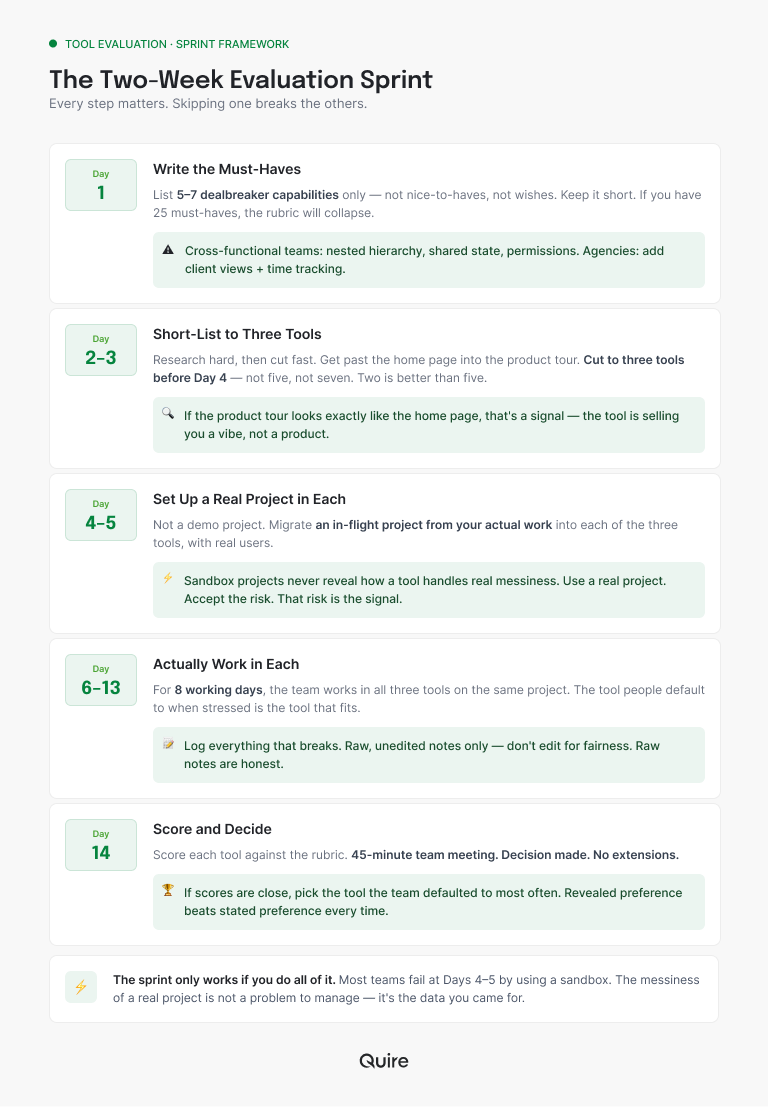
Here's the structure. Every step matters, and skipping one breaks the others.
Day 1: Write the Must-Haves
Before any demo, write down the five to seven capabilities your next tool must have. Not nice-to-haves. Not wishes. Actual dealbreakers. Keep the list short. If you have 25 must-haves, you'll find something to love in every tool and something to hate in every tool, and the rubric collapses into noise.
For cross-functional teams, the short list usually includes nested task hierarchy, shared cross-team state, and a permission model that doesn't fight you. For agencies, add client-facing views and time tracking. For growing teams specifically, the list depends on where you sit on the Scale Curve.
Days 2–3: Short-List to Three Tools
Research hard, then cut fast. Vendor home pages are written by marketing (we would know). Get past the home page and into the product tour. If the tour looks exactly like the home page, that's a signal: the tool is selling you a vibe, not a workflow.
Cut to three tools before Day 4. Not five. Not seven. Three. Two is better than five.
Days 4–5: Set Up a Real Project in Each
Not a demo project. Not "let me just add a few tasks." An in-flight project from your actual work, migrated into each of the three tools, with a small team of real users.
This is where most evaluations quietly fail. Teams use a sandbox project to be safe, and then never learn how the tool handles a real project with real messiness, real stakeholders, and real deadline pressure. Use a real project. Accept the risk. That risk is the signal you came for.
Days 6–13: Actually Work in Each
For eight working days, the team runs all three tools at once on the same project. Yes, it's redundant. Yes, it's a little annoying. That's the point. The tool people default to when they're stressed and behind is the tool that actually fits.
Log everything that breaks. Every "the update didn't reach me," every "I can't find X," every "this is taking too long." Write it down in the moment. Don't edit for fairness later. Raw notes are honest notes.
Day 14: Score and Decide
The rubric goes here (next section). Score each tool. The small team meets for 45 minutes. Decision made. No extensions, no "let's give it one more week."
If the scores are close, pick the one the team reached for most often during the eight working days. That's revealed preference, and it beats stated preference every time.
What's the Best 10-Question Scoring Rubric?
Score each tool 1 to 5 on each question. Higher is better. Total out of 50.
| # | Question | Why it matters |
|---|---|---|
| 1 | Did work actually happen in this tool, or did people work around it? | The single best predictor of long-term fit. |
| 2 | Could a new team member onboard in under an hour? | Onboarding time compounds across every new hire forever. |
| 3 | Did reporting come from task state, or did someone rebuild it? | Tools where reporting is separate create the status meeting problem. |
| 4 | Did cross-team dependencies hold together without reconciliation? | Where cross-functional tools usually break quietly. |
| 5 | Does mobile work well enough to trust? | Asynchronous work lives partly on phones now. |
| 6 | Does the permission model scale without duplicating data? | Hidden complexity killer. |
| 7 | Can stakeholders view without a paid seat? | Otherwise you'll maintain a parallel reporting system. |
| 8 | Does nested hierarchy support the depth we actually need? | Flattening complex projects is a decade-long tax. |
| 9 | Is pricing predictable as the team grows? | Some tools have cliff-pricing that hits around 25 seats. |
| 10 | Is the team still using it voluntarily on day 14? | Revealed preference is more honest than stated preference. |
Add the scores. The winner is the one with the highest total, not the one with the flashiest demo. If two tools land within 5 points of each other, use Question 10 as the tiebreaker.
Where Does the Rubric Separate Tools Most?
The questions that expose real differences are rarely the flashy ones. Question 2 (onboarding under an hour) tends to go against the heavier all-in-one tools, where ClickUp's sheer surface area is the cost of its power.
Question 3 (reporting from task state) is where docs-first tools like Notion ask someone to rebuild a status view by hand. Question 7 (stakeholders viewing without a paid seat) punishes strict per-seat models like Monday's the moment you have 30 clients or execs who just want to look.
Question 8 (nested hierarchy you actually need) separates real task trees from glorified checklists, which is where Asana and Quire tend to pull ahead of flatter tools.
And if you run the sprint on a project that shares people with two others, Questions 3 and 4 together tell you the most useful thing in the whole rubric: whether the tool can show status across several projects at once, or whether someone has to assemble that picture by hand every week.
The rubric asks the questions a demo is designed to skip, and it isn't tuned to favor any one product.
Buying with AI agents on the roadmap? Add four questions to the rubric. The Agent Readiness Test checks whether a tool exposes its state through MCP, scopes agent permissions per project, logs every agent action with one-click revert, and lets a human approve before the agent commits.

When Should Stakeholders Be Involved?
Stakeholders should be involved, just not continuously. The shape that works:
Day 1: the executive sponsor approves the eval timeline and the must-have list. Five minutes. Don't negotiate this in a meeting. Send it in writing.
Day 14: the evaluation team presents the score and the recommendation. The sponsor signs off or pushes back with a reason.
Between: the sponsor is informed, not consulted. If they want to weigh in daily, the eval quietly turns back into a six-month project.
The same logic applies to the broader team. Keep the evaluation team small (3 to 5 people), and bring in async feedback from everyone else only once the finalists are down to two.
What Are the Red Flags During a PM Tool Evaluation?
Watch for these. They predict post-purchase regret better than any feature list does.
"We'll configure it for you." If the sales rep offers a customer success specialist to get you set up, the tool is more complex than the demo suggests. Self-serve setup should be possible. Ask how many of their customers are still self-sufficient six months after "done by CS."
"It's on the roadmap." Treat this as "no." Roadmaps slip. Buy what exists today, not what's promised for Q3.
"You can do that with a Zapier integration." Any capability that needs a third-party integration isn't really a capability. It's a dependency that will break, change its pricing, or add latency at the worst possible moment.
Onboarding takes more than an hour for a new user. If walking a teammate through "how we use this tool" takes a full meeting, the structure is too idiosyncratic. It only gets worse as more people need to learn it.
Pricing that jumps at a specific seat count. Some tools price gently from 5 to 24 seats and then triple at 25. Ask the rep to show you the full pricing curve. If they hedge, assume the worst.
How Do You Document the Final Decision?
Once you've scored and decided, write the decision down in a one-page doc. Five sections:
- What we picked and why (3 to 5 sentences).
- What we almost picked, and why not (so future you can re-evaluate without redoing the work).
- Must-haves the tool covered versus gaps we're knowingly accepting.
- Migration plan (rough; see the outgrowing your tool post for the detailed version).
- When we'll re-evaluate (usually annual, or at the next Scale Curve transition).
This doc matters because the decision will get questioned in six months. "We just picked it" doesn't hold up. "We ran a two-week eval against these criteria, here's the rubric, here's what we accepted" does.
With the decision on paper, the migration comes next. Switching project management tools without losing your history expands item 4 into a full plan, from sorting old projects to the day the old tool goes read-only.
What Does the Sprint Look Like in Practice With Quire?
We'll be specific, so you can compare against the tool you're actually evaluating. A two-week sprint in Quire usually plays out like this.
Day 1: import an existing project (CSV from your old tool, or rebuild it natively in about 30 minutes). Set up nested tasks three or four levels deep. Add a few team members.
Days 2 to 13: run the project for real. Standups happen on the project page. Stakeholder updates live as a recurring task. Cross-team handoffs use task assignment plus a comment thread. The team works on mobile, on desktop, and through the Claude MCP integration if AI workflows are in scope.
Day 14: score against the rubric. The strongest signal you'll get is whether the team is still using Quire voluntarily on Day 14. If they've drifted back to the old tool, the rubric score doesn't matter. That drift is the answer.
This mirror-image method works for any tool. The point is to run real work in the candidate, not to admire it in a demo.
If you want to run the sprint with us, the Quire free tier gives you full feature access for 30 days, long enough to run two sprints if the first one is close.
How Does Tool Choice Change at Scale?
This process works for any growing team, but the stakes rise with how much coordination the tool is holding. A team running two projects can afford to be a little wrong, because migration is still cheap.
A team running a dozen projects that share people can't, because that migration takes a month and costs real throughput. The Scale Curve maps where those stages usually land. Match the rigor of the evaluation to the cost of getting it wrong.
If you're not sure where on the heavy-to-light spectrum your team should land, the lightweight vs heavyweight PM post scores it on five dimensions before you start scoring tools.
Can Quire Handle a Large Team?
This comes up because Quire is easy to start in, and easy-to-start tools are often assumed to have a low ceiling. Worth separating the two questions: how fast a tool onboards, and how much coordination it holds.
On capacity, the paid plans add members as you purchase them, so there is no headcount ceiling built into the product. The 10-member figure people sometimes quote is the free plan's limit, not the product's.
On structure, the things a large organization actually needs are in place:
- Nesting with no depth limit, so a program broken into initiatives broken into workstreams broken into tasks stays one tree rather than four linked projects.
- A minimal interface over that depth. The design works by progressive disclosure, so advanced controls stay hidden until you reach for them, and collapsing a branch folds a large tree into a readable outline. Minimal describes the interface, not the feature set, which is the distinction weight-class shorthand usually gets wrong.
- Portfolio roll-up as a view, not a report. Dashboard View scopes to one project, a folder, or every project at once, reading live task state. Smart Folders filter across projects on every plan.
- Permission scoping. Per-project Permission Control, plus an External Team mechanism that limits a contractor or client to specific tasks.
- Identity and governance. SAML 2.0 single sign-on against Okta, Azure AD, Google Workspace, or any SAML provider, and ISO 27001:2022 certification covering how the data is handled.
- Multi-org billing. Master Organization lets several linked organizations share one member pool instead of paying per member per org.
- A real integration surface. A REST API with push webhooks, so a finance or BI roll-up can be built rather than requested.
Dashboard View requires Professional or higher. SAML single sign-on requires Enterprise. Master Organization requires the master org to be on Premium or Enterprise.
For evidence rather than a feature list: a Silicon Valley nonprofit coordinates 400 volunteers in Quire, around 100 TU Delft students build a satellite across nine sub-teams in it, and a financial firm of 70 serves thousands of clients across five countries from it.

Key Takeaways
Long PM tool trials produce worse decisions than short ones, mostly because of sunk-cost bias, committee averaging, and problem drift.
The two-week sprint forces honesty: one real project, three shortlisted tools, a small evaluation team, a clear must-have list, and a 10-question rubric scored on Day 14. Watch for the "we'll configure it for you," "it's on the roadmap," and "just use Zapier" signals while you trial.
Document the decision in a one-page doc you can defend six months from now. And remember the single best predictor of long-term fit: whether people keep using the tool on Day 14 without being told to.
Frequently Asked Questions
How long should you trial a project management tool before deciding?
Two weeks is usually enough, and six months is usually too long to decide anything. Long trials feel thorough but breed sunk-cost bias and stretch the comparison across projects you can't fairly compare. A two-week sprint on a real project surfaces the sharp edges fast.
How many PM tools should you trial?
Three. Short-list by day 3, run all three on one real project for eight working days, and score them on day 14. One gives you nothing to compare against, five splits the team's attention. Quire makes a fair third candidate, with full feature access free for 30 days.
What should a two-week PM tool evaluation sprint include?
Four things:
- One real in-flight project, not a sandbox
- A small team of 3 to 5 people
- A written must-have list, scored at the end
- A decision date that doesn't move
Running it on a fake project instead of real work is the most common mistake. One real project, not a sandbox, and at least one week the team would have had anyway.
A live project in Quire with real owners and dates tells you more in five days than a feature comparison does in a month.
What's the best scoring rubric for PM tool evaluation?
A 10-question rubric weighted toward fit, not features. It asks whether work actually happens in the tool, whether people onboard in under an hour, whether reporting comes from task state, and whether the team is still using it voluntarily by Day 14. Score each tool out of 50.
Who should be involved in a PM tool evaluation?
Keep it small: 3 to 5 people, including one project manager, one senior contributor per affected function, and whoever signs off on the purchase. Big committees average out real-world fit. Bring in wider async feedback only once the finalists are down to two.
What are the biggest red flags during a PM tool evaluation?
Three: the rep wants to "configure it for you" instead of letting you self-serve, a key capability is "on the roadmap" or needs a third-party integration, and onboarding a new person takes more than an hour. All three get worse after you buy.
Can Quire handle a large team?
Yes. Paid plans add members as purchased, so no headcount ceiling is built in, and the 10-member figure is the free plan's limit. Nesting with no depth limit, portfolio dashboards, per-project permissions, SAML single sign-on, and ISO 27001 certification cover organization-scale needs. A Silicon Valley nonprofit coordinates 400 volunteers in Quire.
Ready to run a two-week sprint on a real tool?
Spin up Quire as one of your three shortlisted candidates. Migrate one in-flight project, run the rubric on Day 14, and let revealed preference decide. If Quire wins the score, keep going. If it doesn't, you've still pressure-tested the rubric on a real tool, which is more than most evaluations ever produce.
Start free at quire.io/signup. No credit card, full feature access, 30 days. The cross-functional template gives you a working starting point in about five minutes.