project management · Jun 15, 2026
Agentic Project Management: How AI Agents Change Where Coordination Lives

Last updated: September 3, 2026
Agentic project management is project work where an AI agent reads and writes your project state directly, runs multi-step tasks, and hands control back at the decisions that need a human. It isn't a chatbot in a sidebar. The shift is structural: status, planning, and retros stop being somebody's Friday-afternoon chore.
- What is agentic project management?
- Why did "AI in PM" disappoint people the first time?
- What does "agentic" actually mean here?
- Where does agentic PM actually change the work?
- Where should the AI live: chat-side, tool-side, or protocol-side?
- The Agent Readiness Test: 4 questions to ask any PM tool
- What doesn't agentic PM change?
- Where should you start?
- Key takeaways
- Frequently Asked Questions
If you sat through one of the first "AI in project management" demos back in 2023, you remember the feeling. Somebody summarized a Jira ticket, somebody else suggested a due date, everybody clapped politely and went back to copying status into a slide by hand.
The problem wasn't that the demos were fake. The AI was a passenger. It rode along in a sidebar, made suggestions, and the human still did all the moving, so most teams forgot to use it within a quarter.
What's different in 2026 isn't the model. It's that the AI is starting to drive: it reads the project state, takes a multi-step action, and stops to check in only when something matters.
Most marketing still slaps agentic on the passenger model with louder adjectives, so the rest of this post gets specific: a working definition, the three places the work actually changes, and a checklist for spotting an agent-ready tool versus a chatbot bolted onto a dashboard.
What is agentic project management?
Agentic project management: project work where AI agents read and write project state directly, take multi-step actions on a team's behalf, and hand control back to humans at defined decision points.
The agent has its own access to tasks, comments, and documents through an integration layer like the Model Context Protocol, the open standard Anthropic introduced in 2024 to let AI assistants read and write data inside other tools. It operates against that state the way a junior PM would, only faster and at any hour, and it stops short of decisions that need human judgment.
Three words in that sentence are doing the heavy lifting.
Directly. The agent isn't pasting text into a chat window. It has structured access to the project graph. It can list open tasks, post a comment, change a label, set a date, write a doc.
Multi-step. It doesn't ask for one action and stop. It can pull this week's open work, group it by owner, draft a status, post it to the right thread, and tag the people who blocked it.
Hand control back. The agent isn't autonomous in the sci-fi sense. It runs to a defined boundary and stops. Anything past the boundary (reassigning a person, telling a customer a date, cutting scope) needs a human nod.
If a tool doesn't have all three, it's not really agentic. It's a Copilot. That's not a put-down. Copilots are useful. They just don't change where coordination lives, and changing where coordination lives is the whole point.
Keep tripping over the vocabulary? Here is agentic AI vs AI agents vs copilots, with each rung shown as it looks inside a project tool.
Agentic is the top rung of a three-layer stack. For the full map of where it sits, start with our guide to AI project management.
Why did "AI in PM" disappoint people the first time?
The first generation of AI features in PM tools fell into a predictable trap. The model was clever, but the integration was thin. The AI could summarize a comment thread, but to act on it, somebody had to click into the tool, open the task, and type the change. The copy-paste tax stayed.
You can see it in any office where people keep Claude in one tab and their PM tool in another. They ask the model what to do, get a solid answer, then tab over and do the work by hand. It's a smarter clipboard, not a teammate. And a clipboard doesn't scale: a 25-person team has too much coordination work for anyone to be a full-time translator between a chat window and a project tool.
And coordination isn't a rounding error in the workday. Microsoft's Work Trend Index put the average employee at 57% of the day spent communicating, in meetings, email, and chat, against 43% spent actually creating. A smarter clipboard does nothing for that 57%. It just shuffles it between two tabs.
Agentic PM is what happens when somebody fixes the integration instead of the model. The agent gets a real interface to the project state. When it decides something needs doing, it does it, then tells you. The clipboard disappears, and with it the context that used to leak out between "AI suggested this" and "human did this."
What does "agentic" actually mean here?
The word agentic gets thrown at any product with an LLM and a Send button. In a PM context, four properties actually separate an agent from a Copilot.
Autonomy with boundaries. It works out which sub-tasks to run and in what order to satisfy a request, but it has hard stops written in, and the moment it hits one, it surfaces what it was about to do and waits. An agent without limits is a liability. An agent without autonomy is a script.
State awareness. It reads from a shared source of truth and knows when it last looked, so it can tell "this is new" from "this is the task I already commented on yesterday." Tools that expose their state through MCP make this trivial. Tools that hide it behind a UI make it impossible.
Tool use, not just text. If the only thing it can do is write in a chat window, you've got a fancier ChatGPT. If it can list tasks, create them, post comments, set assignees, and query a doc, you've got something that moves a project forward.
Judgment plus restraint. The underrated one. A good agent says "I'm not closing this task because nobody confirmed delivery" instead of guessing. Agents without restraint generate confident nonsense and burn trust within a week.
Most products in 2026 have two or three of these. The ones with all four are worth wiring into a team's real workflow.
More context: how MCP turns PM tools into the AI orchestration layer.
Where does agentic PM actually change the work?
If you're trying to picture what changes when a PM team adopts agents, the answer is not "every meeting gets shorter." That happens, but it's a side effect. The real shifts happen in three specific places.
1. Status now writes itself
Status used to be a person job. Somebody chased updates, somebody collated them, somebody wrote the weekly report, somebody noticed it took half a day. Most of it was reading, sorting, and rephrasing. Exactly the work an agent is built for. A Friday status agent pulls every project the team owns, surfaces what shipped, what's blocked, and what changed since last week, and posts a draft the PM reads before sending.
The cultural side effect is more interesting than the four hours saved. When status becomes cheap, teams check it more often, so surprises shrink. The CEO who used to ask "where are we on launch?" three times a week stops asking, because the answer is already pinned at the top of the channel. That's not a feature gain. That's a cultural one.
2. Planning becomes continuous
Quarterly planning has always had a comedy of its own. The week before the off-site, somebody is buried in spreadsheets pretending to be calm. The day of, the room argues about a slide deck that's already two days out of date. Planning has been episodic because pulling the inputs (roadmaps, capacity, dependencies, risks) took a week of slide-making before anyone could even argue about priorities.
An agent keeps those inputs live. It watches the project graph for capacity drift, scope changes, and dependency shifts, then surfaces a "plan health" view any time. The quarterly meeting still happens, because humans still make the priority calls, but the prep collapses to a half-hour of reading. The meeting is about the decision, not the data. And nobody spends Sunday night fixing the deck.
3. Retros get honest
Retros are where the coordination tax shows up most plainly. Teams know they should run them. Most don't, because synthesizing two weeks of work is exhausting, and the ones that do run often turn into a polite recap of the wins. An agent can do the digging: every closed task, every comment with a reaction, every stuck thread, every escalation, grouped by theme into a draft the facilitator walks in with.
This is the rare case where AI improves the quality of human conversation by removing the prep nobody wanted to do anyway. The team spends the hour on what to change, not on remembering what happened. Which, if you've ever facilitated a retro at 5pm on a Thursday, is the only version of the meeting worth having.
Where should the AI live: chat-side, tool-side, or protocol-side?
There's a buyer-side question that doesn't get asked enough: where does the AI live? Three patterns are competing right now, and they produce very different outcomes.
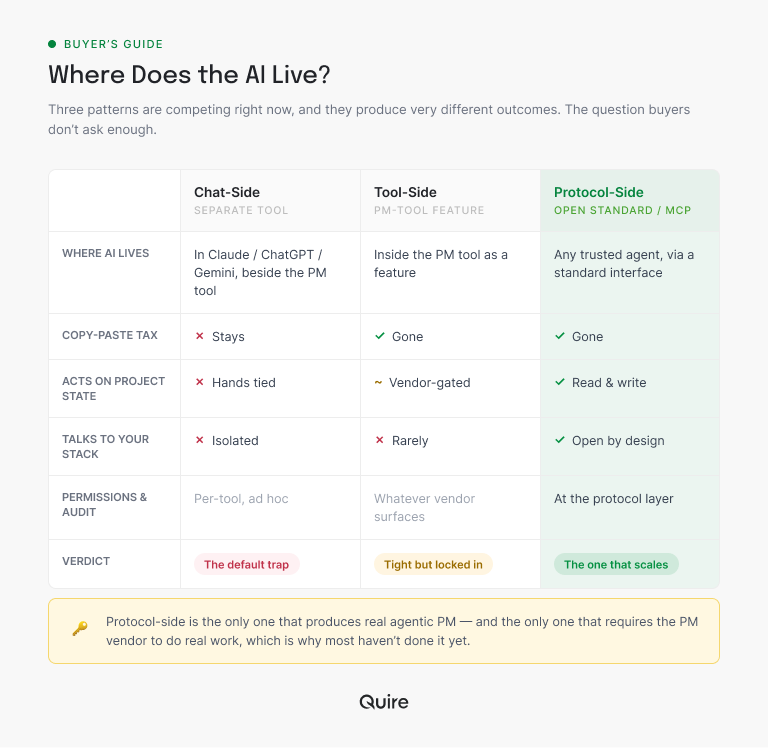
Chat-side AI lives in a separate tool (Claude, ChatGPT, Gemini) and the user copy-pastes between it and the PM tool. The copy-paste tax stays. The AI is smart but its hands are tied. This is the default today and the most common reason teams give up on AI-in-PM.
Tool-side AI lives inside the PM tool as a feature. Summarize this comment, suggest a due date, draft an update. The integration is tight but the AI is locked in. It only knows what the PM vendor has decided to surface, and it usually doesn't talk to anything else in your stack.
Protocol-side AI uses an open standard (MCP being the dominant one in 2026) to let any AI assistant read and write to the PM tool. This is the pattern that scales. The PM tool becomes the source of truth. Any agent your team trusts (Claude, an internal one, whatever) can act on the project state through a standard interface, with permissions and audit trails handled at the protocol layer.
The third pattern is the one that produces actual agentic PM. It's also the one that requires the PM vendor to do real work, which is why most haven't done it yet.
More context: 5 project management workflows that changed the day we got an MCP server.
The Agent Readiness Test: 4 questions to ask any PM tool
If you're choosing a PM tool in 2026 and you expect agentic work to matter to your team in the next year, four questions are worth asking the vendor directly. Together, they're what I've started calling the Agent Readiness Test. A tool that scores yes on all four is genuinely agent-ready. A tool that doesn't will, sooner or later, make your team go back to copy-paste.
| # | Question | Why it matters |
|---|---|---|
| 1 | Does the tool expose its state through MCP or a similar open protocol? | If the answer is "we have an API," ask whether AI assistants can actually use it without custom integration. APIs are great for engineers. They're a wall for agents. |
| 2 | Can you scope agent permissions per project, not per workspace? | Workspace-level permissions are a blunt instrument. You don't want the agent that drafts your marketing status to also read the legal team's project. |
| 3 | Is there an audit trail of every agent action, with one-click revert? | When agents act on your project, you need to see what they did and undo it. Without this, the first time an agent misfires, you'll never trust it again. |
| 4 | Can humans intercept an agent's planned action before it commits? | A good agent surfaces what it's about to do, especially for write actions, and lets the human approve, edit, or cancel. This is the hand control back property in concrete form. |
Tools that score yes on all four are rare in mid-2026. Quire happens to be one of them, which is part of the reason this post exists. But I'd rather you put the questions to every tool on your shortlist than take my word for it. The test is short enough to fit in one vendor email.
If you want the longer version of question one, here's how to evaluate a PM tool without a six-month trial.
What doesn't agentic PM change?
It's worth being clear about what stays the same, because the breathless coverage of agentic AI sometimes suggests the whole job is up for grabs. It isn't.
Agents don't change who owns a decision. If marketing and engineering disagree on a launch date, no agent can resolve that. A human picks. The agent just makes sure both sides have the same data going in.
Agents don't change trust. A team that didn't trust its PM tool before isn't going to trust it more because there's an AI inside. Trust comes from accuracy, predictability, and reversibility. Agents amplify whatever culture the team already has, including the dysfunctional bits.
Agents don't change accountability. If the agent posts a wrong status, the person who set it up is responsible. The whole point of human-in-the-loop is that humans remain in the loop. Anyone telling you otherwise is selling either a fantasy or a lawsuit.
The job of the project manager gets denser, not smaller. Less time on status pulls and update chases. More time on the decisions and conversations only humans can have. That's a better job, but it's not a smaller one.
Worried about the version where the job disappears instead? Here is the task-by-task audit: will AI replace project managers?
Related: The Handoff Gap: Where Cross-Team Projects Actually Break — the specific failure pattern agentic status updates are trying to close.
Where should you start?
If you want to try agentic PM without rebuilding your stack, start with one low-risk workflow. The Friday status report is the most common entry point because it's high-value, low-risk, and reversible. The agent drafts, the human reads, nothing ships without approval.
From there, you can layer in scope-drift detection, async standup compilation, retro synthesis, and prioritization audits. Each of those is a self-contained agent workflow that maps onto an existing painful task. None of them require trust you haven't earned yet. (If you want the full set with the receipts, here are five workflows you can run this week.)
Quire's MCP integration was built for exactly this pattern. The agent operates on the project graph through a standard protocol, every action is logged and reversible, and you can scope permissions per project so the experiment doesn't touch anything sensitive. If you want to try the Friday status agent end-to-end, the MCP setup guide takes about twenty minutes and the agent itself is one prompt.
Key takeaways
Agentic project management isn't a magic fix for coordination overhead. It's a real shift in where the work happens, and the teams that get it right will get back a day or two a week per person, not because the AI is doing the work alone, but because it's doing the work that was never anyone's favorite to begin with.
The PMs and team leads still get to do the part that matters. They just get to do it with the prep already done.
Ready to give your Friday afternoon back to your team?
Start free at quire.io/signup. Pick one workflow, set the boundary, and let the agent start small. You'll know within two weeks whether the integration earns its keep. If it does, you'll wonder why you ever did status by hand. If it doesn't, you've lost a Friday and learned something. Worse trades exist.
Frequently Asked Questions
What is agentic project management?
Project work where an AI agent reads and writes your project state directly, runs multi-step tasks for the team, and hands control back at decisions that need judgment. It's not a chatbot in a sidebar. The agent does the moving; you keep the steering wheel.
How is agentic project management different from AI-powered PM?
AI-powered PM suggests; agentic PM acts. With features, you read a suggestion and apply it by hand. With an agent, it reads the project, takes the action, logs it, and lets you revert if it got something wrong. Feature versus participant.
Do AI agents replace project managers?
No. They replace the low-judgment coordination work, like status pulls, report drafts, and update chases. PMs keep the judgment calls: priorities, escalations, scope cuts, people decisions. The job gets denser, not smaller.
What is MCP and why does it matter for agentic PM?
MCP, the Model Context Protocol, is an open standard that lets AI assistants like Claude read and write data in external tools. For project management, it's what gives the agent a real way into your project state instead of copy-pasting through a chat window. MCP is the open protocol that lets an assistant reach a real tool rather than guess. Quire's MCP connection turns a chat about your project into an assistant reading and updating the actual tasks.
Where should AI agents not be used in project management?
Anywhere a wrong action damages trust faster than it saves time. Reassigning people, closing tasks before delivery is confirmed, promising a stakeholder an unconfirmed date, cutting scope without an owner's sign-off. Agents are safe on data work, risky on people work.
How do you evaluate a PM tool for agentic readiness?
Four questions. Does it expose state through MCP? Can you scope agent permissions per project? Is there an audit trail with one-click revert? Can a human intercept an action before it commits? Four yeses means agent-ready.