project management · Jun 11, 2026
What Is Agentic Project Management? Definition + 5 Workflows

Last updated: September 3, 2026
Agentic project management is project work where an AI agent reads and writes your project state directly, runs multi-step tasks, and checks in with a human at real decision points. The difference from AI features is simple: the agent does the work instead of suggesting it. Five workflows below to try this week.
- What is agentic project management?
- How is agentic PM different from "AI in PM" circa 2024?
- What are five agentic workflows you can run this week?
- How do you set up an agentic workflow without engineering help?
- Where does agentic PM earn its keep (and where doesn't it)?
- Key Takeaways
- Frequently Asked Questions
If you've been hearing the phrase agentic project management and quietly hoping somebody would explain it without a slide deck, this post is for you. You're not alone. The term has been bouncing around since late 2024, and most explanations either sound like a vendor keynote or assume you've already read three other posts.
Here's the short version. Agentic PM is the part of the AI-at-work conversation where the AI actually does the work instead of suggesting it. The agent reads what's happening in your project, runs a multi-step task, posts the result, and stops at the bits that need a human. That's the whole idea. The rest is implementation detail.
This post gives you a definition you can use in a meeting without flinching, draws a clean line between agentic PM and the older "AI features in a tool" pattern, and walks through five workflows you can run this week. By the end you'll be able to pick one, set it up, and see for yourself whether the hype lands.
What is agentic project management?
Agentic project management: project work where an AI agent reads and writes your project state directly, runs multi-step tasks on the team's behalf, and hands control back at decision points that need human judgment.
Three things make that sentence different from older AI-PM definitions.
It reads and writes directly. The agent isn't typing into a chat box you copy out of. It uses a structured connection (most commonly the Model Context Protocol, or MCP) to call real functions on your PM tool: list tasks, post a comment, update a status, draft a doc.
It's multi-step. The agent doesn't do one thing and stop. It plans, runs, checks, runs again. A status report agent might query four projects, sort by team, draft summaries, then post each one to the right thread.
It hands control back. It doesn't pretend to be autonomous when it isn't. The agent has a defined boundary, and the moment a task crosses that boundary (reassigning a person, telling a customer a date, closing a launch task), it surfaces what it wants to do and waits for a human.
If a tool has all three properties, you're looking at agentic PM. Two of three, and you've got something useful but not quite there. One of three, and you've got a Copilot in a fresh coat of paint.
Sorting the terms rather than the properties? Our plain-language breakdown of agentic AI vs AI agents vs copilots covers which rung to buy first.
Not sure which rung your setup is on? Our guide to AI project management lays out all three layers and how to climb them in order.
| AI features in a PM tool | Agentic project management |
|---|---|
| The AI suggests; you click, type, and apply | The AI reads, acts, and logs; you approve |
| Help sits in a sidebar | The agent moves the actual project state |
| You pay the copy-paste tax | The copy-paste tax disappears |
| Human does the work with hints | Human approves at defined checkpoints |
How is agentic PM different from "AI in PM" circa 2024?
The first wave of AI in project management put the AI inside the tool as a feature. Summarize this comment thread. Suggest a due date. Draft a status update from these notes. You'd click a button, read a suggestion, and either accept it or rewrite it in the box next to it.
Useful. Limited. The bottleneck moved from "what should I write" to "how fast can I retype this." A lot of teams used those features for a few weeks and quietly stopped, because the time saved on thinking was handed back on clicking.
Agentic PM moves the AI from feature to participant. It has an account, in a sense. It can read what's there. It can write back. It can run a sequence of actions without being held by the hand for each one. And because the integration goes through a protocol the AI was built to use, the round trip from idea to executed action collapses from minutes to seconds.
The shorthand: agentic PM removes the copy-paste tax that killed the first wave. That's it. That's the whole thing.
For the structural view of what that shift does to a team, see how AI agents change where coordination lives.
What are five agentic workflows you can run this week?
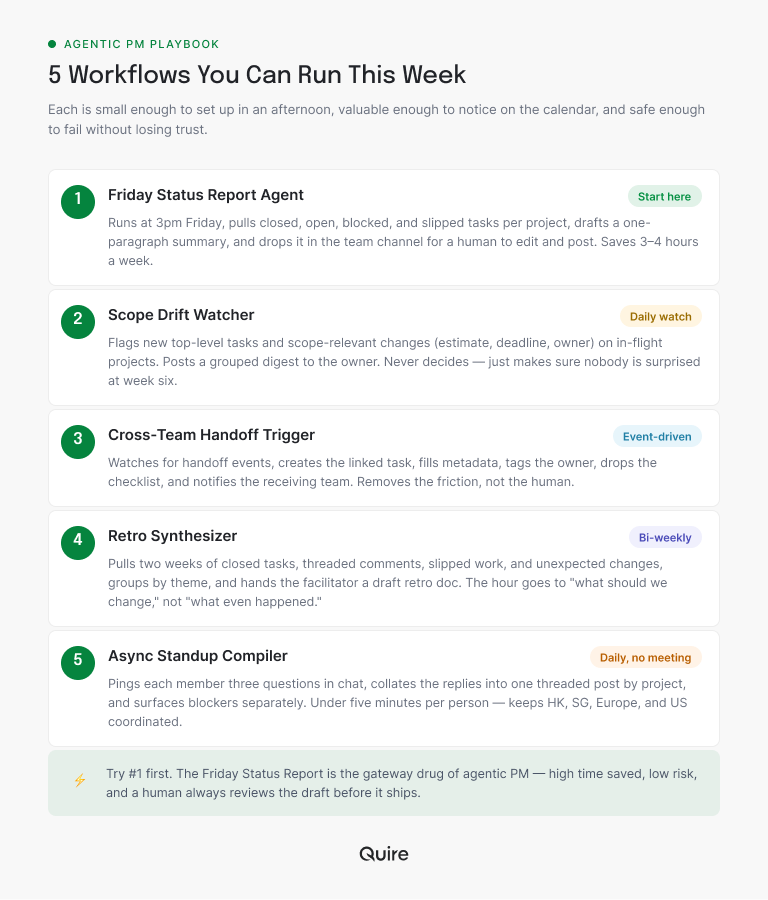
If you'd like to stop reading think-pieces and actually try this, here are five concrete workflows. Each one is small enough to set up in an afternoon, valuable enough to notice on the team's calendar, and safe enough to fail without anyone losing trust. (We run versions of these on our own projects; the five workflows that changed our week has the receipts.)
1. The Friday status report agent
It's 4:30pm on a Friday and somebody on your team is pasting task links into a doc instead of starting their weekend. Start here.
The agent runs at, say, 3pm every Friday. It queries every active project the team owns. For each one it pulls the tasks that closed this week, the tasks still open, anything flagged as blocked, and anything whose due date moved. It writes a one-paragraph summary per project, formats it into the standard template, and drops it into the team channel as a draft.
A human (usually the team lead) reads the draft, makes the small edits a human always needs to make, and posts.
Time saved on a typical week: three to four hours of pulling, pasting, and template-filling for a team of 8-12 running 4-6 active projects. Risk if the agent gets something wrong: the human reading the draft catches it before it ships. Worst case, you've lost ten minutes of reading.
This is the gateway drug of agentic PM. Try it first.
Read more on the coordination tax and why growing teams spend more time reporting than working.
2. The scope drift watcher
Big projects don't usually fail in one dramatic moment. They drift. A task gets added without a date. A new sub-list shows up that wasn't in the original plan. The description on a milestone quietly changes. Each individual change is fine; the cumulative effect after six weeks is that the project everyone agreed to ship isn't the one they're shipping.
A scope-drift agent runs daily or on a state-change trigger. It looks at every project marked as in flight and flags two things: new top-level tasks added since the plan was last approved, and changes to tasks tagged as scope-relevant (estimate, deadline, owner). It posts a short digest to the project owner, grouped by type.
The agent never decides whether the changes are okay. It just makes sure nobody is surprised by them at week six.
3. The cross-team handoff trigger
Handoffs are where cross-functional projects break. Design ships to engineering. Engineering ships to QA. Marketing waits on engineering. Each handoff has a moment where the work technically leaves one team and arrives at another, and that moment is exactly where things get dropped.
An agent can watch the project for handoff events. When a task moves from "design review" to "engineering ready," it creates the linked engineering task, fills in the metadata, tags the right owner, drops a comment with the handoff checklist, and lets the receiving team know they have new work to plan. When engineering closes a task tagged "marketing-needs-update," the agent notifies marketing and drafts the announcement.
You're not removing the human from handoffs. You're removing the friction. The receiving team gets a structured, complete handoff instead of a Slack message that says "hey, ready for you."
Read more on the handoff gap and where cross-team projects actually break.
4. The retro synthesizer
Most teams know retros are valuable. Most teams don't run them consistently. The reason is always the same: the prep is exhausting. Pulling what actually happened across two weeks of work, threading the comments, finding the moments worth talking about. By the time you've done the prep, you don't want to run the meeting.
The retro agent does the prep. It queries the last two weeks. It pulls closed tasks, comment threads with real engagement, the tasks that slipped, the work that landed without a linked task, the moments where labels or owners changed unexpectedly. It groups everything by theme, writes a draft retro doc, and hands it to the facilitator.
The team's hour gets spent on "what should we change," not on "what even happened." The retro becomes a decision-making meeting, which is what it was supposed to be all along.
5. The async standup compiler
Daily standups are the wrong tool for most cross-functional teams. People work in different time zones, on different threads, with different blockers. The 15-minute meeting always runs long and almost never surfaces the thing that matters.
An async standup agent inverts the loop. Instead of pulling people into a meeting, it pings each team member with three questions in their chat tool. They type three sentences and hit send. The agent collates, posts a single thread grouped by project, and pulls the blockers into a separate list so nothing gets buried.
That's under five minutes per person per day. No scheduling, no meeting fatigue, and teams spread across Hong Kong, Singapore, Europe, and the US stay coordinated without anyone losing a morning to a 7am call.
Read more on stakeholder updates without the status meeting.
How do you set up an agentic workflow without engineering help?
For all five workflows above, the setup looks roughly the same.
First, your PM tool needs to speak a protocol the agent can use. MCP, an open standard any AI client can implement, is the dominant one. Quire supports it natively; a few other tools do; many don't yet. Check before you commit to an agentic workflow on a tool that doesn't speak the language. (The 2026 MCP landscape post has the current list.)
Second, your AI assistant (Claude is the most common one teams use here) gets connected to the PM tool through that protocol. This is a one-time configuration step: twenty minutes if your IT team has done it once before, an afternoon if it's the first time. Quire's MCP setup walkthrough covers it end to end.
Third, you write the workflow as a natural-language prompt. You describe what the agent should do, what it shouldn't, what to ask about, and how to format the output. The prompt becomes a saved workflow you can run on a schedule or a trigger.
That's the whole setup. The technical work sits with the vendor. The prompting and the boundary-setting sit with you, and the boundary-setting is where the judgment actually lives.
Where does agentic PM earn its keep (and where doesn't it)?
A quick reality check before you set up five agents and announce your new productivity religion at Monday's all-hands.
Agentic PM earns its keep on tasks that are high-volume, low-judgment, and reversible. Status reports, digests, handoff tasks, retro prep, async standups, label cleanup, milestone tracking. Anywhere the work is mostly reading, sorting, and writing in a structured way, the agent saves real time. These are the tasks you'd happily hand to a smart intern on day one.
It doesn't earn its keep on tasks that are low-volume, high-judgment, and irreversible. Reassigning people. Cutting scope without an owner's sign-off. Telling stakeholders new dates. Closing launches. Anywhere a wrong action would damage trust faster than a right action saves time, the agent stays out, or at most surfaces a recommendation for a human. You wouldn't hand these to the intern on day 30 either, and the agent has had even less onboarding.
The rule of thumb: if you'd be uncomfortable letting a smart intern do it unsupervised, the agent checks in first. If the intern could run with it and you'd notice the time saved, the agent probably can too. Trust grows from small wins, not from announcements.

Key Takeaways
Agentic project management is neither the magic spell some vendors describe nor the gimmick some skeptics dismiss. It's a structural fix for the parts of project management that were always tedious (status, digests, handoffs, retro prep), and it leaves the parts that need humans alone.
The way to find out whether it lands for your team isn't another think-piece. Pick one workflow, give it a real boundary, and run it for two weeks. The Friday status report is the canonical first move.
Ready to see what your Fridays look like when the status report writes itself?
Start free at quire.io/signup. Quire speaks MCP natively, so the five workflows above run on it today. Point the agent at the work nobody on your team wanted in the first place.
Frequently Asked Questions
What is agentic project management in one sentence?
It's project work where an AI agent reads and writes your project state directly, runs multi-step tasks for the team, and checks in with a human at decisions that need judgment. The agent does the moving; you keep the steering wheel.
How is agentic project management different from AI features in a PM tool?
AI features help you do the work. An agentic setup does the work and asks you to approve it at defined points. The practical difference is the copy-paste tax: with features you retype suggestions, with agents the action happens, gets logged, and can be reverted.
What does an agentic project management workflow look like in practice?
Three parts: a trigger (a time, a state change, or a prompt), a defined task list, and a human checkpoint before anything irreversible. Friday status reports, scope drift checks, and async standups all follow this shape. It looks ordinary, which is the point. With Quire's MCP connection an assistant like Claude reads and updates the same tasks the team works in, so it runs against the live project rather than an export.
Do I need to know how to code to set up agentic project management?
No. If your PM tool supports MCP, setup is a one-time integration in your AI assistant, and the workflows themselves are written in plain language.
What is a good first agentic project management workflow to try?
The Friday status report. High value, low risk, fully reversible. Worst case you read a mediocre draft; best case somebody gets their Friday afternoon back. Pick something read-only before anything that writes. Asking an assistant connected to Quire to summarize what slipped this week is low risk and tells you quickly whether the answers can be trusted.
Is agentic project management safe to use on sensitive projects?
Only if the tool gives you per-project permissions, a full audit trail, and one-click revert. Missing any of the three? Keep the agent on low-stakes work until it catches up.