productivity tips · May 20, 2026
5 Project Management Workflows That Changed the Day We Got an MCP Server

Last updated: September 3, 2026
Once your PM tool ships a Model Context Protocol (MCP) server, five coordination workflows collapse from half-hour chores to single prompts. For a 10-person cross-functional team, that's roughly 15 hours a week of reclaimed coordination time. MCP is a speed tool, not a judgment tool; the hard parts of project management still need humans.
- What are the 5 workflows at a glance?
- What makes MCP different from plugins and Zapier-style automation?
- How do you draft a daily standup in 60 seconds with MCP?
- How do you triage cross-team blockers with MCP?
- How do you write executive status updates without a status meeting?
- How do you set up onboarding in 5 minutes instead of 5 days?
- How do you turn a sprint planning transcript into a populated board?
- How much time do these workflows actually save?
- What is still hard, and what is AI not going to fix?
- Key Takeaways
- Frequently Asked Questions
If your AI assistant still can't touch your project management tool, you're running an office in two tabs. One holds the work, the other holds the AI. Every time you want the AI to do something useful with your project data, you're the bridge: copy, paste, explain, paste the answer back.
An MCP server removes the bridge. Your AI reads the real state of your projects and writes the real updates back. Which sounds abstract until you apply it to specific workflows that used to eat thirty minutes each and now take a minute or less.
This post covers five of those workflows, with the before, the after, a sample prompt, and an honest read on what's actually saving time versus what's just moving the work around. All five assume your PM tool has a first-party MCP server. If yours doesn't, or if you're still mapping the landscape, the 2026 MCP PM tool landscape post covers which tools are ready.
If you want the capability picture before the recipes, our guide to AI agents for project management sets out which jobs agents handle reliably today and where they still need a person in the loop.
Related: Introducing Quire CLI: Project Management from Your Terminal — another way to script these same workflows outside a chat client.
What are the 5 workflows at a glance?
| # | Workflow | Before MCP | After MCP | Time saved |
|---|---|---|---|---|
| 1 | Daily standup | 10–15 min/person/day | 1 min/person/day | ~10 min/person/day |
| 2 | Cross-team blocker triage | 2–3 hrs/week scanning + Slacking | One Sunday-night prompt, auto-comments | 2–3 hrs/week |
| 3 | Executive status updates | 90 min biweekly | 15 min weekly | 60–90 min/update |
| 4 | Onboarding project setup | Half a day per new hire | 5 min per new hire | 3–4 hrs/new hire |
| 5 | Sprint planning capture | 2–3 hrs post-meeting | 10 min post-meeting | 2–3 hrs/sprint |
Four of these ran live on a sample project during our MCP webinar. The player below skips the setup and starts at the demos.
In this session12:22 Four workflows: overview13:07 Workflow 1: Capture, meeting notes into assigned tasks15:58 Workflow 2: Understand, risks, gaps, and blockers18:47 Workflow 3: Prioritize across all your projects21:58 Workflow 4: Monitor with a scheduled agent
What makes MCP different from plugins and Zapier-style automation?
The automation you already know runs on triggers you wire up ahead of time: when this happens, do that. Someone builds every path, and each path does its one thing. An MCP server flips that.
Your AI reads the live state of your projects and writes real updates back, and it picks which operations to call straight from a plain-language request. The same connection that drafts your standup this morning triages blockers across six projects tonight, and nobody pre-built either one.
That's the part worth owning early: a plugin makes one tool do one thing faster, while MCP makes your project data legible to any AI client you point at it, Claude today and whatever you switch to next year. Every workflow below leans on that difference. None of them would survive as a fixed recipe, because coordination work is almost never the same twice.
Want the short version you can paste today rather than five full workflows? Our cheat sheet of 10 Quire MCP prompts that do real work covers the same ground one sentence at a time, and lays out which routes suit a prompt versus a fixed automation.
How do you draft a daily standup in 60 seconds with MCP?
Before MCP: You open your PM tool, scroll through what you completed yesterday, check what's assigned today, remember what's blocked, tab to Slack, type it up, post. Ten to fifteen minutes, repeated every day, across every person on the team. That's an hour a day of coordination work, minimum, for a team of five.
After MCP: You prompt your AI:
"What did I complete yesterday in Quire? What's assigned to me today? What's blocked? Write it up as a standard standup update (yesterday, today, blockers), two sentences each."
Your AI reads your task history, pulls today's assignments, flags anything tagged as blocked or unchanged for more than 48 hours, and writes a clean standup. You edit one sentence, paste to Slack, go.
Time saved: Roughly 10 minutes per person per day. For a team of five, that's five hours a week of reclaimed time. Not huge individually, but meaningful in aggregate.
Honest tradeoff: The AI can't read minds. If you worked on something outside your PM tool yesterday (a conversation, a doc, a quick fix that never got ticketed), it won't appear in the draft. Either ticket the work or manually add those items. Worth it in most cases; not worth it if half your work lives outside the tool.
How do you triage cross-team blockers with MCP?
This one's a favorite for anyone who owns coordination between teams.
Before MCP: Every Friday, the project lead manually scans every cross-team project for tasks that are blocked, stale, or in the "waiting on legal/design/eng" purgatory. They Slack three different people, ask for updates, wait. By Monday, they've got a partial picture and the week's agenda is already half-baked.
After MCP: Sunday night, the project lead prompts:
"Across all my active projects, find any tasks that have been in 'Blocked' status for more than 3 days or haven't been updated in 7 days. For each, tag it 'needs-attention', post a comment asking the assignee for a status update, and generate a summary table of all flagged tasks."
Monday morning, the flagged tasks already have comments asking for updates, everyone's inbox has a gentle nudge, and the project lead walks into the week with a complete triage report.
Time saved: Two to three hours per week for a project lead running multiple cross-functional projects. More importantly, the blockers get surfaced before Monday, not during Monday.
Honest tradeoff: AI doesn't always nail the tone of the nudge. Review the comments before they go out, or write a specific prompt instruction about tone ("polite but clear, no passive-aggressive phrasing"). Also, tags proliferate. Clean up the 'needs-attention' tags weekly or they stop meaning anything.
How do you write executive status updates without a status meeting?
This workflow is the one that usually sells skeptics.
Before MCP: Biweekly stakeholder update. You spend 90 minutes every other Thursday pulling data from your PM tool, writing it up, sanding off the rough edges, checking for anything you shouldn't say to the exec team. It lands in their inbox, they skim it, half of them still ask "how's the project going?" in the hallway.
After MCP:
"Draft a 300-word stakeholder update for the 'Q3 product launch' project based on the last 14 days of activity. Include: what was completed, what's at risk, what we need from stakeholders. Tone: calm, specific, no hype. End with an ask for their input on two open questions: pricing model and launch date."
Your AI pulls completed tasks, identifies at-risk work (tasks with blown due dates, milestones with incomplete work), and drafts the update. You edit, send, done in 15 minutes instead of 90.
The 75 minutes saved isn't the real payoff. You can now afford to send stakeholder updates weekly instead of biweekly, because the cost dropped. More updates, less ambiguity, fewer hallway check-ins.
Time saved: 60-90 minutes per update, plus frequency upgrade (weekly instead of biweekly).
Honest tradeoff: The first few drafts will sound off-brand. Either give the AI a voice guide in the prompt or maintain a short "tone examples" doc you paste in. After a few cycles, it'll be close enough to edit quickly.
The status-update post in our cross-functional series covers what makes a good stakeholder update in the first place. Worth reading before you automate the format.
How do you set up onboarding in 5 minutes instead of 5 days?
Before MCP: New hire joins. The manager spends half a day pulling together an onboarding project, copying tasks from the team doc, assigning them, setting due dates, and explaining context in each task description. The new hire starts on Monday and the manager is still writing task #14 on Tuesday.
After MCP:
"Here's our team's onboarding handbook [paste content]. Create a new Quire project called 'Onboarding: [name]', turn the handbook content into tasks with appropriate subtasks, assign them to [name], stagger due dates over the next two weeks, and add context from the handbook to each task description."
Five minutes. Tasks, subtasks, assignees, due dates, context, all populated from the handbook content. The new hire logs in and sees a complete, sequenced onboarding plan. The manager spends their day actually onboarding the human, not formatting their task list.
Time saved: 3-4 hours per new hire.
Honest tradeoff: The generated plan will be generic. Add a few role-specific tasks manually. Also, the AI sometimes over-explains in task descriptions. Trim or ask for "one-sentence context per task" in the prompt.

How do you turn a sprint planning transcript into a populated board?
The one that feels slightly magical until you've done it three times and it's just normal.
Before MCP: Sprint planning meeting ends. Someone, usually the PM or tech lead, takes the notes home, translates them into user stories, breaks them into tasks, assigns them, estimates them, and drops them into the PM tool. Two to three hours of post-meeting work. By the time the sprint board is ready, half the team has already started working from the notes, not the tickets.
After MCP:
"Here's the transcript from today's sprint planning meeting [paste]. Create a new sublist in the 'Current sprint' project called 'Sprint 34'. For each user story discussed, create a task with appropriate subtasks, assign based on the discussion, add estimates in story points where mentioned, and flag any tasks where scope wasn't fully decided."
Ten minutes. The board is populated, the team has a single source of truth, and you can walk out of sprint planning knowing the tickets will be ready before you've finished your coffee.
Time saved: 2-3 hours per sprint, plus the compounding benefit that the whole team works from the board, not from scattered notes.
Honest tradeoff: Transcripts aren't always clean. If your meeting recording service has transcription errors, the AI will inherit them. Quick pass before generating tickets usually cleans this up. Also, estimates pulled from conversation tend to be optimistic. Review them.
How much time do these workflows actually save?
Before committing to rewiring your week around MCP workflows, worth a reality check.
How we estimated this: the numbers below are conservative midpoints from running these five workflows ourselves on a 10-person cross-functional team for two quarters, cross-checked against time-tracking data. Your mileage will vary with team size, meeting cadence, and how much of your work actually lives in the PM tool.
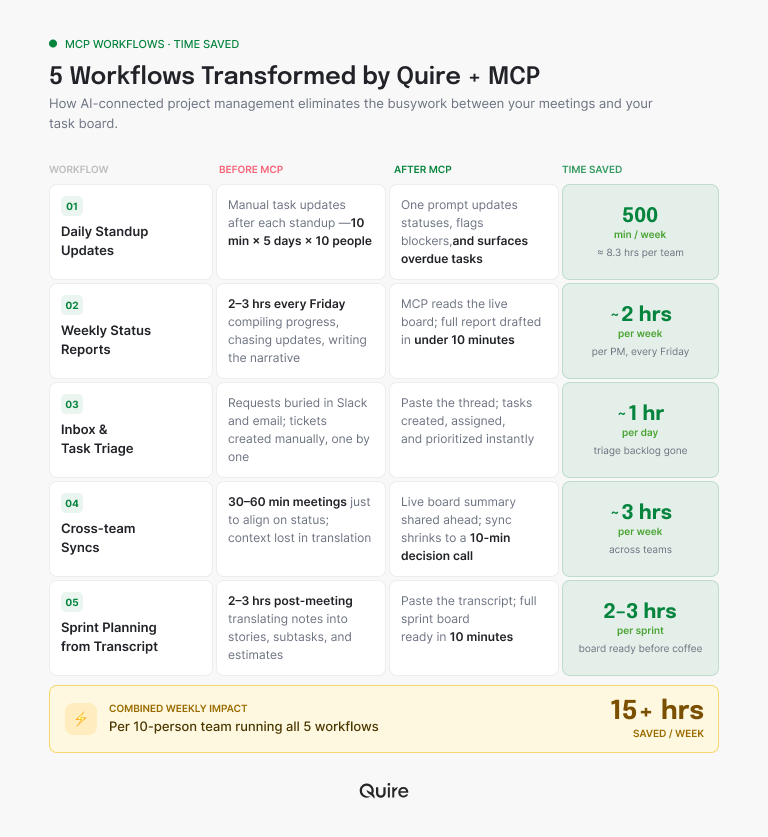
For a team of 10 doing cross-functional work, the five workflows above conservatively save:
- Standups: 10 min × 10 people × 5 days = 500 min/week
- Blocker triage: 150 min/week for the project lead
- Stakeholder updates: 90 min every 2 weeks = 45 min/week on average
- Onboarding: 3 hours × ~2 hires/quarter = ~15 min/week on average
- Sprint planning: 150 min every 2 weeks = 75 min/week on average
That's around 15 hours a week of reclaimed time for a team of 10, concentrated in the people doing coordination work (project leads, PMs, managers). Not transformative. Not nothing. The bigger the team, the bigger the number, which is why this lands hardest for growing teams, where coordination load climbs with every hire.
The hidden gain is arguably bigger than the direct time savings: the coordination overhead that used to happen in meetings can now happen async and in writing, which means fewer status meetings, which means more focus time for the ICs.
What is still hard, and what is AI not going to fix?
No technology post is honest without this section, so here it is:
AI doesn't know your politics. It doesn't know that the exec sponsor is actually indifferent to the Q3 launch and the real blocker is a VP who won't say what they want. MCP-enabled workflows are only as good as the data in your tool; the unspoken stuff stays unspoken.
AI is optimistic about estimates and timelines. Left alone, it will under-estimate complex work and over-estimate simple work. Humans still need to do the reality check on anything touching capacity or deadlines.
AI is not a substitute for hard conversations. The coordination work that matters most ("we need to cut scope," "this stakeholder is stalling") still requires humans who trust each other to say hard things. An MCP server is a productivity tool, not a trust generator.
Some workflows shouldn't be automated. A thoughtful one-to-one about project direction is not a status update. Don't let the "everything can be a prompt" enthusiasm eat the things that genuinely needed a conversation.
Related: Quire MCP + Claude Managed Agents: A Working Build — what these workflows look like running as a persistent managed agent instead of a one-off prompt.
Key Takeaways
MCP turns AI from a summarizer of project data into an agent that can act on it. The five workflows most worth automating first are daily standups, cross-team blocker triage, stakeholder updates, onboarding, and sprint planning from meeting notes. For a team of 10, that's roughly 15 hours a week of reclaimed coordination time, concentrated in the people doing the coordination, which is usually where it's most valuable.
The honest framing: MCP is a speed and coverage tool, not a judgment tool. AI assistants still need supervision, drafts still need review, and the hard parts of project management (prioritization, scope debates, stakeholder dynamics) are still yours. What changes is how much of your week is spent on the mechanical half of the job. For most teams, that's a real win.
Frequently Asked Questions
What is an AI project management workflow?
A repeatable task your AI assistant performs by reading from and writing to your PM tool through an MCP server. Examples include drafting status updates, triaging blockers, and generating tasks from meeting notes. Real action, not just summarizing what you paste in.
Which workflows benefit most from MCP-enabled project management?
Five show the fastest ROI: daily standups, cross-team blocker triage, executive status updates, new-hire onboarding, and sprint planning from meeting transcripts. Each moves from a half-hour task to a one-prompt task. The ones where the answer already exists in the project and somebody is retyping it. Over Quire's MCP connection an assistant reads the live tasks, so a weekly status stops being a copy-paste job.
Is this just automation with extra steps?
No. Zapier and scripts run predefined triggers; MCP workflows are conversational. You describe what you want, and the AI decides which operations to call. That flexibility matters for coordination work, which is rarely perfectly repeatable.
Will AI replace project managers?
No. AI shortens coordination tasks, but PM is mostly judgment, like prioritization, stakeholder dynamics, and risk calls. MCP frees you from the mechanical half of the job so you can spend more time on the hard half.
What are the limits of AI-driven project management workflows?
AI lacks organizational context (politics, unspoken priorities) and tends toward optimistic estimates. Treat AI-generated tasks and updates as drafts to review, not final artifacts.
Do these workflows work with Claude, ChatGPT, or other AI assistants?
Yes, with any MCP-capable client. Claude Desktop, Claude Code, and Cowork work today; ChatGPT has partial support via GPT actions. Your PM tool needs a first-party MCP server on its end.
Is it safe to give AI write access to my project data?
Yes when MCP uses scoped authentication, which the major implementations do. You authorize the AI with the same permissions as your user account and can revoke at any time. The bigger risk is AI making bulk changes you didn't expect, so review write-heavy prompts before running them.
Ready to reclaim the 15 hours a week your team is spending on coordination?
These five workflows only work if your PM tool ships an MCP server the AI can actually use. Quire's covers the full data model (tasks, projects, subtasks, comments, documents, insights) so Claude can do the work, not just summarize it.
Start free at quire.io/signup. No credit card, full feature access, 30 days. Then connect Claude in five minutes and run your first standup-by-prompt tomorrow morning.