developers · May 20, 2026
Quire MCP + Claude Managed Agents: A Working Build

Last updated: August 6, 2026
We replaced our Monday recap meeting with a Claude Managed Agent that reads our Dev_Changelog Quire project via Quire MCP, groups completed work from the last seven days by tag, and writes a customer-readable weekly brief as a new Quire document. Runtime is under 30 seconds on Haiku 4.5. The biggest non-obvious win was aggressive tool filtering, which cut per-run input tokens from ~82,000 to ~12,000 and kept the job inside Tier 1 rate limits without an API upgrade.
It is Monday, 9:04 AM. Someone in your team channel asks, "Hey, quick recap of what shipped last week?" Three people open their tabs, scroll through the Kanban board, try to remember which of the forty closed tasks were actually meaningful, and come back twenty minutes later with two bullets and a shrug. The recap meeting that was supposed to take ten minutes runs forty. By Tuesday everyone has forgotten what was in it.
We replaced that loop. We built an agent on Quire MCP and Claude Managed Agents that reads our Dev_Changelog project every Monday morning, finds everything completed in the last seven days, groups it by team, translates the dev shorthand into something a customer could read, and writes the whole brief into a fresh Quire document. Total runtime: under thirty seconds. Total ongoing maintenance: zero.
This post is the full build, including the three things that broke on the way and how we fixed them. If you have ever wanted an AI agent that does real work on your project data instead of just chatting about it, this is a working recipe.
What does the agent actually produce?
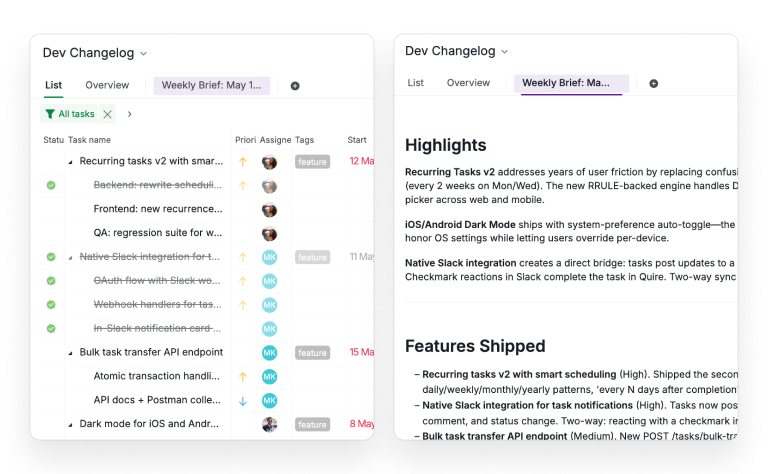
Every Monday at 9 AM Pacific, a Claude session wakes up, queries Quire, and creates a new document in our Dev_Changelog project titled Weekly Brief: May 15 to May 21, 2026. The document has five sections, in this order:
- Highlights with the top three items by user impact
- Features Shipped with each new capability translated into a user-facing benefit
- Bugs Fixed describing what the user was experiencing before the fix
- Design Updates focused on what visibly changed
- Social and Marketing including engagement numbers where the task description had them
Empty sections are skipped silently. At the bottom there is a one-line count summary. The whole thing runs about 400 words and reads like an internal digest rather than a marketing changelog, because that is exactly what the system prompt asks for.
See the live examples: the agent reads from the filtered Dev_Changelog source project, and the Weekly Brief: May 15 to May 21, 2026 is the actual document it produced.
The team reads it in two minutes during standup. Nobody has to write it. Nobody has to remember to.
Our MCP webinar reaches the same destination without any of the build steps, in the Monitor stretch. That's where the player below starts.
In this session21:58 Workflow 4: Monitor with a scheduled agent writing the weekly report
What do Quire MCP and Claude Managed Agents give you?
Quire MCP is a Model Context Protocol server hosted at https://mcp.quire.app/mcp. It exposes Quire's API as a set of standardized tools that any MCP-compatible client can call. There are about ninety-five of them covering everything from search_tasks to create_document to bulk_create_tasks. The agent does not need to know how Quire's REST API is shaped. It just sees a tool catalog and calls what it needs.
Claude Managed Agents is Anthropic's hosted runtime for autonomous agents. You define an agent (model + system prompt + tool config), an environment (sandboxed container with network policies), and create sessions that actually do the work. Anthropic handles the sandboxing, the credential proxy, the execution loop, the audit log. None of that is code you have to write.
The combination matters because each piece on its own is just plumbing. Quire MCP without an agent is a tool catalog with nobody calling it. Claude Managed Agents without a domain-specific MCP is a sandbox with nothing to do. Plug them together and you get an agent that takes real action against real production data, with proper auth and sandboxing built in.
Not on Claude Managed Agents? Quire MCP also works with Open Claw, the open-source MCP client. Same tool catalog, same OAuth flow, same workflows you can build on top. Pick whichever runtime fits your stack.
Why this matters: Most PM tools don't ship a public MCP server yet. Asana, Monday, and ClickUp expose REST APIs but no MCP, so you'd have to wrap them yourself and handle auth. Notion has MCP, but its tool surface is built for docs and pages, not the task-and-subtask structure project automation actually needs. Quire MCP is built around the work units (tasks, subtasks, statuses, tags, sublists) an agent operates on, which is why this build was an afternoon and not a quarter.
How do you build the agent, step by step?
The whole setup took about an hour, most of which was spent fighting a config gotcha I will get to in a moment. Here is the actual recipe.
1. The agent definition
The agent is a single YAML file. The system prompt is the most important part because it is what turns a generic Claude session into a changelog writer:
name: Dev Changelog Writer
model:
  id: claude-haiku-4-5
  speed: standard
system: |-
  You are the weekly changelog writer for the Quire project
  "Dev_Changelog" (https://quire.io/w/Dev_Changelog).
  When invoked:
  1. Use the Quire MCP to search Dev_Changelog for tasks where status
     is completed and the `toggled` timestamp falls within the last 7
     days. Pull name, description, priority, tags, and subtasks.
  2. Group results by tag: feature, bugfix, design, social. Within
     each group, sort by priority (urgent, high, medium, low).
  3. Translate each task from internal dev shorthand into plain
     language a customer would understand. Features: lead with the
     user-facing benefit. Bugfixes: lead with what the user was
     experiencing. Design: describe what visibly changed. Social:
     include engagement numbers if mentioned.
  4. Create a new document in Dev_Changelog using `create_document`.
     Title: "Weekly Brief: [start date] to [end date]". Sections:
     Highlights, Features Shipped, Bugs Fixed, Design Updates,
     Social and Marketing, plus a footer with item counts.
  5. If zero completed tasks are found, do not create a document.
mcp_servers:
  - name: quire
    type: url
    url: https://mcp.quire.app/mcp
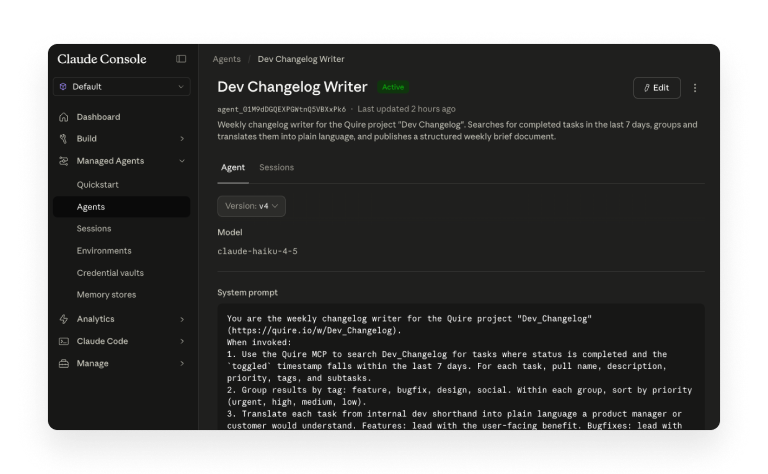
We chose Haiku 4.5 because the work is not reasoning-heavy. The agent groups, filters, and formats, which Haiku handles fine at roughly a tenth of Sonnet's per-token cost and with substantially higher rate limits. For an unattended weekly run, that rate-limit headroom matters more than the marginal reasoning gain.
2. Tool filtering, which is where the real money is
By default, when you attach the Quire MCP server to an agent, all ninety-five tool definitions get loaded into context every time the agent makes a model call. That is a lot of tokens, and most of them are pointless when your agent only needs to read tasks and create a document.
Filter ruthlessly:
tools:
  - mcp_server_name: quire
    type: mcp_toolset
    default_config:
      enabled: false
      permission_policy:
        type: always_allow
    configs:
      - name: search_tasks
        enabled: true
      - name: create_document
        enabled: true
      - name: list_tags
        enabled: true
      - name: resolve_quire_url
        enabled: true
default_config.enabled: false means "nothing on by default", and the configs block opts in to the four tools the agent actually uses. This single change took our per-run input token count from around 82,000 down to under 12,000, which moved us comfortably under the Tier 1 rate limit. (More on that in the war stories below.)
There is a security benefit too. With only search_tasks, create_document, list_tags, and resolve_quire_url enabled, the agent literally cannot delete, archive, or modify any existing data, even if a prompt injection tried to make it. The Quire bulk_delete_tasks tool is not in its toolkit, so the model cannot call it.
3. The environment
Managed Agents runs each session inside a gVisor sandbox with a network policy you control. The default is "Limited" with no external network access, which will block your agent from reaching Quire MCP. The cleanest fix is least-privilege: keep the type as Limited, but explicitly allow the one hostname you need.
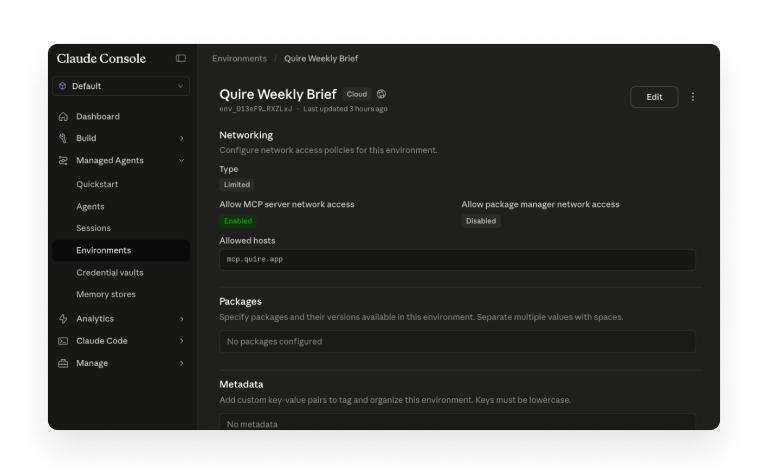
In the Claude console: Manage Environments → your env → Networking → enable Allow MCP server network access → add mcp.quire.app to Allowed hosts. Leave package manager network access disabled, because this agent does not install anything.
4. The credential vault
Quire authenticates via OAuth. In Managed Agents, OAuth tokens live in a credential vault that sits outside the sandbox. When the agent calls Quire MCP, a credential proxy injects the token server-side. The model itself never sees the token, which means a successful prompt injection cannot exfiltrate it.
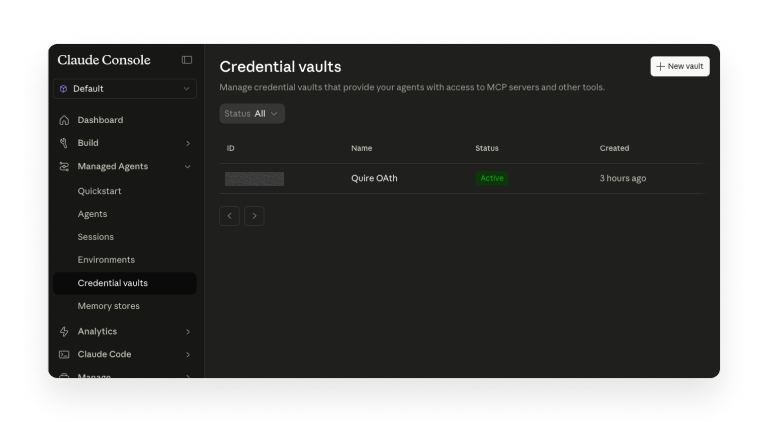
Create a vault, click Add credential, point it at https://mcp.quire.app/mcp, choose OAuth as the type, and run the authorization flow. Once the credential shows as Active, the vault is ready.
5. Scheduling
Managed Agents sessions are one-shot. They do not auto-repeat. To get the agent to run every Monday, point any scheduler at the sessions.create API endpoint with a cron expression of 0 9 * * 1. We use a simple Cloudflare Workers Cron Trigger that calls the Anthropic API once a week, but GitHub Actions on a schedule works equally well, and so does any cloud function platform.
What broke, and how did we know?
Three things went sideways on the way to a clean weekly run. They are worth naming because if you build something similar you will hit at least one of them.
Wrong MCP URL. Quire's product is hosted at quire.io, but the MCP server is at quire.app. We pointed everything (agent, environment allowed hosts, credential vault) at mcp.quire.io/mcp and got a confusing OAuth failure, then once we pushed past that, an HTTP 502 from the upstream. The fix is boring but worth flagging: every reference to the MCP must use mcp.quire.app, not quire.io. If any one of the three places has the wrong host, the run fails.
Agent toolset bloat. Anthropic's default agent_toolset_20260401 ships every general-purpose tool (bash, file operations, web search, code execution) into context. Our agent does not need any of those. Leaving the default toolset enabled on top of the Quire MCP server pushed our input token count past 80,000 per model call and we hit the Tier 1 rate limit instantly. Removing the default toolset and filtering Quire's tools (as shown above) brought it down to about 12,000. The lesson: every tool in your agent's context is a tax, even if the agent never calls it.
Rate-limit panic. Before we figured out the bloat issue, the natural reaction was "we need to upgrade the API tier." Tier upgrades cost money. The actual problem was the agent was loading 70,000 tokens of tool definitions it would never use. Always check what is in your context window before assuming you need a bigger limit.
What does Quire MCP enable beyond a weekly changelog?
The weekly changelog is a useful first agent, but it is mostly a proof of concept. The pattern (one Managed Agent + Quire MCP + a scheduled trigger) extends to a lot more.
A few we are prototyping:
- A daily sprint kickoff brief that reads tasks moved into "In Progress" overnight and posts a summary to Slack
- An incident retrospective drafter that watches a Quire project for completed
incidenttasks and assembles a draft retro doc with timeline, contributing factors, and follow-up actions pulled from the subtasks - A client status digest that runs on Friday afternoons for each client project, summarizing the week's deliverables in language suitable for forwarding directly to the client
The shape is the same every time. A scheduled trigger, a focused agent, a small set of Quire MCP tools, a document or message as output. The hard work (sandboxing, credentials, the agent loop) is in Managed Agents. The domain work (which Quire data to query, what to do with it) is in the system prompt.
When is this not the right approach?
A Managed Agent is overkill for one-off questions. If you want a one-time summary of "what shipped this quarter," asking Claude directly in a chat window and pasting the Quire data is faster than building a deployed agent. The agent shape only pays off when the same job runs repeatedly without supervision.
It is also the wrong shape when the work is genuinely reasoning-heavy, like writing a thoughtful product strategy from the same data. Haiku is fine for "summarize and format." For "decide what we should do about this," you want Sonnet or Opus, and at that point you probably want a human in the loop too.
And if your project data is sparse (say, a couple of completed tasks per week with no descriptions), the agent has nothing useful to summarize. The output is only as good as the discipline your team has about writing real task descriptions. We learned this the hard way when an early test run produced a brief that was technically correct and totally uninformative, because half the task names were just ticket IDs.
Don't need AI in the loop at all? Quire CLI gives you the same data through structured commands you can script and cron, without a model call in the path.

Key Takeaways
The weekly changelog agent is small in scope and big in payoff because it removes a recurring tax (the Monday recap meeting) without anybody having to remember to do anything.
The pieces that made it work were specific: Haiku 4.5 for cost and rate-limit headroom, aggressive tool filtering to keep the context window tight, a least-privilege environment policy that only allows traffic to mcp.quire.app, and a credential vault so the agent never touches the actual OAuth token.
The general lesson is that Quire MCP plus Claude Managed Agents is a fast way to put an autonomous agent in front of your project data without building any infrastructure. The hard parts (sandboxing, auth, scheduling, audit logs) are already solved. What you bring is the prompt, the tool selection, and the discipline to write project data that is worth summarizing in the first place.
Frequently Asked Questions
What is Quire MCP?
Quire MCP is a Model Context Protocol server that lets AI agents read from and write to your Quire workspace using a standardized tool interface. It lives at https://mcp.quire.app/mcp and exposes about ninety-five tools covering search, task and document creation, bulk operations, and more. Any MCP-compatible client (Claude, Cursor, custom agents built on the Anthropic SDK) can connect to it.
What are Claude Managed Agents?
Claude Managed Agents is Anthropic's hosted runtime for running long-lived autonomous agents in the cloud. You define an agent (model, system prompt, tools), an environment (sandboxed container with network policies), and create sessions that execute work. Anthropic handles the sandboxing, credential brokering, and execution loop, so you do not have to build that infrastructure yourself.
Why use Haiku 4.5 instead of Sonnet or Opus for this kind of automation?
Summarizing structured task data into a document is not a reasoning-heavy task. It is grouping, filtering, and formatting. Haiku 4.5 handles that quality bar fine, costs roughly a tenth of Sonnet per token, and has substantially higher rate limits at every API tier. For a weekly job that runs unattended, the cost and rate-limit headroom matter more than the marginal reasoning gain.
How long does the agent take to generate a weekly brief?
For a project with around twenty completed tasks in the window, the full run takes under thirty seconds end-to-end. That includes searching Quire, processing the results, writing the document body, and creating the document back in the project. Most of that time is the model call, not the tool round-trips.
Can the agent edit or delete existing tasks in my project?
Only if you explicitly grant those tool permissions. The Quire MCP server exposes about ninety-five tools, but Claude Managed Agents lets you enable a subset per agent. For the changelog use case we enabled only four read-and-create tools, so the agent cannot modify or delete any existing data even if a prompt injection tried to make it.
What happens if no tasks were completed in the week the agent runs?
The agent prompt includes a fallback instruction: if zero completed tasks are returned by the search, do not create a document and instead log a single line saying the week was empty. This prevents a blank or misleading weekly brief from being published when the team did not ship anything in the window.
Do I need to be on a paid Quire plan to use Quire MCP?
Quire MCP works with any plan that has API access. Current API quotas are listed on the Quire pricing page. For a once-a-week agent making a handful of tool calls per run, free-tier or starter limits are generally enough.
Can I run this same agent against multiple Quire projects?
Yes. The cleanest pattern is one agent definition per workflow and one session per project. The project URL becomes a parameter at session creation time. If you want a single weekly brief covering multiple projects, restructure the prompt to query each project sequentially and combine results into one document.
Ready to build your own agent on Quire MCP?
Start your 30-day free trial at quire.io/signup and explore the Quire developer docs to see the full MCP tool catalog. No credit card, full access.