
project management · May 7, 2026
Cross-Functional PM Software: What Actually Matters

Last updated: September 30, 2026
Best-tool listicles rank PM software by features and price, which doesn't predict adoption. A capability framework works better: five capabilities (nested hierarchy, shared cross-team state, explicit handoff tracking, read-only stakeholder views, and a clean permission model) separate cross-functional PM tools that stick from ones that frustrate teams. Apply the framework to your shortlist, then validate fit with a two-week sprint on a real project.
- Why "Best Tool" Lists Are Useless for Cross-Functional Work
- What Are the 5 Capabilities That Separate Tools?
- How Do the 5 Capabilities Map to Tool Types?
- How Do You See Workload Capacity Across Departments?
- What About Cross-Departmental Automation?
- What Are the Red Flags in Cross-Functional PM Software?
- How Do You Run a Quick Evaluation Sprint?
- Where Does Quire Fit (and Where Doesn't It)?
- Key Takeaways
- Frequently Asked Questions
Every year, somebody publishes a list of the 12 best project management tools for cross-functional teams. It's the same 12 tools, in a slightly different order, with the same filler adjectives: "powerful," "flexible," "intuitive." You could replace the names with dog breeds and the structure would hold.
These lists don't help you buy cross-functional PM software. They help the publisher earn affiliate commissions, which is a fine business, but it's not a buying guide. The actual question, "will this tool work for my team, running my projects, with my stakeholders?", is the one the listicle format can't answer.
This post is the alternative. Instead of a list, it's a capability framework, the tool-selection layer of cross-functional project management.
You'll apply it to whatever tools you're considering (Asana, Monday, ClickUp, Notion, Jira, Quire, whatever's on your shortlist) and come out with a clearer answer than any top-10 post can give you. No affiliate links.
Just the five things that actually separate cross-functional PM tools from tools that are going to frustrate you within six months.
Evaluating tools for AI-agent integration specifically? Project Management Tools With MCP Support in 2026 covers how the field looks on that one capability.
Cross-functional PM software: project management software that can hold one piece of work while several departments act on it, rather than giving each team its own copy to keep in sync. In practice that means five capabilities, deep task nesting, shared state across teams, an explicit handoff signal, read-only views for stakeholders who will never log in, and a permission model granular enough that no team needs to duplicate data to protect it.
Why "Best Tool" Lists Are Useless for Cross-Functional Work
The problem with best-tool lists isn't that they're biased (they are). It's that they rank tools by things that don't predict fit. Feature count. Price tier. G2 review scores. None of those tell you whether your marketing team will actually use the tool once the novelty wears off.
And that, habitual use, is the only thing that matters for cross-functional software, because cross-functional tools fail when one team stops using them and starts sending Slack messages instead.
Fit depends on three things the lists can't see: the specific shape of your projects, the tool-tolerance of your teams, and the coordination problems you're actually trying to solve. A tool that's perfect for a 50-person engineering org is mediocre for a 15-person agency. A tool that wins on a features comparison can still be the wrong answer because nobody on your team wants to open it.
What you need is a framework, something that turns "is this tool any good?" into "does this tool have the capabilities my cross-functional work specifically needs?"
Not sure the tool is even the bottleneck? The Coordination Tax: Why Growing Teams Spend More Time Reporting Than Working covers the cost this framework is trying to reduce.
What Are the 5 Capabilities That Separate Tools?
In order of how often they matter:
1. Why Does Nested Task Hierarchy Matter?
Cross-functional projects are rarely flat. A product launch contains a marketing launch contains a webinar plan contains a landing page spec contains a copy review. If your tool forces all of that into a single list, you lose the structure that makes the work legible. Nested hierarchy does the real work in cross-team projects. It separates a 300-line project you can read from a 300-line project nobody opens twice.
The practical test: open the tool and try to model a real cross-team project with three levels of nesting. If the interface fights you, it's not a nested-hierarchy tool, no matter what the marketing page says.
2. Why Is Shared State Across Teams Critical?
Every team that touches a task should see the same task, not a copy, not a synced version, not a report that reflects the task. The same one. The same status. The same due date. The same comment thread.
The practical test: design changes a due date. Does engineering see the change the moment it happens, in the same task, without a sync or a notification? If yes, shared state works. If the change lives in a "design view" that engineering has to pull, the state isn't actually shared, you've just built a coordination cost into the tool.
3. How Does Explicit Handoff Tracking Help?
Handoffs between teams are where cross-team projects actually break. A tool that treats handoffs as "just reassigning the task" is underpowered. You want a tool where a handoff has a state (not-yet-acknowledged, acknowledged, in-progress), a receiver, and a visible signal that work has moved to someone else.
The practical test: can the tool answer "how many handoffs are waiting on an acknowledgment right now?" without anyone building a custom report? If yes, handoffs are a first-class object. If no, they're invisible, and they will stay invisible until your timeline slips.
4. Why Do You Need Read-Only Stakeholder Views?
Executives, sponsors, and clients often don't need to edit anything. They need to see. A tool that requires every viewer to be a full-seat user will force you into a workaround, weekly updates, exported decks, shared screenshots, that defeats the point of having a single source of truth.
The practical test: can a stakeholder see a project view without logging in to a paid seat? If yes, stakeholder communication can live in the tool. If no, you're going to end up maintaining a parallel reporting system.
For context on what those stakeholder updates should look like, see our post on async stakeholder updates.
5. Why Does the Permission Model Make or Break Adoption?
Some tools make "design can see X but edit Y" so complicated that teams end up duplicating data to work around the permissions. If your permission model creates more copies of the truth, the truth is no longer single-sourced, and everything else breaks.
The practical test: model a real permission scenario from your org, say, "engineering can edit engineering tasks, marketing can view them, legal can add comments but not edit." If you need more than five minutes to configure this, the permission model is probably going to hurt you later.

How Do the 5 Capabilities Map to Tool Types?
This is the table that's actually useful. Not "here are 12 products." Instead, "here are the capability types, and here's what to look for."
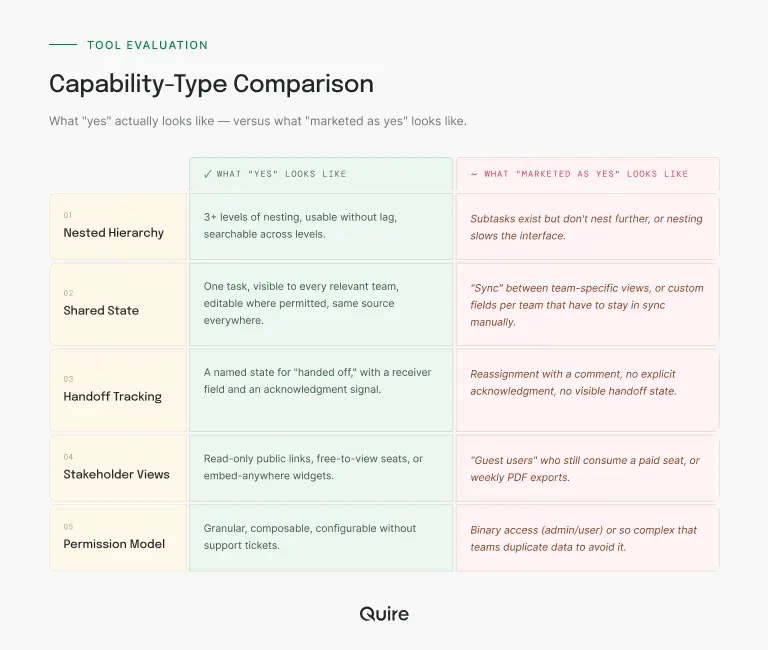
Nested hierarchy. What "yes" looks like: 3+ levels of nesting, usable without lag, searchable across levels. What "no, but marketed as yes" looks like: subtasks exist but don't nest further, or nesting slows the interface.
Shared state. What "yes" looks like: one task, visible to every relevant team, editable where permitted, same source everywhere. What "no, but marketed as yes" looks like: "sync" between team-specific views, or custom fields per team that have to stay in sync manually.
Handoff tracking. What "yes" looks like: a named state for "handed off," with a receiver field and an acknowledgment signal. What "no, but marketed as yes" looks like: reassignment with a comment, no explicit acknowledgment, no visible handoff state.
Stakeholder views. What "yes" looks like: read-only public/shared links, free-to-view seats, or embed-anywhere widgets. What "no, but marketed as yes" looks like: "guest users" who still consume a paid seat, or weekly PDF exports.
Permission model. What "yes" looks like: granular, composable, configurable without support tickets. What "no, but marketed as yes" looks like: binary access (admin/user) or so complex that teams duplicate data to avoid it.
How Do You See Workload Capacity Across Departments?
The five capabilities above decide whether teams can share the work. This one decides whether you can see who is buried under it, and it's the question most buyers ask immediately after the five.
Every vendor names it differently. Workload heatmap, resource capacity chart, team allocation view, utilization report. The test underneath doesn't change, and it's worth writing down before any demo: can one screen tell you a developer is over-allocated across three cross-functional projects while marketing has room this month? If getting that answer means opening each project in turn and doing the addition yourself, the tool tracks projects, not people.
Two things separate the tools that pass from the ones that demo well. The view has to sit above the project layer, because a per-project chart can only ever report its own slice. And it has to live on a screen somebody already opens, or it becomes a weekly ritual that quietly stops happening around March.
Quire puts this on the Overview screen, at folder, Smart Folder, or organization scope. The Member Workload widget reads every project inside whichever scope you opened and lists people instead of projects, so a person carrying work in four places appears once, with the total.
There's a free-plan version of the same picture on the time axis: aim a Smart Folder at every active project, open it in Timeline, and group by assignee.
Each name gets its own row, and two fat bars stacked on one row in the same week is the collision you were looking for.
What none of this does is invent numbers. Hours exist only if your team puts them on tasks as an estimate field, and then the totals are arithmetic instead of vibes. A tool that shows you a confident utilization percentage without ever asking for an estimate is inferring from task count and trusting you not to check.
Overview and Timeline are on every Quire plan, including free. Pinning the Member Workload widget onto a dashboard you build, and the custom fields that hold hour estimates, are on Professional and higher. See the pricing page.
The management side of this, measuring real capacity and then rebalancing once you can see the overload, is covered in team workload management.
What About Cross-Departmental Automation?
Quire automates cross-department handoffs through the layer underneath the task list. Three routes cover the job:
- Webhooks fire on task events, and the REST API covers whatever the webhooks don't.
- The n8n integration is where if-this-then-that logic gets built visually, conditionals and branches included, so "when this task hits Done and the owner sits in Legal, create these four tasks" becomes a workflow on a canvas.
- The Quire MCP server adds a third route, where the conditional part is a sentence you write to an AI assistant.
The payoff is range. One n8n workflow can also touch your CRM, your billing system, and a Slack channel in the same pass.
What Are the Red Flags in Cross-Functional PM Software?
Some patterns show up repeatedly in tools that seem good in the demo and fail in the rollout. Watch for these.
The "we support that with an integration" answer. Any capability that requires a third-party integration to work is a capability the tool doesn't really have. Integrations break, change pricing, and introduce latency. If cross-team shared state requires a Zapier workflow, the tool isn't shared-state by default.
The setup consultant. If a sales rep offers you a "customer success onboarding specialist" to get the tool configured, that's a signal that real setup takes longer than the demo suggests. Ask how long the average team takes to become self-sufficient. If it's more than two weeks, factor that in.
The reporting module. Every tool has one. Most are bad. The test is whether reporting is a read of task state or a separately-maintained layer that needs reconciliation. If your reports require a human to refresh them every week, you've recreated the status meeting problem inside the tool.
The feature roadmap as a sales tool. If the sales rep answers "does it do X?" with "it's on the roadmap for Q3," treat that as "no." Roadmaps slip. Buy what exists.
How Do You Run a Quick Evaluation Sprint?
Once you've narrowed to two or three tools, don't do a six-month trial. Do a two-week sprint. We broke down the full method in how to evaluate a PM tool, but the short version: pick one real project, run it start to finish in each tool, see what breaks. Two weeks is long enough to hit the sharp edges and short enough that you're not still evaluating when the budget quarter ends.
Where Does Quire Fit (and Where Doesn't It)?
Fair to be transparent here. Quire was built around nested task hierarchy and shared cross-team state specifically, because both of those are where most PM tools get quiet about cross-functional limitations.
The nested task hierarchy goes well beyond three levels without interface lag, and the shared state is the default. There's no per-team view that drifts from the source.
Stakeholder views are read-only and free, which means you're not paying per seat for people who only need to see the work.
Capability five holds up too, which matters here because the permission model is where most cross-departmental setups start duplicating data.
Roles and permissions are assigned per organization, folder, and project, so engineering can own its tasks while marketing views them and legal comments on them, all against one copy.
An External Team can be scoped into a single project without seeing the rest of the organization, which removes the usual reason teams clone a project for an outside department.
And reporting is a read of live task state rather than a separate layer, across every scope from one project to the whole organization.
Capabilities three and four are handled, though not with dedicated feature names. Handoff acknowledgment runs through custom statuses, so "handed to legal" and "accepted by legal" are real states on the task rather than a comment somebody has to read.
Stakeholders who will never log in get a view-only share link that expires on a schedule you set, without consuming a paid seat, which is the specific trap in capability four.
If a single team is running a single short project, almost any tool will do, so the capability framework matters less.
For everyone else, the deciding variable is how tangled the work is, not how many people are doing it. Cross-functional coordination gets hard when one deliverable crosses three teams that each use different words for the same thing, and that happens at twelve people and at four hundred.
The framework above is honestly a better way to test fit than anything we could say about ourselves. Try the free tier against a real project and see.
If you've narrowed to two tools and can't decide, the post on lightweight vs heavyweight PM has a spectrum-based self-assessment that usually breaks the tie.
Wondering whether it holds at the top end: a Silicon Valley nonprofit coordinates 400 volunteers in Quire, and Quire at organization scale walks the roll-up, permission, and single sign-on requirements that show up at that size.
Key Takeaways
Best-tool lists don't help you buy cross-functional PM software. A capability framework does. Five capabilities predict most of the fit: nested hierarchy, shared state across teams, explicit handoff tracking, read-only stakeholder views, and a clean permission model.
Red flags are "that's via integration," "we'll set it up for you," and "it's on the roadmap." The evaluation itself should be a two-week sprint on a real project, not a six-month trial.
And the test that matters most isn't features, it's whether every team will actually open the tool six months after onboarding.

Frequently Asked Questions
What makes project management software "cross-functional"?
Cross-functional project management software is built around the assumption that multiple teams with different tools, workflows, and vocabularies need to share a single source of truth for a project. The core test is whether design, engineering, marketing, and support can all see the same task, the same status, and the same due date without anyone having to reconcile three systems into a weekly report.
Why don't "best cross-functional PM tool" lists help with actual buying decisions?
Most lists rank tools by feature count, price tier, or review scores, none of which predict whether a tool will work for your specific team. The gap between "tool has feature X" and "team will actually use feature X" is where most software investments die. A capability framework helps more than a list because it forces you to articulate which capabilities matter for your shape of team before you look at any tool.
What are the most important capabilities for cross-functional PM software?
Five capabilities matter most: nested task hierarchy so cross-team projects don't flatten into unreadable lists, shared state across teams so everyone sees the same version of a task, explicit handoff tracking so work doesn't disappear between teams, read-only stakeholder views so non-users can stay informed, and a permission model that doesn't force you to duplicate data. Almost everything else is secondary.
How do you know a tool is wrong for cross-functional work?
Three red flags show up early: the tool requires a workaround to show the same task to two teams, reporting is a separate manual process rather than a direct view of task state, and onboarding a new team member takes more than an hour to explain the structure. If any of these appear during the evaluation, the tool will get worse at scale, not better.
Do we really need a separate tool for cross-functional work, or can we extend our existing PM tool?
Most teams try to extend first, and most teams end up switching within eighteen months, because PM tools designed for single-team use scale badly when cross-functional coordination becomes the main job. If your current tool is missing nested hierarchy or shared cross-team state, no amount of plugins or workflow automations will close the gap. The extension usually costs more in workarounds than switching would cost outright.
Can you see if someone is over-allocated across multiple projects?
In Quire, yes. The Member Workload widget lives on the Overview screen at folder, Smart Folder, and organization scope, reading every project underneath it, so it lists people rather than projects. Someone carrying work in four projects shows up once, with the total.
How should cross-functional teams handle permissions across departments?
The test is whether the model ever forces you to duplicate data. Quire assigns roles per organization, folder, and project, and an External Team can be scoped into one project without seeing the rest of the organization.
Ready to score the capability framework against a real tool?
Skip the listicle. Spin up a Quire workspace, drop in one real cross-team project, and run the five-capability test. If it scores well, keep going. If it doesn't, at least you have a sharper rubric for the next one.
Start free at quire.io/signup, no credit card, full feature access, 30 days. Free tier covers up to 10 members, 4 projects, and 1,000 tasks per project after the trial.
