project management · Jun 4, 2026
Lightweight vs Heavyweight PM: Where Your Team Belongs

Last updated: September 3, 2026
Lightweight vs heavyweight describes five independent dimensions, not two product categories: setup speed, structure depth, process overhead, visibility model, and pricing curve. Most teams running cross-functional work across several concurrent projects belong in the middle. Score your team on each dimension and match your profile to a tool's profile, not the other way around.
- Why is "lightweight vs heavyweight" a spectrum, not a dichotomy?
- What are the five dimensions to evaluate a PM tool?
- Who wins at each end of the spectrum?
- Where do most growing teams actually belong?
- How do I figure out where my team belongs?
- How does this fit with the rest of the PM evaluation picture?
- Which PM tools sit where on the spectrum?
- Key takeaways
- Frequently Asked Questions
- Try a middle-ground PM tool: Quire's free tier
Every buying guide loves a tidy split. Lightweight tools over here (Trello, Todoist, basic Asana), the friendly ones anyone can pick up in an afternoon and that quietly fall apart the first time one project has to hand work to another.
Heavyweight tools over there (Jira, Microsoft Project, full ClickUp), the serious ones that take six weeks of configuration before your team ships a single thing. Pick a side, the framing says. Get on with it.
But you've probably noticed the side you picked isn't quite fitting. The lightweight tool is groaning under nested projects, the exact point a flat board stops scaling for a growing startup. Or the heavyweight one is sitting half-configured because nobody has time to be its full-time gardener. That's not a you problem. It's a framing problem.
What you're looking at is a spectrum, not a fork in the road, and the right spot for your team depends on five dimensions that "lightweight vs heavyweight" completely flattens. Some teams need light setup but deep structure. Some need medium structure plus cheap stakeholder visibility.
Some need serious process for the 20% of their projects that actually matter, and lightweight everything else. "Which category are you?" is the wrong question. "Which dimensions matter for you, and how much of each?" is the better one.
From here, we'll walk the five dimensions, call out who genuinely wins at each end, and spend most of the time on the middle band. That middle is where growing teams keep landing once their work stops fitting in one project, because nobody warned them it existed. (Yes, that middle is also where Quire lives. We built quire.io for that band specifically, so call it disclosure and move on.)
Why is "lightweight vs heavyweight" a spectrum, not a dichotomy?
Lightweight vs heavyweight project management: lightweight tools optimize for fast setup and low ceremony, heavyweight ones for structure, control, and reporting depth. These are not two boxes to sort tools into. They are five independent spectrums, and most real tools sit light on some and heavy on others.
Lightweight and heavyweight are positions on five independent spectrums, not two boxes to sort tools into. A good tool sits light on some and heavy on others. The "lightweight vs heavyweight" framing forces teams to pick a tribe when the actual decision looks more like picking out a custom pair of shoes. Which dimensions matter for your specific feet, and how much of each?
Most teams get this wrong in one of two ways. They grab a lightweight tool because it feels friendly, then watch it buckle the first time a project needs three levels of nesting and two functions working off the same state. Or they buy a heavyweight tool because it looks "serious," and spend three quarters configuring it before anyone ships a single thing. Both fates are avoidable if you evaluate on dimensions instead of categories.
What are the five dimensions to evaluate a PM tool?
The five dimensions are setup speed (how fast a new person becomes productive), structure depth (how deeply you can model a project), process overhead (how much maintenance the tool needs), visibility model (how non-users see the work), and pricing curve (how cost grows with team size).
Each dimension is independent. A good tool might sit at the light end of one and the heavy end of another. You want a tool whose profile matches your team's needs, not one that's uniformly light or uniformly heavy.
1. Setup speed: how fast can a new person be productive?
- Light end: under 30 minutes. The structure is intuitive, there's no required configuration, and the person opens the tool, creates a project, and starts working.
- Heavy end: weeks of configuration before meaningful use. Custom fields, workflows, integrations, and templates all need a setup pass. Usually arrives with a "customer success specialist" attached.
Which you want: lighter is better for most growing teams. The exception is regulated environments or organizations with formal PMO structures, where the upfront configuration actually produces lasting value (and where someone is being paid full-time to maintain it).
2. Structure depth: how deeply can you model a project?
- Light end: flat lists of tasks. One level of subtasks at most. Perfectly fine for short, shallow work.
- Heavy end: unlimited nesting, cross-project dependencies, custom object types, portfolio views, Gantt with critical paths, resource leveling.
Which you want: depends entirely on your projects. A team running short marketing campaigns can live happily on light structure. A team running multi-quarter cross-functional initiatives needs real nesting. This is where the nested task hierarchy argument lives.
Structure depth is what lets one person see a single deliverable while a lead sees the whole initiative it belongs to, from the same data, with nobody maintaining a summary by hand.
Teams doing complex cross-team work need that depth without the rest of the heavyweight package, and that's exactly the gap Quire was built to fill.
3. Process overhead: how much maintenance does the tool require?
- Light end: near-zero overhead. Tasks get created, updated, closed. That's it.
- Heavy end: ongoing admin. Someone has to maintain workflows, update templates, manage integrations, and keep custom fields consistent across teams.
Which you want: lighter, unless you have dedicated ops headcount. If you're expecting individual contributors to maintain the tool in between their actual jobs, overhead becomes a tax they'll silently refuse to pay. The tool decays, the workarounds breed, and a year later you're back where you started.
4. Visibility model: how do non-users see the work?
- Light end: email summaries, Slack notifications, or a "share link" that works without an account.
- Heavy end: rich dashboards, customizable exec views, integrated BI reporting, compliance-grade audit trails.
Which you want: mid to heavy for any team with stakeholders who don't log in daily. The async stakeholder updates post covers this in detail. If stakeholders can't see the work without a meeting, you'll end up maintaining a parallel reporting system on the side. That's heavyweight overhead in disguise, and arguably the worst kind, because nobody's auditing whether it still tracks reality.
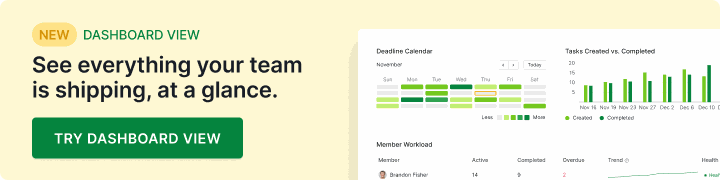
Worth knowing before you score this dimension: dashboards have been drifting toward the middle of the spectrum. Quire now ships Dashboard View, a drag-and-drop dashboard of task panels and charts you can scope to a single project or a whole portfolio. That scoping is the part that matters.
A lead can watch one initiative and an executive can watch every initiative at once, off the same underlying tasks, which is usually the difference between a status meeting and a link.
So "we need exec dashboards" is no longer, on its own, a reason to buy the heavy end.
5. Pricing curve: how does cost grow as the team grows?
- Light end: flat per-seat pricing, generous free tier, predictable at every size.
- Heavy end: tiered pricing with feature gates, enterprise negotiations, cliff pricing at specific seat counts.
Which you want: lighter pricing almost always, especially for growing teams. Heavyweight pricing isn't inherently evil, but it rewards organizations that already have a procurement team. It punishes the ones still negotiating software purchases in a Slack thread at 4:47pm Friday.
Who wins at each end of the spectrum?
The mental shortcut of "lightweight wins at small, heavyweight wins at large" is close enough to feel true and wrong enough to matter. Headcount is a proxy, and a lazy one. What decides the fit is the shape of the work.
Pure lightweight wins for work that stays shallow and self-contained. Short projects, one owner each, no dependencies worth tracking, no compliance load. The overhead of anything heavier will kill adoption. If that's your work, don't fight it. Buy light, ship things, come back when the wall arrives.
Pure heavyweight wins for work where getting the process wrong costs more than running it: regulated industries (finance, healthcare, pharma, defense), organizations running a formal PMO with a mandated methodology, and portfolios tangled enough to need resource leveling and critical-path scheduling. If that's your work, the overhead is earning its keep.
Mixed wins for almost everybody else. Cross-functional organizations, agencies, operations teams, and most software companies. The common thread is work that spans several concurrent projects and more than one function, where handoffs happen weekly and stakeholders want status without attending a meeting to get it. That work needs real structure (deep nesting, shared state, handoff tracking) and gets nothing back from enterprise configuration overhead.
Headcount does tell you roughly when this shift tends to arrive. Coordination stops being informal somewhere between the Spotify "squad" size (6-12 people, where one tool with light structure usually works) and Dunbar's number (~150, where formal coordination structures get hard to avoid).
But the coordination load is what forces the change, not the org chart. A twelve-person studio juggling eight client projects can need more structure than a forty-person team all pointed at one product.
This "mixed" zone is where the lightweight-vs-heavyweight framing does the most damage. Teams here get sold heavyweight tools they don't need, or lightweight tools that crack the moment work starts crossing team boundaries, because the buying guide framed the choice as binary.
Where do most growing teams actually belong?
Most teams whose work has outgrown a single flat list belong in the middle of the spectrum. In practice that means cross-functional projects, several of them running at once, and no regulator asking for an audit trail.
The middle is meaningful structure (nested hierarchy, shared state, handoff tracking) without the enterprise configuration overhead. Setup takes an hour or two, not weeks. Pricing stays predictable per seat. One person maintains the tool part-time, not a dedicated ops team.
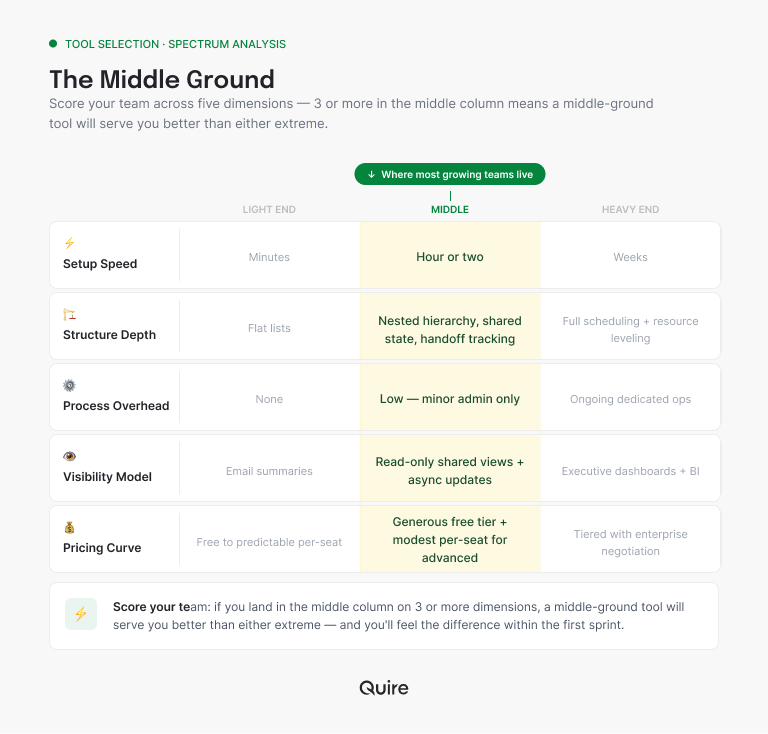
Tools in this space offer meaningful structure without the heavyweight tax.
The middle is the right answer for most teams, not a compromise between two better options. The trap is thinking you have to pick an extreme, then discovering 18 months later that the extreme you picked doesn't fit your team and never really did.
How do I figure out where my team belongs?
Score your team on each dimension. For each question, pick the answer closest to your situation.
1. When a new person joins, how quickly should they be productive in your PM tool? - Same day → light - Within a week → middle - Whenever they complete training → heavy
2. How deep does your typical project structure go? - Just a list of tasks → light - Projects contain sub-projects → middle - Portfolios of programs of projects → heavy
3. Who maintains the tool configuration? - Nobody in particular → light - One person, part-time → middle - A dedicated ops person or team → heavy
4. How do stakeholders see project status? - Slack updates, occasional emails → light - Shared read-only views + written updates → middle - Dashboards and formal reports → heavy
5. What's your budget flexibility? - Free or predictable per-seat only → light - Willing to pay modestly for structure → middle - Enterprise procurement available → heavy
Tally it up. Mostly light? A lightweight tool is fine for now. Mostly middle? You're in the space most growing teams live in. Mostly heavy? You're in enterprise territory. Mixed? Score by dimension and look for tools whose profile matches yours, not tools that win on a single axis and call it victory.
How does this fit with the rest of the PM evaluation picture?
The lightweight-heavyweight spectrum is one view of the same territory covered in cross-functional PM software (which dimensions matter for cross-team work specifically) and how to evaluate a PM tool (the method for actually testing fit). They're complementary. The spectrum helps you understand the terrain. The evaluation sprint helps you test candidate tools against your specific context.
One pattern worth naming: most growing teams don't realize they're in the middle until they've already picked a tool from one of the extremes and slammed into a wall. The signs you've outgrown your PM tool post covers what that wall actually feels like.
If you're early in the evaluation, start from the middle and see whether any dimension pulls you toward an end. Don't start at an end and discover, six months in, that you need to drag yourself back to the middle.
And once you're heavy enough that projects start competing for the same people, tool weight stops being the main question. That's project portfolio management territory: deciding which projects to fund and staff across the whole set, not just how to track the work inside one.
Which PM tools sit where on the spectrum?
Trello, Todoist, and basic Asana sit on the light end. Jira, Microsoft Project, and Smartsheet anchor the heavy end. Quire and mid-tier ClickUp configurations cover the middle, where cross-functional work with real nesting tends to land. Read the "best for" column as a description of the work, not of the company. The full map:
| Position | Examples | Best for |
|---|---|---|
| Pure lightweight | Trello, Todoist, basic Asana | Short, self-contained projects, shallow dependencies |
| Light-to-middle | Notion (for tasks), Linear (for engineering) | One function's work, deep in its own domain |
| Middle, scaling upward | Quire, mid-tier ClickUp config | Cross-functional work, several concurrent projects, nested structure, up to multi-department portfolios |
| Middle-to-heavy | Asana Enterprise, full Monday | Formal PMO, mandated methodology, procurement-led buying |
| Pure heavyweight | Jira, Microsoft Project, Smartsheet | Regulated industries, resource leveling, critical-path portfolios |
Treat this as a starting point rather than a definitive ranking. Tools shift their position as they release features (and as they raise prices). Verify against current pricing and current capability before deciding anything based on a table you read on the internet.
If you want to see what a middle-ground tool actually feels like, the Quire free tier runs full-featured for 30 days. An honest way to check whether the middle of the spectrum fits your team without committing to a six-month trial.
Key takeaways
Lightweight vs heavyweight describes five independent dimensions, not two categories to choose between: setup speed, structure depth, process overhead, visibility model, and pricing curve. Most teams running cross-functional work across several concurrent projects belong in the middle of the spectrum, not at either extreme.
Headcount is a weak proxy for this; coordination load is the real signal. The tools that serve this space offer meaningful structure (nested hierarchy, shared state, handoff tracking) without the enterprise overhead. The buying trap is treating the decision as binary.
The fix is scoring each dimension separately and matching your profile to a tool's profile. If you're not sure where you sit, start from the middle and move toward an end only when a dimension actually demands it.
Frequently Asked Questions
What's the difference between lightweight and heavyweight project management software?
Lightweight tools prioritize speed of adoption, simplicity, and low process overhead. They win on "anyone can use it tomorrow." Heavyweight tools prioritize structure, configurability, and enterprise features. They win on "this can model any process." The tradeoff is real but rarely binary, and most growing teams actually live in the middle.
Is a lightweight PM tool always better for small teams?
Usually, but not always. Team size predicts this poorly. Lightweight tools shine when projects are short and dependencies are shallow. They struggle with deep nesting, shared cross-team state, or read-only stakeholder visibility, whatever the headcount.
When is a heavyweight project management tool the right choice?
When the cost of getting a process wrong exceeds the cost of running it. Think regulated industries, a formal PMO with a mandated methodology, or portfolios that need resource leveling. Without those, heavyweight is more weight than the problem warrants.
What dimensions should I evaluate on the lightweight-heavyweight spectrum?
Five: setup speed, structure depth, process overhead, visibility model, and pricing curve. Score each separately instead of forcing a single "simple or complex" verdict on the tool. Judge them on the shape of your work rather than on a label. Hierarchy depth, how many views read the same data, and setup cost for a new project are the three that predict fit, and they are what Quire is built around.
What's the "middle ground" in PM tools?
Tools that offer meaningful structure (nested hierarchy, shared state, explicit handoffs) without the configuration overhead of enterprise software. Teams land here once work spans several concurrent projects and more than one function.
Try a middle-ground PM tool: Quire's free tier
If your self-assessment landed mostly in the middle, Quire is built for exactly that profile. Deep nested hierarchy without the configuration tax, free read-only stakeholder views, predictable per-seat pricing, and a learning curve measured in hours, not weeks.
One distinction worth keeping straight while you read the spectrum: interface weight and capability weight are different axes, and tools get miscategorized when they're collapsed into one. Quire is deliberately minimal on the first and not on the second.
The design works by progressive disclosure, showing three surfaces (a sidebar, one hierarchical task list, and a detail panel for the selected task) and keeping advanced controls like the filter bar tucked away until you reach for them. A clean screen is a design decision here, not a shortage of features.
The middle is not a ceiling, though. The same workspace carries the heavy-end requirements when you reach them: portfolio dashboards across every project, per-project permission scoping, SAML single sign-on, ISO 27001:2022 certified data handling, and a REST API with webhooks for the reporting your finance team wants.
A Silicon Valley nonprofit coordinates 400 volunteers in it, and around 100 TU Delft students build a satellite across nine sub-teams in it. What you avoid by starting in the middle is paying the configuration tax before you have the problem it solves.
Start free at quire.io/signup, no credit card, full feature access, 30 days. Run the self-assessment first, then check whether the tool actually matches your profile.