
project management · Oct 2, 2026
What Is a Work Management System? 3 Signs Your Team Needs One

Last updated: October 21, 2026
A work management system records what is true about a piece of work right now; a task list records what to do about it. Teams cross that line the first time a second person needs an answer the list can't give. The switch only pays off when each piece of work carries its own owner, state and history.
- What is a work management system?
- When does a task list stop being enough?
- What does a work management system hold that a task list doesn't?
- Where does task management software end and a work management system begin?
- Why do teams waste the move off a task list?
- How does work management run in Quire?
- Key takeaways
- Frequently asked questions
Nobody outgrows a task list because the list got too long. Long lists are what lists are for, and a good one handles a few hundred items without complaint.
What sends teams looking for a work management system is quieter.
One Tuesday somebody asks where the supplier contract got to. Answering takes eleven minutes:
- Check the list.
- Find a line that says "supplier contract" with a tick beside it.
- Work out that the tick meant the draft went out, not that it came back signed.
- Message two people to confirm.
The item was there the whole time. It just couldn't answer for itself.
This post is about that boundary, and about crossing it without wasting the move.
What is a work management system?
Work management system: a shared system in which each piece of work holds its own state, owner and history, so anyone can read where it stands at the source instead of reconstructing it from people.
The distinction that matters here is audience, not richness. A personal list exists to answer one question for the person who wrote it, and it answers that well.
A work management system has to answer a different question for people who aren't you, while you're in a meeting, on vacation, or no longer at the company.
That's why the tick is the problem. A tick is one bit, done or not, and real work spends most of its life in the states between.
Sent for review. Blocked on legal. Approved with changes. All of those appear on a list as unticked, so the difference between them lives in the head of whoever last touched it.
Psychology has a name for what teams use instead, and it isn't a filing system.
The APA Dictionary of Psychology defines a transactive memory system as one where "information to be remembered is distributed among various members of a group", each relied on to supply it when needed. That's a genuinely efficient arrangement while the work stays inside one conversation.
It's also the first thing to break once the work leaves that conversation, because retrieval requires a person, and people are in meetings, on vacation, or gone.
The cost shows up in the numbers, too. A Gartner survey of 4,861 employees found that 47% of digital workers struggle to find the information they need to do their jobs effectively.
Most of that hunting is for state that already exists, sitting in someone's head or someone's thread. That's why being productive at work is usually a coordination problem before it's an effort problem.
In Quire, the answer to "where did this get to?" sits on the task itself: its assignee, its status and the comments underneath. Finding it stops depending on finding the right person.
When does a task list stop being enough?
The moment work crosses one of three thresholds, and it only takes one. You don't gradually outgrow a list. You cross one of these lines, and after that the list is quietly lying to you.
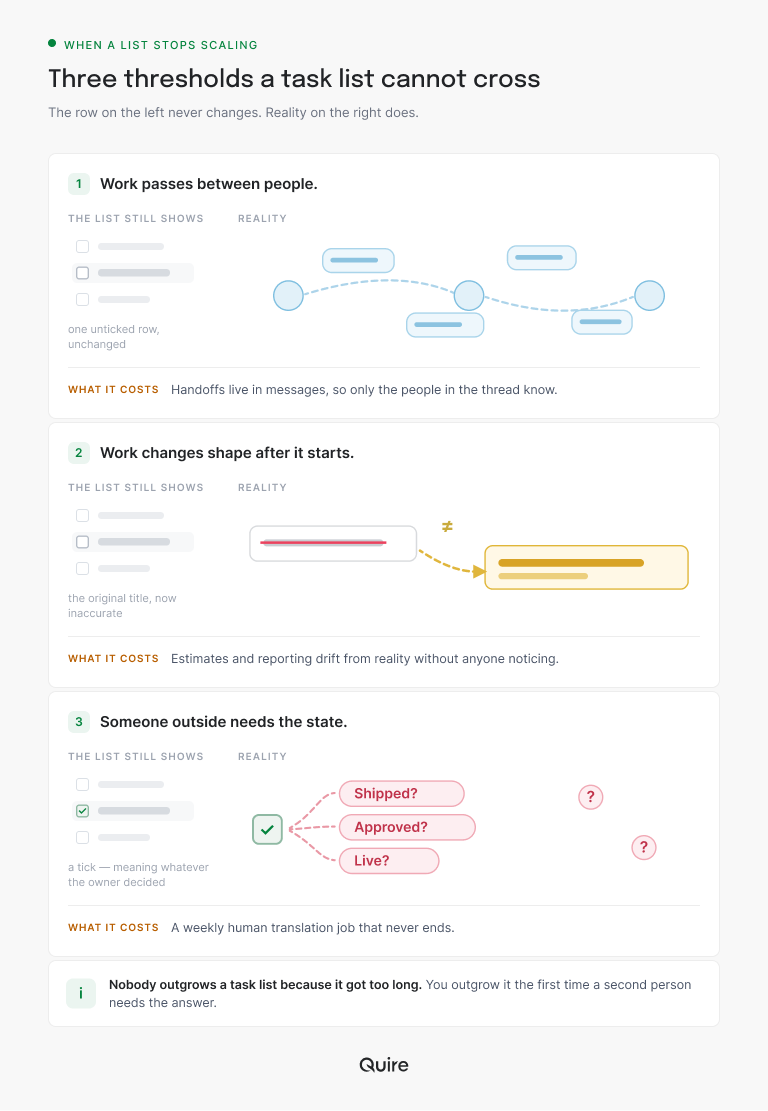
Work starts passing between people. The moment a piece of work has a second person in its history, the list stops being a record and becomes one person's view of a shared thing. Nothing on it shows the work changed hands, so the handoff exists only in a message somebody has to remember.
In Quire a handoff is a field change, not a message. Procurement reassigns the contract task to legal, and it lands in legal's My Tasks with every earlier comment still attached.
Work changes shape after it starts. The line item said "write the launch email." Three weeks later it's a launch email, two variants, a legal review and a translation. The row is now a label for something that no longer resembles it, and anyone reading the list is reading a description that expired.
Quire handles that growth by letting tasks nest. The five new jobs become subtasks under the original, each with its own owner and due date, instead of five loose rows that forgot they belong together.
Somebody else has to see it without asking. This is the threshold most teams actually hit first, and the one they most often misdiagnose as a communication problem.
If a manager, a client or another function needs the state and the only route is a person, you have a retrieval problem. No amount of tidying the list will fix it.
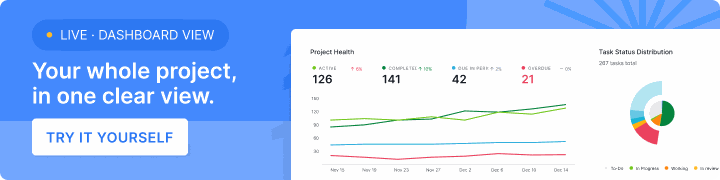
In Quire the fix starts with the statuses. Rename them after real states, such as Sent for review or Blocked on legal, and give each a progress percentage. The project's Overview tab then turns them into a Task Status Distribution chart that anyone on the project can read without asking.
Distributed teams hit this third threshold on day one, since nobody can lean over and ask. The 10 benefits of remote team management software cover what that shared record has to do across time zones.
Want to test the threshold rather than guess? Move the one piece of work people keep asking you about into a free Quire project. Give it an owner and a real status, then see whether the questions stop.
For a manager who wants one cut across several projects, a Dashboard pulls the same widgets into a single shared view.
Dashboard View is available on Professional plans and higher. Custom statuses and the Overview tab come with every plan, including Free. Full details are on our Pricing page.
What does a work management system hold that a task list doesn't?
Four things, and a tool that misses any one of them will feel like a list with extra steps.
State that's more than a tick. Statuses that describe where the work is, so "done" isn't carrying four different meanings depending on who ticked it.
An owner that's a name. Not a team, not a channel. One accountable person, visible without opening anything.
History. What changed, when, and why. This is the one teams skip and the one that makes the difference a month later, when the useful question isn't what the status is but when it stopped moving.
A shape per audience. The person doing the work, the person planning it and the person reporting on it need different pictures of the same thing. If each of them has to keep their own copy, you have three sources of truth and no system.
Here's how the two setups compare, row by row:
| What the work needs | What a task list gives you | What a work management system gives you | Where it lives in Quire |
|---|---|---|---|
| State | A tick, which is either done or not | A named stage, such as in review, blocked or approved with changes | Custom statuses, each with its own progress percentage |
| Owner | Whoever happened to write the line | One accountable name, visible from every view | The task's assignee, which also puts it in that person's My Tasks |
| History | Nothing, or a crossed-out line | What changed, when and why | Comments, @mentions and the task's activity trail |
| Audience | One layout for one reader | A picture of the same work for each reader | List, board, timeline and calendar views of the same tasks |
For how one set of tasks gives each audience its own picture, read which project view fits which kind of work, from Gantt to Kanban to calendar.
Where does task management software end and a work management system begin?
There's no clean line between the two categories. There's a line inside every tool, and it sits wherever a row stops carrying state for anyone but its owner.
Plenty of task management software already sits on the right side of that line, and some products sold as work management sit on the wrong one. So test the row, not the label. Open a task somebody else owns and see whether you can tell where it stands.
Project management software runs on a different axis. It's built around a plan with an end date, so its home screen is the schedule and its question is whether you'll finish on time.
Work management is built around work that keeps going, like a marketing calendar, an operations queue or a support backlog. What it tracks is current state.
Most teams end up needing both, and the expensive mistake is buying a scheduling tool for a problem that was never about dates.
In Quire one set of tasks carries both: the dates the timeline reads and the statuses everyone else reads. The plan and the current state live on the same object instead of in two tools.
If the question underneath yours is really about which category of tool you're shopping for, start with what collaborative work management means, plus five checks to test any tool.
Why do teams waste the move off a task list?
Because they move the rows and keep the habits. It's almost always the same story.
A team decides the list isn't working and picks something more capable. They import every row, then carry on exactly as before. Items still have no owner. Statuses stay at not-started and done, because nobody defined the ones in between. Nothing records why anything changed.
Six weeks later the verdict is that the new tool is bloated and the old list was simpler, which is true, because what they built was the old list inside a bigger application.
The move only pays when the habits move too. Four of them do most of the work, and each has an obvious home in Quire:
- Every piece of work gets a name against it. One assignee, never a team or a channel.
- Statuses describe the work, not the person. "Waiting on supplier" tells a reader something. "With Sam" mostly tells them who to message.
- Changes carry their reason. When a date or scope moves, the why goes in a comment on the task instead of into a thread.
- Someone decides what wins. One shared place makes the competition for attention obvious, and a Priority setting on the task records the call where the work lives.
None of that requires a heavier tool. It requires deciding that the work is the record, not somebody's memory of it.
There's a useful test after a month. Pick a piece of work nobody has touched in two weeks and see whether you can tell what happened to it without messaging anyone. If you can, the system is real. If not, you have a list with more fields.
How does work management run in Quire?
One task holds the work, and everyone reads that same task in the layout they need. It carries its own owner, its status, its discussion and its sub-parts, so the work stays one thing as it gets more complicated.
Here's the supplier contract from the top of this post, set up the way a work management system expects:
- The task. "Supplier contract: packaging vendor" sits in the Procurement project, assigned to the procurement lead and due on the 15th.
- The parts. Four subtasks hang underneath it, from sending the draft to filing the signed copy. Legal's review subtask carries legal's name, so it shows up in their My Tasks.
- The state. A custom status, Out for signature, set at 60% progress. Nobody has to guess whether a tick meant sent or signed.
- The change. The supplier pushes back on payment terms. The procurement lead comments on the task and @mentions legal, and the activity trail logs the due date moving to the 22nd.
- The reader. The person who used to ask opens the task and reads the answer straight off the screen: out for signature, waiting on the supplier's lawyers, due the 22nd.
Eleven minutes becomes about ten seconds, and nobody got interrupted.
The same tasks are readable as a list, a board, a timeline or a calendar, which is what removes the copies. Whoever is doing the work can stay on the board. Whoever is planning can work from the timeline.
Whoever needs to know what lands this week opens the calendar. One record underneath, three readings on top, and nothing to reconcile on Monday morning.
Quire's list view is the whole system laid out as a tree. Every row carries an owner, a status and a history, which is the difference this post has been describing all along.
When the work runs across several projects at once, see how Smart Folders give you one view across every project.
Key takeaways
- The trigger is never the number of tasks. It's the first time a second person needs something the list can't tell them.
- Three thresholds mark the line. Handoffs between people, work that changes shape, and readers outside the work who need its state.
- A real system holds four things. State, an owner, history and a view for each audience, or it's a list with extra steps.
- Move the habits with the rows. Import a flat list into a bigger tool, change nothing else, and you've bought a slower list.
- In Quire, the work is the record. One task carries its owner, status and discussion, and the same tasks read as a list, board, timeline or calendar.
Ready to test it on real work? Start free at quire.io/signup, set up the one piece of work that keeps generating questions, and time how long the next "where did this get to?" takes to answer.
Frequently asked questions
What is a work management system?
One where a piece of work keeps its own state, owner and history, so anyone can read where it stands without asking a person. A list records what to do; a system records what's true. The switch is triggered by more people needing the answer, not by more tasks.
How do I know my team has outgrown a task list?
Watch for three symptoms. Two together is usually enough.
- Work passes between people with only a message to show for it.
- Work changes shape after it starts.
- Somebody has to interview the team to write a status update.
Is a work management system the same as project management software?
Not quite. Project management software is built around a plan that finishes, so it tracks the schedule. Work management is built around work that continues, so it tracks current state. The common mistake is buying a scheduling tool for a problem that was never about dates.
What is the biggest mistake when moving off a task list?
Importing the list and keeping list habits. Teams move a flat set of rows into a more capable tool and keep treating each one as a private reminder. Then they conclude the tool is bloated. Nothing improved because nothing changed except the software.
Which task management software features turn a list into a work management system?
Four, one for each gap a flat list leaves open.
- Real statuses. In Quire, custom statuses with a progress percentage.
- One named owner. The task's assignee.
- A history of changes. Comments plus the activity trail.
- Several views of the same tasks. List, board, timeline and calendar.
Does a work management system make a team more productive at work?
It returns the time spent reconstructing state, from chasing updates to rebuilding a status report out of conversations. Teams are more productive at work when state can be read at the source. In Quire the same tasks read as a list, board, timeline or calendar, with no second copy.
