
productivity tips · Aug 6, 2026
Beyond the To-Do List: How to Build a Task Management System That Holds Up
Last updated: October 21, 2026
Your to-do list isn't wrong, it's incomplete. The four task management methods worth knowing are the to-do list, GTD, Kanban, and time-blocking, and most real setups blend them. Pick the one that fixes your actual failure mode: capture, visibility, or time. All four need the same thing underneath: work broken into a nested list, because none of them can act on a task that's secretly a project. Then put it where the work lives and where your whole team can see it, not in a private app that drifts by Thursday.
- What is a task management method, really?
- What are the four task management methods that matter?
- How do you pick the right task management method?
- Why does every method need the work broken down first?
- How do you turn a method into a system you'll keep?
- Where does a to-do list quietly fail a team?
- What changes for a real team that makes the switch?
- What are the most common task management mistakes?
- Key takeaways
- Frequently asked questions
You wrote the list this morning. A dozen items, full of nerve, drawn up over coffee around nine. It's late afternoon now, and the list is somehow longer. Three things have rolled to tomorrow for the fourth day running, and the one that actually mattered is still sitting there, ignored.
The list isn't failing you out of spite. It's doing the only thing a list can do: hold items. It can't tell you what's important, what to drop, or that two of those tasks belong to someone else.
Better task management methods exist, and you don't have to bin the list to use them. So let's walk through the ones that actually matter, how to pick between them, and how to turn one into a system that outlasts a busy week.
What is a task management method, really?
Task management method: a repeatable way of capturing, organizing, and acting on your work so the right things get done and nothing important slips. A to-do list is the simplest version. The stronger methods add the layers a plain list lacks: priority, structure, visibility, and a clear next action.
The key word there is repeatable. Anyone can have a productive day by luck. A method is what makes the following Wednesday go well too, even when you're tired and everything's slightly on fire.
Think of it as the difference between a heap and a system. A heap is everything dumped in one place. A system has rules for what goes where and what happens next. The methods below are just different sets of those rules, each one good at fixing a different way your heap is letting you down.
What are the four task management methods that matter?
You could read about a dozen of these. You don't need to. Four cover almost everything, and most real setups are a mix of them anyway.
1. The to-do list
The original, and genuinely not useless. A to-do list is fast, it's portable, and the plain act of writing things down gets them out of your head, which counts for more than people give it credit for.
Its weakness is everything past capture. No priority, no ownership, no sense of time, and no way to say no. Left alone, it only grows. Use a plain list for a single day or a short set of errands, and stop leaning on it the moment it outgrows what you can hold in your head. That happens sooner than you'd think.
The version worth keeping is a list that isn't stranded. In Quire, My Tasks is exactly that: your own running list, pulling in everything assigned to you across every project, so the personal layer and the team's work are the same data rather than two things you reconcile on Fridays.
2. Getting Things Done (GTD)
GTD, from David Allen, is the method for people whose main problem is "things keep slipping through the cracks." It's built on a process: capture everything, clarify what each thing actually is, organize it by context, review it regularly, then act with a clear head.
The magic of GTD is that it moves everything out of your brain and into a trusted place, so you stop using memory as a filing system (it's a terrible one).
That part isn't just folklore: a study in the Journal of Personality and Social Psychology found that unfinished tasks keep nagging at your attention until you make a concrete plan for them, at which point the mental static fades.
The cost is a few moving parts and a standing review to keep it honest.
The step people abandon first is the someday pile, because it clutters the view you actually work from. Quire's Peekaboo handles that mechanically: set a date and the task disappears until then, which is what makes the weekly review a five-minute pass instead of a chore you skip.
Want the step-by-step version: here's how to set up the GTD method so capture and review actually stick instead of fizzling in week two. And if the weekly review itself keeps slipping, James Clear's 2 minute rule is the habit trick for starting it small enough to keep.
3. Kanban
Kanban is the method for people who can't see where their work is stuck. Instead of a list, you get columns, usually something like To Do, Doing, and Done. Tasks become cards, and you slide each card across the board as the work moves.
The whole point is visibility. At a glance, you and your team see what's in flight, what's blocked, and what's piling up in one column because of a bottleneck nobody named out loud. A list hides all of that. A board shows it.
Where teams go wrong is running the board in a second app, so the plan lives one place and the progress lives another. Quire was built the other way around: the nested list and the Kanban board are two readings of the same tasks. Move a card and the list already knows. Nothing to sync, because nothing was ever copied.
This is where the old list quietly meets its match: to-do list versus Kanban, and what most project management gets wrong about the difference.
4. Time-blocking
Time-blocking is for the people who have a perfectly good list and still never reach the important thing. The method is simple: you don't just list a task, you give it an actual slot on the calendar. Not "sometime this week," but "Wednesday, 10 to 11:30."
It works because a task with no time attached competes badly against meetings, messages, and anything else with a clock on it. Blocking time is how the quiet, important work finally gets defended. The catch is that real days break your blocks, so you have to re-block without guilt when they do.
Re-blocking is where a paper calendar loses. Give a Quire task a start and due date and it shows up on the Calendar, where a broken block is a drag to another day instead of a rewrite. The task keeps its owner, its subtasks, and its comment history on the way there.
How do you pick the right task management method?
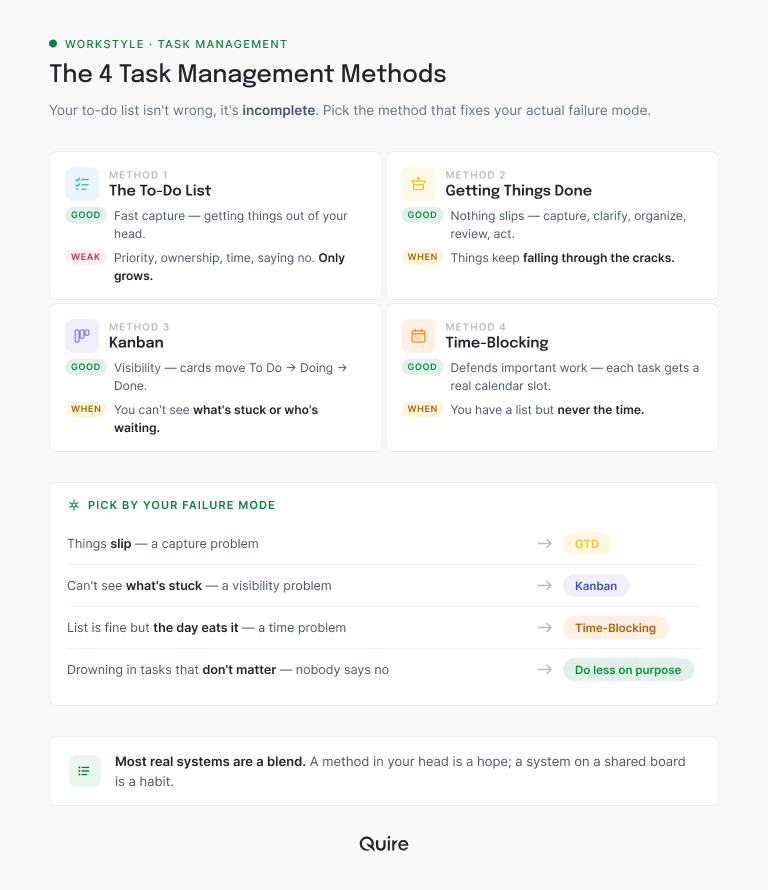
Don't pick by popularity. Pick by your actual failure mode. Be honest about the specific way your current setup lets you down, because each method is good at a different rescue.
If things keep slipping and you're remembering tasks at 11pm, your problem is capture. Lean GTD.
If you genuinely don't know what's stuck or who's waiting on what, your problem is visibility. Lean Kanban.
If your list is fine but the day eats it alive, your problem is time. Lean time-blocking.
And if you're drowning in tasks that mostly don't matter, your problem isn't a method at all. It's that nobody's allowed to say no. Sometimes the most productive move is doing less on purpose, which sounds like a bumper sticker until you actually try it.
On that last one: why focusing on productivity can make you less productive, and why doing less is sometimes the higher-output call.
More on making that trade on purpose: work less by working smarter, and why saying no is a skill worth practicing, not a shortcut.
Most people land on a blend. A Kanban board for visibility, a bit of GTD discipline for capture, time-blocking for the work that needs a running start. That's not cheating. That's how real systems get built.
The blend is also where most setups quietly fall apart, because each method gets its own app and now you're the integration layer.
That's the whole reason Quire holds all four at once: capture in My Tasks, read the same tasks as a nested list, flip them onto a board when you want to see flow, put dates on them and read the same set on a calendar.
One task, four ways of looking at it, no re-entry between them. Blending stops costing anything once the methods stop living in separate tools, which takes about ten minutes to test on a free account.
Why does every method need the work broken down first?
Every method above assumes something none of them actually gives you: tasks already small enough to act on. GTD asks for a next action, Kanban wants a card that can move a column, time-blocking needs something that fits in an afternoon. All three stall the moment a line on your list is secretly a whole project.
This is the deepest thing wrong with a flat list, and no amount of care fixes it. "Redesign the pricing page" and "reply to Dan" sit at the same size, on the same line, which quietly claims they're comparable. They aren't. One is forty minutes. The other is three weeks and four people.
The fix is structural: let a task contain tasks. Quire is built on that rather than having it bolted on, with unlimited nesting, so "Redesign the pricing page" stays one collapsed line while you're scanning and opens into copy, comps, legal review, and deploy when you're actually working. The shape of the work is the plan, and a flat list is exactly the format that throws that shape away.
Which brings back the study from earlier. The nagging stops when a goal has a concrete plan attached, and a tree is what that plan looks like once it's out of your head. "Launch the site" stops pulsing at you at 11pm, because the thing you owe tomorrow is one visible item near the bottom of a branch.
That's why the hierarchy makes the four methods better instead of competing with them:
- GTD's next action stops being a judgment call. It's the deepest open item under whatever you're looking at. You read it off the tree instead of re-deriving it every morning.
- Kanban cards stop lying about size. A card that's really a project carries its own subtasks underneath rather than pretending to be one step, so "In Progress" means the same thing for every card in the column.
- Time-blocking finally gets something honest to block. You schedule a subtask you can finish by lunch, not a parent you can only chip at, which is why the block survives contact with the day.
When one branch grows big enough to be its own world, drill down into it and the rest of the project goes quiet until you come back up.
Unlimited nesting in the task list is on every Quire plan, including free. Keeping that hierarchy intact on the Kanban board (Task Bundle) is on Professional and higher; the flat board itself is free. Details are on the pricing page.
The long version of this argument, and the reason Quire got rebuilt around a tree in the first place: why we abandoned the to-do list.
How do you turn a method into a system you'll keep?
Here's the trap that kills every method, even the good ones. You set it up beautifully on a Sunday, and by Thursday it's drifted out of sync with reality, because you've been maintaining it by hand in a place separate from where the tasks actually get done. Nobody keeps two systems aligned for long.
A method becomes a system when it lives where the work lives, and when the whole team can see it. That's the difference between a tidy idea and a thing that holds up under a busy week.
Still choosing that shared place? We compared the best task management software and task trackers against each other, so the tool you land on fits the method you just picked.
In Quire the pieces are already in one place, so a method stops being theory fairly fast. On top of the tree from the last section you add tags and dates to sort by, sublists to carve out a filtered slice without copying anything, and a board that carries the status so nobody has to ask for it.
The part that decides whether it survives is the setup cost. A system you have to rebuild by hand for every new project gets rebuilt twice and then abandoned.
Save the structure once as a template and the next project starts with the columns, the tags, and the nesting already in place, which is the difference between a method you used in March and one you still run in September.
Quire's template library has a whole section built around the methods in this article, so you can start from a working setup instead of a blank project.
Tools aren't the point. What matters is that a method stops being a private hack and becomes the shared place your work actually lives.
Where does a to-do list quietly fail a team?
Everything so far works for one person. The cracks get much wider the moment you add other people.
A personal list is invisible to everyone else. Your colleague can't see you're already on the thing they were about to start. The priority you're working from might be three days stale.
And the only way anyone learns the status of your work is to interrupt you and ask.
Spread that across a whole team and the busyness turns strange: everyone working hard, nobody sure they're working on the right thing, and the same "wait, who's doing this?" conversation every single week.
A shared system fixes the thing a list structurally can't. It lets the whole team see the same work, in the same order, at the same time. The double-work stops. The status meeting shrinks, because the board already answers the questions the meeting existed to ask.
If your team already says "wait, who's doing this?" most weeks, a reminder won't fix it. A board everyone can already see will. Worth testing on a free Quire account before your next status meeting eats another ten minutes.
The moment a second person needs the answer, you're past what a list was built for. The three signs your team needs a work management system show where that line sits and what the system has to hold.
What changes for a real team that makes the switch?
Take a five-person studio that's spent months running on separate lists, each person keeping their own in their own app. The morning check-in eats ten minutes while everyone reads theirs aloud and the rest wait for a turn. Things still slip, because a task that's "done" on one person's list is news to everyone else until it happens to surface.
They move the work into a single Quire project instead. Every deliverable becomes a task with someone's name on it and a real deadline, the bigger ones split into subtasks (draft, review, client sign-off), and a Priority field marks the two things that actually matter this week. The whole set runs as a Kanban board: To Do, In Progress, In Review, Done.
The "In Review" column swells one week. Instead of a hunch that things were dragging, they can see the bottleneck: four tasks, one reviewer, all waiting. They rebalance in ten minutes by reassigning two of them. The check-in drops to five, because nobody needs to recite a list anyone can already read, and the reviewer's overload was visible before anyone had to complain about it out loud.
| What you'd ask | Five private lists | One shared Quire board |
|---|---|---|
| Is this task done? | Ask the person and wait for a reply | One glance at the column it's sitting in |
| Who owns this? | Guessed, sometimes wrong | The assignee field, always visible |
| What's actually stuck? | A feeling, usually voiced too late | A column that's visibly swollen |
| Morning check-in | Ten minutes of reading lists aloud | Five minutes, mostly decisions |

Nothing magic happened. They didn't work more hours or adopt some exotic framework. They moved from five private lists to one shared system, and the coordination overhead that was quietly eating their week mostly evaporated.
What are the most common task management mistakes?
A few traps catch almost everyone moving past the basic list.
- Adopting a whole method when you needed one part. You don't have to run pure GTD. Take the capture habit and leave the rest if that's all you were missing.
- Building it where the work isn't. A gorgeous system in a separate notes app will drift and die. Keep it where the tasks actually get done.
- Never deleting anything. A system that only grows is just a slower list. Build in a way to drop, tuck, or archive, or it'll bury you politely.
- Keeping it private on a team. If your teammates can't see your work, you're all coordinating by guesswork. Shared beats clever every time.
Keeping it private is the real lesson hiding in all of this. The best task management method is rarely the most sophisticated one. It's the one your whole team can actually see and keep using on a bad week.
Once the method holds, an assistant can run the boring half of it for you. That's the subject of AI task management: the four jobs worth handing to an AI, and the ones to keep.
Key takeaways
Your to-do list was never wrong. It was just incomplete, a record pretending to be a system. The fix isn't to abandon it. It's to add the layers it's missing: priority, structure, visibility, and a clear next action, borrowed from whichever method matches the way your current setup keeps failing.
Pick the part that solves your real problem, blend freely, and put the whole thing somewhere your team can see it. A method in your head is a hope. A system on a shared board is a habit, and it's most of what it takes to be more productive at work without adding hours to your day.
Ready to move past the list? Start free at quire.io/signup and build a task system your whole team can actually see.
Frequently asked questions
What are the main task management methods?
The four that matter are the to-do list, GTD, Kanban, and time-blocking. The list captures, GTD organizes so nothing slips, Kanban makes work visible, and time-blocking assigns tasks to real slots. Most working systems blend them.
What's the difference between a to-do list and a task management system?
A list tells you what to do. A system tells you what to do first, who owns it, when it's due, and whether it's moving. The list is the starting point, not the finished thing.
Why do big tasks break a to-do list?
Because a flat list gives a three-week project and a two-minute reply the same single line. Every method needs tasks small enough to act on, and none of them breaks the work down for you. A nested list does it structurally, by letting a task contain tasks.
How do I choose a task management method?
Match it to your real problem. Forgetting things means you need capture (GTD). Can't see what's stuck means you need Kanban. Plenty of tasks but no time means you need time-blocking.
Why does my to-do list never get shorter?
Because a flat list has no way to say no, so it only grows. A real system adds priority and a place to tuck or delete tasks, so the list reflects what you'll actually do.
Can a task management method make you more productive at work?
When it lowers the effort of deciding what to do next. The gains come from not re-deciding the same things daily and not losing tasks between apps. In Quire, the method sits with the actual tasks, so the team stops coordinating by guesswork.
What's the best task management method for a team?
The one everyone can see. A shared Kanban board beats four private lists because it shows the same work, in the same order, at the same time. Shared visibility matters more than the specific method.
