
project management · Nov 12, 2026
Team Task Management: One Shared Board for This Week, Ongoing, and Incoming

Last updated: November 12, 2026
Team task management is one shared list with three states of time: due this week, ongoing, and just arrived from another team. An Incoming section gives the handoff that arrives as a message a home, and the triage rule is owner, then bucket, then date, once a week. Quire's Team Task Management template ships the whole board, ready to duplicate.
- What is team task management?
- Why do five private lists work right up until they don't?
- What is the triage rule for incoming work?
- What comes with the Quire Team Task Management template?
- Spreadsheet, chat channel or team task management software: which one holds three states of time?
- How does a request run through the board in Quire, end to end?
- What do you change when you copy it?
- Key takeaways
- Frequently asked questions
Three questions decide whether a team's week holds together:
- Where does a request from another team land when it reaches yours?
- Who decided what's due this week, and can everyone see that decision?
- When the client demo, the newsletter and a login bug from support all want the same slot, which one moves?
If the honest answers are "someone's inbox," "whoever asked loudest" and "we find out the day before," the problem isn't effort. It's that team task management is happening in five places at once: a personal to-do app, a spreadsheet, two chat threads and one very good memory.
One shared board fixes most of it, as long as the board knows about time. Work due this week is not the same as work that runs all year, and neither is the same as a request that arrived twenty minutes ago and hasn't been looked at. Three states, three sections, one list.
The failure mode is the fourth pile: the one nobody owns. This post is about not having one.
The method runs on one board inside task management software, and Quire ships a ready-made template built for exactly this shape.
What is team task management?
Team task management: the shared practice of capturing, assigning, scheduling and tracking a team's tasks in one place everyone can see, so that what is due, what is ongoing and what has just arrived are visible to the whole team rather than to whoever wrote them down.
Team task management is one shared list with three states of time, and a rule for moving work between them. Your to-do app answers "what am I doing today?" The team version answers a harder question: "what are all of us doing, and who is waiting on whom?"
Those three states are worth naming, because most lists collapse them into one:
- Due this week. Dated work with a real deadline: the client demo on Thursday, the newsletter on Friday.
- Ongoing. Work with no fixed end date that still has to happen: reviewing mockups, keeping the onboarding doc current, tidying the shared drive (someone has to).
- Incoming. Requests that arrived from outside the team and haven't been looked at yet. No owner, no date, not yet.
The moment you sort work into those three, a fourth category shows itself: the request that got a date before it got an owner, or an owner before anyone agreed it was worth doing. That's the pile that eats Wednesdays, and the whole method exists to keep it empty.
A personal to-do list and a shared team board can hold the very same tasks. What changes is who sees them and who decides:
| What changes | Personal to-do list | Shared team board |
|---|---|---|
| The question it answers | What am I doing today? | What are all of us doing, and who is waiting on whom? |
| Who sees it | You | The whole team, plus anyone following a task |
| Where a request from another team lands | Your inbox, or your memory | An Incoming section, with no owner or date yet |
| Who sets the due date | You, when you write it down | The team, at triage, once the task has an owner and a bucket |
| Where it lives in Quire | My Tasks, which gathers your tasks from every project | One shared project, with a section per state of time |
If your team's list is still one column of everything, start with the personal layer. How to build a task management system that holds up covers the methods underneath, and this post is the team-sized version of it.
Why do five private lists work right up until they don't?
Private lists fail at the handoff, not at the list. Renata's list is excellent. So is the designer's. The trouble starts when Sales asks Renata for an updated pricing one-pager, in a chat message, at the end of a thread about something else.
Renata reads it, thinks "sure," and gets pulled into a call. The request now exists in exactly one place: her memory. Sales believes it's in progress. Renata believes she'll get to it. Both are right, and the one-pager still isn't happening.
This is the ordinary shape of cross-team work, and it's getting more common, not less. Cross, Rebele and Grant, writing in Harvard Business Review, found that time spent on collaborative activities had grown by half or more over two decades.
More collaboration means more handoffs, and every handoff that arrives as a message is a task with no home.
A shared board with an Incoming section gives it one. The request doesn't need an owner or a date yet. It needs a place to sit where the team will see it on Monday, which is a much lower bar than "someone remembers."
The handoff is where cross-team work goes missing, and it has a fix. The Handoff Gap gives a handoff a real definition (someone who owns it, an agreed picture of done, a timestamp) and a four-question test that catches the gap early.
What is the triage rule for incoming work?
Incoming work gets an owner and a bucket before it gets a date. In that order, and no skipping.
The instinct runs the other way. A request arrives, someone asks "when do you need it?", and a Friday gets attached before anyone has agreed who is doing it or whether it belongs in this week at all.
Now you have a deadline with no owner, which is a promise made on the team's behalf by nobody in particular.
So the triage rule is three quick decisions, ideally made once a week in a room (or a call) rather than in a thread:
- Owner. One name, or two if the work is genuinely shared. "The team" is not an owner.
- Bucket. Does it go into this week's deliverables, into ongoing work, or does it stay in Incoming with a Waiting tag because you need more from the requester?
- Date. Only now, and only for the first bucket. Ongoing work gets a rhythm, not a deadline.
The rule has a side effect people don't expect: Incoming stays small. Once the team knows every request will be looked at on Monday, requesters stop chasing on Tuesday, and the team stops answering "did you see my message?" as a full-time role.
Triage is also where workload gets honest. If the same name comes up for the third request in a row, the board is telling you something before the person has to.
When the same reliable person keeps landing the extra work, the fix is a capacity read, not a pep talk. Team workload management walks through measuring real capacity and rebalancing before it turns into a resignation.
What comes with the Quire Team Task Management template?
Four sections, three statuses, three workflow tags and one saved sublist, already wired. Open the Team Task Management template and the three states of time are the first thing you see, with a fourth section for the rhythm that keeps them moving.
The three working sections map one to one onto the states of time:
- This week's deliverables holds dated work.
- Ongoing work holds tasks with no fixed deadline.
- Incoming requests from other teams holds asks nobody has triaged yet. They carry no due date until triage, on purpose.
The fourth section is Team meetings, which holds a Monday kickoff to set the week's priorities and a Friday review to close done tasks and plan the next week.
Statuses are kept deliberately short: To-do, In progress and Completed.
Three tags mark the states a status can't:
- Waiting: you need something from the requester.
- To discuss: bring it to Monday.
- Needs review: done, pending a second pair of eyes.
Then there's the sublist. Top priorities is a saved filtered view that collects every task marked High or Urgent, across all four sections, so the team's must-dos read as one short list without anyone maintaining it.
The sample tasks show the shape rather than filler. An urgent client demo sits in this week's deliverables tagged Needs review.
In Incoming, the pricing one-pager Sales asked for waits at priority High, tagged Waiting. A login-page bug from support sits below it, untouched, which is exactly where an untriaged bug should be on a Sunday night.
The template also carries a short "How to use this template" document with four steps:
- Copy it with Duplicate, from the dropdown beside the project name.
- Rename the sections to fit your workflow.
- Assign tasks, set real due dates and adjust priorities.
- Swap the tags for whatever your team tracks, by function, client or stage.
Open a free Quire account, duplicate this template, and Incoming, This week and Ongoing are set up before the kettle boils.
Spreadsheet, chat channel or team task management software: which one holds three states of time?
Anything can hold a list; the question is which one holds the handoff, the owner and the weekly rhythm without a person babysitting it. Here's how the three usual candidates line up against what this method needs, with the rest of the method on the same page.
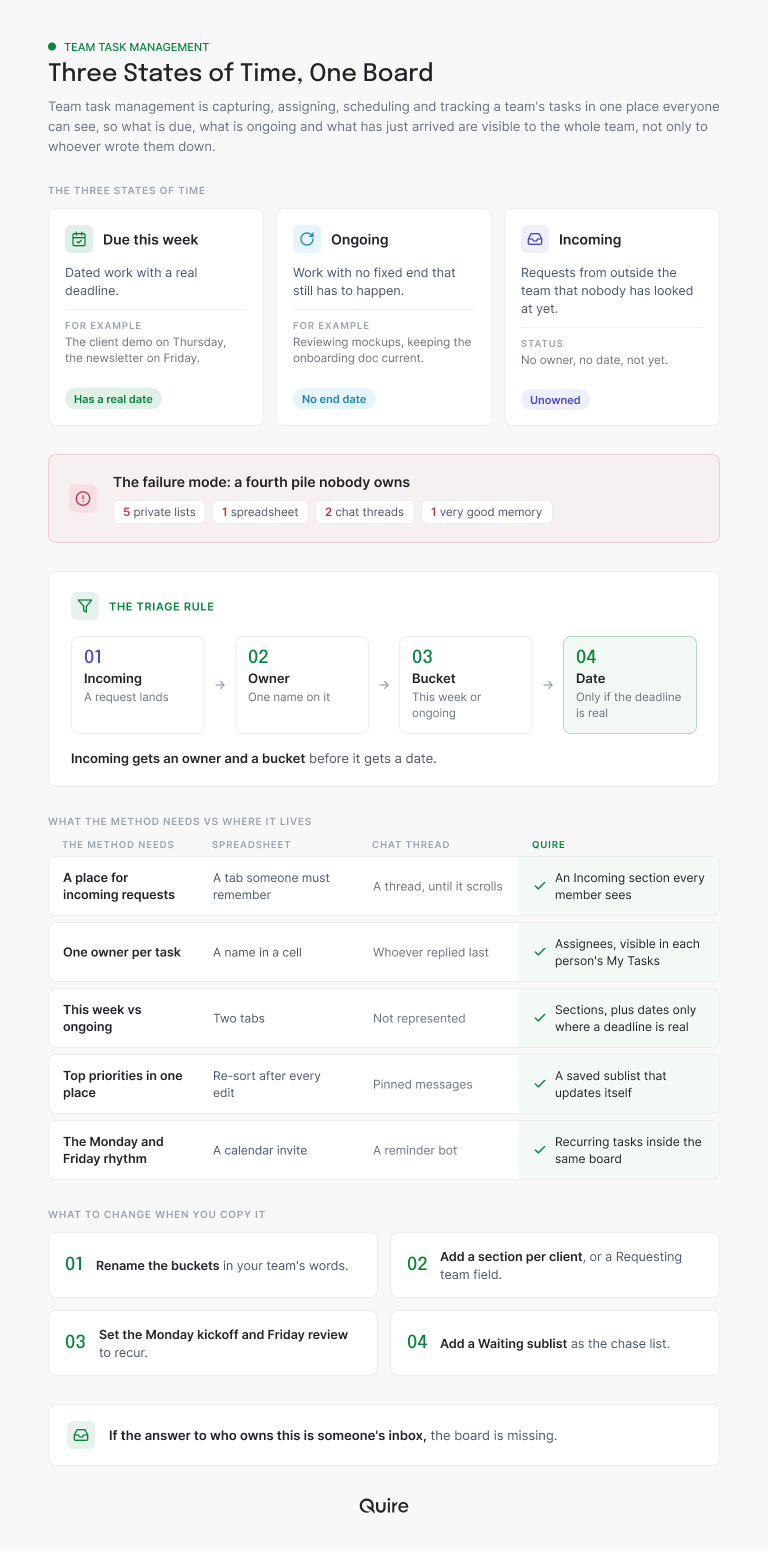
One need the picture leaves out is your own slice of the work. In a spreadsheet it's a filter somebody can break, and in a channel it's a search for your name. In Quire it's My Tasks, which pulls every task assigned to you from every project.
The spreadsheet and the channel both have a place in a team's week. The spreadsheet is a fine export; the channel is where the conversation about a task happens. The trouble starts when either one is asked to be the list of record, because both depend on a human to keep them true.
That's the hand-off worth making. Let the chat stay chat, and let the board hold the state.
How does a request run through the board in Quire, end to end?
Here's the one-pager request, start to finish, on the template. Follow it with Renata, whose team owns the pricing pages.
Thursday afternoon, an account manager in Sales adds a task to Renata's project: "Sales asked for updated pricing one-pager." It lands in Incoming requests from other teams with a short description of what changed and which deals are waiting. No assignee, no date.
He tags it Waiting, because Legal still hasn't confirmed one figure, and marks it High.
Nothing happens until Monday, and that is the point. Renata set the Monday kickoff task in Team meetings to repeat weekly when she copied the template, so it's already sitting there with the date on it.
In the kickoff, Renata opens Incoming and triages the three items in it. The login bug goes to the engineer who owns that page. The landing-page copy feedback, tagged To discuss, gets ten minutes and an owner.
The one-pager comes to her: she assigns herself and the designer (multiple assignees, since the layout is genuinely his), drags it into This week's deliverables, and sets a start of Tuesday and a due date of Thursday.
She removes the Waiting tag, because Legal confirmed the figure over the weekend, and adds two subtasks underneath: "Pull current prices from the sheet" and "Lay out the two-column version." The designer gets the second one. Then a reminder, one day before the due date, shared with both of them.
Now watch where that task shows up without anyone copying it. It's on the designer's My Tasks the moment he's assigned. It's in the Top priorities sublist because it's marked High.
Switch the project to Board view and the same card sits in the To-do column, ready to move to In progress on Tuesday. Open Calendar view and it's on Thursday, next to the client demo.
Wednesday, Renata's part is done. She tags it Needs review and the designer picks it up from his list. Thursday morning the review happens in the task's comments, the status flips to Completed, and the account manager, who follows the task, gets the notification without anyone writing an update.
Friday, the Friday review task comes due. The team closes what's done, moves the two tasks that slipped into next week (with new dates, not vague ones), and completes the review. Shortly after, Quire creates next Friday's copy on its own.
If Renata's team runs several projects at once, one per client say, a Smart Folder gathers them into one live view, so Monday's triage reads every Incoming section at once instead of project by project.
The Monday kickoff and Friday review are ordinary tasks set to repeat weekly. Recurring tasks covers the weekly, monthly and yearly options, and why the next copy appears only after you complete the current one.
Reminders and Calendar view come with Quire's Professional plan and up. Sections, tags, sublists, Board view, My Tasks and Smart Folders are part of every plan, free included.
What do you change when you copy it?
Keep the three states of time and change everything else to match how work reaches you. Copying is the project menu (the small dropdown beside the project name) and then Duplicate, which always creates a new project of your own. Then, in roughly this order:
- Rename the buckets in your team's words. "This week's deliverables" might be "Due this sprint" or "Client deadlines." The names matter less than the fact that the team agrees on what moves where.
- Add a section per client or product line, if that's how requests arrive. Some teams want Incoming split by requesting team; a Select custom field called "Requesting team" does the same job without more sections.
- Set the Monday kickoff and Friday review to recur weekly. They're plain tasks in the template; make them repeat and the rhythm keeps itself.
- Swap the tags for what you actually track. Waiting, To discuss and Needs review are workflow states. If your team lives by client or by stage, tag by that.
- Add a sublist for what you're waiting on. A saved view filtered to the Waiting tag becomes the chase list, and you can share it with whoever does the chasing.
- Put a reminder on the deadlines that bite. Not all of them, just the ones that cost something when they slip.
One more, quieter change: decide who runs Monday. The board does the remembering, but triage is a human decision, and a decision with no owner is the fourth pile in a new outfit.
Key takeaways
Team task management is one shared list with three states of time: due this week, running ongoing, and just arrived. The fourth pile, work with a date but no owner or an owner but no agreement, is the one to keep empty, and the triage rule does it: owner, then bucket, then date.
Private lists are fine for the personal layer. They give way at the handoff, when a request from another team arrives as a message and lives only in someone's memory. An Incoming section on a shared board gives that request a place to wait until Monday.
The Quire Team Task Management template ships the shape: four sections, three statuses, three tags and a Top priorities sublist. Duplicate it, rename the buckets, set the kickoff and review to recur, and the board starts doing the remembering for you.
Want next Monday's triage to take fifteen minutes? Start free at quire.io/signup, duplicate the Team Task Management template, and move this week's three loudest requests into Incoming before you leave today.
Frequently asked questions
What is team task management?
Capturing, assigning, scheduling and tracking a team's work in one place everyone can see, split by when it is due: this week, ongoing, or just arrived. In Quire that is one project with a section per state, so a request from another team has a home before it has an owner.
How is team task management different from personal task management?
A personal list answers what you are doing today; a team list answers what everyone is doing and who is waiting on whom. In Quire, My Tasks is the personal layer, gathering your tasks from every project, and the shared board is the team layer, so nothing gets reconciled on Friday.
How do you triage incoming requests from other teams?
Owner first, then bucket, then date, once a week rather than in the thread it arrived in. In the Quire template, new asks wait in the Incoming section with no due date, and the Monday kickoff moves each one into this week's deliverables or ongoing work with an assignee.
What is in the Quire Team Task Management template?
Four sections (This week's deliverables, Ongoing work, Incoming requests from other teams and Team meetings), three statuses, three workflow tags (Waiting, To discuss, Needs review) and a Top priorities sublist that collects everything marked High or Urgent. Duplicate it in Quire and rename the sections to your team's words.
Can a spreadsheet or a chat channel work as a shared team task list?
Both can hold the list, and both need a person to keep it true. Team task management software like Quire keeps the state on the task itself, so owner, due date, section and priority update in one place and show up in My Tasks, Board and Calendar on their own.
How does a shared task board help a team be more productive at work?
It removes the remembering. When every request has a place to land and a weekly moment to be triaged, nobody spends Tuesday asking whether their message was seen. With Quire holding the owner, the date and the priority on each task, the team is more productive at work instead of busy tracking it.
