
project management · Jul 30, 2026
Your Best People Are Always the Most Overloaded. Here's How to Fix the Workload Math

Last updated: October 21, 2026
Team workload management means spreading work so everyone's near their capacity and nobody's over it, sustainably, not equally. The trap is invisibility: work scattered across projects never gets added up, so it lands on your most reliable people until they break. Measure real capacity (25 to 30 hours, not 40), compare load against it per person, and move work, not just deadlines. Make it something you can see continuously, not reconstruct after a resignation.
- What is team workload management?
- Why do your best people end up the most overloaded?
- Why is team workload so hard to see?
- How do you measure real team capacity?
- How do you spot overload before someone burns out?
- How do you actually rebalance the workload?
- What does team workload management look like when you catch overload early?
- How does Quire answer the workload heatmap question?
- What are the most common workload mistakes?
- Key takeaways
- Frequently asked questions
There's someone on your team who always lands the plane. When a deadline is real and something absolutely has to ship, it goes to them, because you trust them to deliver. And they do. Every time.
Which is exactly why they're drowning.
Nobody planned it. It's just what happens without real team workload management: work drifts toward the person most likely to handle it, and because they handle it, more work drifts their way. The overflow settles on whoever's most willing to carry it, and because they rarely complain, it keeps settling. Right up until the day they go quiet, or hand you a resignation letter that lists "always overloaded" somewhere between the polite lines.
The reason it stays hidden is almost boring: most teams can't actually see workload. Tasks are scattered across projects, sitting in different people's heads, and nobody's adding it up. You can't balance what you can't see, so it doesn't get balanced. It just quietly stacks.
This post is about fixing that. What workload management actually is, why capacity is so easy to misjudge, how to spot overload before it becomes a goodbye, and how to rebalance in a way that moves the work, not just the dates on it.
What is team workload management?
Team workload management: spreading work across a team so everyone's loaded near their capacity, but nobody's consistently over it.
Team workload management is the practice of seeing who's doing what across every project, adding it up per person, and rebalancing when one person's underwater while another has room. Three moves do most of the work: measure real capacity (25 to 30 hours, not 40), compare each person's committed hours against it, and move work rather than deadlines.
One thing that trips people up: the goal isn't equal workloads. People have different capacities, roles, and speeds, and forcing identical loads is its own kind of mismanagement. The goal is sustainable loads, where the team's total output stays high and nobody's quietly running at 130% on the way to a hard stop.
Why do your best people end up the most overloaded?
Because reliability compounds, and nobody's tracking the compounding.
Call it the reliability tax. Work that matters goes to the person who handles it well. Handling it well earns them more work that matters. The overflow from everyone else's plate drifts their way too, because they're the safe bet.
And since they rarely push back, the load grows without anyone deciding it should. There's no meeting where someone says "let's quietly bury our most dependable person until she cracks." It happens anyway, one reasonable Tuesday assignment at a time.
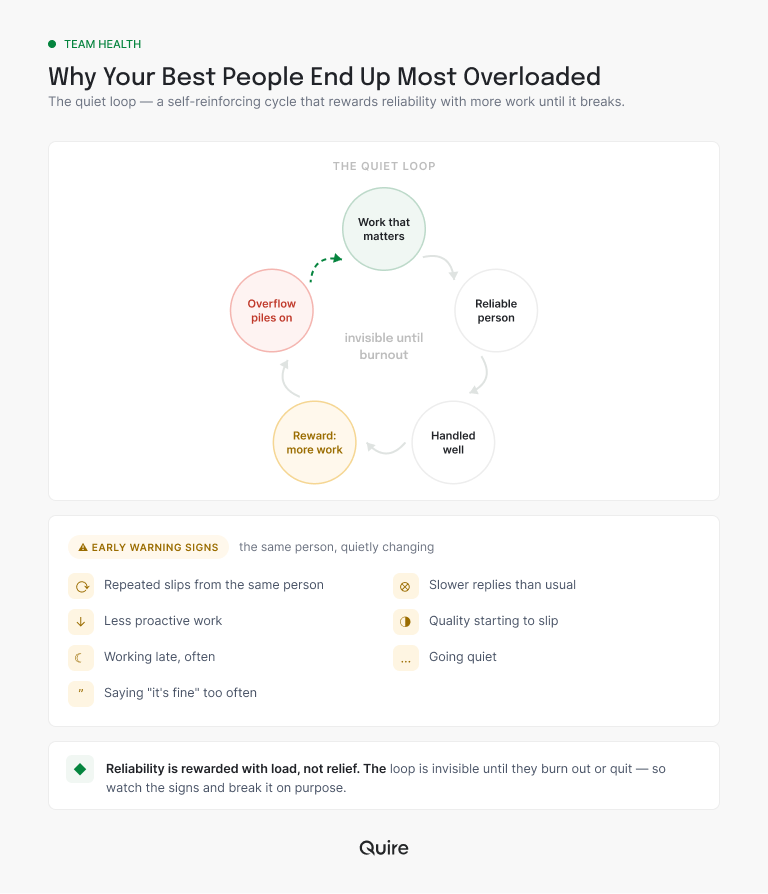
This is not a rare management failure, it's the default one. Gallup's research on employee burnout found that 23% of employees feel burned out at work very often or always, with another 44% burned out sometimes, and it names unmanageable workload as one of the five main causes.
Gallup's own framing is the part worth sitting with: high performers can flip from optimistic to hopeless when the load stops being survivable. The people most likely to hit that switch are the ones you'd least like to lose.
The cruel part is that it's invisible to everyone, the manager included, until it's expensive. Without a picture of who's carrying what, overload doesn't show up as a number. It shows up, eventually, as a two-week notice, which is the most expensive form of feedback there is.
Why is team workload so hard to see?
Because it lives in pieces, in different places, and no single view adds it up.
Take Rina, your strongest developer. She's got three tasks in the marketing site project, two in the mobile launch, and a standing habit of reviewing everyone else's pull requests that exists only in the team's collective memory.
Each project sees its own slice and assumes it has fair access to her. None of them see the total. The launch lead thinks she's mostly free, the marketing lead thinks the same, and Rina knows the truth but is too busy to draw anyone the picture.
The invisible half is growing, too. In Harvard Business Review, Rob Cross, Reb Rebele, and Adam Grant reported that time spent in collaborative work has grown by 50% or more over two decades. That's the review, the unblocking, the "quick question" that eats forty minutes. None of it is a task in anyone's project, so none of it shows up in the plan, and it lands hardest on exactly the people everyone else depends on.
So workload stays a feeling instead of a fact. And feelings are terrible at triggering action before a crisis. If your team runs several projects at once, the fix starts at the level above any one project, which is the same reason portfolio-level tracking exists at all.
This is the tax hiding underneath the workload one: the coordination tax, where growing teams spend more time reporting on work than doing it. Worth reading if your people feel busy but the output doesn't match.
How do you measure real team capacity?
Start by throwing out the 40-hour week. It's a number you tell the spreadsheet to feel organized.
A full-time person does not have 40 hours of project work in them. Subtract meetings, email, messages, context-switching, and the ordinary friction of a workday, and most people land somewhere between 25 and 30 hours of real, focused capacity. Plan against the theoretical 40 and you've overcommitted everyone by a third before you've handed out a single stretch task, then spent the quarter puzzled about why everything runs late.
So the math is simple. Capacity is realistic available hours. Load is committed hours. The gap between them, positive or negative, is the thing you manage. Someone sitting at 34 committed hours against 27 of real capacity is over, and that's where you step in, before the gap turns into a slipped deadline or a burned-out person.
The trick is making that arithmetic happen somewhere other than your head. In Quire, an estimate is a custom field on the task, so the number travels with the work instead of living in a separate planning sheet that goes stale by Thursday.
Add an "Est. hours" field, put a number on the tasks that actually consume time, then group by assignee and each person's committed hours stack up in one column. That's the whole calculation, and it updates itself every time somebody reassigns a task.
Skip the setup: pin the per-person hours onto a Quire dashboard and read the gap every Monday without reopening the spreadsheet.
Custom fields and Table View, the spreadsheet-style layout where this reads most naturally, are on Quire's Professional plan and higher. The Timeline and Overview views described below are on every plan, including free. Details on the pricing page.
Our own PM team runs a version of this, which is written up in three real practices for Table View, including the resource-allocation one. It is not sophisticated. It's a column of estimates, grouped by person, checked weekly. Sophistication is not what teams are missing here. Arithmetic is.
If the arithmetic still lives in a spreadsheet, see what software team management adds that the spreadsheet drops: eight ways a shared tool cuts risk, cost, and errors once a team passes five people.
How do you spot overload before someone burns out?
The obvious signs are the late ones. By the time someone's visibly cracking, it's been building for weeks. The trick is to catch it earlier, from the pattern, not the collapse.
Watch for deadlines slipping from the same person over and over, response times stretching out, and a drop in proactive work (they've gone purely reactive because there's no slack left to think ahead). Then the quiet signals, which matter most: consistently working late, going unusually silent, and saying "it's fine, I've got it" often enough that you start to suspect it is not, in fact, fine.
Tracking workload as data is precisely so you don't have to catch these in the wild. A capacity view shows the over-allocation weeks before any of the symptoms surface. You want the chart to flinch long before the person does.
The version of this that survives a busy month is the one you don't have to remember to run.
Quire's Member Workload panel lists who is carrying what, and it sits on the Overview of a folder, smart folder, or organization, so it spans projects rather than showing you one slice. Because that Overview is the screen you already open, the flinch arrives without a ritual.
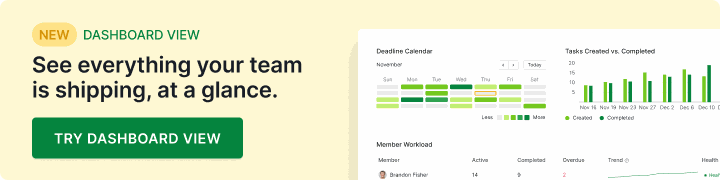
If you'd rather have it next to your other numbers, Dashboard View lets you pin the same panel onto a dashboard you build, alongside a deadline calendar and whatever else you actually check, on Professional and up.
The human side of this deserves its own read: 7 productivity tips to avoid burnout at work, for protecting the person once the numbers tell you they're at risk. If the silence has already set in, the ten signs of disengaged employees and 15 ways to re-engage them are the next read.
How do you actually rebalance the workload?
Here's the move most people get wrong. When someone's overloaded, they shuffle deadlines. Push this to next week, that to the week after. But moving dates doesn't reduce load. It just reschedules the drowning. To actually rebalance, you have to move work.
There are four real moves, plus the one that only feels like a move:
| The move | What it does to the load | Best when | The catch |
|---|---|---|---|
| Reassign | Removes the hours from one person and adds them to another | Someone else has genuine room and the work isn't locked to one specialist | Handover costs real hours, so it works better before the task is half-done |
| Resequence | Keeps the total but flattens the peak into a later week | Two heavy efforts happen to land on one person in the same week | Only helps if the later week is genuinely lighter, which is worth checking |
| Defer | Takes the hours out of this period entirely | The work is real but nothing breaks if it lands next quarter | Deferred work quietly returns, so it needs a date, not a someday pile |
| Cut scope | Removes the hours permanently | The team is over capacity every week, not just this one | Needs an actual decision from whoever owns the outcome |
| Move the deadline | Nothing. The same hours sit on the same person | The date was wrong to begin with and the load was always fine | Feels like managing workload, which is why it's the most common non-fix |
All four of the real moves need the same precondition, which is seeing the true picture across everyone and every project at once.
This is where a tool that shows the whole picture earns its place. Build a Smart Folder that pulls in every project the team touches, switch it to Timeline, and group by assignee.
Now each person is one horizontal band, and the collisions announce themselves: two fat bars stacked on the same name in the same week is your resequencing candidate, visible before anyone files a complaint.
Dragging a bar reschedules the task, and changing the assignee moves the work rather than the date, which is the distinction the table above is built around.
If you are shopping rather than configuring, this is the capability that separates the categories: a tool that tracks projects will not add a person up across them. That is the work management job, and our best work management software roundup scores ten of them on the reporting and team-size questions that decide it.
Worth knowing before you decide anything: Smart Folders and Timeline are both on the free plan. If your team's workload is currently a guess, you can stop guessing this afternoon. Start a free Quire project, point a Smart Folder at everything in flight, group by assignee, and look at the one name with more bars than anyone else.
What does team workload management look like when you catch overload early?
It looks like a five-minute conversation instead of a backfill. Here's the whole difference between a team that tracks workload and one that doesn't, in one scene.
Rina's band on the Timeline goes crowded in week two, not month three. Grouped by assignee, next week shows three bars on her name: the payments work, a review commitment, and a migration task, all landing together. The estimate field adds up to about 34 hours against her real 27. Nothing's on fire yet. That's the entire point.
So the manager acts while the fix is still cheap, and every move is a few seconds of work:
- The migration task gets reassigned to a teammate sitting at 60%, who could use the stretch. One field change, and 8 hours leave Rina's column and appear in his.
- The review commitment slides a week. Its due date moves, and because it's a task rather than a favor Rina remembers, it doesn't get lost in the shuffle.
- The payments work stays, and the parts that were living in Rina's head become subtasks with their own owners and dates, so the pairing engineer picks up two of them instead of waiting to be told.
- The invisible work finally becomes visible. That habit of reviewing everyone's pull requests gets a recurring task with an estimate on it, which is the only way it ever counts against her capacity.
Rina stays near 27 hours, ships the payments work clean, and never finds out how close she came to a genuinely brutal month. Nobody held a resourcing meeting. Somebody looked at a screen they open anyway, and moved four things.
That's the value of seeing workload as a number instead of a hunch. Caught early, the fix is small and boring: a task moved, a deadline nudged. Caught late, the fix is a backfill and a three-month hole. Same underlying problem, wildly different price tag.

How does Quire answer the workload heatmap question?
With the Member Workload panel, which does a heatmap's job under a different name.
"Workload heatmap" is the term Asana and Wrike use for a grid of people against weeks, where color intensity flags whoever is over capacity. "Resource management," "capacity planning view," and "utilization chart" are aiming at the same job from different vendors. Compare the job, not the label. Can one screen tell you that a developer is over-allocated across three projects at once while somebody in marketing has room this month?
Quire answers that with the Member Workload panel described above, which lives on any folder, Smart Folder, or organization Overview and reads every project underneath it. What you get is a list of people and what each one is carrying.
Same question, different rendering. For the time dimension a heatmap gets from its horizontal axis, use the Smart Folder plus Timeline setup from the previous section, where each person owns a row across the calendar and stacked bars on one row are the over-allocation.
A heatmap also needs an hours figure per task before it can shade anything, and plenty of teams never enter one, so the grid ends up shaded by task count, which looks precise and is not. Quire asks you for the estimate as a custom field first, so the numbers stay honest by month three.
Shopping rather than configuring? Cross-functional PM software scores this capability alongside the four others that decide multi-team fit.
What are the most common workload mistakes?
The patterns that quietly cost you good people:
- Planning against 40 hours. Real capacity is 25 to 30. Plan against the fiction and everyone's overcommitted on day one.
- Moving deadlines instead of work. Rescheduling overload doesn't shrink it. Move the work or cut the scope.
- Rewarding reliability with more load. Watch your most dependable people the closest. They're the ones who won't tell you they're sinking.
- Checking workload quarterly. It shifts weekly. A review every three months catches burnout a quarter late.
- Counting only the work that has a task. Reviews, unblocking, and mentoring are hours too. If they never get an estimate, they never get managed.
- Confusing busy with productive. Someone at 130% load isn't your top performer. They're your top risk.
The busy-versus-productive one is worth sitting with. The person who looks heroically busy is often the person you're about to lose, and the heroics are the warning, not the win. It's also the reason output goes up when hours come down past a certain point, which is not a motivational slogan so much as arithmetic about attention.
Overload often means a team has outgrown how it runs, not just how it's staffed: the project management playbook for growing teams covers the scaling side, and how to add people without burning out the ones you already have.
Key takeaways
Team workload management is making sure work is spread so everyone's near capacity and nobody's over it, sustainably, not equally. The reason it goes wrong is invisibility: work scattered across projects never gets added up, so it settles on your most reliable people until they break.
Measure capacity honestly (25 to 30 real hours, not 40), put an estimate on the work so the arithmetic happens on a screen instead of in your head, and rebalance by moving work, not just dates.
Most of all, make workload something you can see continuously, not a thing you reconstruct after someone quits. You want the chart to flinch first, so the person never has to.
Worried your best person is carrying too much? Start free at quire.io/signup, pull your projects into one Smart Folder, and group by assignee. The answer takes about five minutes, and it's usually a name you already suspected.
Frequently asked questions
What is team workload management?
Spreading work across a team so everyone's loaded near capacity but nobody's consistently over it. The goal is sustainable loads, not equal ones, since people have different capacities and roles.
How do you measure team capacity?
Use realistic available hours, around 25 to 30 of real project work per week, not the theoretical 40. Then compare each person's committed work against that. The gap is what you manage.
Why do the best people end up the most overloaded?
Because reliability compounds: work goes to whoever handles it well, and the reward is more of it. Gallup names unmanageable workload as a top-five cause of burnout, and high performers are the ones it reaches first.
What are the signs of team overload?
Repeated slips from the same person, slower responses, a drop in proactive work, quality issues, and the quiet ones: working late, going silent, and saying "it's fine" too often. Track the data so you catch it before the symptoms.
How do you balance a team's workload?
Make all work visible across people and projects, find who's over and under capacity, then move work, not just deadlines, by reassigning, resequencing, deferring, or cutting scope. Seeing the real picture is the hard first step.
What tool do you use for team workload management?
Any tool that adds up one person's work across every project. In Quire that's a Smart Folder on Timeline grouped by assignee (free plan), or the Member Workload panel on a folder or organization Overview.
How does Quire show team workload and over-allocation?
The Member Workload panel lists each person with what they're carrying across every project in scope, and Timeline grouped by assignee covers the calendar dimension, where stacked bars on one row show the over-allocation.
Can you see if one person is over-allocated across several different projects?
Yes, and it's what project-scoped tools miss. Member Workload sits above the project layer at folder, Smart Folder, or organization scope, so someone carrying work in four projects appears once with the total instead of looking fine in four separate views.
