
project management · Aug 13, 2026
AI Task Management: What Changes When Your List Gets an Agent

Last updated: October 21, 2026
AI task management is letting an AI capture, prioritize, schedule, and follow up on your tasks, working from the list you already have instead of a new app. An agent reads the whole list and acts on it, where an app just stores it. It goes wrong when it invents priorities or makes silent edits, so keep approval on changes. The best setup is not another to-do app; it's connecting AI to your current tool through MCP.
- What is AI task management?
- What are the four jobs an AI does with a task list?
- What can an agent do that a to-do app can't?
- Where does AI task management go wrong?
- How do you set up AI task management without a new app?
- What does AI task management look like in Quire?
- When is AI task management overkill?
- Key takeaways
- Frequently Asked Questions
Be honest about where your tasks actually live. Some are in a to-do app. Some are in a notebook. A few are starred emails you will never look at again. The rest are in your head, surfacing at 2am to remind you they exist. You don't have a task list. You have a task diaspora.
That scatter is the real reason "getting organized" never sticks. It isn't a discipline problem. Keeping five half-lists in sync is its own part-time job, and nobody has room for a second job on top of the first.
AI task management is the current attempt to fix that, and most of it is being sold to you wrong. This post is about what it actually means, the four jobs an AI can genuinely do with your tasks, where it still trips, and how to set it up without adopting your tenth productivity app this year.
What is AI task management?
AI task management: using an AI assistant or agent to capture, prioritize, schedule, and follow up on your tasks, working from your real list instead of a separate app.
The AI reads what's on your plate through an integration like MCP and handles the sorting and chasing, while the decisions about what matters stay with you.
The key word is your. A generic chatbot can give you advice about productivity. An AI with access to your actual tasks can look at the fourteen things due this week and tell you which three are load-bearing. That only works if it can see the list, which is the whole game and the part the marketing skips.
MCP is what turns that access from a promise into plumbing. Anthropic released it as an open standard on November 25, 2024, aimed squarely at the problem that every assistant was cut off from the tools its user already worked in. It's the reason "AI task management" can now mean something more than pasting screenshots into a chat window.
Most tools calling themselves AI task managers are really just to-do apps with a summarize button. Useful for about a week, then they become one more place you forgot to check.
This is the personal-scale version of a bigger story. If the tasks in question belong to six people across three projects rather than to you, the AI project management guide is the same argument one level up.
If you'd rather watch this than read about it, the 40-minute MCP webinar below is the same setup on camera. This clip opens on the plain-English explanation of MCP, then goes straight to connecting Claude to a real Quire project.
In this session08:55 What connects them: MCP, in plain terms10:09 Connect Claude to Quire, live proof13:07 Workflow 1: Capture15:58 Workflow 2: Understand18:47 Workflow 3: Prioritize21:58 Workflow 4: Monitor
What are the four jobs an AI does with a task list?
Four: capture, prioritize, schedule, and follow up. Almost everything marketed as AI task management is one of those four wearing a different name.
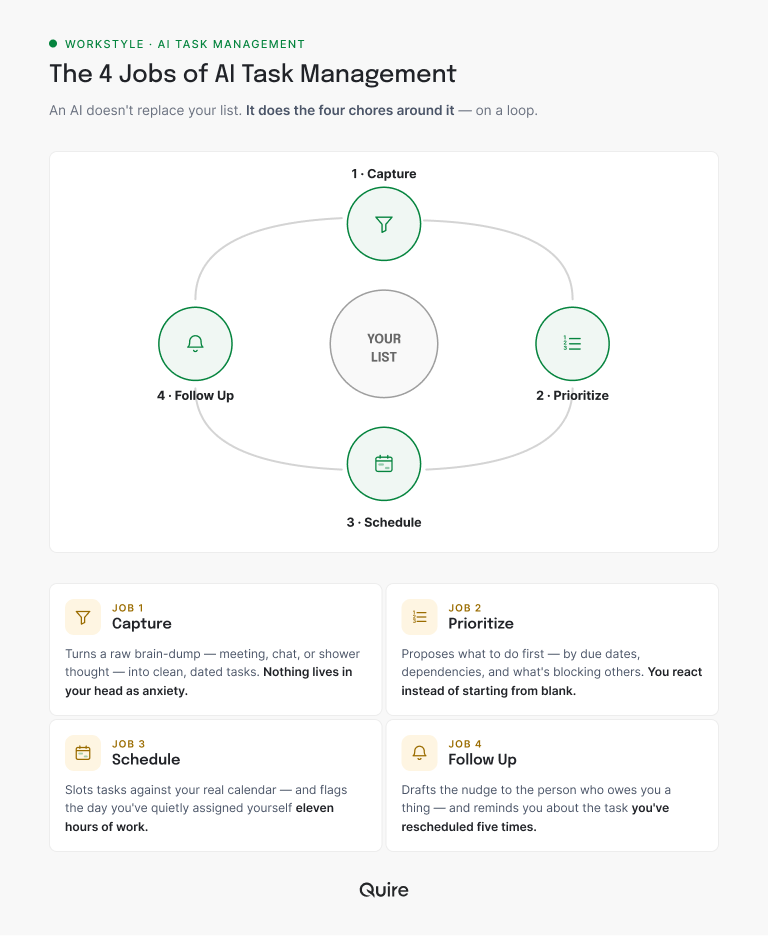
Capture. Ideas and commitments arrive everywhere: a meeting, a Slack thread, a shower thought. An AI can turn a raw dump ("follow up with Sam, book the venue, review the deck before Thursday") into clean, dated tasks, so nothing lives in your head as anxiety.
Pointed at a Quire project, that dump comes back as three real tasks with due dates, and anything the note implies is multi-step arrives already broken into subtasks under a parent.
Prioritize. This is the one people want most. Given everything on your list, the AI proposes an order based on due dates, dependencies, and what's blocking other people.
In Quire it has the raw material to do that honestly: the due dates on each task, the parent-and-subtask tree that shows what has to finish first, and a Priority custom field if you keep one.
You don't have to accept its order. You have to react to it, which is far easier than building it from a blank page.
Schedule. The AI can slot tasks against your real calendar and flag the day you've quietly assigned yourself eleven hours of work. Because dates live on the tasks themselves in Quire, the same set of tasks you just sorted shows up on the Calendar view without anyone re-entering anything. Seeing an overloaded Wednesday on Monday beats discovering it on Wednesday.
Follow up. The unglamorous one that actually saves your reputation. The AI drafts the nudge to the person who owes you a thing, posts it as a comment on the task itself with them @mentioned, and reminds you about the item you've rescheduled so many times it deserves its own anniversary.
None of these is exotic. All of them are the overhead that sits between you and the work, which is exactly the overhead worth handing off. If you want to feel the difference rather than read about it, a free Quire account plus one connected AI client is enough to try the prioritize job on tomorrow's list tonight.
If your list has outgrown the personal scale and become a team problem, that's a different post: agentic project management and where coordination work actually lives.
What can an agent do that a to-do app can't?
A to-do app is a container. It holds your tasks and waits. Every bit of sorting, updating, and chasing is still on you, which is why a neglected app quietly rots into a museum of things you meant to do.
An agent acts on the list. It reads all of it, proposes the order, drafts the follow-ups, and points at the task you keep avoiding. The mental math you normally do at the start of every day, that's the thing it takes over. You still decide. You just don't start from zero.
Nobody notices what that mental math costs, because it arrives in seconds rather than hours.
A study by Harvard Business Review counted roughly 1,200 switches between windows and applications in a single working day, and found the reorienting after each one adds up to just under four hours a week, about 9% of the time someone spends at work.
A large share of those switches are pure task-management overhead: which list, which app, what was next. Collapse that and you get real hours back, not motivational-poster hours.

Where does AI task management go wrong?
Two ways, and both are worth knowing before you hand anything over.
It invents priorities. Ask an AI what to do first and it will answer with total confidence, even when the true answer depends on a conversation it wasn't part of. The task it ranks fourth might be first because your boss mentioned it in a hallway. The AI can't see hallways. Treat its order as a strong first draft, not a verdict.
It makes silent edits. The scary failure isn't a bad suggestion; it's a change you didn't notice. An AI that quietly moves a due date or marks something complete has just introduced a lie into the one place you trust.
What defuses that is a record: in Quire, every change lands in the task's activity history with a name and a timestamp, so an agent's edit is never invisible and you can always see what it touched and put it back.
Both problems have the same fix: the AI proposes, you approve anything that sticks. Keep that line and AI task management is a helper. Blur it and it's a very fast source of small betrayals.
How do you set up AI task management without a new app?
You don't buy an AI to-do app. You keep the list you already have and give an AI access to it. That single decision is what separates a setup you're still using in six months from a folder of abandoned trials.
There are three routes people actually take, and they are not close in quality.
| The setup | What the AI can actually see | What it costs you | Best when |
|---|---|---|---|
| Connect an AI to the tool your tasks already live in (Quire over MCP) | Your live tasks, with assignees, due dates, subtasks and comments, updated as you work | One connection, about five minutes, no migration | The work is already dated, shared, and depended on by other people |
| Buy a standalone AI to-do app | Only the tasks you retype into it | A migration up front, then a tenth app to keep current | The list is short, private, and lives nowhere else yet |
| Paste your list into a chatbot | A frozen snapshot that goes out of date the moment you send it | Copy-paste every session, and nothing it decides lands back on the list | A one-off triage you have no intention of repeating |
The bridge for the top row is MCP, the Model Context Protocol, which lets an AI assistant read and write your real tasks instead of you copy-pasting them into a chat. Once that connection exists, "sort my day" and "draft my overdue follow-ups" become one sentence each, run against the tasks that already exist.
Do it in order. Keep your current list. Connect the AI through MCP, which in Quire's case is the five-minute setup and works with Claude, ChatGPT, or any other MCP client. Hand it one job first, like prioritizing today or drafting follow-ups. Keep approval on anything it changes.
Then review for a week and add jobs as trust grows. No migration, no new app to abandon, no importing three years of tasks into something you'll quit in March.
Choosing where your list should live so an AI can reach it? Start with the best to-do list apps compared, then check which ones actually connect to AI. For a shared team list, the top-10 task management software ranking does the same job one size up.
What does AI task management look like in Quire?
Here's the concrete version, start to finish. Your tasks are in Quire. You connect Claude to it through MCP once, and never think about the plumbing again.
Monday morning, instead of staring at the board and doing the sorting in your head, you ask: read my tasks, group them by project, and tell me the three that unblock other people first.
The agent walks your real task tree, reads the due dates and the subtasks under each parent, and comes back with an order plus its reasoning. "Send revised quote" moves to the top because two other tasks are waiting behind it.
The venue booking drops, because its due date is a fortnight out and nothing depends on it.
Then it does the chasing.
It drafts a comment on the task Sam owns, @mentioning him with the one question that's actually blocking you, and flags the deck review you've now moved three times, which is Quire's way of telling you that task needs to be smaller or dropped.
You glance at the whole thing, fix the one call it got wrong, and approve the rest. Everything it changed sits in each task's activity history with its name on it.
Nothing moved without you. The list is still yours, still in the tool your team already shares, still readable by the people who depend on it. What changed is that the ten minutes of "okay, what am I actually doing today" finished while your coffee was still too hot to drink, and arrived as a draft. Do that every morning for a month and the compounding is not subtle.
The exact wording matters more than people expect. We collected the ones we reuse in 10 Quire MCP prompts that do real work, including the day-planning one this section describes.
When is AI task management overkill?
Plenty of the time, and it's worth saying out loud. If your entire list is six things and you can hold it in your head between coffees, wiring up an AI to manage it is a solution hunting for a problem. The overhead of setting it up would cost more than the sorting it saves.
The honest tell is scatter and volume. AI task management earns a place when your work is spread across too many places to track by memory, or when the list is long enough that just deciding the order is its own daily chore. Below that line, a notebook is fine and cheaper.
There's also a failure mode worth naming: an AI cannot rescue a list that has no shape. If the tasks are vague, undated, and three weeks wide, an agent will confidently sort mush. Structure first, agent second.
No system underneath the list yet? Fix that before adding AI, with task management methods that hold up when the week gets loud.
And if the real trouble is that your tasks keep waiting on other people's tasks, then task management isn't your bottleneck at all. Coordination is, and that's a team-level fix, not a personal one.
More on that team-level cost, and why it grows faster than headcount: the coordination tax.

Key takeaways
AI task management is not a new app to buy. It's a helper you attach to the list you already keep, and it earns its place on four jobs: capturing what's scattered, proposing what's first, scheduling what's real, and chasing what's owed. It stumbles on judgment and on silent edits, so you keep the approval and the AI keeps the busywork.
The people who get value out of it are the ones who resisted the migration pitch and just gave AI access to their real tasks, in a tool that records what the agent did. Less app-hopping, more done.
Want to try it on your own list this week? Start free at quire.io/signup, point Claude at it over MCP, and ask for tomorrow's order before you go to bed tonight. You'll wake up to a plan instead of a pile.
Frequently Asked Questions
What is AI task management?
Using an AI assistant or agent to capture, prioritize, schedule, and follow up on your tasks, working from your real list rather than a separate app. The AI does the sorting and chasing through an integration like MCP; the decisions stay yours.
Is AI task management just another to-do app?
No. Most AI to-do apps ask you to migrate your whole life into a new tool. The better pattern is to keep the list you have and give an AI access to it, so it prioritizes and follows up without a migration.
What can an AI agent do with my task list that an app can't?
An app stores and waits. An agent reads the whole list, proposes what to do first, drafts the follow-ups you forget, and flags the task you keep rescheduling. It acts on the list instead of just holding it.
Where does AI task management go wrong?
It invents priorities it sounds confident about, and it makes silent edits to dates or statuses. The fix is a tool that records every AI action, the way Quire's task activity history does, so the AI proposes and you approve.
How do I start without switching tools?
Connect an AI assistant to your current task tool through MCP, then hand it one job like sorting your day. Quire's MCP server takes roughly five minutes to hook up from Claude or ChatGPT, so the assistant works on the tasks you already have.
Does AI task management make you more productive at work?
Yes, mainly by cutting the switching cost of juggling tasks across apps. In Quire, an agent connected through MCP prioritizes your list and drafts the follow-ups, so staying organized stops eating the time you meant to spend on the work.
