
project management · Aug 4, 2026
AI Project Management: The Complete Guide

Last updated: October 21, 2026
AI project management is running project work with AI that can read your real project state and do coordination chores, not a chatbot in a sidebar. It comes in three layers: AI assistants (answer questions), MCP-connected tools (read and write your live tasks), and autonomous agents (run whole workflows with human checkpoints). Start by connecting the AI you already use to the tool you already have, hand it one chore like the weekly status, and expand as trust builds.
- What is AI project management?
- What are the three layers of AI project management?
- What does AI actually do well in project work today?
- What still needs a human?
- How do you evaluate an AI project management tool?
- How do you wire AI into your stack with MCP?
- What should you let an agent touch first?
- Key takeaways
- Frequently Asked Questions
Somewhere in your company, right now, a smart person is copying task updates out of a project tool and pasting them into an AI chat window to ask what's at risk. Then they're copying the answer back into a status doc. The AI is brilliant. The setup is silly. That person has become the most expensive clipboard in the building.
The gap between those two tabs is what AI project management is actually about. Not the 2023 demo where somebody summarized a ticket to polite applause. The real question in 2026 is architectural: can your project tool hand an AI genuine context, and can it accept finished work back?
This guide is the map. What the term means, the three layers it comes in, what works today, what still needs you, and how to wire it up without replacing your stack.
What is AI project management?
AI project management: the use of AI systems, from chat assistants to autonomous agents, to plan, track, and coordinate project work. In its useful form, the AI reads live project state through an integration layer like MCP, does real coordination work, and leaves the judgment calls to humans.
That definition is doing quiet battle with a marketing trend. Right now the label gets stuck on everything from "our tool has a summarize button" to "an agent replans your quarter overnight." Both are technically AI in project management. They are not remotely the same purchase.
The word that separates them is access. An AI that can't see your project can only give generic advice about it. An AI that can read your task tree, your comments, and your deadlines can do actual work. So before comparing features, it helps to sort the whole category into three layers.
AI is the newest layer on an older shift, moving project work out of spreadsheets and email into software: what digital project management is, with the features and practices every AI setup still depends on.
What are the three layers of AI project management?
Every AI-and-projects setup you'll meet in 2026 lands on one of three rungs: an AI assistant that answers questions but can't see your project, an MCP-connected tool that reads and writes your live tasks, and an autonomous agent that runs whole workflows and pauses at human checkpoints. The difference between them is how much the AI can see and how much it can do.
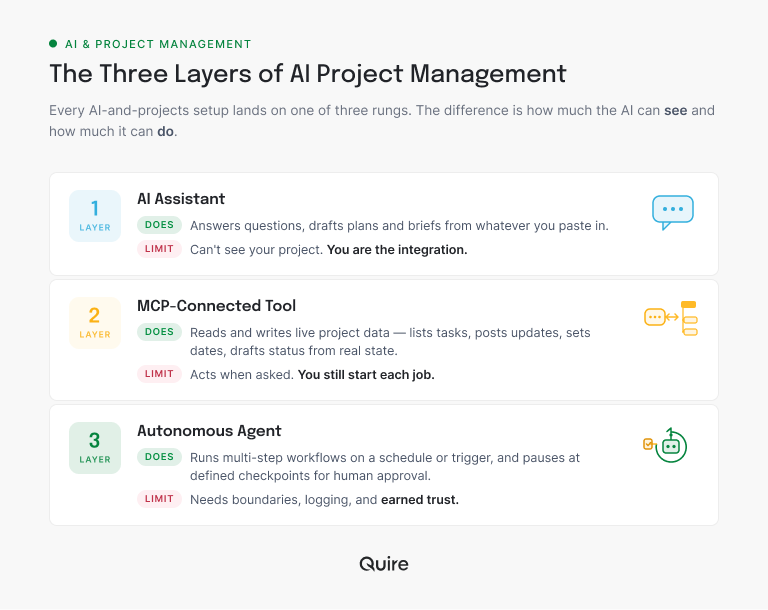
Layer one is where most teams live, and it's the clipboard problem from the intro. Useful, but the human carries every byte of context by hand.
Layer two is where the economics change. Once the AI has structured access to project state, "write my Friday status" stops being a paste-athon and becomes one sentence. The bridge that makes this possible is usually MCP, and we'll get to it below.
Layer three is agentic work: the AI notices, acts, and reports, instead of waiting to be asked. It's real, it's running on production teams today, and it's also where governance stops being optional. For the close-up on this rung, we broke down what AI agents can do in project management today, workflow by workflow.
Layer three is a whole discipline of its own. For the structural view, read our pillar on agentic project management and how AI agents change where coordination lives.
What does AI actually do well in project work today?
The honest answer: the coordination work nobody lists as their favorite part of the job. That's not a small category. Microsoft's 2025 Work Trend Index found 53% of leaders saying productivity must increase while 80% of the workforce reports lacking the time or energy to do their work, and 46% of leaders say their companies already use agents to fully automate some workflow. The capacity gap is real, and coordination is where it hides.
Concretely, an AI with project access is already good at five jobs. It drafts status reports from live task data instead of from memory. It turns meeting notes into assigned, dated tasks. It triages overdue work every morning and surfaces what actually matters. It checks dependencies before you commit a date. And it summarizes a noisy week into something an executive will actually read.
Notice the pattern: every one of those is reading, sorting, and rephrasing project state. No taste required, no authority exercised. That's the sweet spot in 2026, and when we timed these against our own projects, the daily standup write-up alone came back at roughly ten minutes per person per day.
What a single AI request looks like against a real project
Here's the meeting-notes job, end to end, on a Quire project connected to Claude through MCP. You paste the notes from the kickoff call and ask for tasks.
The assistant reads the project's existing task tree first, so it doesn't duplicate work that's already there. Then it writes.
It creates a parent task called Q3 pricing page refresh under the Marketing sublist, assigns it to the marketing lead, and sets a due date of August 21 because that's the date somebody said out loud in the meeting.
Underneath it, four subtasks: copy draft, design comps, legal review, staging deploy, each with its own assignee and its own date, sequenced so legal review lands before the deploy rather than after it.
It fills the Priority custom field on the parent from the words "this is the blocker for Q3." It adds a comment on the legal review subtask quoting the exact line from the notes that created it, so nobody has to ask why the task exists.
That's the whole difference between layer one and layer two in one paragraph. A layer-one assistant would have handed you a tidy bulleted list of those same tasks, and you would have spent the next fifteen minutes typing them into your project by hand. Here, you open the board and the work is already sitting in it, with a comment trail explaining itself.
Everything above is reversible, which is the point. Wrong assignee, wrong date, task that shouldn't exist: fix it in two clicks, or tell the assistant to fix it.
Nothing in that workflow needs a migration or a new subscription, so it's a reasonable thing to try on one real project this afternoon.
Connect the AI you already pay for to a free Quire account, paste in your last set of meeting notes, and see what comes back before you decide anything bigger.
Want the receipts? Here are 5 project management workflows that changed the day we got an MCP server, timed and documented.
What still needs a human?
Everything with a tradeoff in it. AI can tell you the launch is at risk; it can't decide whether to cut scope, slip the date, or ask the team for a heroic week, because that decision is about people, politics, and what you promised whom.
The line is cleaner than the debate suggests. Sort any coordination chore by whether finishing it requires a judgment call, and the answer falls out.
| The job | Hand it to the AI | Keep it human |
|---|---|---|
| Status | Drafting the weekly update from live task data | Deciding how much bad news the update should carry |
| Dates | Flagging that two dependencies now collide | Promising a new date to the client |
| Backlog | Sorting overdue work and surfacing what stalled | Choosing what gets cut when the list is too long |
| People | Showing who is carrying how much this week | Reassigning someone's work to somebody else |
| Meetings | Turning notes into assigned, dated tasks | Settling the disagreement the notes recorded |
Read the right-hand column again and the shape is obvious: every one of those is a decision somebody has to own. Priorities stay human. Disagreements between teams stay human. Commitments to customers stay very human, since an AI that promises a client a date has just made your apology schedule for you. And accountability never transfers: if the agent posts a wrong number, it's still your number.
One more honest boundary: not every project needs any of this yet. When the whole thing fits on one board and a stand-up covers it, your coordination overhead is already close to zero and adding an AI layer to it is a hobby, not a fix.
The layers above start paying off when the work stops being visible in one glance: parallel workstreams, dependencies that cross teams, and updates that outnumber the minutes you have to write them.
For the fuller argument on when coordination costs explode, read the coordination tax.
How do you evaluate an AI project management tool?
Skip the adjective on the pricing page. "AI-powered" describes the 2026 software market the way "electric" describes appliances. What you're actually buying is access and control, and five questions expose both.
| # | Question | What a yes buys you |
|---|---|---|
| 1 | Can the AI see project state through an open protocol like MCP? | Real context instead of pasted fragments. This is the difference between layer one and layer two. |
| 2 | Can it act: create tasks, post comments, set dates? | Work gets finished, not just described. Summaries alone keep the clipboard job alive. |
| 3 | Can you scope what it touches, per project? | The marketing agent never reads the legal project. Workspace-wide access is a blunt instrument. |
| 4 | Is every AI action logged and reversible? | The first mistake becomes a correction, not a trust crisis. |
| 5 | Does it work with the AI your team already uses? | Claude, ChatGPT, or whatever comes next. A bundled bot means betting your workflow on one vendor's model. |
Put these to every vendor on your shortlist. They'll enjoy it. (They won't.) But the answers sort the market fast, because questions one and five are hard to retrofit: a closed tool with a bundled bot has to rebuild its architecture to say yes.
Quire answers yes to all five, and the answers are checkable rather than claimed: the MCP server is open to any client, it writes as well as reads, you connect it per project, every action lands in the task's activity history where you can undo it, and it makes no assumption about which AI you use.
That is the part where the project management company mentions its own software. The useful bit is that you can verify all five in a free account before you believe any of it.
Comparing tools on question one? Here's our field guide to which project management tools actually speak MCP in 2026.

How do you wire AI into your stack with MCP?
MCP, the Model Context Protocol, is the open standard Anthropic introduced in 2024 that lets AI assistants read and write data in external tools through a structured interface. For project work it's the plumbing that turns a chat window into a colleague: the AI queries your actual task tree instead of trusting whatever you remembered to paste.
Here's the adoption path we recommend, and the one we use ourselves.
Map where the coordination time goes. List the recurring chores that eat your week: status compilation, overdue triage, meeting follow-ups, report formatting. Repetitive, text-heavy, judgment-light. That's your AI backlog, pre-sorted.
Pick one workflow to hand off. Make it high-value, reversible, and mildly resented. The weekly status draft is the classic pilot: needed every week, read by a human before anyone important sees it.
Connect your PM tool through MCP. In Quire this takes about five minutes and works with Claude, ChatGPT, or any MCP client. The step-by-step setup guide covers the whole thing, screenshots included, and our list of 10 Quire MCP prompts that do real work gives you something to type the moment the connection lands.
Running agents from a terminal or a CI job instead of a chat client? The Quire CLI reaches the same tasks, projects, and documents from the command line, and the n8n integration covers the scheduled-trigger case.
Scope permissions and set boundaries. One project, not the workspace. Decide which actions run free (reading, drafting) and which wait for approval (anything you can't undo with one click).
Review a week of output, then expand. Read everything the pilot produces and correct it in your prompts. When it proves reliable, add the next workflow. Trust is built per workflow, not granted per tool.
That's the whole migration. Nobody changed tools, nobody imported anything, and the 11:52am scramble before the noon stakeholder call quietly stopped being a scramble.
The same wiring pays off on a single person's list too, with a shorter setup and lower stakes: see AI task management for the personal-scale version of this playbook.
What should you let an agent touch first?
Start an agent on the work where a mistake is obvious and costs you a correction, not a relationship.
That means reading state, drafting text, sorting lists, and flagging risks: everything the agent produces there gets read by a person before it matters. Give it those early and freely. The other pile, the one that touches teammates and outside promises, keeps its approval step forever. Reassigning somebody's work, committing a date, closing a task nobody verified, quietly trimming scope. Those need a name attached, and the name has to be a person's.
The teams that get burned skip that line.
Microsoft's research above shows adoption sprinting ahead, with 82% of leaders confident they'll use digital labor to expand capacity in the next 12 to 18 months, and speed without boundaries is how you get an agent cheerfully emailing a client the wrong launch date at 6am.
Write your boundary list before the first agent runs, keep every action logged, and expand the safe list as the audit trail earns it.
In practice the boundary lives in two places. Scope is one: connect the assistant to the one project you're piloting, not the whole organization, so a misfired instruction can only reach work you're already watching.
The audit trail is the other: in Quire every task change carries who made it and when, so an AI edit reads the same way a teammate's edit does and gets corrected the same way.
Those two together are what let you say yes to the next workflow without a meeting about it.
Ready to define what your agent may touch? Start from what agentic project management actually is, plus 5 workflows and the guardrails each one needs.
Key takeaways
AI project management isn't a feature you buy; it's an architecture question you ask. The three layers (assistant, MCP-connected, agentic) are really one question in three sizes: how much of your project can the AI see, and how much can it do? Move up the layers deliberately: connect the AI you already use to the tool you already have, hand it one resented chore, and let the audit trail decide how fast to go.
The payoff isn't science fiction. It's the quiet deletion of the copying, compiling, and chasing that was never the job you were hired for.
What that leaves of the role, split task by task: will AI replace project managers?
Ready to try layer two this week? Start free at quire.io/signup, connect Claude or ChatGPT through MCP in about five minutes, and ask for your first live status report. Your clipboard is ready for retirement.

Frequently Asked Questions
What is AI project management?
The use of AI systems, from chat assistants to autonomous agents, to plan, track, and coordinate project work. In its useful form, the AI reads live project state through a layer like MCP, does real coordination work, and hands judgment calls back to humans.
What's the difference between an AI assistant, an MCP-connected tool, and an AI agent?
An assistant answers questions but can't see your project. An MCP-connected tool lets the AI read and write your live tasks. An agent runs multi-step workflows on its own and checks in at human-approval checkpoints. Climb the layers in that order.
What does AI actually do well in project management today?
Status drafts from live data, meeting notes into assigned tasks, overdue triage, dependency checks, and week-in-review summaries. It's weak at priorities, tradeoffs, and anything you'd apologize to a client for.
Do I need to replace my project management tool to use AI?
No. If your tool speaks MCP, the AI you already use can work with the projects you already have. Quire connects to Claude, ChatGPT, or any MCP client in about five minutes. Migration only enters the conversation when your tool has no AI access path at all.
How do I evaluate an AI project management tool?
Five questions: Can the AI see project state through an open protocol? Can it act on tasks? Can you scope access per project? Is every action logged and reversible? Does it work with the AI your team already uses? Five yeses means it can grow with you.
Does AI project management actually make teams more productive at work?
Yes, when it targets coordination rather than creation. The hours that went into compiling status and chasing updates go back into real work, and in Quire the MCP-connected assistant handles exactly those chores from live task data.
