
project management · Aug 20, 2026
Run Your Projects from Claude: 10 Quire MCP Prompts
Last updated: August 20, 2026
Connect Quire MCP to Claude and you can run real project work from a chat window: draft the weekly status, triage what's overdue, turn meeting notes into assigned tasks, check a dependency before you promise a date. Below are 10 copy-paste prompts. Read freely, and add "show me before creating" to anything that writes.
- What is Quire MCP, and what do you need first?
- Which 10 Quire MCP prompts do real work?
- What does one prompt actually do inside Quire?
- How do you write a Quire MCP prompt that works?
- Is a Quire MCP prompt better than a fixed automation?
- Which Quire MCP prompts should you never run unreviewed?
- Key takeaways
- Frequently Asked Questions
Most people connect an AI to their project tool, run one impressive demo, and then quietly forget it's there. Not because it didn't work, but because nobody handed them the second prompt, or the third. The setup was the easy part. Knowing what to actually ask is where the value hides.
So this is the cheat sheet. Ten Quire MCP prompts that do real work, the kind you'll paste into Claude on a Monday and use again on Tuesday. Each one runs against your live Quire projects, not a pasted summary, so the output is your real work, handled.
A quick honesty note before the list: reading prompts are safe to run anywhere, and writing prompts should always end with "show me before creating." That one habit is the difference between a helpful assistant and a fast source of surprises.
What is Quire MCP, and what do you need first?
Quire MCP: Quire's Model Context Protocol server, which lets an AI client like Claude read and write your real Quire projects through natural-language prompts. Connect it once and Claude can list tasks, create them, set dates and assignees, post comments, and read your documents, all from a chat window.
You need two things: a Quire account with a project in it, and an MCP-capable AI client like Claude. The connection is a few-minute, no-code setup. MCP itself is the open standard Anthropic published in November 2024 to let AI assistants act inside the tools people already work in, so the same prompts run in any client that speaks it.
The shift the prompts below depend on is already measurable. Anthropic's Economic Index report from September 2025 found that directive conversations, where someone hands over a whole task instead of asking for help with one, rose from 27% to 39% across eight months of Claude usage, overtaking back-and-forth collaboration for the first time. People stopped asking AI for advice about their work and started giving it the work.
That only pays off if the AI can reach the work. A chat window with no access to your project can write you a beautiful status update about tasks it invented.
If you haven't wired it up yet, start here: Quire MCP setup in 5 minutes, connecting Claude, ChatGPT, or any AI client. Then come back for the prompts.
Prefer to watch someone do this first? The 40-minute MCP webinar below opens on the demo stretch, where prompts get typed into Claude and a live Quire project changes on screen in response.
In this session13:07 Capture: a raw note becomes dated tasks15:58 Understand: the project read back to you18:47 Prioritize: what deserves today21:58 Monitor: catching what quietly stalled27:16 Running it on your own project
Which 10 Quire MCP prompts do real work?
These ten. Copy them, swap in your real project name, and adjust the wording to taste. They're starting points, not incantations.
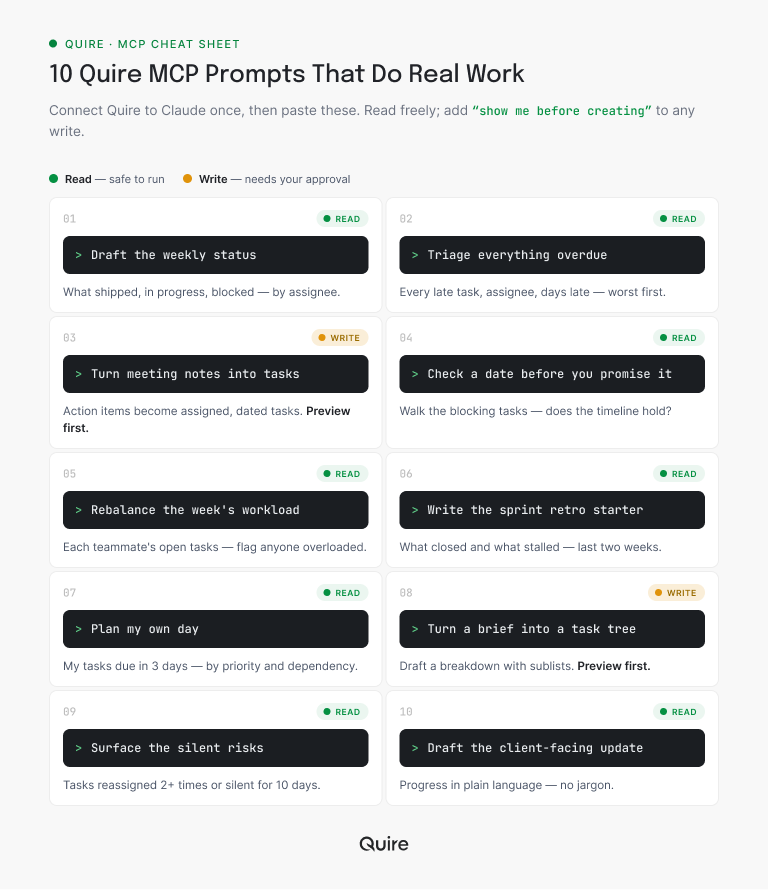
1. Draft the weekly status. "Read my [Marketing] project and draft this week's status: what shipped, what's in progress, what's blocked, grouped by assignee." Quire returns a status built from live task state, so you're editing a draft instead of chasing updates for one.
2. Triage everything overdue. "List every overdue task in [project] with its assignee and how many days late it is, worst first." You get the honest picture in seconds, which is usually less scary than the version in your head.
3. Turn meeting notes into tasks. "Here are my raw notes. Create tasks in [project] for each action item, assign owners, set due dates. Show me before creating." The action items that normally evaporate after a call land as real, dated tasks you approve first.
4. Check a date before you promise it. "Before I commit [Aug 30] for [task], check its blocking tasks and tell me whether the timeline actually holds." Quire walks the dependency chain so you don't promise a date the work can't support.
5. Rebalance the week's workload. "Show each teammate's open tasks due this week and flag anyone carrying more than six." The overloaded person shows up before Friday, when you can still do something about it.
6. Write the sprint retro starter. "Summarize what closed in [project] over the last two weeks, plus the threads that stalled, as a retro starting point." The facilitator walks in with a draft instead of a blank whiteboard.
7. Plan my own day. "List my tasks across all projects due in the next three days, ordered by priority and what's blocking other people." Your morning triage becomes a nine-second read instead of a ten-minute stare.
8. Turn a brief into a task tree. "Read this brief and draft a task breakdown with sublists in [project]. Don't create anything until I approve it." Quire's nested sublists mean the AI can propose a real hierarchy, not just a flat list.
9. Surface the silent risks. "Find tasks in [project] reassigned more than twice, or with no update in ten days." These are the quiet stalls that become next month's fire, caught while they're still small.
10. Draft the client-facing update. "Write a client update on [project] progress from the current tasks, plain language, no internal jargon." The external summary that used to cost you half an afternoon arrives ready to polish.
Notice the shape: eight of the ten only read and draft, and the two that write end with an approval step. That's the pattern that keeps this safe and useful at the same time.

What does one prompt actually do inside Quire?
It creates real objects you can open, edit, and reassign, not a summary of what it would have created. Prompt three is the clearest example, so here it is end to end.
Say you paste four lines of notes from a launch call: pricing page needs a rewrite, Dan owes the legal review, the demo video is stuck on the voiceover, and everything has to land before the 28th. With "show me before creating" on the end, Claude comes back with a proposal rather than a fait accompli.
Approve it and this is what lands in the project:
- A parent task, "Rewrite the pricing page," assigned to you, due August 26, sitting in the Launch sublist where the rest of the campaign lives.
- Four subtasks under it, in order, because the note implied a sequence: draft copy, design pass, legal check, publish.
- A separate task, "Legal review of pricing claims," assigned to Dan and due August 25, so the dependency in your notes is now a dependency in the project.
- A comment on the demo-video task recording that the voiceover is the blocker, with the person who owns it @mentioned so it shows up in their notifications.
Nothing here is a special AI object. They're ordinary Quire tasks, so the Board, the Calendar, and everyone's My Tasks list pick them up immediately, and the activity history on each one shows exactly what the AI touched and when.
That is the part people underestimate until they try it. The prompt takes eleven seconds; the same cleanup by hand is fifteen minutes of typing you resent. A free Quire account and one connected client is enough to run this on your next set of meeting notes tonight.
Prompts are the hands-on layer of a bigger picture. The complete AI project management guide covers where this fits, what to hand over, and what to keep.
How do you write a Quire MCP prompt that works?
Name the project, name the scope, and say what the output should look like. The ten above are templates, but you'll write your own within a day, and three habits separate a prompt that lands from one that wanders.
Name the project and the scope. "Draft the status" makes the AI guess which project and how far back. "Draft this week's status for [project], grouped by assignee" gives it the edges. Vague scope is the single most common reason a prompt returns something almost-right.
Ask for a preview before any write. The phrase "show me before creating" turns a risky command into a safe proposal. You see the tasks it wants to make, approve the good ones, and cut the rest. It costs four words and buys total control.
Say what the output should look like. "As a bullet list," "in plain client language," "as a table by owner." The AI is good at facts and format both, but only if you name the format. Otherwise you get its default, which is rarely your house style.
And when a prompt gets it wrong, fix it in the prompt, not by hand. If the status missed a project, add it to the sentence and rerun. Correcting the instruction teaches you the phrasing that works, so next week's version is sharper. Editing the output by hand teaches you nothing and keeps the work on your plate.
These prompts are the on-ramp to a bigger shift. For where it leads, read our pillar on agentic project management and how AI agents change where coordination lives.
Is a Quire MCP prompt better than a fixed automation?
Not better, different, and the difference is who decides what happens. An automation decides once, when you build it. A prompt decides every time you type it. There are four ways to get work out of a Quire project without doing it by hand, and they fail in different places.
| The route | Who decides what happens | What it can see | Best when |
|---|---|---|---|
| A Quire MCP prompt in Claude | You, in the moment, in one sentence | The live project: tasks, assignees, dates, subtasks, comments, documents | The ask is phrased differently every time and needs judgment |
| A fixed automation (Zapier, n8n) | A rule you wrote weeks ago | Only the fields the trigger hands it | The same event should always get the same reaction |
| Quire CLI in a terminal or CI job | A script, on a schedule you set | Whatever you query, in bulk, repeatably | The job is large, mechanical, and reads nothing between the lines |
| Clicking through Quire yourself | You, step by step | Everything, at the speed you can click | The call is delicate enough that you want to feel every step |
Row one and row two get confused most often, so here is the tell. A Zapier-style automation is perfect for the predictable, repeating thing you never want to think about again: when a high-priority task goes overdue, post a note to the channel.
A prompt is for the judgment-flavored request: "what's at risk this week," "rebalance if anyone's drowning," "draft this in the client's language." You wouldn't build a Zap for those, because the ask changes every time you make it.
The two work well stacked. The automation catches the event the moment it happens; once a week, the status prompt interprets the whole picture, why three tasks slipped, who is overloaded, what it means for the deadline. Reaching for the wrong one is how teams end up with either brittle rules or a chatbot they have to babysit.
For the workflows behind these prompts, with real timings, see 5 project management workflows that changed the day we got an MCP server.
Which Quire MCP prompts should you never run unreviewed?
Anything that writes. The guardrail is short enough to tape to your monitor: let the AI read anything, and approve anything it writes.
Reading prompts, like status drafts, overdue lists, and risk scans, can run freely, because the worst case is a summary you ignore. Writing prompts, like creating tasks, changing dates, or reassigning people, always get "show me before creating" so nothing lands without your nod.
And a few things stay off the list entirely: telling a client a date, cutting scope, or closing a task nobody verified. Those are human calls the AI can prepare but shouldn't make.
Because every action in Quire is stamped into the task's activity trail, who did it and when, a mistaken write is a quick undo rather than a crisis. That record is exactly what lets you experiment freely with the reading prompts and grow the writing ones as your trust builds.
New teammates tend to worry the AI will quietly wreck a project on day one. In practice the opposite happens. They start with reading prompts, see that nothing changes without a click, and get bolder over a week or two.
The guardrail isn't a brake on the fun. It's the thing that makes people comfortable enough to actually use the prompts instead of admiring them from a safe distance.

Key takeaways
Connecting Quire MCP is the easy five minutes. Getting value out of it is about having the second prompt ready, and the fifth. These ten cover the coordination work that quietly eats a week: status, triage, notes, dependencies, workload, retros, client updates.
Paste them, adjust them, and keep the ones that stick in a note you reuse. The rule underneath all of them never changes. Read freely, approve every write, and keep the genuinely human calls human.
Do that and Claude stops being a clever demo and starts being the teammate who did the boring half before you sat down.
Want to run prompt one this week? Start free at quire.io/signup, connect Claude to Quire through MCP, and ask for this week's status. The first draft arrives faster than you can alt-tab away, and that tends to be the moment it clicks.
Frequently Asked Questions
What is Quire MCP?
Quire's Model Context Protocol server, which lets an AI client like Claude read and write your Quire projects directly: list and create tasks, set dates and assignees, post comments, read documents, all through natural-language prompts.
Do I need to code to use Quire MCP prompts?
No. Connecting Quire to Claude is a few-minute, no-code setup in the AI app. After that, the prompts here are plain English you copy, paste, and tweak.
Are Quire MCP prompts safe to run on a live project?
Reading prompts are completely safe. For prompts that create or change tasks, add "show me before creating" so you approve first. Quire records every action in the task's activity history and lets you revert.
Which AI clients work with Quire MCP?
Any client that speaks the Model Context Protocol, including Claude. Connect once, then the same prompts run against your real Quire projects.
What is the difference between Quire MCP and a Zapier integration?
A Zapier automation runs a fixed rule set up in advance. Quire MCP lets you decide what to do in the moment, in a sentence. Many teams run both.
Do Quire MCP prompts actually make a team more productive at work?
Yes. A team gets more productive at work when status, triage, and meeting-note cleanup take one prompt instead of an hour each. In Quire, these prompts run against live tasks, so the time saved is real hours back.
