
project management · Aug 11, 2026
AI Agents for Project Management: What They Do Today

Last updated: October 21, 2026
AI agents for project management read your live project data, do multi-step coordination work, and stop for a human at the decisions that matter. Six workflows are reliable today: status rollups, tasks from notes, dependency checks, risk flags, report drafts, and week summaries. Start with one reversible workflow, connect it through MCP, and widen the leash as trust builds.
- What is an AI project management agent?
- What can AI agents for project management do today?
- Where do AI agents for project management still fall short?
- What does your PM tool need to expose for agents to work?
- How do you run a Claude and Quire agent workflow, step by step?
- How do you keep an agent from doing something dumb?
- Key takeaways
- Frequently Asked Questions
Every few weeks someone on Reels shows you an AI agent running an entire project by itself. It assigns work, reshuffles the timeline, emails the client, and closes tasks while a founder narrates over ambient music. It looks like the future. It is mostly editing.
The real version of AI agents for project management is quieter, and honestly more useful. An agent that drafts your Friday status in nine seconds will not go viral, but it will give you back an afternoon. The trick is knowing which jobs agents are genuinely good at right now and which ones are still a demo waiting for a blooper reel.
So this post skips the hype reel. Here's what AI agents for project management actually do in 2026, the six workflows worth turning on this week, where they still fall on their face, and how to run one without handing over the keys to anything you can't undo.
What is an AI project management agent?
An AI project management agent is a program that reads your live project data, carries out multi-step coordination work like drafting status or turning meeting notes into tasks, and stops for a human before anything irreversible. It works through an access layer like MCP, so it acts on real tasks instead of a pasted summary, then reports back.
AI agent for project management: a program that reads your live project state, performs multi-step work on it, and hands control back to a human at defined checkpoints.
The word that matters is does. An assistant answers a question. An agent goes and does the thing, records what it did, and comes back to tell you about it.
That distinction is architectural, not marketing. Anthropic's engineering team, in its write-up on building effective agents, draws the line at who holds the wheel: a workflow moves through code paths somebody wrote in advance, while an agent directs its own steps and tool choices to reach the goal.
In project terms, a workflow is the rule that shifts a card to Done when the last checkbox is ticked.
An agent is the thing that reads forty tasks, works out that three of them contradict the schedule, and writes that up without being told which three to look at.
That gap sounds small and isn't. An assistant living in a separate tab can tell you "you should probably reassign that overdue task." An agent with real access can propose the reassignment, show you the change, and make it the second you approve. One is advice.
The other is a coordinator you didn't have to hire. If that line between advice and action is the part you're still weighing, we split it three ways in agentic AI vs AI agents vs copilots.
The bridge that makes the second one possible is an integration layer, usually the Model Context Protocol, the open standard that lets an agent read and write your tasks directly instead of guessing from a pasted screenshot. Without that access, an "agent" is just a chat window with ambition. Agents sit at the top of the three layers laid out in our AI project management guide, and this post is the close-up on that layer.
If the whole idea is new to you, agentic project management is the longer argument about where coordination ends up once agents are in the picture, and this shorter piece pins down what the term actually means. Neither is homework. The rest of this post stands on its own.
Before the list of what agents do, here is one that isn't theoretical. The recording below opens at the moment our MCP webinar stops explaining agents and points one at a live Quire project.
In this session12:22 Four workflows: overview13:07 Workflow 1: Capture, meeting notes into assigned tasks15:58 Workflow 2: Understand, risks, gaps, and blockers18:47 Workflow 3: Prioritize across all your projects21:58 Workflow 4: Monitor with a scheduled agent
What can AI agents for project management do today?
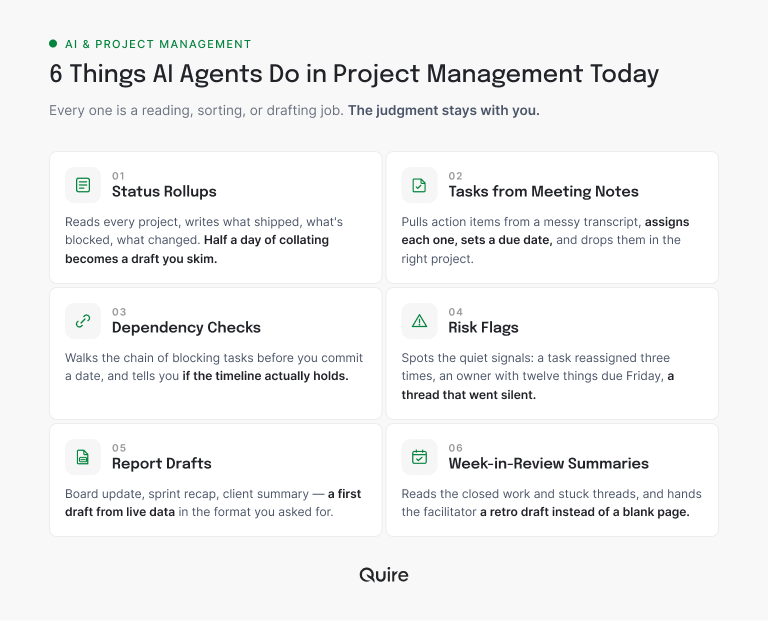
Six workflows are reliable enough to run on a real team right now, and every one of them is a reading, sorting, or drafting job. That is precisely the shape of work agents handle well.
This has stopped being a lab experiment. According to Microsoft's 2025 Work Trend Index, 46% of leaders say their company already uses agents to fully automate at least one workflow. The live question is no longer whether teams run agents. It's which jobs they hand over.
1. Status rollups. The agent reads every project the team owns, then writes the week up: work that shipped, work that's stuck, and anything that moved since the last update. Pointed at a Quire workspace, it walks the task tree, reads the closed items and the comments sitting under the stuck ones, and comes back with a draft you skim and send. Half a day of collating turns into a five-minute read.
2. Tasks from meeting notes. Paste a messy transcript and the agent pulls out the action items, then creates each one as a real task: owner assigned, due date set, dropped into the right Quire project, broken into subtasks where the note implies steps. Decisions that used to evaporate ten minutes after the call now exist somewhere with a name attached.
3. Dependency checks. Before you commit a date, the agent walks the chain of blocking tasks and tells you whether the timeline actually holds. It reads each task's start and due dates along with its parent and subtasks, so it can name the specific item that has to move for your date to survive. It's the check nobody does by hand because it's tedious, which is why dates slip.
4. Risk flags. The agent watches for the quiet signals: a task reassigned three times, an owner with twelve things due Friday, a thread that went silent mid-decision. That first one is only findable because Quire keeps an activity trail on every task, so the reassignments are recorded rather than remembered.
5. Report drafts. Board update, sprint recap, client summary. The agent produces a first draft from live data, in the format you asked for, and a human does the last ten percent that needs taste. Ours writes its draft straight into a Quire document, so the report lands beside the work instead of in somebody's inbox.
6. Week-in-review summaries. At the end of a sprint, the agent reads the closed work, the comments that drew reactions, and the threads that stalled, then hands the facilitator a retro draft instead of a blank page.
Notice what unites them: not one requires the agent to exercise authority. It reads, it sorts, it phrases. The judgment stays with you.
If reading about this is less convincing than watching it, the cheapest test is a free Quire project, our MCP server, and a single prompt asking for this week's status. Fifteen minutes, nothing at risk, and you learn more than another article can tell you.
Want these written up with the actual prompts and timings? See 5 project management workflows that changed the day we got an MCP server.
Where do AI agents for project management still fall short?
The honest list is just as important, because the failures are where trust gets burned.
Agents are bad at priority calls. Ask one which of two launches matters more and it will give you a confident answer built on nothing, because the real answer lives in a conversation the agent wasn't in. Priority is a human call informed by data, and the agent's job is the data half only.
They're bad at anything involving people. Reassigning a teammate, nudging someone who's behind, deciding who takes the on-call weekend. Those need context about mood, workload, and history that no task tree contains. An agent that reshuffles people on metrics alone will be technically correct and socially radioactive.
And they hallucinate under pressure. Ask an agent to close out a task list and a poorly bounded one will mark things "done" it has no way of verifying. That's not a reason to avoid agents. It's the reason the good ones stop and ask instead of guessing.
Those weak spots are the job description that survives. The full split: will AI replace project managers?
The rule that keeps you safe is short: hand over the data, keep the people. Let an agent read and draft as much as it likes. Make it ask before it touches a teammate, a date, or a promise to someone outside the team.
Both failure modes shrink when the list belongs to one person, because you supply the missing context yourself. That smaller version is AI task management for individuals, and it's the cheapest place to start.

What does your PM tool need to expose for agents to work?
Three things: an open protocol the agent can read and write through, permissions you can narrow to one project, and a record of every change that you can walk back. An agent is only as capable as the access your tool gives it, and a brilliant model wired to a tool that hides its data behind a UI can do nothing but talk.
Quire clears all three, and each one is something you can check yourself rather than take on faith. The protocol is a first-party MCP server at mcp.quire.app, open to Claude, ChatGPT, Cursor, or anything else that speaks MCP, so nobody on your side has to build the bridge.
The narrowing rides on Quire's own membership model: members are added project by project, so an agent signed in as a member of your pilot project has no route into the rest of the organization.
And the record is the activity trail Quire already keeps on every task, showing who changed what and when, with a removed task restorable instead of retyped. An agent's change lands in the same history as everybody else's, which is why fixing one feels routine rather than forensic.
Miss any one of the three and agents stay a party trick. A tool with an API but no MCP forces you to build the bridge yourself. A tool with workspace-only permissions makes narrowing impossible. A tool with no activity record means you'll never trust the agent twice.
Comparing tools on exactly this? Here's the field guide to which project management tools actually speak MCP in 2026.
How do you run a Claude and Quire agent workflow, step by step?
Pick one reversible job, connect the agent to real project data, write down where it has to stop, narrow it to a single project, and read its output for a week before widening anything. Here is that sequence on the weekly status agent, the one most teams should run first.
Pick the workflow. The Monday status roundup. It's valuable every week, and a wrong draft costs you a re-read, not a project.
Connect the agent to your data. Point Claude at Quire through MCP. It takes about five minutes with the setup guide, and from then on the agent reads your real task tree, not a pasted export.
Write the instructions and the stopping point. Tell the agent: read these three projects, list what shipped and what's blocked, group it by owner, draft it in our house format. Then the hard line: do not post it anywhere, do not change any task, hand me the draft.
Narrow it to one project. Add the account the agent signs in as to the pilot project only. It then sees one project's tasks and nothing else, so the experiment can't spill into the client work next door.
Review for a week. Read every draft, fix it in the prompt rather than by hand, and watch the quality climb. When it's boring and correct two weeks running, add the next workflow.
Here's what one run actually looks like inside the project.
The agent opens Q3 Launch, finds Ship pricing page assigned to Mai with Friday's due date and three of its four subtasks closed, sees that the open one, Legal sign-off, carries a two-day-old comment with a question nobody answered, and reports exactly that: on track, one dependency waiting on a person.
Then it stops. Chasing Legal is a human's job, and the agent leaves it alone because the instructions said to.
The whole point of doing it this way is that nothing irreversible ever happens without you. The agent works like an eager new hire who checks before doing anything permanent, which is exactly the new hire you want.
Ready for the version that runs itself? We built a scheduled agent that writes our weekly brief from Quire data every Monday morning, gotchas and all.
How do you keep an agent from doing something dumb?
Decide up front which actions the agent may take alone, which need your sign-off, and which it may never touch at all. Write that list before the first run, not after the first incident. Guardrails aren't a compliance chore; they're what lets you say yes to agents at all.
| The action | Who runs it | What it touches in Quire | Cost if it's wrong |
|---|---|---|---|
| Read tasks, subtasks, comments | Agent, no approval | Nothing, it only reads the task tree | None |
| Draft the status or the weekly report | Agent, no approval | Writes a new document | You edit a draft |
| Turn meeting notes into tasks | Agent proposes, you approve | Creates tasks, owners, due dates | A few tasks to delete |
| Move a due date | Agent proposes, you approve | Changes a task's start or due date | Somebody plans around a wrong date |
| Reassign an owner | Human only | Changes who the task belongs to | A teammate hears it from a robot |
| Close work, or message anyone outside the team | Human only | Completes the task, or leaves Quire entirely | Unfinished work marked done, or your name on a promise you didn't make |
The split in that table follows one question: does a person read the output before it counts? Everything in the top rows produces text somebody reviews, so the agent can run it unattended. Everything in the bottom rows lands on a teammate or a client, so it keeps its approval step permanently.
Keep every action recorded, because when something looks off you want to see what the agent did and when. Keep a way back, because the first time an agent misfires without one is the last time anyone trusts it. An agent doesn't fail the way software fails.
There's no crash and no error message, just a confident note to the wrong person, sent under your name, discovered two meetings too late. The teams that stay happy with agents are the ones that decided in advance what the agent was never allowed to touch.

Key takeaways
AI agents for project management are real, useful, and narrower than the demos suggest. They shine on the coordination work that was never anyone's favorite part of the job: status, triage, dependency checks, report drafts. They're weak exactly where the job gets human, which is a feature rather than a bug, as long as the tool makes them stop and ask.
What your tool exposes decides what any of this is worth. An open protocol, permissions you can narrow to one project, and an activity trail you can walk back are the three things that turn an agent from a demo into a teammate.
Start small. One reversible workflow, connected through MCP, narrowed to one project, watched for a week. That's how you find out whether an agent earns its keep on your team without betting anything you can't get back.
Want to run the status agent this week? Start free at quire.io/signup, connect Claude through MCP, and ask for a draft of Monday's update. Worst case, you read a draft and edit it. Best case, you never write a status report by hand again.
Frequently Asked Questions
What are AI agents for project management?
AI programs that read your live project data, run multi-step coordination work like drafting status or triaging tasks, and pause for human approval before anything irreversible. An agent takes the action itself through a layer like MCP, then reports back.
What can an AI agent actually do in a project today?
Six things reliably: status rollups, tasks from meeting notes, dependency checks, risk flags, report drafts, and week summaries. All reading-and-writing jobs. Deciding priorities and promising client dates are not on the list. The practical ceiling is what the agent can reach. Quire's MCP connection lets an assistant like Claude read and update the same tasks your team works in, so it acts on the live project rather than a description of it.
What's the difference between an AI agent and an AI assistant?
An assistant answers when asked and can't see your project. An agent has structured access through a protocol like MCP, so it acts on tasks directly and stops at a checkpoint. An assistant suggests; an agent does.
Do AI agents replace project managers?
No. The low-judgment coordination work moves to the agent, and the judgment work comes straight back to you. Priorities, escalations, scope cuts, and people calls stay with the PM. The job gets denser, not smaller.
Are AI agents safe to run on real projects?
They are when the tool gives you permissions you can narrow to one project, a full record of every action, and a way to walk a change back. Let agents read and draft freely, and require approval for anything you can't easily undo.
Do AI agents make teams more productive at work?
Yes, when pointed at coordination rather than creative decisions. In Quire, an agent connected through MCP drafts the weekly status from live tasks and turns meeting notes into assigned work, so the coordination tax shrinks instead of moving between tabs.
