
project management · Sep 3, 2026
Gantt Chart vs Kanban vs Calendar: Which Project View Fits the Work

Last updated: October 14, 2026
The gantt chart vs kanban argument is the wrong argument. A timeline answers when and in what order, a board answers where work is stuck, a calendar answers what lands on a given day, and a table answers how many rows compare. Pick the view that answers the question your project keeps asking, expect to need more than one, and check that the extra views are renderings of the same tasks rather than copies somebody has to keep in sync.
- What are you actually choosing when you pick a project view?
- Gantt chart vs kanban: what does each view really answer?
- Which project view fits each of the four work shapes?
- Why does one project need more than one project view?
- Does your task management software render the view or copy it?
- How does Quire handle gantt chart vs kanban on the same tasks?
- What does this look like on one real project?
- What should you check before you commit to a project view?
- Key takeaways
- Frequently Asked Questions
Ask a room of project managers which view they use and you will get an argument, usually a confident one. Somebody swears by timelines. Somebody else moved their team to a board two years ago and would not go back. A third person quietly runs everything from a spreadsheet and outperforms both.
They are all right, which is the tell that the question is malformed. The usual framing, gantt chart vs kanban, treats this as a matter of taste or seniority. It is neither. A view is a claim about the shape of the work, and when the claim is wrong the view hides the exact thing you needed to see.
This is the decision guide. Here is what each view genuinely answers, which shape of work each one fits, why most projects need more than one, and the switching cost nobody puts in the budget.
What are you actually choosing when you pick a project view?
Project view: a way of drawing one set of tasks so a single question about them becomes obvious at a glance. Every view is a trade, making one thing visible by pushing something else out of sight, so the right view follows the shape of the work rather than personal preference.
That trade is not a failure of software design. It is how representations work.
In a 2013 PLoS One study, Enkhbold Nyamsuren and Niels Taatgen had people play two structurally identical versions of the same card game, one with pictures and one with the same attributes written as words.
Same puzzle, same strategy, and yet the researchers found that "visual presentation style can have a significant impact on performance": finding a match took more than twice as long in the word version.
Nothing about the problem changed. Only the picture did. That is the whole case for taking view choice seriously, and it is why "we tried a board and the team hated it" is usually a story about the wrong work shape rather than a story about boards.
Gantt chart vs kanban: what does each view really answer?
The two views people argue about most are the two that answer the most different questions.
A Gantt style timeline answers when. It draws work as bars along a date axis, so length means duration and position means order. Its real subject is not the tasks, it is the relationships between them: this cannot start until that finishes. When sequence is what threatens the project, nothing else shows you the risk as directly.
A kanban board answers where. It draws work as cards in columns, so a column means a state and a stack means a queue. Its real subject is flow. When the thing that threatens the project is work piling up at one stage, the board shows you the pile immediately, and the timeline will not.
The failure modes follow from that. Put continuously arriving work on a timeline and you get a beautiful drawing that is wrong by Tuesday and has to be redrawn every week.
Put a launch with hard dependencies on a board and every card looks equally ready to move, right up to the moment you discover two of them were waiting on the same approval.
None of which makes the first choice permanent, as long as the two pictures are readings of the same tasks. Then trying the other one costs a click rather than a migration, and guessing wrong on Monday costs nothing by Friday.
Not sure which one your project wants? Put one real week of work into a free Quire project, read it once as a board and once as a timeline, and notice which picture answered your question without you having to go looking.
For the argument against the traditional version of the chart specifically, read why a modern timeline beats a traditional Gantt chart.
Which project view fits each of the four work shapes?
Four shapes cover most projects. Find yours and the view stops being a debate.
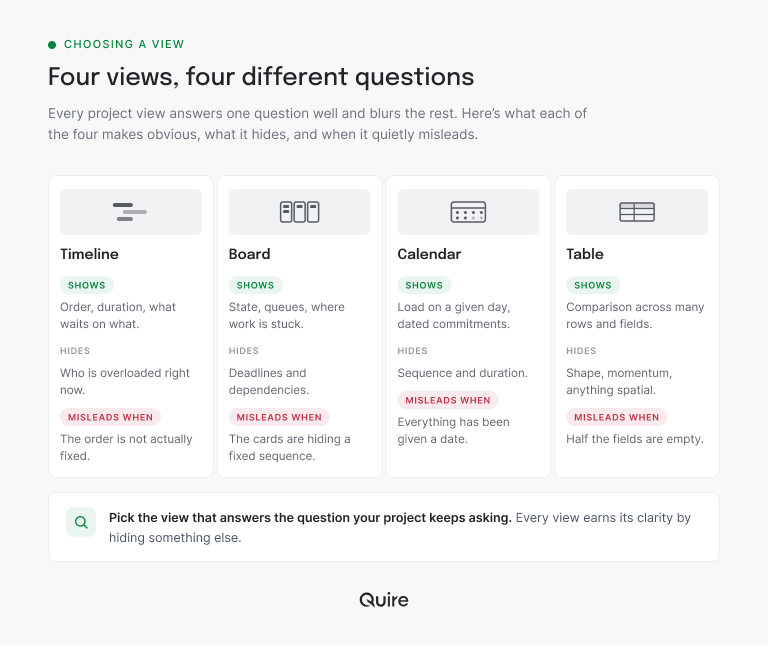
Fixed sequence. A launch, an audit, a migration. The order is real and the dates depend on each other. This wants a timeline, because the sequence is the risk.
Continuous flow. Support requests, content production, bug triage. Work arrives, moves through stages, leaves. This wants a board, because the queue is the risk.
Dated commitments. Campaign sends, deliveries, anything where a specific day matters more than duration. This wants a calendar, because load on a given day is the risk.
Comparable records. Sixty items with owners, costs, statuses and custom fields you need to sort and filter. This wants a table, because the risk is that something in the set is quietly wrong and you cannot see it one card at a time.
| Work shape | What it looks like | The question you keep asking | The view that answers it |
|---|---|---|---|
| Fixed sequence | A launch, an audit, a migration, where dates depend on each other | Will this land on time, and what is it waiting on? | Timeline |
| Continuous flow | Support tickets, content, bug triage, arriving and leaving all week | Where is this stuck right now? | Board |
| Dated commitments | Campaign sends, deliveries, anything tied to a specific day | What lands on Thursday, and is that day already full? | Calendar |
| Comparable records | Sixty items with owners, costs, statuses and custom fields | Which one of these is quietly wrong? | Table |
The four shapes are not four products. In Quire they are four readings of one project, which is what makes the choice reversible: the work can be a sequence this quarter and a flow the next without anybody rebuilding anything.
Read the other way round, here is what each view gives up in exchange for the thing it makes obvious.
If the timeline is the shape you landed on, start with what a project timeline is, with types and examples.
Why does one project need more than one project view?
Because the people on it are not asking the same question.
The person planning wants sequence. The people doing the work want state, and specifically their own state, not the project's. The person reporting outward wants dates and a defensible answer about whether things will land.
Those three needs are genuinely different, and insisting everyone read the plan the same way just means two of the three quietly build their own.
That is where the real damage starts. The moment a team answers "we need it differently" by exporting to a spreadsheet or spinning up a second board, the project has two versions of the truth with no rule for which one wins.
They agree for about a week. After that, every status conversation begins with reconciling them, which is a cost nobody ever attributes to the decision that caused it.
For the version of this problem that spans several projects at once, see how Smart Folders give you one view across every project.
Does your task management software render the view or copy it?
Here is the question to ask before adopting any second view: is it a rendering, or is it a copy?
A rendering reads the same tasks you already have. Change an owner in one place and every view is already correct, because there is only one record. Switching costs a click and nothing else.
A copy is a separate artifact that happens to describe the same work. Change an owner and you have created a discrepancy that will surface three days later in a meeting. The cost is not the export; it is every future edit, forever, paid by whoever remembers to do it.
Most "we tried multiple views and it got confusing" stories are copy stories, not view stories. The confusion came from the second source, not from the second picture.
It is also the question worth putting to any task management software on your shortlist, and it is almost never on the feature comparison page. Ask whether the second view reads your existing tasks or hands you a new set to maintain.
Once you have picked the board, the next question is how to set it up. Read how to operate a kanban board past three columns.
How does Quire handle gantt chart vs kanban on the same tasks?
By treating the view as a lens rather than a format you commit to.
The same tasks appear as a list, a board, a timeline, a calendar or a table, and you move between them from the same project. Nothing is exported, duplicated or regenerated, so the question of which view the team should standardize on mostly dissolves.
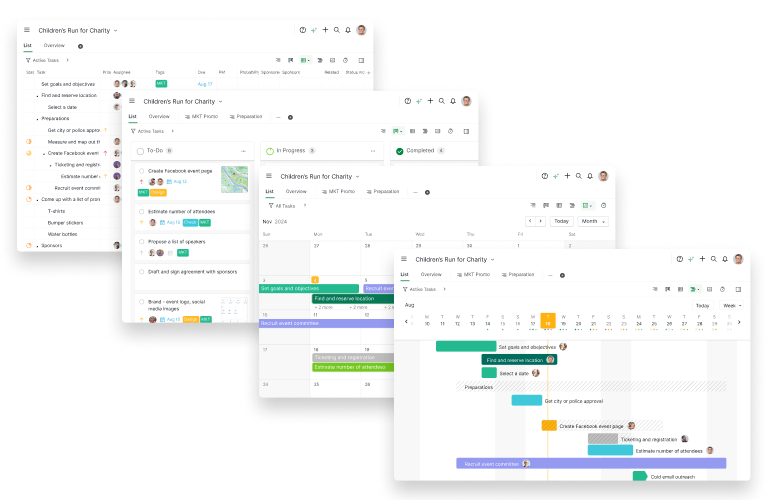
The planner can sit in the timeline, the designer can work off the board, and the person writing the client update can read the calendar, all of them looking at one set of records.
A few specifics matter more than the list of names. The board is nested, so a card can hold real sub-work instead of forcing every subtask to become its own card and clutter the column.
The table carries custom fields and formulas, which is what makes it a genuine comparison tool rather than the list with borders. And because dates live on the tasks themselves, moving something on the calendar moves it everywhere, rather than creating the drift a copied schedule guarantees.
For the board specifically, including when a second dimension helps, read the complete guide to kanban swimlanes.
What does this look like on one real project?
Take a website relaunch, which is the awkward case: a fixed sequence at the front, a continuous flow at the back, and a launch date somebody has already told a customer.
One task in it might be Rewrite the pricing page. In Quire that single record carries the assignee, a due date of September 18, a status of In review, and three subtasks underneath it: draft, legal check, upload.
Nothing about that record is view-specific. It is a task with its fields filled in. What changes is which of those fields the picture puts in front of you.
On the timeline it is a bar ending September 18, sitting behind the design freeze it depends on. That is the planner's reading, and it answers whether the launch date survives.
On the board it is a card in the In review column, with its three subtasks still nested inside it rather than scattered as three more cards. That is the writer's reading, and it answers what is stuck with legal.
In the table it is one row among sixty, sortable against an Effort custom field with a formula column doing the arithmetic somebody would otherwise redo in a spreadsheet. That is the reading you reach for when you suspect one row in the set is wrong.
Move the due date on the calendar and all three change, because there was only ever one date. That is the whole difference between a second view and a second job.
What should you check before you commit to a project view?
Three checks, each of which takes a minute and saves a quarter.
Name the recurring question. If you cannot say what your team asks most often, you are picking a view by aesthetics. Write the question down first.
Check the fields the view depends on. A calendar without dates is an empty grid, and a table where half the custom fields are blank is worse than a list, because it looks like data. Fill the fields the view reads before judging the view.
When a table depends on a field, protect the field. Quire lets you lock a Custom Field so only the people you choose, or no one, can edit its values. See how to lock a Custom Field.
Re-check at every phase change. Work that was a fixed sequence during build usually becomes a continuous flow once it ships. Teams rarely revisit the view when that happens, then blame the tool for a fit that expired months ago.
If the question turns out to be about which day something lands rather than what order it runs in, start with the project calendar that actually shows what's due.
Key takeaways
The gantt chart vs kanban question is really a question about the shape of your work. Fixed sequences want a timeline, continuous flow wants a board, dated commitments want a calendar, and comparable records want a table. Pick the one that answers what your team keeps asking, and let the others be secondary readings rather than rival plans.
Then protect the one real version. Extra views are close to free when they render the same tasks and expensive forever when they are copies, and almost every story about views causing confusion turns out to be a story about a second copy nobody agreed to maintain.
Want to stop arguing about which view is correct? Start free at quire.io/signup, load one project, and give each person the lens that answers their question instead of asking them to share yours.

Frequently Asked Questions
What's the real difference in gantt chart vs kanban?
A timeline shows duration and sequence, so it answers when things happen and what waits on what. A board shows state, so it answers where work is right now and where the queue is backing up. Pick the timeline when order is the risk, the board when pile-up is the risk. In Quire they are two readings of the same tasks, so the pick is not permanent.
How do you choose a project view?
Start from the shape of the work. Fixed sequences want a timeline, continuously arriving work wants a board, dated commitments want a calendar, and large sets of comparable records want a table. If you cannot name which shape you have, that is the real question. Put one real week into a free Quire project and read it two ways before you commit.
Can one project use more than one view?
Yes, and most should. Planners need sequence, doers need state, reporters need dates. The trap is giving each group a copy of the plan, because copies drift within a week. In Quire the views render one set of tasks, so nobody maintains a second version.
When is a gantt chart the wrong project view?
When the order is not actually fixed. If work arrives continuously and gets reprioritized weekly, a timeline becomes a drawing someone redraws every Monday. It earns its maintenance cost only when sequence genuinely constrains the project. Moving to the board in Quire is a view switch, not a rebuild.
What does switching views actually cost?
Nothing if the views read the same data, and a great deal if they do not. The hidden cost is reconciling two artifacts that disagree. Ask it of any task management software you shortlist: does the second view read your existing tasks, or hand you a separate copy to maintain? Quire's four views read one task set.
Does picking the right project view make a team more productive at work?
It removes the tax of people reading the wrong picture and asking questions the view should have answered. Teams are more productive at work when "where is this and when does it land" is visible rather than requested. In Quire, switching views is one click on the same tasks.
